


Diapositivas de presentación de Powerpoint de revisión mensual






Try Before you Buy Download Free Sample Product
 Impress Your
 Audience
 100%
100% Editable
 Save Hours
 of Time


Presentamos nuestro contenido listo Diapositivas de presentación de PowerPoint de revisión mensual. El paquete de presentación de revisión del plan mensual específico del tema consta de diapositivas PPT autoexplicativas, como descripción general del negocio, desempeño financiero, actualizaciones de clientes y proyectos, análisis de la competencia, hoja de ruta futura, RSC, desarrollos / hitos clave logrados, por nombrar algunos. Proporcione una imagen general de su rendimiento mensual utilizando los elementos visuales PPT del plan de negocios mensual. Utilice estas plantillas de PowerPoint de evaluación del rendimiento empresarial editables para facilitar su reunión de revisión empresarial mensual. Muestre sus números según el país, la geografía, el producto, el segmento, etc. con la ayuda de la presentación de PowerPoint del formato de reunión de revisión empresarial. Utilice plantillas de PowerPoint de revisión del rendimiento empresarial para realizar un seguimiento y supervisar su progreso con respecto a los objetivos estratégicos y operativos. Además, esta plantilla de presentación PPT de revisión corporativa de aspecto profesional le proporcionará el formato adecuado para llevar a cabo una reunión de negocios mensual con sus empleados. Por lo tanto, descargue los gráficos PPT del informe de revisión empresarial visualmente atractivos para impulsar el rendimiento y el crecimiento internos. Combata el calor con nuestras diapositivas de presentación de PowerPoint de revisión mensual. Siéntase relajado en cualquier lugar.
People who downloaded this PowerPoint presentation also viewed the following :
Contenido de esta presentación de Powerpoint
Diapositiva 1 : Esta diapositiva presenta la Revisión mensual. Indique el nombre de su empresa y comience.
Diapositiva 2 : Esta es una diapositiva de Agenda. Exprese sus agendas aquí.
Diapositiva 3 : esta diapositiva muestra la tabla de contenido de la presentación.
Diapositiva 4 : esta diapositiva destaca la descripción general del negocio de la tabla de contenido.
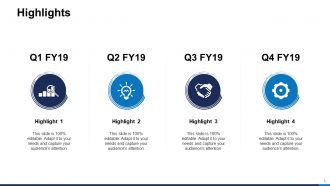
Diapositiva 5 : esta diapositiva muestra aspectos destacados con iconos relacionados y cuadros de texto adicionales.
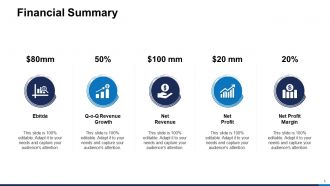
Diapositiva 6 : Esta diapositiva presenta un resumen financiero que describe: EBITDA, beneficio neto, crecimiento de ingresos QOQ, margen de beneficio neto, ingresos netos.
Diapositiva 7 : esta diapositiva muestra la división de ingresos, por geografía, que muestra datos en porcentaje.
Diapositiva 8 : Esta diapositiva representa la división de ingresos, por país, incluidos países como Asia, Australia, América del Sur, América del Norte y África.
Diapositiva 9 : Esta diapositiva muestra la división de ingresos por producto / segmento en forma de tabla.
Diapositiva 10 : Esta diapositiva presenta la división de ingresos por producto / segmento en forma gráfica.
Diapositiva 11 : Esta diapositiva muestra los avances / hitos clave logrados con imágenes relacionadas.
Diapositiva 12 : Esta diapositiva destaca el desempeño financiero de la tabla de contenido.
Diapositiva 13 : Esta diapositiva representa P&L - KPI que describen - Ingresos, COGS, Beneficio operativo, Aumento neto de efectivo.
Diapositiva 14 : Esta diapositiva muestra P&L - KPI (forma tabular).
Diapositiva 15 : Esta diapositiva muestra el balance general - KPI que describen - Activo corriente, Pasivo corriente, Activo total, Pasivo total.
Diapositiva 16 : Esta diapositiva presenta el Balance general: KPI (forma tabular) que muestran los pasivos.
Diapositiva 17 : Esta diapositiva muestra Balance general: KPI (forma tabular) que muestran los activos.
Diapositiva 18 : Esta diapositiva representa el estado de flujo de efectivo - KPI que describen - Operación, Actividades de financiamiento, Actividades de inversión, Aumento neto de efectivo.
Diapositiva 19 : Esta diapositiva muestra el estado de flujo de efectivo: KPI (forma tabular).
Diapositiva 20 : Esta diapositiva muestra los coeficientes financieros clave, que incluyen: coeficiente P / E, coeficiente de deuda a capital, coeficiente actual, rendimiento de los activos, rendimiento del capital y rendimiento de la inversión.
Diapositiva 21 : Esta diapositiva presenta actualizaciones de financiación que muestran las deudas.
Diapositiva 22 : Esta diapositiva presenta actualizaciones de financiación que muestran la equidad.
Diapositiva 23 : Esta diapositiva destaca las actualizaciones de clientes y proyectos de la tabla de contenido.
Diapositiva 24 : esta diapositiva muestra los principales clientes y proveedores en forma de tabla.
Diapositiva 25 : Esta diapositiva representa a los principales deudores y acreedores.
Diapositiva 26 : esta diapositiva muestra las actualizaciones del cliente con imágenes relacionadas.
Diapositiva 27 : Esta diapositiva muestra Actualizaciones de proyectos sobre proyectos importantes empaquetados, pedidos importantes en curso, proyectos importantes perdidos y pedidos en trámite.
Diapositiva 28 : Esta diapositiva destaca el análisis de la competencia de la tabla de contenido.
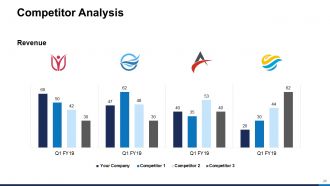
Diapositiva 29 : Esta diapositiva muestra el Análisis de la competencia (Ingresos) con la ayuda de un gráfico de barras.
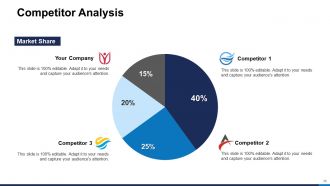
Diapositiva 30 : esta diapositiva presenta el análisis de la competencia (cuota de mercado) con la ayuda del gráfico circular.
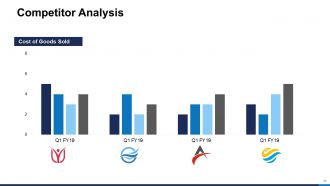
Diapositiva 31 : Esta diapositiva muestra el análisis de la competencia (costo de los bienes vendidos).
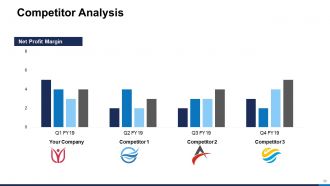
Diapositiva 32 : Esta diapositiva representa el análisis de la competencia (margen de beneficio neto).
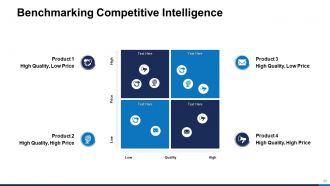
Diapositiva 33 : Esta diapositiva muestra la evaluación comparativa de la inteligencia competitiva en forma de matriz.
Diapositiva 34 : Esta diapositiva destaca la hoja de ruta futura de la tabla de contenido.
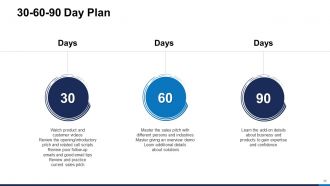
Diapositiva 35 : Esta diapositiva muestra el plan de 30-60-90 días con cuadros de texto.
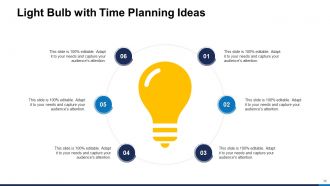
Diapositiva 36 : Esta diapositiva presenta una bombilla con ideas para planificar el tiempo.
Diapositiva 37 : Esta diapositiva muestra la hoja de ruta del producto (diseño - 1) en forma de línea de tiempo.
Diapositiva 38 : Esta diapositiva representa la Hoja de ruta del producto (Diseño - 2) en forma gráfica.
Diapositiva 39 : Esta diapositiva muestra la hoja de ruta del producto (diseño - 3).
Diapositiva 40 : Esta diapositiva muestra las fases de implementación con cuadros de texto.
Diapositiva 41 : Esta diapositiva presenta los principales obstáculos u obstáculos.
Diapositiva 42 : esta es una diapositiva opcional para obstáculos u obstáculos importantes.
Diapositiva 43 : Esta diapositiva muestra el análisis foda. Describa las fortalezas, debilidades, oportunidades y amenazas de su empresa.
Diapositiva 44 : Esta diapositiva destaca la RSE / Actividades misceláneas de la Tabla de contenido.
Diapositiva 45 : Esta diapositiva representa la Responsabilidad Social Corporativa (RSC) con un diagrama y cuadros de texto relacionados.
Diapositiva 46 : Esta diapositiva muestra la evaluación comparativa del servicio al cliente en forma gráfica.
Diapositiva 47 : Esta es una diapositiva opcional para la evaluación comparativa del servicio al cliente.
Diapositiva 48 : Esta diapositiva muestra el organigrama con nombres y designaciones.
Diapositiva 49 : Esta diapositiva presenta los objetivos y las métricas de éxito. Agregue datos según las necesidades.
Diapositiva 50 : Esta diapositiva muestra el Cuadro de mando de la salud con la puntuación general, los aspectos cualitativos y los aspectos cuantitativos.
Diapositiva 51 : Esta diapositiva muestra los iconos de revisión mensual.
Diapositiva 52 : Esta diapositiva recuerda unos 15 minutos de pausa para el café.
Diapositiva 53 : esta diapositiva se titula Diapositivas adicionales para avanzar.
Diapositiva 54 : Esta diapositiva muestra un gráfico de barras agrupadas con una comparación de tres productos.
Diapositiva 55 : Esta diapositiva presenta Columna agrupada - Gráfico de líneas con una comparación de tres productos.
Diapositiva 56 : Esta diapositiva muestra un gráfico circular con datos en porcentaje.
Diapositiva 57 : Esta diapositiva muestra el gráfico de columnas agrupadas de áreas replanteadas.
Diapositiva 58 : Esta es la diapositiva Nuestra misión con imágenes y texto relacionados.
Diapositiva 59 : Esta es la diapositiva Acerca de nosotros para mostrar las especificaciones de la empresa, etc.
Diapositiva 60 : Esta es una diapositiva de comparación para establecer una comparación entre productos básicos, entidades, etc.
Diapositiva 61 : Esta es una diapositiva financiera. Muestre sus cosas relacionadas con las finanzas aquí.
Diapositiva 62 : Esta diapositiva se titula Notas Post-it. Publique sus notas importantes aquí.
Diapositiva 63 : esta es una diapositiva de rompecabezas con cuadros de texto para mostrar información.
Diapositiva 64 : Esta es una diapositiva de destino. Indique sus objetivos aquí.
Diapositiva 65 : Esta es una diapositiva de Venn con cuadros de texto.
Diapositiva 66 : Esta es una diapositiva de agradecimiento con dirección, números de contacto y dirección de correo electrónico.
Revisión mensual de las diapositivas de presentación de PowerPoint con las 66 diapositivas:
Siéntase relajado en cualquier lugar con nuestras diapositivas de presentación de PowerPoint de revisión mensual. Te ayudan a combatir el calor.
-

Monthly Review
-

Agenda
-
Monthly Business Review
-
Monthly Business Review
-
Highlights
-
Financial Summary
-
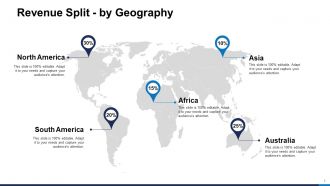
Revenue Split by Geography
-
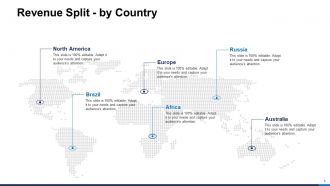
Revenue Split by Country
-
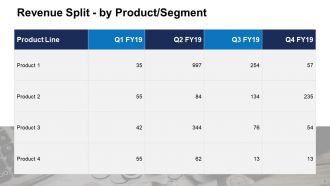
Revenue Split by Product Segment
-
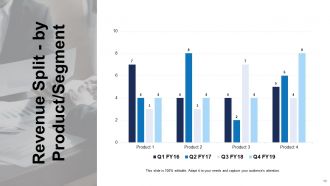
Revenue Split by Product Segment
-
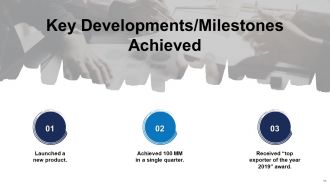
Key Developments Milestones Achieved
-
Monthly Business Review
-
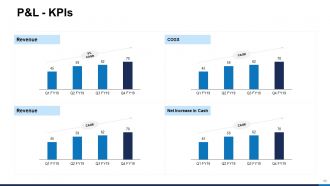
P L KPIs
-
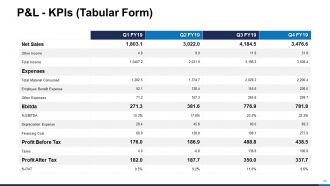
P L KPIs Tabular Form
-
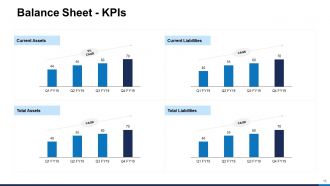
Balance Sheet KPIs
-
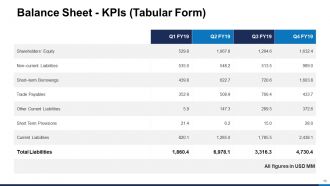
Balance Sheet KPIs Tabular Form
-
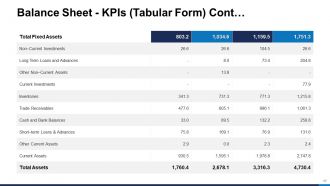
Balance Sheet KPIs Tabular Form Cont
-

Cash Flow Statement KPIs
-
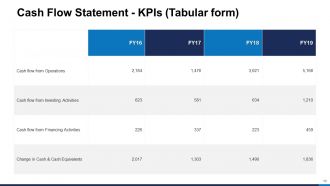
Cash Flow Statement KPIs Tabular form
-
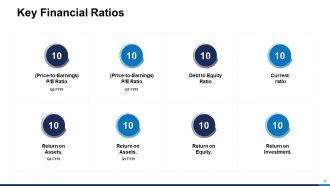
Key Financial Ratios
-
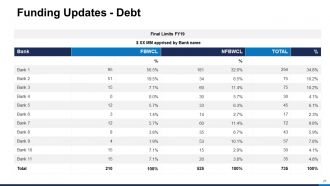
Funding Updates Debt
-
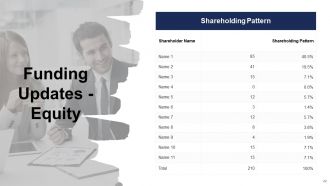
Funding Updates Equity
-
Monthly Business Review
-
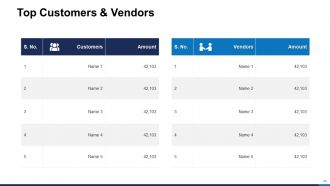
Top Customers Vendors
-
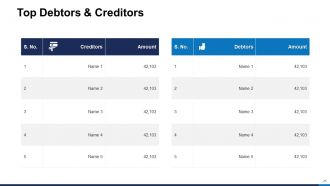
Top Debtors Creditors
-
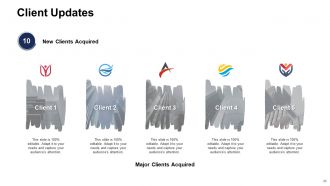
Client Updates
-
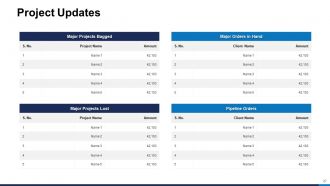
Project Updates
-
Monthly Business Review
-
Competitor Analysis
-
Competitor Analysis
-
Competitor Analysis
-
Competitor Analysis
-
Benchmarking Competitive Intelligence
-

Monthly Business Review
-
30 60 90 Day Plan
-
Light Bulb with Time Planning Ideas
-
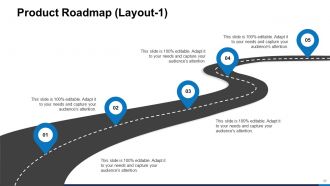
Product Roadmap Layout 1
-

Product Roadmap Layout 2
-
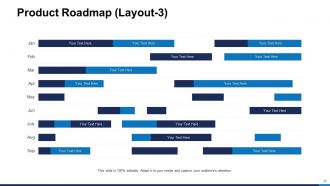
Product Roadmap Layout 3
-
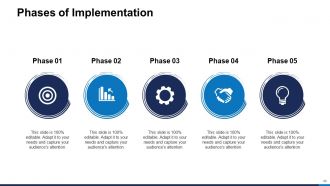
Phases of Implementation
-
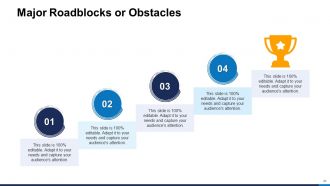
Major Roadblocks or Obstacles
-

Major Roadblocks or Obstacles
-
Swot Analysis
-

Monthly Business Review
-
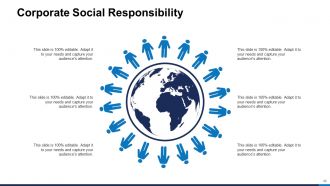
Corporate Social Responsibility
-
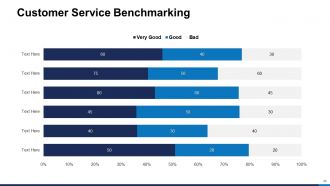
Customer Service Benchmarking
-
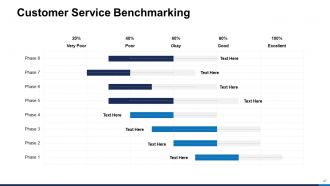
Customer Service Benchmarking
-
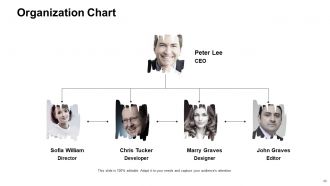
Organization Chart
-
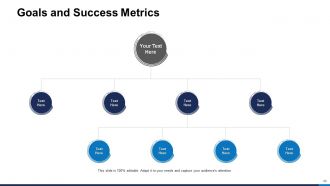
Goals and Success Metrics
-
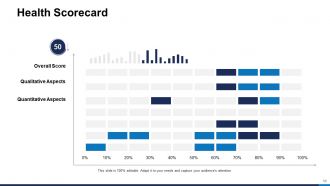
Health Scorecard
-
Monthly Review Icons Slide
-

Coffee Break
-

Additional Slides
-
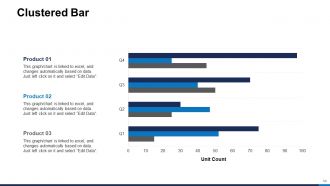
Clustered Bar
-
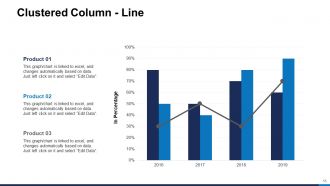
Clustered Column Line
-
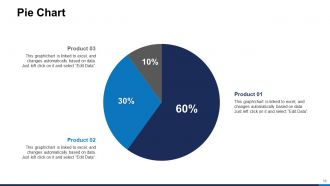
Pie Chart
-
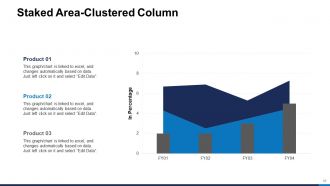
Staked Area Clustered Column
-

Our Mission
-
About Us
-
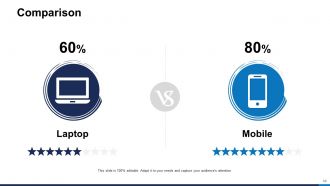
Comparison
-
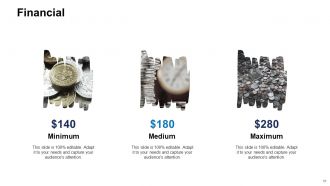
Financial
-
Post It Nots
-

Puzzle
-

Target
-
Venn
-

Thank You
FAQs for Monthly review
Pick your most important KPIs first - revenue, conversion rates, customer acquisition costs, whatever your team actually cares about. Throw in some operational stuff like project completion and budget tracking. Customer satisfaction scores are good too if you've got them. Keep it tight though - maybe 5-7 metrics max? Nobody wants to sit through endless charts (trust me on this one). Focus on numbers that actually tell the story of your month. The key is being able to explain why each metric matters and what you're gonna do if something's off track.
Honestly, charts and graphs are a game changer for monthly reviews. People actually pay attention instead of zoning out over spreadsheet data. Bar charts make trends super obvious, and progress bars or before/after screenshots make your wins feel real. I've sat through way too many meetings where someone just reads numbers off a screen - total snooze fest. Color coding different metrics helps too, but don't go crazy with it. The whole point is telling a story with your data instead of just throwing stats at people. Keep charts clean and simple so everything clicks immediately.
Think detective story when you're presenting data. Start with the problem, walk through what the numbers show, then boom - reveal what actually happened. Don't just throw charts at people. Make your user segments into actual characters and follow their journey. I swear it works so much better than boring spreadsheet dumps. Build some suspense too - reveal insights bit by bit instead of everything upfront. "Our conversion rate dropped like a rock" lands way harder than "decreased 23%." Oh, and try starting your next review with "Here's what happened to our power users..." Trust me, people actually pay attention when you frame it that way.
Don't wait until the end of the month to dump all your feedback into one presentation - trust me, I've been there and it's a nightmare. Instead, grab feedback as it happens throughout the month. Set up some kind of shared doc or folder (honestly whatever works for your team) to capture stuff from stakeholders, teammates, your own notes, everything. Then review it weekly so you can actually see what patterns are emerging. Way better than scrambling last minute. Your presentations will actually tell a story instead of just being random data thrown together. Start tracking this week if you can.
Honestly, executives hate data dumps more than anything. Keep it to like 3-5 metrics max - the ones that actually move the needle. I've seen so many presentations bomb because someone crammed 15 tiny charts on every slide. Nobody can even read that stuff from the back of the room. Here's the thing though - don't just show your wins. Call out the problems too and what you're doing to fix them. People respect that honesty way more than pretending everything's perfect. Make it visual, tell a story with your numbers, and always wrap up with concrete next steps they can actually do something about.
Honestly, I learned this the hard way after boring way too many executives with technical details they didn't care about. You've gotta know your audience first - like, what actually keeps them up at night? Execs want the big picture stuff. Budget impact, strategic wins, major roadblocks. Your team needs the nitty-gritty - process changes, who did what, operational details. Clients? They only care about their specific goals and what's happening next. I always write down my audience's top 3 priorities before touching PowerPoint now. Game changer. Also switch up your visuals - clean summary charts for leadership, detailed breakdowns for your team.
Honestly, just pick a template and stick with it. Your executives will love not having to decode a new layout every month. I made this mistake early on - kept switching colors and chart styles thinking it looked "fresh" but it just annoyed everyone. Same spots for your key metrics each time makes trends way easier to catch. Plus you'll save yourself hours not redesigning everything from scratch. The consistency thing sounds boring but it actually makes your data tell a much clearer story. Trust me on this one.
Numbers are your best friend here - "closed 15 deals" beats "productive month" every time. Be real about challenges but don't just dump problems on them without showing you're thinking through solutions (that's honestly my biggest pet peeve with these reviews). I'd go with 2-3 wins with actual metrics, then maybe 1-2 roadblocks where you explain what you learned. Keep everything to one sentence if you can. The trick is ending with specific next steps so they see you're already planning ahead, not just complaining about what went wrong.
Honestly, just stick with PowerPoint or Google Slides for your monthly reviews. Everyone already knows them, so you won't waste time explaining how to navigate weird interfaces. Canva's where it's at though if you want something that actually looks good - their templates are seriously impressive and make up for my complete lack of design sense. Oh, and if you're dealing with tons of data, maybe create your charts in Excel or Tableau first, then drop them in. Don't get sucked into fancy animations either. Pick one tool and master it. You'll thank me later when you're not scrambling to learn new software every month.
Before you even touch those slides, figure out which metrics actually tie back to your company's big strategic goals. I literally keep that strategy doc open the whole time I'm prepping - otherwise I get distracted by cool data that doesn't matter. Build your story around how this month moved the needle on revenue growth, customer retention, whatever they're obsessing over right now. Honestly, execs only care about progress on the stuff they're getting judged on. Everything else gets cut, even if your team crushed it.
Arrows and color coding are your best friends here - they make changes pop instantly. Those little sparkline charts? Game changer for showing trends without cluttering everything up. I'd do week-over-week breakdowns so people can pinpoint exactly when stuff shifted. Don't just dump numbers on them though. Add notes about what actually caused the changes if you know. Context beats raw data every time. Make it brain-dead obvious what went up, down, or stayed the same. Oh, and before/after shots work great too.
Honestly, just jump right in with a quick poll or show of hands - gets everyone awake from the start. Ask stuff like "what challenges hit your team this month?" throughout the presentation. The whole "raise your hand if you've experienced this" thing is kinda cheesy but it actually works, even on Zoom calls. When you hit those boring data sections, pause and ask different departments for their take on the numbers. Oh and don't save questions for the end - that's where engagement goes to die. Stop every few slides instead and let people jump in. Try one of these next time and you'll see the difference immediately.
Oh totally do an action items slide - that's like the most important part honestly. List who's doing what and when it's due before your next meeting. I've watched so many solid presentations just die because everyone walked away confused about next steps lol. Also throw in any budget stuff or resources people mentioned during the discussion. For bigger projects, set up those follow-up check-ins so things don't get forgotten. And definitely email those action items within a day while it's all still fresh in people's heads!
Okay so I always start with the numbers - that's your backbone. But here's the thing: you gotta throw in actual customer quotes and team feedback to explain what's really happening behind those charts. I do like 60/40 data to stories, though it totally depends who you're presenting to. Spreadsheet nerds? Go heavy on the graphs. People-person executives? Mix it up more. The stories make your data memorable instead of just... forgettable numbers on a slide. Oh and pair each big data point with a real example that backs it up. Makes everything way more convincing.
Okay so definitely run through it out loud at least twice - thinking about it silently is basically useless. Time yourself too because going over is awkward for everyone. Lead with your biggest wins or most urgent stuff right away to hook them. Don't rush through all the data, and honestly, make eye contact even if it feels weird. Pauses are good! Have backup slides ready because someone will 100% ask for regional breakdowns or whatever. Oh and know your key numbers cold so you're not constantly staring at notes. Trust me on this one.
-
Attractive design and informative presentation.
-
Commendable slides with attractive designs. Extremely pleased with the fact that they are easy to modify. Great work!
-
Enough space for editing and adding your own content.
-
Innovative and attractive designs.
-
Informative design.
-
a very compelling executive summary and business review presentation