

Multiple charts showing company sales sample ppt files




Try Before you Buy Download Free Sample Product
 Impress Your
 Audience
 100%
100% Editable
 Save Hours
 of Time


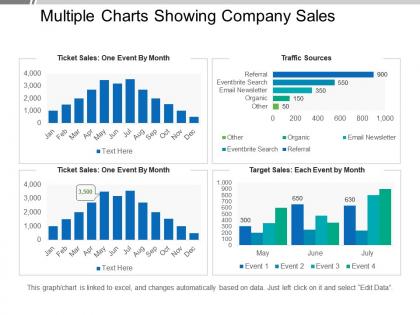
Deliver on your promises with your reports with our multiple charts showing company sales layout PowerPoint slide. Use this PPT layout to create charts, records or presentations representing your company's sales to accurately represent your company while showing your sales in a positive light. We have prepared many chart formats that can be used to clearly demonstrate all types of sales data that you want to demonstrate. Include information to clearly show the growth and sales figures in an easy to understand format by adding relevant data to each chart. Show the influence of each sales figure in a comprehensive and clear manner while highlighting factors that affected the said sales during the past financial years. Include data that shows future predictions and figures which increases investor confidence in the reader. Use color-coded format to clearly demonstrate each of the charts in an easy to understand pictorial format. Download our, multiple charts showing company sales layout PowerPoint slides in a snap while keeping a comprehensive approach. Elaborate on the ecology with our Multiple Charts Showing Company Sales Sample Ppt Files. Acquaint folks with the benefits of conservation.
People who downloaded this PowerPoint presentation also viewed the following :
Multiple charts showing company sales sample ppt files with all 5 slides:
Our Multiple Charts Showing Company Sales Sample Ppt Files employ a beautiful blend of colors. They create a captivating and aesthetic effect.

FAQs for Multiple charts showing company sales
Start with their actual problem - something that hits home for them specifically. Real customer stories work way better than generic pitches, trust me. Throw in solid numbers because data sells itself. I've sat through too many presentations that were basically word salad with zero substance. Do your homework first so you're not just winging it up there. Keep slides clean and visual - walls of text kill attention spans. Oh, and don't end with that weak "any questions?" thing. Give them something concrete to decide on instead.
Dude, stories are everything in sales. Way better than just listing features - people actually remember them. I've watched deals close literally because someone shared the perfect customer story at the right moment. It's wild how powerful that is. Stories help prospects picture themselves getting those same results, you know? Oh, and here's what works crazy well - start your pitch with a quick story about another client who had their exact problem. Hooks them immediately. People zone out during feature dumps, but a good story? They're locked in. Trust me on this one.
Dude, visual design can totally make or break your pitch. I've watched companies with incredible products bomb because their slides looked like garbage - it's honestly painful to see. Clean design makes you look credible right off the bat. Plus it helps people actually follow your story instead of getting lost in messy layouts. Pick one simple template and stick with it (consistency is key). Good fonts, smart color choices, organized layouts - all that stuff keeps people paying attention instead of zoning out. Trust me, prospects notice when you've put effort into making things look professional.
Dude, don't just talk about your company the whole time - focus on fixing their actual problems. Research them first too, that's basic stuff. Keep it short! I've watched people drone on for 45 minutes when they could've said everything in 15. Never read directly off your slides either - that's so awkward and pointless. Ask questions during your pitch and leave room for them to jump in. Honestly, the best ones feel more like you're just having a real conversation about how you can help. Oh, and always give them clear next steps at the end.
Pick your 3-5 best numbers and stick with them - any more kills attention spans. Charts work better than spreadsheets (nobody's squinting at Excel during your pitch). Tell stories with your data instead of just firing off stats. Like, "40% revenue growth in six months" sounds way more impressive than a bunch of quarterly breakdowns. I always keep extra data handy for questions afterward, but don't blast them with everything upfront. Honestly, each number should help close the deal. If it doesn't make them want to say yes, cut it.
Do your homework on who you're presenting to first. With C-suite folks, stick to ROI and big-picture strategy stuff. Technical teams want the nitty-gritty specs and implementation details. Younger crowds usually love interactive demos and seeing what their peers are doing, but older audiences? They're more into traditional case studies and solid references. Honestly, half the battle is just reading the room - I've had to completely switch gears mid-pitch when I could tell something wasn't clicking. Pro tip: prep different versions of your main points so you can emphasize whatever hits best with your audience.
Okay so first thing - just listen and actually hear them out before you say anything back. Ask questions to figure out what's really bugging them instead of getting all defensive right away. Half the time they're actually giving you useful info about what they need! Once you understand their actual concern, hit them with some solid examples or proof that addresses it specifically. Then see if that worked. Honestly, the worst thing you can do is act dismissive or take it personally. Think about it this way - if they're objecting, they're still in the conversation, right? That's actually a good sign. Oh and always ask if there's anything else bothering them before you wrap up.
Start with something that grabs them instantly - a crazy stat, a question that hits their biggest problem, or a quick story. Nobody wants to hear how your company started in 2015, trust me. You want that "oh wait, what?" reaction. When you're wrapping up, hit the main benefits again and give them a real deadline. Here's the thing though - ditch the whole "any questions?" thing. Be specific instead. Try "So when should we set up that implementation meeting?" It's way more direct and actually moves things forward.
Dude, you HAVE to rehearse - I can't stress this enough. Smart people bomb all the time because they think they can just wing it. Practice at least 3-4 times before anything important. You're not just memorizing slides, you're building muscle memory for handling curveballs and nailing your timing. Those awkward transitions? They'll kill your momentum if you don't work them out beforehand. Once your content becomes second nature, you can actually focus on connecting with people instead of panicking about what comes next. Trust me on this one.
Ditch PowerPoint for Prezi or Canva - way more visual and interesting. For remote stuff, Zoom's screen sharing works great, no tech headaches. Here's what I'd focus on though: audience response tools like Mentimeter are seriously underrated. People actually participate instead of zoning out on their phones. CRM integrations let you pull live data straight into your presentation, which looks super professional. If you're presenting in person, grab a wireless presenter so you're not glued to your laptop. Props help too - sounds cheesy but it works. Don't try everything at once though. Pick one new thing per presentation or you'll stress yourself out.
Get feedback right away while it's fresh - either ask on the spot or shoot them an email within 24 hours. Don't just ask "how was it?" though. Be specific: "what part hit home?" or "where did I lose you?" People are weirdly more honest over email sometimes. I'd also pay attention to which slides confused people during the actual pitch. Maybe create a quick template with 3-4 good questions you can reuse. The important thing is writing down what you learn and actually looking at it before your next presentation. Otherwise you'll just make the same mistakes again.
Honestly, the biggest mistake I see is cramming way too much text on slides. One point per slide max. Use good visuals that actually make sense with what you're talking about - not just random stock photos. Your audience should be watching you, not squinting at tiny paragraphs. Oh, and practice those transitions! Nothing kills the vibe like awkwardly clicking through slides. The whole deck should just back up your story, not replace you telling it. Fonts stay consistent, charts stay readable. Here's the thing though - always know your stuff well enough to wing it if the tech craps out on you.
Talk about their actual problems and how you fix them - not your fancy features. Lead with what you do in one sentence a regular person would get. Then connect everything to outcomes they care about. Use their exact words back to them. If they said "streamline operations," say that same phrase when you explain your fix. Most presentations just dump a list of what they can do without the "so what?" Always flip it - outcome first, then how you make it happen. Honestly, people tune out if you don't hook them fast. Wrap up with real proof like numbers or stories from other clients. Makes it believable instead of just sales talk.
Yeah, remote presentations are tricky - you lose that energy and can't tell if people are actually paying attention or just scrolling Instagram. I've found shorter chunks work way better, like breaking things up every few minutes with questions or polls. Make your slides super visual too. Honestly? I think of it like hosting a mini TV show now - sounds weird but it works. Ask specific people direct questions so they can't just zone out. Oh, and breakout rooms are clutch if you can swing it. The worst thing is just talking at a screen for 30 minutes straight.
Don't go in there acting like you're just trying to close a deal. Ask about their bigger challenges - stuff beyond what you're pitching today. Share some industry insights that actually matter to them. Listen when they talk (I know, revolutionary concept). Most reps mess this up by being way too pushy. You want them seeing you as someone who gets their business, not just another salesperson. Oh, and whatever you promise during the presentation? Actually do it. Even the tiny stuff. End with a real plan for staying connected, not some vague "let's touch base soon" nonsense.
-
Informative presentations that are easily editable.
-
Easily Editable.