

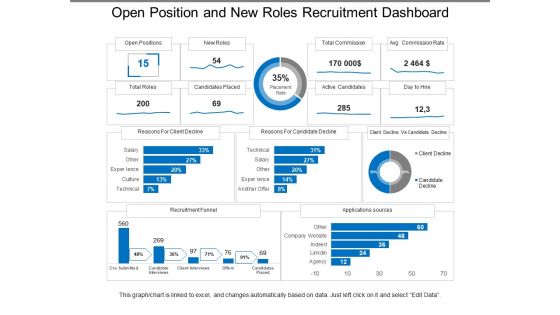
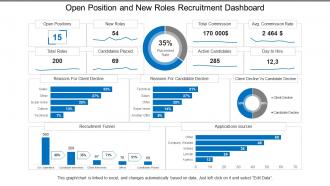
Open position and new roles recruitment dashboard





Try Before you Buy Download Free Sample Product
 Impress Your
 Audience
 100%
100% Editable
 Save Hours
 of Time


Ensure the breaks are equally interesting with our Open Position And New Roles Recruitment Dashboard. Arrange for the interim.
People who downloaded this PowerPoint presentation also viewed the following :
Open position and new roles recruitment dashboard with all 6 slides:
Highlight hollow boasts with our Open Position And New Roles Recruitment Dashboard. Convince folks that the claims are exaggerated.
FAQs for Open position and new
So definitely track time-to-fill and cost-per-hire first. Source effectiveness too - like which job boards actually work vs just drain your budget. I'd add candidate pipeline health and offer acceptance rates. Quality of hire is tricky to measure but worth it. Interview-to-offer ratios will save you from endless pointless interviews (been there). Diversity metrics and hiring manager satisfaction are pretty standard now. Honestly, visual dashboards make everything easier to digest. Start with these basics, then pile on whatever specific stuff your team keeps complaining about.
So basically everyone can finally see the same stuff - candidate pipeline, where people are in the process, all that. No more "hey what's happening with the Smith role" emails clogging your inbox (seriously, those are the worst). HR stops chasing managers for feedback, recruiters know if budgets got approved, whatever. You can spot exactly where candidates are getting stuck or if someone's not doing their job. Oh and set up alerts so people get notified when they need to act. Honestly makes the whole hiring thing way faster.
Honestly, data viz is what saves your recruitment dashboard from being totally useless. Nobody wants to stare at endless spreadsheet rows when they're trying to hire fast. With funnel charts, you'll actually see where candidates get stuck. Heat maps show you which job sources work best - way better than scrolling through numbers. Progress bars and trend lines make bottlenecks obvious at a glance. I always tell people to keep it simple though. If someone can't look at your dashboard and immediately know what's broken or what's working, you've overcomplicated it. Make the story clear.
Honestly, just figure out what your company actually gives a damn about first. Diversity focus? Track demographic breakdowns and where you're sourcing from. Speed matters more? Go heavy on time-to-fill and spot those bottlenecks. Most tools let you drag widgets around anyway - super easy to customize. Here's what works: write down your top 3 hiring priorities, then match metrics to each one. Also maybe think about what would make your CEO smile when they see the numbers? That's usually a good north star, even if it sounds kinda cynical. Start there and tweak as you go.
Weekly updates work best - pick the same day so you don't forget. Here's the thing though: only track metrics that actually help your hiring goals. Don't dump every possible chart on there just because you can (I totally did this once and nobody looked at it lol). Time-to-hire, source effectiveness, pipeline health - that's your core stuff. Oh and definitely check with your hiring managers about what they actually want to see. Half the time they need different insights than you think. Set up automated feeds wherever possible because manually updating data is the worst.
Dude, AI totally changes the game for recruitment dashboards. It'll screen candidates automatically and actually predict who's gonna work out best. Plus it catches those annoying bottlenecks before they screw you over. Resume parsing happens instantly, candidates get ranked by fit, and - this is kinda wild - it even spots bias in your hiring patterns. The machine learning aspect is honestly the best part since it gets better as you feed it more data from your actual hires. I'd start with dashboards that have resume parsing and predictive scoring built in. Those two features alone will save you so much tedious work.
Honestly, I'd go with Tableau or Power BI first - they're both pretty solid for handling big datasets and the visualizations look professional. Google Data Studio is free which is nice, but it can be weird to work with sometimes (learned that the hard way). Your team technical at all? Grafana might be worth checking out, or hell, even Excel if you just need basic tracking. Really depends what metrics you're actually trying to watch though. I'd figure that out first, then see what fits your budget and how tech-savvy everyone is. Power BI's probably the sweet spot for most teams.
Dude, real-time data is a game changer for hiring. You'll catch bottlenecks right when they happen instead of finding out a week later that your hiring manager has been sitting on resumes forever. Maybe scheduling interviews is taking way too long - you'd know immediately. Response times, conversion rates, all that stuff becomes crystal clear. Honestly, I think most companies are flying blind without it. Plus you can see which job boards or referral sources actually work and stop wasting money on the crappy ones. Just set up some alerts so you're not constantly checking dashboards like a maniac.
Funnel charts are perfect for your pipeline stages, and bar charts work great for tracking source effectiveness. I'd go with circular progress indicators for time-to-hire stuff too. Heat maps are honestly my favorite though - they show application volume by day/week and you'll spot patterns you never noticed before. Tables? Save those for when people want to dig deeper into details. The whole point is picking visuals that match whatever decision you're trying to make. Start with your biggest KPIs first and choose something that makes trends super obvious right away - like within seconds of looking at it.
Honestly, recruitment dashboards are game-changers for spotting bias you didn't even know existed. Track who's making it through each hiring stage by demographics. Look at how different interviewers score candidates - that one's always eye-opening. Some job descriptions just don't attract diverse candidates, which is weird but fixable. You'll start seeing patterns in what seemed like normal hiring decisions. I'd focus first on where you're losing underrepresented groups most - like, are they dropping off after phone screens? Set up regular reports on your whole pipeline from application to offer. The data tells stories you wouldn't expect.
Dude, you gotta track which sources actually work, not just which ones flood you with resumes. Like, maybe LinkedIn gives you way better hires than those generic job boards. Employee referrals? They almost always win - I swear people just hire better when there's a real person vouching. Once you know this stuff, you can stop wasting money posting everywhere and double down on what actually works. Track your cost-per-hire and how long it takes to fill roles by source. Also check if people stick around after 90 days - that's the real test.
So basically your recruitment dashboard connects through APIs to whatever systems you're already using - HRIS, ATS, payroll stuff. Look for ones with pre-built connectors for your specific tools (like Workday or BambooHR) because honestly, custom integrations are a pain. Real-time syncing is huge - you want your data updating instantly when candidates move through the pipeline. I'd start by figuring out where all your data currently lives, then find a dashboard that actually works well with your existing tech. Some are pickier than others about what they'll connect to.
Honestly, data integration is gonna be your worst enemy - ATS systems and job boards never play nice together. Your team might push back too, especially if they think you're trying to spy on them with metrics. I'd skip the fancy dashboards at first. Pick like two KPIs that actually tell you something useful, not just what looks cool to executives. Oh, and seriously budget way more time for cleaning up messy data than you think. Get your recruiters involved early so they don't hate the whole thing before you even launch it.
Dude, user feedback is everything for your recruitment dashboard. It shows you what recruiters actually use versus what you *think* they need. Trust me, most features we obsess over? They probably don't even click them. Ask your power users what pisses them off daily - maybe it's the candidate search taking forever or some metric they're tracking in spreadsheets because your dashboard doesn't have it. Those frustrations are where you should start. I'd hit up like 3-4 of your heaviest users first. Their complaints will guide your whole roadmap way better than guessing.
Drop-off rates show you exactly where candidates are bailing from your hiring process. Maybe they're ghosting after the first interview, or they see your salary and nope out immediately. I'd start with whatever stage has your biggest drop-off and figure out what's going wrong there. Could be your process drags on forever, your communication is terrible, or people realize the job isn't what they thought. It's honestly like detective work - you gotta dig into why people are running at that specific point and fix whatever's causing the friction.
No Reviews