

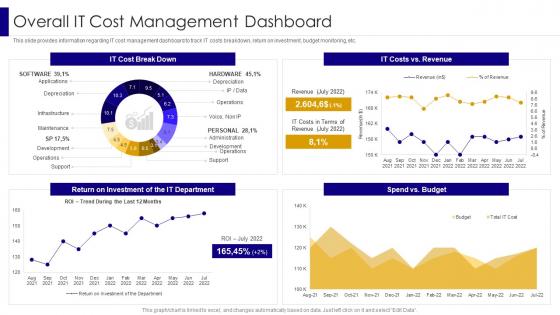
Overall It Cost Management Dashboard Managing It Infrastructure Development Playbook




Try Before you Buy Download Free Sample Product
 Impress Your
 Audience
 100%
100% Editable
 Save Hours
 of Time


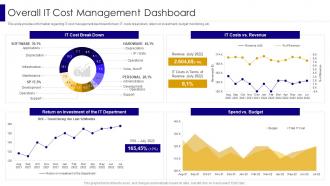
This slide provides information regarding IT cost management dashboard to track IT costs breakdown, return on investment, budget monitoring, etc.
People who downloaded this PowerPoint presentation also viewed the following :
Overall It Cost Management Dashboard Managing It Infrastructure Development Playbook with all 7 slides:
Use our Overall It Cost Management Dashboard Managing It Infrastructure Development Playbook to effectively help you save your valuable time. They are readymade to fit into any presentation structure.





FAQs for Overall It Cost Management Dashboard Managing It
You've got three big pieces to figure out. Start with visibility - seriously, you can't fix what you don't see. Track everything: cloud costs, software licenses, hardware, all of it. Set up governance next with approval workflows and spending rules (this part's annoying but saves your butt later). Optimization comes last - rightsize your resources, dump unused stuff, negotiate better deals. Oh and do regular cost reviews with your team so IT spending actually makes sense for the business. Honestly, most people skip the visibility step but that's where you gotta begin.
Honestly, cloud's where it's at for cutting costs. No more dropping crazy money upfront on servers and hardware that'll be outdated in three years anyway. You literally just pay for what you use - kinda like your electric bill but way more predictable. Your IT team can stop babysitting servers and actually work on cool projects instead. The cloud provider handles all that boring maintenance stuff automatically. Oh, and scaling up during busy periods? Super easy now. I'd probably look at your biggest resource hogs first and run the numbers on moving those over.
Cost per user is probably your best starting point - basically how much you're dropping per employee on IT stuff. I'd also track IT spending as a percentage of revenue since that lets you compare against industry standards. System uptime matters too because honestly, what's the point of "saving" money if everything crashes constantly? Project budgets versus actual costs are super telling as well. My advice? Pick maybe 2-3 metrics that match whatever's keeping you up at night cost-wise and just focus on tracking those consistently first. You can always add more later once you get the hang of it.
Yeah, you can definitely save big on IT costs - like 30-60% on labor if you do it right. Development and support work see the biggest drops since you're hiring from cheaper markets. But here's the thing - management gets way more complicated. You'll deal with communication headaches, possible quality hiccups, and honestly? The coordination time adds up fast. I'd test it out on stuff that won't break your business first. Build solid relationships with whoever you pick, and don't forget to count all those sneaky hidden costs like training time. Otherwise you might end up wondering where your "savings" went.
So automation can really cut your IT spending in a few ways. First off, it handles all those tedious manual tasks your team normally does. Cloud resource optimization is probably the biggest money-saver though - most companies are literally throwing cash away on servers they don't even use. It also does things like patch management and monitors your systems 24/7, which prevents those nightmare outages that cost a fortune. Oh, and automated cost tracking catches budget overruns before they get ugly. Honestly, I'd start there with the cost monitoring - you'll probably be shocked at where your money's actually going.
Split your budget into buckets - roughly 70% for keeping things running (maintenance, security, basic ops) and save 30% just for innovation stuff. Don't fall into the trap of cutting innovation when money gets tight, because honestly that's how you end up with ancient systems that bleed cash later. Put your innovation money toward projects that'll actually cut operational costs or show real business results. Oh, and start with small pilots first to prove they work before you go all-in. Way less risky that way.
Dude, vendor management is seriously where you can save the most money in IT. Negotiate better rates whenever contracts come up. Consolidate stuff too - like why are you paying for three cloud storage services? One's probably enough. Those auto-renewals are the worst, they always bump prices hoping you won't notice. I'd set up quarterly check-ins to review spending. The trick is building actual relationships with vendors instead of just treating them like order-takers. When they see you as a partner, they'll work with you on cutting costs. Trust me on this one.
Dude, budget forecasting is like having a heads up before your IT costs go crazy. You'll catch those surprise spikes early and actually plan for them instead of panicking later. Track your biggest expenses for a few months first - that's your starting point. Then you can spot patterns, like when everyone suddenly needs more cloud storage in Q4 or whatever. Honestly, the best part? Those budget meetings become so much easier when you're not just guessing at numbers. You go from "shit, we blew the budget again" to actually knowing what's coming. Start simple and build from there.
Shadow IT is the worst - departments just buy whatever they want without telling anyone. Plus you've got cloud servers nobody's touched in months still racking up charges. Don't even get me started on software licenses we're paying for but not using. Quick wins: audit your cloud stuff this week, I guarantee you'll find money sitting there. Set up alerts for unused resources and do monthly spend check-ins with each department. Oh, and keep a master list of all your software - sounds boring but it'll save your budget. The tricky part is actually seeing where money's going versus where you think it's going.
Zero-based budgeting means literally starting from $0 - ignore what you spent before. Brutal? Yeah, but it works. List your absolute necessities first: security, compliance stuff, systems that'd break the business if they went down. Everything else has to earn its spot based on actual value, not habit. Make departments pitch every single tool and license like it's new. Nothing gets auto-renewed just because "we've always had it." Honestly, you'll be shocked how much dead weight you find. Each expense needs to justify itself or it's gone. Way more work upfront but you'll cut so much waste.
So basically you're swapping big upfront server purchases for monthly cloud bills. Way more predictable, but the costs become usage-based which freaked me out initially - felt like I had zero control over the budget. The upside though? You can actually scale with demand instead of guessing what you'll need next year. Just set up cost tracking right away because I've seen people get nasty surprises when their cloud spending goes nuts. Once you get the hang of monitoring usage patterns, it's honestly much better than the old way.
Honestly, just match your tech spending to stuff that actually moves the needle for your business. Don't get sucked into flashy new tools that vendors are hyping - been there, done that. Pick projects that either make you money or cut real costs. Your users complaining about something constantly? That's probably where to start. I'd build a simple scoring system - revenue impact, cost savings, how well it fits your strategy. Those quick wins are gold because they free up cash for bigger moves later. Oh, and actually track if things worked out like you thought they would. Most people skip that part but it's how you get better at this whole prioritization thing.
Honestly, just do a software audit first - you'll probably find a ton of stuff you're paying for but not using. Most companies waste way more than they think. Try negotiating volume discounts when you can, and look into open-source options for anything that's not mission-critical. Here's the thing though - you need approval processes or people will keep buying the fancy versions of everything. Review your licenses regularly to catch duplicates. Oh, and don't forget maintenance costs eat up your budget too. I'd start that audit next quarter if possible.
Honestly, you need to watch your spending in real-time instead of getting slammed with surprise bills later. I've seen too many teams discover at month-end that someone left expensive cloud instances running (oops). Set up alerts when you hit certain spending thresholds - trust me on this one. Weekly check-ins with your team leads work way better than hoping everyone stays on budget. You'll actually spot the weird stuff immediately, like when costs suddenly spike for no obvious reason. Plus you can optimize based on what's really happening, not just wild guesses about usage patterns.
Look, cybersecurity is basically insurance for all your other tech spending - gotta protect those investments from getting torched by hackers. Most people say 10-15% of your IT budget, but honestly? That feels kinda low with how nuts ransomware has gotten lately. First thing - do a risk assessment to figure out what'd actually screw your business if it got hit. Then split your money between the proactive stuff (endpoint protection, employee training) and having a plan for when shit hits the fan. Don't just buy every flashy security tool that gets pitched to you though. Focus on what actually protects your biggest vulnerabilities first.
-
Much better than the original! Thanks for the quick turnaround.
-
I loved the hassle-free signup process. A few minutes and, I had this giant collection of beautiful designs.