


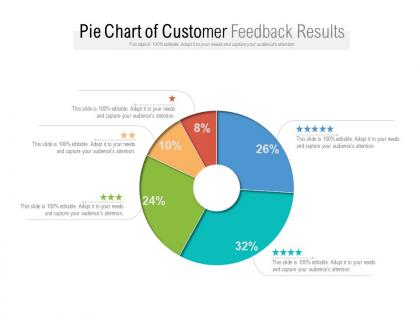
Pie chart of customer feedback results




Try Before you Buy Download Free Sample Product
 Impress Your
 Audience
 100%
100% Editable
 Save Hours
 of Time


Our Pie Chart Of Customer Feedback Results get brains to focus clearly. They excel at channelizing grey cells.
People who downloaded this PowerPoint presentation also viewed the following :
Pie chart of customer feedback results with all 6 slides:
Our Pie Chart Of Customer Feedback Results are a clever choice. Folks will agree with your bright ideas.

FAQs for Pie chart of
Honestly, customer feedback is everything for template design. Users will straight-up tell you when a layout sucks for their content or they can't find basic elements. We've scrapped entire slide masters because people said the text hierarchy was confusing - those complaints hurt but they were right. Track the most common issues and you'll spot patterns fast. It helps you figure out which templates to ditch, what needs fixing, and where you're missing stuff in your library. Way better than guessing what's broken versus what actually is.
Hit them up with quick surveys right after presentations - like 3-4 questions tops about visuals and clarity. People bail if it's longer. Also try embedding feedback forms right in the template files so they can comment while using them (honestly works way better than I expected). For bigger clients, just call or email within a day or two while everything's still fresh. Oh and definitely track responses in a spreadsheet. You'll start seeing patterns pretty fast. The timing thing is huge though - wait too long and they've already forgotten half their thoughts.
Skip the surveys and go deeper. One-on-one interviews are where you'll get the real stuff - you can actually dig into why people feel certain ways instead of just getting a number rating. Focus groups are pretty useful too, especially when customers start bouncing ideas off each other (honestly some of the best insights happen in those random moments). Try having customers walk through their actual journey with your product - they'll point out problems they didn't even know bothered them. Start with maybe 5-8 interviews and you'll start seeing patterns way faster than you'd think.
Okay so for new ones, survey within 2 weeks of launch, then hit them again at 30 and 90 days. Catches problems early. Your existing templates though? Every 6 months - I know it sounds like overkill but trust me, user needs shift constantly. The popular templates deserve quarterly pulse surveys, just 2-3 quick questions since they're getting hammered with usage. Oh and set those calendar reminders right now because you'll totally forget otherwise. I always think I'll remember these things and never do. Consistency beats perfection here.
Dude, customer feedback is literally everything for improving templates. People will tell you straight up when something sucks or when they can't figure out basic stuff. I've seen some pretty harsh comments but honestly? That's where the best ideas come from. You start noticing patterns real quick - like everyone hates the same layout or keeps asking for features you never thought of. Set up feedback loops after you launch stuff so you're not just guessing what works. Oh and prioritize the most complained-about templates first, obviously.
Start asking specific questions after your presentations - like what they thought about your color choices or if the layout felt too busy. Honestly, the unsolicited comments are usually the most valuable since people aren't just being polite. I'd keep a simple spreadsheet (I know, boring but it works) and jot down patterns you notice. Maybe one industry always wants cleaner slides while another loves bold graphics. After a few months you'll start seeing trends, then you can build templates around what actually lands well with different client types. The feedback might surprise you.
So the main things customers keep complaining about are ease of use and being able to customize stuff without rebuilding everything from zero. Visual appeal is huge too - everyone wants sleek, modern designs. Mobile responsiveness comes up all the time (seriously, why is this still an issue in 2024?). Fast loading speeds matter a lot since nobody wants their site crawling. Here's what I'd do - when you're reviewing templates, just focus on those four things and you'll spot most problems before they become headaches.
Go with anonymous survey tools - people don't trust companies with their real info anymore, and honestly, I don't blame them. Strip out anything identifying like names or account numbers. Third-party platforms work better than your own forms since customers think they're more legit. Make sure you tell people upfront that it's anonymous and what you'll do with their responses. Being transparent from the start is huge. Oh, and send a follow-up later showing you actually used their feedback without mentioning who said what.
Start with usability scores and how long stuff takes people to finish - that's where you'll see if your templates actually work. I'd track whether people customize them or just use what you give them. Adoption rates matter too. The "ease of customization" rating is probably your best friend here since that's where everyone gets stuck. Visual consistency feedback is huge - templates might look amazing but if they don't match company branding, what's the point? Don't overthink the feedback part. Just do a short monthly survey with 3-4 questions. Nobody wants to fill out some massive form anyway.
User feedback is seriously your best friend here. People will straight up tell you when your categories are confusing or when they can't find stuff. Plus they'll ask for features you didn't even think of - half the time their ideas are actually genius. I always watch what words they use since that's probably how you should label things anyway. The key is setting up some way to regularly go through all this feedback instead of just letting it pile up. Oh, and when you see the same complaint three times? That's definitely something to fix.
Okay so for analyzing customer feedback, there's actually a bunch of routes you can take. Text analytics tools like MonkeyLearn or Lexalytics are great for pulling sentiment from surveys and reviews. Google Analytics shows behavioral stuff, and social listening tools like Hootsuite track mentions everywhere. Excel works too if you're just starting - don't sleep on basic categorization honestly. Pick tools based on your data sources though. Swimming in survey responses? Text analytics is your friend. Mixed feedback types mean you'll want something like Qualtrics that does it all. Start simple first, then build up.
Honestly, just grab quotes from your best customers and stick them right on your product pages - the specific ones work best, like "this saved me 3 hours every week." Video testimonials are gold though, way better than boring text blocks. I'd also throw quick snippets into your emails and social stuff. Oh, and case studies showing actual before/after results? Those crush it. Just don't use the same testimonial everywhere - match what you're showing to where someone is in deciding whether to buy. Start by texting your happiest customers this week for a quick quote.
Don't just take feedback at face value - you gotta look at the bigger picture first. Maybe one person says "this template sucks" but 499 others are using it fine. I always fall into the trap of obsessing over whatever complaint landed in my inbox yesterday (recency bias is real). Check who's actually complaining too. Power users want totally different stuff than newbies do. Sometimes people blame the template when honestly? They just need better training. Always cross-check complaints with your actual usage data before you go changing everything.
Honestly, just make it super easy for them. Skip the generic "rate us 1-5" stuff - ask specific questions like "what bugged you about checkout?" or "which part went smoothly?" Hit them up while it's still fresh in their mind too. Throw in a small incentive if you can, like a discount code or whatever. Some people still won't bother (which is annoying but whatever), but you'll get way better responses when you're specific about what you want. The vague "tell us about your experience" emails are basically useless.
Look, customer feedback is literally your blueprint for what to build next. Scan for patterns in feature requests - that's your development priority list right there. Complaints are gold, honestly sometimes more useful than praise. They show you content gaps and where people get stuck. Test new ideas through feedback before you waste time building stuff nobody wants. I learned this the hard way at my last job. Regular team reviews help you spot recurring themes, plus you'll discover weird use cases you never thought of. Set up some system to track it all or you'll forget the good insights.
No Reviews