

Planning cycle powerpoint presentation slides





Try Before you Buy Download Free Sample Product
 Impress Your
Audience
 100%
Editable
 Save Hours
of Time


Achieve your organizational goals and follow step by step process using content-ready Planning Cycle PowerPoint Presentation Slides. Incorporate easy-to-understand planning cycle PPT templates to get more information and ways to reach the targets. This is an ongoing process. Companies keep amending changes to bring positive changes within their organizations. New goals are continuously made, take different approach and planning never ends. Grab this professionally designed planning cycle PowerPoint presentation slides to help you achieve the objectives. This deck comprises of templates such as planning cycle flowchart, analysis of opportunities, identify aim, explore options, selection of best option, detailed planning, plan evaluation, plan implementation, and closure of plan. These templates are completely customizable. You can edit the color, text, icon and font size as per your requirement. Add ore remove the content, if needed. Download this ready-made planning cycle PowerPoint presentation slides to execute your planning process smoothly. Gain access to authenticated data with our Planning Cycle Powerpoint Presentation Slides. You will be accurately informed.
People who downloaded this PowerPoint presentation also viewed the following :
Content of this Powerpoint Presentation
Slide 1: This is an introductory slide for PLANNING CYCLE. State Your Company Name and begin.
Slide 2: This slide shows a Planning Cycle Flowchart displaying- Analysis of Opportunities, Feedback, Explore Options, Identify, Aim, Selection of Best Option, Detailed Planning, Plan Evaluation, Plan Implementation, Closure of Plan.
Slide 3: This slide presents Analysis of Opportunities displaying- Threats: Negative Trends in your field, Competition in your field. Strengths: Work Experience, Education. Weaknesses: Lack of Work Experience, Limited Education, Wrong Major. Opportunities: Positive Trends in your field, Enhancing Education.
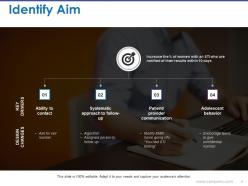
Slide 4: This slide displays Identify Aim with- KEY DRIVERS: Ability to contact, Systematic approach to follow-up, Ask for cell number. DESIGN CHANGES: Patient/ provider communication, Adolescent behavior, Algorithm, Assigned person to follow up, Modify EMR home going info “You had STI testing”, Encourage teens to give confidential number.
Slide 5: This slide displays Explore Options with the following points- People, Community & Youth Work, Technology & Science, Business & Services, Cultural & Arts, Environment: Urban & Rural, Making things, Out of the box/ ambitious.
Slide 6: This slide presents Selection of Best Option with- Technology & Science as subheading.
Slide 7: This slide presents Detailed Planning with the following subheadings- Set Goals and Objectives, Identify and Prioritize, Implementation, Assess need, Develop Strategy, Monitor and Evaluate.
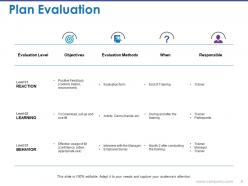
Slide 8: This slide shows Plan Evaluation in tabular form.
Slide 9: This slide showcases Plan Implementation with- Project Plan, Business Analysis, DEVELOPMENT (Desktop, App), Build the CRM System, Data Migration, Training, White User’s Manual, DEVELOPMENT (ANDROID APP), Build the Android App, Testing, Intg. Testing, SUPPORTING, Conduct Training, Conduct Webinar.
Slide 10: This slide shows Closure of Plan with the following subheadings- Closure Plan, Approvals, Detailed Design, Post-Closure Plan, Post-Closure Closing.
Slide 11: This is a Planning Cycle Icon Slide. Use the icons as per need.
Slide 12: This slide is titiled Additional slides. You may change the content as per need.
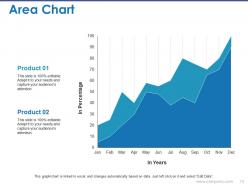
Slide 13: This is an Area Chart slide to show product/entity comparison, specifications etc.
Slide 14: This is a Column chart slide to show product/entity comparison, specifications etc.
Slide 15: This is a Bar graph slide in a creative graph form. Present data/information etc. here.
Slide 16: This is Our Mission slide with Vision and Goals and text boxes to go with. State them here.
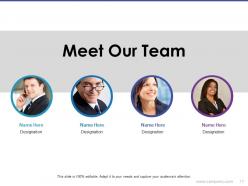
Slide 17: This is Meet Our team slide with names and designation to fill information for.
Slide 18: This is an About us slide. State team/company specifications here.
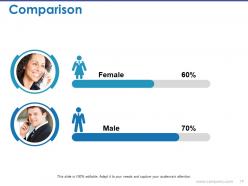
Slide 19: This is a Comparison slide to show comparison, information, specifications etc.
Slide 20: This is a Thank You slide with Address# street number, city, state, Contact Numbers, Email Address.
Planning cycle powerpoint presentation slides with all 20 slides:
Ensure adherence to directions with our Planning Cycle Powerpoint Presentation Slides. Be able to insist on compliance.










FAQs for Planning cycle
So first you gotta figure out where you're at right now - that's the assessment part. Then set some actual goals, develop your strategy, plan how you'll implement everything, and monitor how it's going. Honestly, most people get stuck in the planning phase forever which drives me crazy. Just start executing when you feel ready enough! The whole thing's pretty cyclical too. Once you evaluate your results, that info feeds back into your next assessment round. Think of it more like a loop than a straight line. Short version: know where you are, decide where you're going, map it out, do the work, check your progress.
Honestly, goals are like having GPS for your planning - without them you're just driving around aimlessly hoping to stumble onto the right path. I learned this the hard way lol. When you write down 2-3 specific things you want to accomplish, suddenly everything clicks into place. You can figure out realistic timelines, decide what's actually worth your time, and track if things are working. Your team stops going in circles too since everyone knows what they're aiming for. Trust me, nail down those concrete outcomes first before you get lost in all the planning details.
Different phases need different metrics - it's pretty straightforward actually. Assessment should track data quality and how engaged stakeholders are. When you're setting goals, measure how SMART they are and if teams align. Implementation is honestly where everything goes wrong, so watch milestone completion, budget variance, and resource use closely. Then evaluation needs outcome metrics tied to your original goals plus documenting what you learned. Keep it simple though - pick max 2-3 metrics per phase. I've seen too many people get obsessed with vanity numbers that don't mean anything. Just make sure you actually review them regularly or what's the point?
Honestly, stakeholder involvement totally changes how you plan - it's way more back-and-forth instead of just plowing ahead. You'll be gathering requirements and double-checking stuff upfront, which feels slow but trust me, that's usually where things go sideways if you rush it. The whole cycle gets longer at first. But it's actually way more solid because you're finding problems early and making sure everyone's on the same page about what matters. Oh and set up actual check-in meetings at each step - don't just hope people will randomly give you feedback when they feel like it.
Honestly, most people mess up by being way too optimistic with their timelines. Like, add at least 20% buffer time because something always breaks. Also don't plan this stuff alone - I can't tell you how many times I've watched teams crash because they forgot to include the right people from the start. Oh, and stop overthinking every little detail! You'll just get stuck spinning your wheels instead of actually doing anything. Priorities change anyway, so figure out what absolutely can't move first. Then set up regular check-ins so you can pivot when needed.
Look, tech is honestly a lifesaver for cutting out all the tedious stuff that makes planning such a pain. Project management tools handle milestone tracking and send those annoying reminder emails for you - no more hunting people down yourself. Real-time dashboards show you what's actually happening vs what you planned, which is weirdly satisfying to watch. Some AI tools even do resource allocation now (though I'm still figuring that part out). My advice? Pick whatever's eating up most of your time right now and automate just that one thing first. Don't try to overhaul everything at once.
Think of feedback like a GPS for your planning - it shows you when things go sideways and helps fix stuff for next time. I usually grab feedback during and after each phase to see what actually worked versus what was a total disaster. Plans almost always fall apart somewhere (mine definitely do), but that's normal. The key is spotting patterns in where you consistently mess up, then tweaking your approach. Otherwise you just keep making the same planning mistakes forever. Even quick, informal check-ins work - doesn't have to be fancy. Just build some feedback moments into whatever cycle you're already doing.
Honestly, it depends on your industry's speed. Tech moves crazy fast so quarterly makes sense, but manufacturing usually does annual since their supply chains are harder to pivot. Retail's kinda nuts - they plan seasons like a full year out! Financial companies mostly go annual with quarterly check-ins because of all the regulations. Healthcare takes forever because of funding cycles and compliance stuff. My old boss used to say just look at how fast your market changes and how long your big decisions take to roll out. That combo will tell you what works best for your timeline.
Honestly? Just go with PowerPoint or Google Slides - boring but everyone gets it. Miro's great for mapping out timelines with your team first, then you can build the actual deck. I always grab graphics from Canva because budget slides are depressing enough without ugly charts. Oh, and don't rebuild data viz from scratch - just pull stuff straight from Excel or Tableau. Way easier. Skip the fancy animations too. People want to hear your plan, not watch slides bounce around. Simple template, clear story, you're good.
Charts and dashboards are honestly a lifesaver during analysis - you'll spot problems right away instead of digging through spreadsheets forever. When you're strategizing, whiteboards and mind maps help everyone actually see how ideas fit together. I swear some of my best breakthroughs happen when I'm just sketching stuff out. Gantt charts keep implementation on track (though I hate how they look, they work). For evaluation, visual reports make comparing results super obvious. Oh, and timeline trackers are clutch for keeping teams aligned. Start your next session by drawing something simple first - makes everything click faster.
Honestly? Most companies do the big formal review once a year, but you're gonna want those lighter quarterly check-ins too. Tech moves so fast - like, if you're in that space, maybe even every 6 months. The thing is, stuff comes up. Budget shifts, priorities change, market goes sideways. I learned this the hard way at my last job actually. Build flexibility in from day one instead of treating your plan like gospel. Those quarterly reviews though? Put them on your calendar now and don't let anyone move them.
Honestly, just get everyone together at the start and hammer out goals, priorities, and how you'll measure success. This one step prevents most of the headaches later - trust me on that. Check in regularly so problems don't fester, and use some kind of shared doc or dashboard where people can actually see what's happening. Everyone needs to get their role AND how it fits the whole thing. I know it feels like overkommunicating, but people aren't mind readers. Way better to say too much than assume they're following your logic.
Having a solid planning cycle is like doing regular check-ups instead of waiting for things to fall apart. You'll catch problems early when they're still manageable. Each cycle gives you a chance to look at what's actually happening vs what you thought would happen - honestly, I'm always surprised by how much changes between meetings. Update your risk assessments based on real data, not old assumptions. Short bursts work better than marathon sessions too. Your planning meetings become radar for incoming issues rather than just boring status reports where everyone pretends everything's fine.
Dude, culture totally changes how planning works. In hierarchical places, everything takes forever because it has to go up like 5 approval levels. Consensus cultures are different - they'll drag out meetings until everyone's happy (which is actually smart even if it feels slow). Some teams think years ahead, others pivot every month. Oh and communication styles matter too - like whether people give direct feedback or dance around issues. Honestly? Just figure out how your team operates first, then build your timeline around that instead of forcing some textbook process on them.
Build review points and feedback loops right into each phase of your planning cycle. Most teams honestly just skip collecting data on what's working (and what isn't) then wonder why they keep hitting the same walls. Use those insights to tweak your current plan and shape the next one. Make improvement systematic instead of reactive. Monthly retrospectives work great - or quarterly reviews where you actually ask "what should we do differently?" I've seen too many teams treat this like an afterthought. When it's built into your process, improvement happens automatically.
No Reviews