


Pmo Service Budget Status Report




Try Before you Buy Download Free Sample Product
 Impress Your
 Audience
 100%
100% Editable
 Save Hours
 of Time


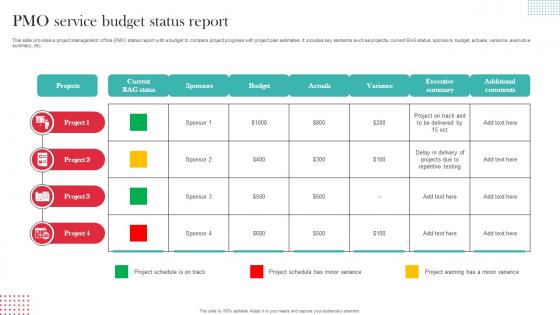
This slide provides a project management office PMO status report with a budget to compare project progress with project plan estimates. It includes key elements such as projects, current RAG status, sponsors, budget, actuals, variance, executive summary, etc.
People who downloaded this PowerPoint presentation also viewed the following :
Pmo Service Budget Status Report with all 6 slides:
Use our Pmo Service Budget Status Report to effectively help you save your valuable time. They are readymade to fit into any presentation structure.





FAQs for Pmo Service
Okay so for your PMO budget report, definitely include actual vs planned spend and resource costs - both staff and contractors. Project allocations are crucial too. Variance explanations matter because people always ask "why the difference?" Don't skip operational stuff like tools and training - honestly, that's where costs sneak up on you. Add forecasts for what's left this period, plus any risks or opportunities you see coming. The whole point is showing where money goes and the reasoning behind it. Oh, and stick an exec summary at the top since half your audience won't read past that anyway.
Honestly, PMO budget reports are your best friend for building trust with stakeholders. People want to see actual numbers, not just "everything's fine" updates. When you show them where money's going vs. the plan, they'll respect that transparency way more than getting blindsided later. I've seen too many PMs get burned by scope creep - like that "tiny change" that somehow costs 20% of your budget. Variance analysis is clutch here, seriously makes you look like you actually know what you're doing. Executives eat this stuff up because it shows you're not just winging it financially.
Track your budget variance first - planned vs actual spend is basic but crucial. Resource utilization matters too because honestly, are your PMs actually swamped or just costing you a fortune? I'd also measure cost per project delivered and ROI on PMO investments. Don't forget the softer stuff - project success rates, on-time delivery, stakeholder satisfaction. Finance loves when you can show cost avoidance numbers (if you can actually quantify them without making stuff up). Start with these basics, then add whatever metrics your leadership obsesses over.
Look, your PMO budget basically shows whether you're actually funding the stuff that matters to your strategy. Projects that drive revenue, cut costs, or help you grab market share get the dollars - that's where you want to see alignment. Each quarter, check that strategic alignment section in your budget reviews. Pretty telling when you see which strategic priorities get the biggest chunks of funding versus which ones just get lip service. If there's a mismatch between what leadership says matters and where the money goes, that's your red flag right there. Those reports track spending against priorities all year, so gaps become obvious fast.
Ugh, data collection is gonna be your worst nightmare. Half your project teams report stuff differently, the other half forget entirely. Then scope changes hit you weekly and suddenly all your resource forecasts are trash. Finance wants these super detailed breakdowns but PMs barely track that level of detail - honestly drives me crazy. Oh and chasing people for missing info? Prepare to feel like you're babysitting. Get standardized templates set up ASAP, that'll save your sanity. Also build in extra time for reports because guaranteed someone drops something on you last second.
Honestly, automation is a game changer for PMO budgeting. Stop chasing down spreadsheets from every team lead - tools like Monday.com or Smartsheet pull that data automatically. They connect to your financial systems and give you live dashboards that actually catch problems before they blow up. The reporting part alone saves hours since you're not stuck formatting charts for stakeholders anymore. I'd start by figuring out which manual tasks are eating most of your time (probably data collection, right?), then find tools that handle those specific headaches. Real-time tracking means no more nasty budget surprises.
Okay so forecasting is basically how you turn all that old project data into predictions for what's coming up - costs, timelines, resource needs, the whole deal. It's like your budget report's crystal ball but actually useful. Your stakeholders want to know where money's going, not just where it went. Honestly, the hardest part is remembering to update your forecasts regularly because nobody wants to make decisions off stale numbers. I've seen too many PMOs get burned by that. Short answer: it's what makes your budget report actually forward-looking instead of just a fancy spreadsheet of historical spending.
Honestly, your PMO budget report is like having a roadmap for where to put your money. Check out the variance data first - it'll show you which projects are bleeding cash and which ones are sitting on unused funds. Then just move money around from the underperformers to the stuff that actually matters. The forecasting part is clutch too because you can see problems coming before they smack you in the face. I swear, half the time you don't realize how much money disappears into random operational stuff until you really dig into these reports. Just pull it up before any big resource meetings so you've got real numbers instead of just guessing.
So here's the deal with risk management and PMO budgets - they're totally connected. High-risk projects need extra cash set aside, usually 5-15% depending on how sketchy things look. You'll also end up paying for your best people (aka the expensive ones) on those risky projects. But honestly? Good risk planning actually saves you money because you're not dealing with surprise disasters later. I learned this the hard way on a project that went completely off the rails last year. Bottom line: bake those contingency funds into your initial budget. Way better than begging for emergency money when everything's already on fire.
Honestly, PMO budget reports are super useful for learning from past mistakes. You'll see exactly where previous projects went off the rails financially - like which cost categories always seem to explode beyond what anyone planned. Looking at actual vs. planned spending across different project types gives you real data instead of just guessing. (Way better than those "best case scenario" budgets everyone loves making.) When you're planning something new, dig up similar past projects from your reports. That historical stuff helps you set budgets that actually make sense and spot the risky areas before they bite you.
Set up weekly budget check-ins - bi-weekly works too if you're moving fast. Pick variance thresholds like 5-10% that automatically trigger reviews when you hit them. Most budget disasters happen because nobody's actually watching the numbers until it's way too late, which drives me crazy. Make sure any scope changes get budget approval first through some kind of change control process. Forecasting tools help predict where your spending's headed. Oh, and executives eat up dashboard reporting - they love pretty charts. Don't try implementing all this at once though. Start with one or two things so you don't overwhelm everyone.
Ok so first thing - never just dump numbers on people without explaining what happened. Tell the story behind each variance, like scope creep or surprise issues that popped up. Honestly, I've watched so many PMOs crash and burn because they skip this part. Visual dashboards help a ton. Start with your biggest problems first, then get into the details. Oh and different audiences need different info - execs want the big picture impact while PMs need all the nitty-gritty stuff. Always have your action plan ready with timelines.
Honestly, monthly budget updates are a lifesaver - don't wait for quarterly reviews to drop bad news on people. Skip the fancy jargon and just explain what's happening with the money in plain English. I learned this the hard way, but document every single change with approvals before you make moves. Set up those threshold alerts so you're not scrambling to explain overruns after the fact. People hate surprises, especially finance folks. Keep stakeholders in the loop before big adjustments, not after. It sounds obvious but so many PMs mess this up.
Oh totally - dig into those old budget reports! Seriously, they're gold for spotting where you always blow past estimates or which project types consistently surprise you. I still laugh at some of our early resource predictions... so off base. Document the patterns in a simple log you'll actually use later. Bump up contingency rates based on real data, not gut feelings. Share these insights with your PMs too - helps them build way more realistic estimates from the start. Creates templates from what actually worked versus what you thought would work.
Getting stakeholder feedback on your PMO budget reports is a game changer. Project managers and finance folks catch things you'll miss every time. They know which metrics actually matter and can spot trouble before it shows up in the numbers. I've watched boring spreadsheets turn into tools people actually use once you ask what they need. Regular check-ins work way better than just shooting reports out there - honestly, most people don't even open those emails. Their input makes everything more accurate and way more useful for decision-making.
-
Great product with effective design. Helped a lot in our corporate presentations. Easy to edit and stunning visuals.
-
Fantastic collection. Loved how we can personalize these templates as per the requirements.