


Process flow improvement steps ppt infographic template





Try Before you Buy Download Free Sample Product
 Impress Your
 Audience
 100%
100% Editable
 Save Hours
 of Time


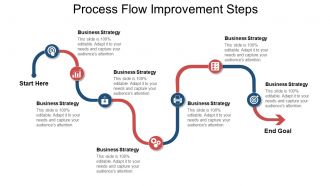
Get this Process Flow Improvement Steps PPT Infographic Template to plan your business strategically. Determine the time that will be needed to accomplish a task. Set an organized timeline to meet the business targets using this timeline PPT template. Show key activities hour by hour to update the smooth execution of the business plan. Highlight specific phases of work that needs to be covered in time. Communicate factors that will help shape your organization and increase the output. Strategize the efficient working of your business with this process flow structure PowerPoint template. Give stakeholders a visual overview of future targets and releases. Provide a layout of the well-structured process with this process flow roadmap PPT diagram. With such a visual illustration, make your presentation effective. A professionally designed presentation is just a few clicks away. Invest less amount of time and make a hassle-free, high-quality presentation using this process map PPT slide.
People who downloaded this PowerPoint presentation also viewed the following :
Process flow improvement steps ppt infographic template with all 5 slides:
Our Process Flow Improvement Steps Ppt Infographic Template are all about brightness. Bright ideas emanating from bright brains.


FAQs for Process flow improvement steps
Honestly, the biggest red flags are when you're constantly putting out fires instead of actually getting ahead of things. Your team starts complaining about doing the same tedious stuff over and over? That's when you know something needs fixing. Missing deadlines becomes the norm, customers won't stop calling to complain, and everyone's making way too many mistakes that need fixing later. I always tell people to just map out what you're actually doing step by step - you'll be shocked how much time gets wasted in weird places. If you're always playing catch-up, something's gotta change.
Process mapping sounds boring but it's actually wild how much broken stuff you'll find. Pick something that drives your team crazy and map every single step with sticky notes. You'll see where work gets stuck, people sit around waiting, or someone's doing the same thing twice for no reason. The redundant approvals alone will make you question everything. Gap between what you think happens vs. reality is usually huge. Decision points and handoffs are where most problems hide. Honestly, we just accept so much dysfunction as normal until you actually see it laid out visually.
Dude, you absolutely need stakeholder feedback - it's like your sanity check. People actually doing the work will catch stuff you'd never see from the management level. I've watched so many "brilliant" process changes crash and burn because nobody bothered asking the frontline folks what they thought first. Get input from everyone who touches that process, not just the higher-ups. They know where the real bottlenecks are hiding. Oh, and start collecting feedback early - don't wait until you've already redesigned everything. Their insights help you figure out what'll actually move the needle versus what just sounds impressive in meetings.
Look, start by figuring out what's actually eating up everyone's time. Then find tech that tackles those specific problems. Workflow automation tools are great for repetitive stuff. Process mapping software helps you see where things get stuck. Even something as basic as switching from endless email chains to a shared database - trust me, game changer. I'd honestly just pick one process that makes everyone want to scream and fix that first. You'll get quick wins and people will actually want to do more changes after that. Dashboards for tracking metrics are useful too, but don't go crazy with everything at once.
Honestly, you need to track both speed and quality stuff to see if it's actually working. Cycle time and error rates are obvious ones. Throughput too. But also look at cost per transaction - that one's huge for showing real impact. Customer satisfaction scores matter more than people think. Employee feedback is clutch since they're the ones dealing with your changes every day. Oh, and definitely get baseline numbers before you change anything! Otherwise you're just guessing. I'd stick to maybe 4-5 metrics tops. More than that and you'll go crazy trying to analyze everything.
Dude, employee training is seriously a game changer. Your team starts catching bottlenecks you'd never see from up top when they actually get why each step matters. Fewer mistakes = way less time fixing stuff later (and trust me, that rework eats up hours). They'll feel more comfortable pitching ideas too since they understand how everything connects. Oh, and definitely cross-train some key people first - they're great at spotting where things get messy between departments. It's honestly one of those things that pays off pretty quick.
Honestly, most people try changing everything at once instead of finding their real bottlenecks first. Big mistake. Get your frontline workers involved from the start - they know what's actually broken better than management does. Don't get distracted by shiny new software either (I've seen teams waste months on this). Map out your current process before you touch anything. Also, pick the right metrics or you won't know if your changes worked. People hate change when they don't understand why you're doing it, so explain that upfront. Start small and measure everything.
Map out your process first with value stream mapping - that's your Lean foundation. Then use Six Sigma's DMAIC approach to dig into the problems you found. They actually complement each other pretty well since Lean cuts waste while Six Sigma handles the quality stuff. I'd start small with a kaizen event (gets people excited), then bring in the statistical analysis when you hit trickier issues. The back-and-forth between quick Lean fixes and deeper Six Sigma work is where the magic happens. Don't overthink it though - just alternate between speed improvements and data-heavy problem solving.
Dude, mapping out your workflows is a game changer. All those annoying bottlenecks and redundant steps? They literally pop right off the page once you visualize everything. I always think it's like cleaning out your car - suddenly you can see all the random junk that shouldn't be there. You'll catch where things get stuck and spot those handoff points that always mess everything up. Makes training new people way easier too since they can actually see the whole picture. Just grab any basic flowchart tool and pick one process that's been driving everyone crazy lately.
Honestly, you need people from different departments involved because they see the whole workflow, not just your tiny corner. Other teams spot bottlenecks you'd never notice - it's wild how obvious some fixes become when you get fresh eyes on things. I've seen people bang their heads against problems for months, then someone from accounting walks by and solves it in five minutes. The best part? When everyone helps design the changes, they actually follow through instead of finding sneaky ways to go back to the old way. Just pick one messy process and get representatives from each team to map it out together.
Honestly, just take it slow and always have a backup plan. Test stuff with a small group first - way better to catch problems early than deal with angry users later. Keep everyone in the loop about what's changing because people hate being blindsided at work. If you can run old and new processes side by side for a bit, do it. Documentation is such a pain but you'll thank yourself later when things get messy. Oh, and time it right - don't roll out changes during your busiest week. Make sure your team's ready to fix whatever breaks.
Customer feedback is basically your reality check - shows you where things actually fall apart from their view, not where you think problems are. Map their complaints to specific steps in your process. Then focus on fixing the stuff that bugs the most people or creates the biggest headaches. I've watched so many "improvements" that looked perfect but completely whiffed on what customers went through daily. Oh, and start by grouping similar feedback together - makes patterns way more obvious. Trace each theme back through your current flow to find which steps are the real troublemakers.
Look for stuff that's hitting your customers hard or creating major bottlenecks first - that's where you'll see quick wins. I swear by the impact vs effort matrix thing, just sketching it out helps so much. High impact but easy to fix? Jump on those. Time-sucking processes are obvious targets, but honestly don't sleep on the ones driving your team crazy. Frustrated people work slower, period. Oh and definitely loop in whoever's actually doing the work when you're deciding priorities. They'll spot the real problems way faster than you will from looking at reports and stuff.
Honestly, I'd make it routine instead of treating it like some big project. Monthly check-ins work well - have your team look at the numbers and spot what's slowing things down now. Here's the thing though: celebrate the small stuff or people burn out from constantly hearing what's broken. Don't let one person own all the improvements either, rotate that around. Otherwise it dies when they get swamped or leave. Pick maybe 2-3 processes max this quarter and track a few key metrics consistently. You'll actually see if you're making progress that way.
Lucidchart or Visio are solid for mapping out your current vs future processes - super visual and easy to follow. Monday.com works great for tracking project milestones if you want something fancier than spreadsheets. Though honestly? Excel or Google Sheets handle most metrics just fine unless you're drowning in data. I've watched teams waste weeks debating between tools when they could've been making actual progress. Pick one thing and stick with it - that's way more important than finding the "perfect" platform. Start basic, then upgrade later if needed.
-
Great designs, Easily Editable.
-
Amazing product with appealing content and design.