

Procurement Dashboard Powerpoint PPT Template Bundles




Try Before you Buy Download Free Sample Product
 Impress Your
 Audience
 100%
100% Editable
 Save Hours
 of Time


Our Procurement Dashboard Powerpoint PPT Template Bundles are topically designed to provide an attractive backdrop to any subject. Use them to look like a presentation pro.
People who downloaded this PowerPoint presentation also viewed the following :
Procurement Dashboard Powerpoint PPT Template Bundles with all 17 slides:
Use our Procurement Dashboard Powerpoint PPT Template Bundles to effectively help you save your valuable time. They are readymade to fit into any presentation structure.
-
Procurement Dashboard
-
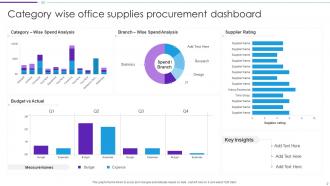
Category wise office supplies procurement dashboard
-
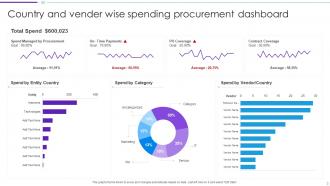
Country and vendor wise spending procurement dashboard
-
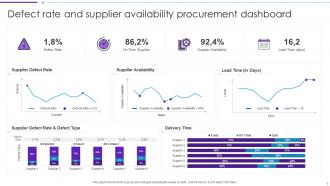
Defect rate and supplier availability procurement dashboard
-
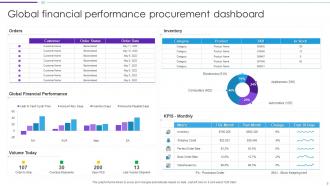
Global financial performance procurement dashboard
-
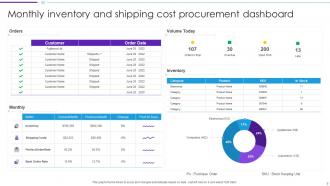
Monthly inventory and shipping cost procurement dashboard
-
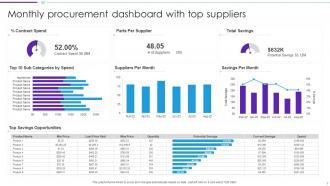
Monthly procurement dashboard with top suppliers
-
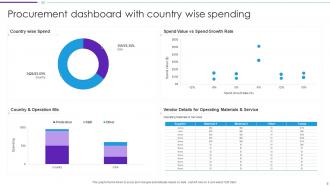
Procurement dashboard with country wise spending
-
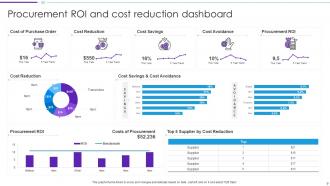
Procurement ROI and cost reduction dashboard
-
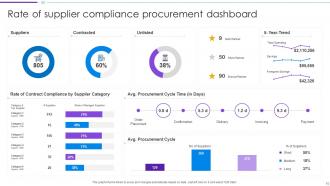
Rate of supplier compliance procurement dashboard
-
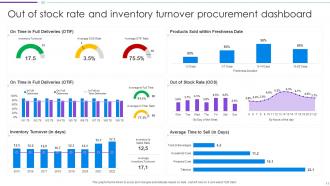
Out of stock rate and inventory turnover procurement dashboard
-

Procurement Dashboard
-

-

-

-

-

FAQs for Procurement Dashboard Powerpoint
Track your cost savings first - that's the big one everyone cares about. Supplier performance scores and PO cycle times are solid basics too. Contract compliance rates will save you headaches down the road. Spend analysis by category is honestly where most people get surprised - you'll probably find money going places you didn't expect. Procurement ROI and supplier diversity matter depending on your company's priorities. Oh, and don't skip days payable outstanding or maverick spend percentage since those hit your bottom line directly. Start simple with these, then add more fancy stuff later.
So basically you get real-time visibility into spending, supplier performance, all that stuff - but in one place instead of hunting through a million spreadsheets. You'll catch cost savings way faster. Risky suppliers? You'll spot them before they screw you over. The trick is setting up metrics that actually matter to your bottom line, not just numbers that make you look smart in meetings (though those are fun too). Honestly, it just makes decision-making so much easier when you're not guessing. Track the KPIs that move the needle for your business and you're golden.
Dude, real-time data completely changes the game for procurement dashboards. Instead of finding out about supply chain issues weeks later, you'll catch price spikes and vendor problems right when they happen. Stakeholders eat this stuff up too - there's something about live numbers that just hits different. The whole point is responding fast enough to actually do something about it. Switch suppliers, move budgets around, whatever. I'd say start with your most critical stuff first though, don't try to connect everything at once or you'll go crazy. Way better than those useless monthly reports sitting in everyone's inbox.
Honestly, dashboards are a game-changer because most people's eyes glaze over when you throw spreadsheets at them. Charts and graphs make spending patterns way more obvious - like, you can actually see where money's going instead of hunting through endless rows. The cool part is stakeholders can click around and explore what matters to them. Your CEO might want the big picture on spend categories, but department heads will probably dive into their specific vendors. Real-time updates are huge too - suddenly everyone's asking smarter questions in meetings. I'd start with maybe 3-4 key metrics that actually matter to your audience, then expand from there.
Biggest mistake? Shoving every metric you can find onto one screen. Trust me, it just overwhelms people. Skip the vendor jargon too - your stakeholders don't care about "advanced analytics capabilities," they want to know if they're overspending on widgets. Check your data sources first because bad numbers will tank your credibility instantly. Here's what actually works though: go sit with the procurement folks before you build anything. Watch them work for like an hour and you'll learn more than any requirements doc will tell you.
Hey! So procurement dashboards are basically like having x-ray vision for your spending. They'll show you stuff you'd never catch otherwise - like when three different departments are buying from separate vendors for the same thing, or price differences that'll make you wonder what people were thinking. The visual breakdowns are pretty helpful too, especially when you see how much you're actually spending on random suppliers instead of your preferred ones. Set up some alerts for weird spending spikes (trust me on this one) and maybe review your biggest vendor contracts every few months to see where you can push for better deals.
Honestly, procurement dashboards are game-changers for staying compliant. They track all your contract deadlines and regulatory stuff in real-time, plus you can see supplier certifications at a glance. The visual alerts alone will save your sanity when you're managing tons of vendors. Budget tracking keeps spending in check automatically. Performance metrics help catch supplier issues early - way better than dealing with problems later. Oh, and the audit trail feature? Total lifesaver. Instead of digging through endless spreadsheets when auditors show up, you just generate reports instantly. Single-source dependencies get flagged too, which I didn't expect but it's super helpful.
Look, supplier performance data is what makes or breaks your procurement dashboard. It shows which vendors actually deliver versus the ones who just talk big. Track stuff like delivery times, quality scores, cost performance - honestly saves me so much headache during vendor meetings. You'll spot patterns fast, like when someone's performance drops off a cliff or they're killing it consistently. Plus you get real data for contract negotiations instead of just going on gut feeling. Makes sourcing decisions way easier when you've got concrete numbers backing you up.
Honestly, just focus on what your team actually uses every day - not what looks impressive. Manufacturing folks need supplier lead times and inventory stuff right up front. Healthcare? More about compliance and vendor certs. Most platforms let you drag widgets around pretty easily and add custom fields. I'd start by figuring out what's currently driving you crazy in procurement, then build around fixing those specific headaches. Don't try tracking everything at once though - that's where people mess up. Map out your real pain points first, then customize from there.
Honestly, just go with whatever your IT team already uses - trust me on this one. Power BI's solid if you're Microsoft-heavy, but Tableau and Qlik Sense are great too for handling all that messy spend data and supplier stuff. Excel actually works fine for smaller datasets (people sleep on it). The real win is connecting everything - your ERP, supplier databases, contracts - so executives can see those pretty visual KPIs they obsess over. I'd probably lean Power BI since it plays nice with other Microsoft tools, but seriously, pick what your tech people know. You don't want to be figuring out data connections alone at 9pm.
Honestly? Daily updates work best for most procurement dashboards. You're dealing with active RFPs and budget tracking - that stuff changes fast and stale data will bite you. I've seen teams make costly mistakes because their numbers were a week old. For the bigger picture strategic stuff, weekly might be fine. But here's the thing - match your refresh rate to how often people actually look at it. No point updating hourly if your team checks it twice a week, you know? Start daily and see how it goes.
Skip the data dumps - people just want to see the story. Charts beat tables every time, and honestly, that red/yellow/green color thing is weirdly effective. Lead with your biggest wins or problems right up front. Then get into the weeds only if someone asks. Your KPIs should focus on stuff like cost savings and supplier performance, but here's the key part - always explain what it actually means for their budget. Don't make them guess. Keep text on slides super minimal. Oh, and prep those simple explanations ahead of time for how your metrics connect to what each department cares about. Trust me on this one.
So you can totally build predictive stuff right into your procurement dashboard - just connect forecasting models that crunch your historical spend data, supplier performance, market trends, all that good stuff. Then it'll start showing you things like price changes coming up, which suppliers might be risky, contract renewals you need to handle soon. I've honestly seen some setups that'll even warn you when demand's about to jump for certain categories. Most BI tools (Tableau, Power BI) already have the ML features built in. Start with something simple like spend forecasting first. Your team can get used to trusting the predictions before you go crazy with it.
Focus on real-time spend tracking first - that's your bread and butter. Contract expiration alerts and supplier performance metrics are must-haves too. Honestly, I'd prioritize a clean interface over fancy features any day. Half the dashboards I've used look like someone threw data at a wall and hoped it stuck! Build in automated approval workflows and live budget comparisons. Charts beat data tables every time - people's eyes just glaze over with spreadsheets. Here's what I'd do: figure out your team's top 3 daily tasks and design around those workflows. Don't overcomplicate it from the start.
Honestly, procurement dashboards are a game changer for getting departments to actually talk to each other. Finance, ops, and procurement can all see the same spend data and supplier performance in real time - no more awkward moments where nobody knows which vendor we're even using. Bottlenecks become obvious way faster, and decisions get made on actual facts instead of wild guesses. The best part? Those annoying email chains asking for updates just... stop. Create some shared views for your main stakeholders and you'll be shocked how much smoother everything runs between departments.
-
Love how there are no boring templates here! The design is fresh and creative, just the way I like it. Can't wait to edit and use them for my extended projects!
-
Illustrative design with editable content. Exceptional value for money. Highly pleased with the product.