

Project Management Status Dashboard Snapshot With Key Strategy Issues Report




Try Before you Buy Download Free Sample Product
 Impress Your
 Audience
 100%
100% Editable
 Save Hours
 of Time


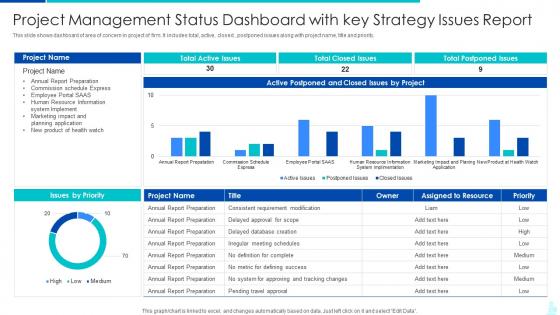
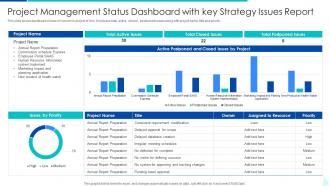
This slide shows dashboard of area of concern in project of firm. It includes total, active, closed , postponed issues along with project name, title and priority.
People who downloaded this PowerPoint presentation also viewed the following :
Project Management Status Dashboard Snapshot With Key Strategy Issues Report with all 7 slides:
Use our Project Management Status Dashboard Snapshot With Key Strategy Issues Report to effectively help you save your valuable time. They are readymade to fit into any presentation structure.





FAQs for Project Management Status Dashboard Snapshot With Key
So you'll need real-time status indicators and milestone tracking first - those are non-negotiables. Budget vs actual spend is huge too, plus team workload stuff so you can see who's drowning. Honestly, I'd put risk alerts right at the top because nobody likes getting blindsided by problems. Task completion rates help catch bottlenecks early, and resource allocation charts are pretty clutch for that too. The whole thing should give you everything at a glance without being crazy overwhelming. Start basic, then tweak it based on what your actual projects need - every team's different anyway.
Dude, visual data is a game changer for project tracking. You can catch problems and trends instantly instead of scrolling through endless spreadsheets. Burndown charts, progress bars - that stuff just clicks with your brain faster. I swear, once you start using dashboards you'll wonder how you survived without them. Stakeholders get it immediately too, no need to explain every detail. Real-time updates keep everyone on the same page about deadlines. Honestly just start simple with basic progress tracking - you'll notice the difference right away. Way better than those boring status reports nobody reads anyway.
Honestly, real-time data makes or breaks a good dashboard. Without it you're basically looking at yesterday's news while today's problems pile up. I've seen too many projects crash because someone found out about budget issues three weeks too late. Live data lets you spot timeline delays and resource problems right when they start - way better than playing catch-up later. The trick is setting up those automatic feeds so everything updates itself. Nobody has time to manually refresh data all day. Once it's running live, you can actually fix stuff before it becomes a total mess.
Honestly, dashboards are game-changers for keeping everyone on the same page. Your team can see what's happening, who's doing what, and when stuff's due - all in one spot. No more drowning in "hey what's the status?" messages every five minutes. I love how you can catch problems early before they blow up into full disasters. Stakeholders bugging you for updates? Just send them the link. Set up some automatic alerts and boom - way fewer pointless meetings. Though I'll warn you, people still somehow miss the notifications sometimes, but that's on them.
Honestly, just track the stuff that actually matters - timeline, budget burn, how you're using your people, and whether tasks are getting done. That's it. I've worked with way too many teams drowning in useless data! Risk tracking helps too, especially with outside clients. Your executives only care about money and deadlines anyway, while your team leads need the nitty-gritty task stuff. Start simple with those basics - you can always add more later if it's actually useful. But seriously, if people won't use it because it's too complicated, what's the point?
So here's what I'd do - ask each person what decisions they're making every day, then build dashboards around that. Executives just want the big picture stuff like budget and timelines. Your team members? They need the nitty-gritty task details and what's blocking them. Most PM tools are pretty decent at custom widgets once you actually take time to set them up (which nobody ever does initially, let's be honest). You can tweak refresh rates and notifications per person too. It sounds like extra work upfront but it saves so many random "hey what's the status" messages later.
So Monday.com and Asana are solid picks - I use Monday for most stuff. Trello's great if you just need basic task tracking, nothing fancy. Microsoft Project is overkill unless you're doing serious enterprise work (learned that the hard way). Smartsheet sits somewhere in the middle with decent Gantt charts. Look, don't stress about picking the "perfect" one right away. Grab free trials of maybe 2-3 and actually test them on a real project. You'll know pretty quick what feels right for how your team works. Start simple though - you can always upgrade later.
Honestly, dashboards saved my butt so many times once I finally started using them properly. You get everything in one spot - budget burns, timeline slips, resource issues - and it's all updating live. The color coding thing sounds cheesy but it actually works. Red means panic, yellow means pay attention, you know? Way better than finding out about problems during those painful weekly meetings. I'd check mine every morning with coffee (became a weird ritual). Oh, and definitely set up alerts for the scary stuff so you're not constantly refreshing the page like a maniac.
Put your most critical stuff right at the top - nobody wants to scroll hunting for key metrics. Use the same colors for status updates so people don't get confused. White space actually helps (I know it feels wasteful but trust me). Group things logically by team or project phase, and definitely don't try cramming everything on one screen. Those overloaded dashboards are the worst. Let people customize their view too - different stakeholders care about totally different things. Oh, and test it with real users early on. They'll spot problems you'd never notice.
Honestly? Weekly is probably your best bet, but daily works too if you're not gonna hate yourself for it. The trick is keeping your data current without making it feel like a second job. I've watched so many dashboards just die because people got ambitious with updates and then burned out hard. Daily's great if your projects move super fast or you've got automated feeds doing the work. But weekly keeps everyone in the loop without you wanting to pull your hair out. Just pick something and stick with it - your team needs to know when fresh info's coming.
The worst thing you can do is cramming everything onto one screen - users will just peace out. Been there with vanity metrics too, they look cool but are basically useless for decisions. Stick to maybe 5-7 metrics that actually matter for your project. Real-time data is huge because nobody trusts old info. Clean design wins every time - if people need a manual to understand it, you've gone too far. Oh and start basic first. You can always add more later but honestly? Most dashboards work better when they're simple anyway.
First thing - get your data feeds automated from those finished projects. Pull budget variance, timelines, resource stuff. Most dashboard tools hook right into your archives anyway. Then create trend lines so you can actually see patterns (seriously, we ALL underestimate testing phases lol). Pick maybe 3-5 key benchmarks that'll help with future planning. Don't go crazy with every metric under the sun. Compare your current project against similar past ones - honestly it's pretty eye-opening when you're talking to stakeholders about realistic expectations.
Dude, automated reporting is a game changer. No more manually pulling data every week - it just generates and sends itself to everyone who needs it. Real-time updates mean you catch problems way faster too. The consistent formatting alone makes stakeholders so much happier, and honestly the visual charts make spotting trends pretty obvious. I'd start with weekly reports for execs and daily ones for your team. Oh, and you won't have that Sunday night panic about forgetting to compile everything anymore, which is honestly the best part.
Honestly, mobile compatibility is huge for project management. You can approve stuff and check on things while you're literally anywhere - commuting, waiting around, whatever. Your team can update progress from job sites too, which keeps everyone on the same page. The tricky part is making sure task assignment and milestone tracking actually work well on phones (some apps are terrible at this). I'd definitely test it out with your real workflows first before getting everyone to use it. Trust me, when deadlines get crazy, being able to handle urgent stuff from your phone is a lifesaver.
Honestly, dashboards are a game-changer for cutting down on those endless "where are we at?" meetings. Your team can see real-time progress, budget burn, blockers - all that stuff - without bugging you constantly. Everyone's looking at the same data, so no more awkward surprises when stakeholders suddenly find out you're behind schedule. The trick is keeping it honest though. Don't sugarcoat things just because it looks prettier. I learned this the hard way on my last project. Set it up so people can actually check their own progress instead of always coming to you for updates.
-
I want to express my gratitude to SlideTeam’s presentation design services team for helping me create the best presentation of my life!
-
Awesome presentation, really professional and easy to edit.