

Project Solution Deployment Plan Powerpoint Presentation Slides




Try Before you Buy Download Free Sample Product
 Impress Your
 Audience
 100%
100% Editable
 Save Hours
 of Time


A Technological Upgradation Plan outlines the activities to deploy, install, and integrate a solution or system into the organizations current operations. Here is a professionally designed Project Solution Deployment Plan template that is useful for top management that wants to achieve the objective of business process or activity modification for greater efficiency and accelerated growth. In planning and procurement, we have discussed business processes undergoing transformation, hardware and software requirements, and roles and responsibilities of the employee involved in the transition project. Post that workforce training plan is prepared to mentor company employees to embrace technological change without any rigidity. The monitoring and maintenance system issue tracker sheet, incident management chart, and contingency plan are covered to ensure that the updated system is working as desired. This PPT also has the project signoff sheet to ensure the clients proper handing over the deployed and tested method. Also, using this template, the user can draft out a strategy to overcome multiple bottlenecks of business the transition project easily by mitigating numerous risks associated with each phase. Download this 100 percent editable template now.
People who downloaded this PowerPoint presentation also viewed the following :
Content of this Powerpoint Presentation
Slide 1: This slide introduces Project Solution Deployment Plan. State Your Company Name and begin.
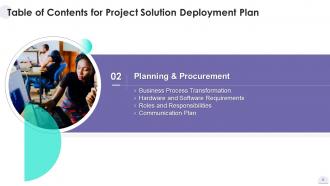
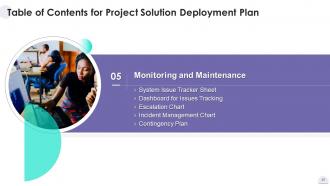
Slide 2: This slide shows Table of Content for the presentation.
Slide 3: This slide presents title for topics that are to be covered next in the template.
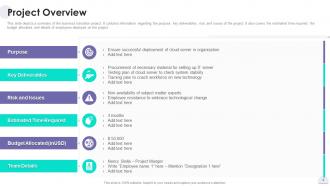
Slide 4: This slide displays summary of the business transition project.
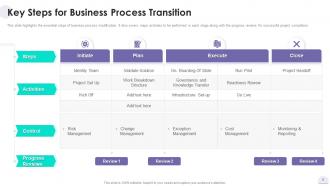
Slide 5: This slide represents essential steps of business process modification.
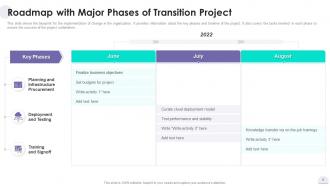
Slide 6: This slide showcases the blueprint for the implementation of change in the organization.
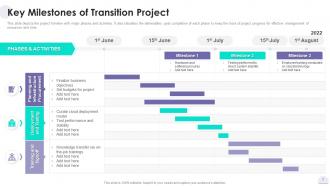
Slide 7: This slide shows project timeline with major phases and activities.
Slide 8: This slide presents title for topics that are to be covered next in the template.
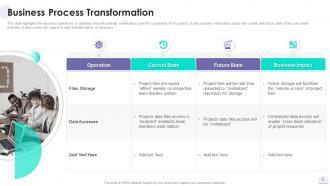
Slide 9: This slide displays business operations or activities that will undergo modification.
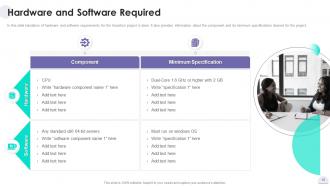
Slide 10: This slide represents Hardware and Software Required for Transition Project.
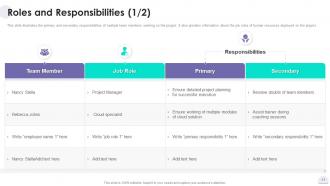
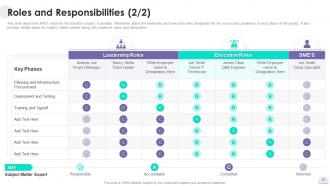
Slide 11: This slide showcases Roles and Responsibilities for Transition Project.
Slide 12: This slide shows RACI matrix for the transition project.
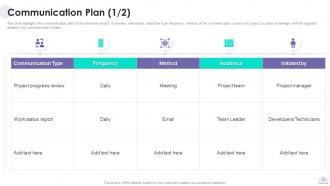
Slide 13: This slide presents communication plan of the transition project.
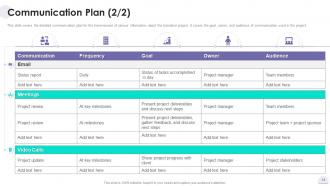
Slide 14: This slide displays detailed communication plan for the transmission of various information.
Slide 15: This slide represents title for topics that are to be covered next in the template.
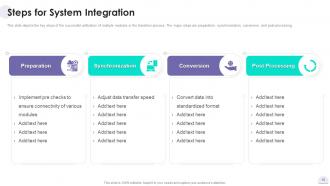
Slide 16: This slide showcases key steps of the successful unification of multiple modules in the transition process.
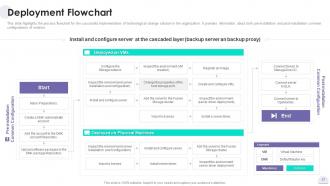
Slide 17: This slide shows process flowchart for the successful implementation of technological change.
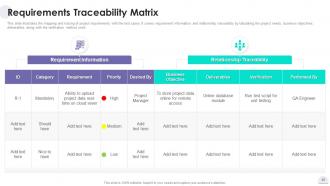
Slide 18: This slide presents mapping and tracing of project requirements with the test cases.
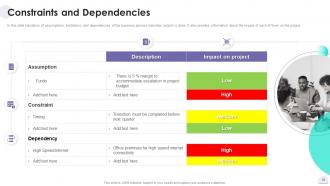
Slide 19: This slide displays Constraints and Dependencies for Transition Project.
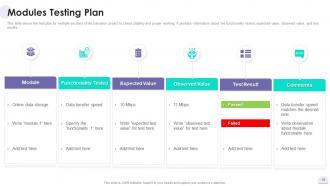
Slide 20: This slide represents the test plan for multiple sections of the transition project to check stability.
Slide 21: This slide showcases title for topics that are to be covered next in the template.
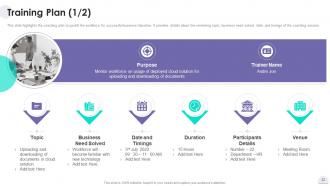
Slide 22: This slide shows coaching plan to upskill the workforce for successful business transition.
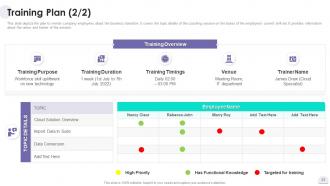
Slide 23: This slide presents plan to mentor company employees about the business transition.
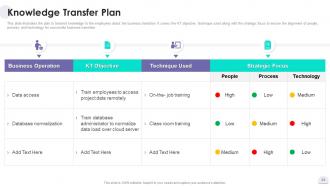
Slide 24: This slide displays plan to transmit knowledge to the employees about the business transition.
Slide 25: This slide represents title for topics that are to be covered next in the template.
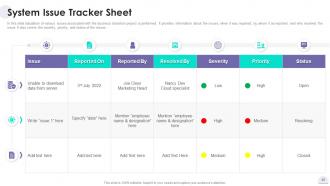
Slide 26: This slide showcases System Issue Tracker Sheet for Transition Project.
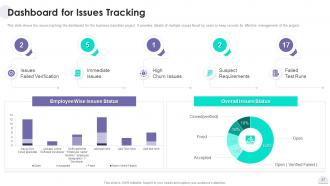
Slide 27: This slide shows the issues tracking the dashboard for the business transition project.
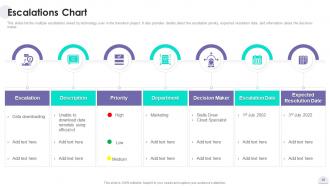
Slide 28: This slide presents multiple escalations raised by technology user in the transition project.
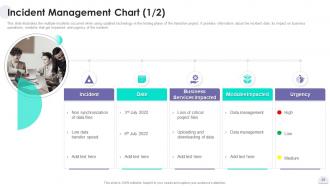
Slide 29: This slide displays multiple incidents occurred while using updated technology in the testing phase.
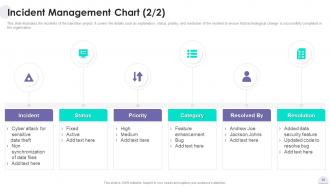
Slide 30: This slide represents Incident Management Chart for Transition Project.
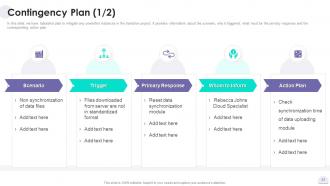
Slide 31: This slide showcases tabulated plan to mitigate any unwanted instances in the transition project.
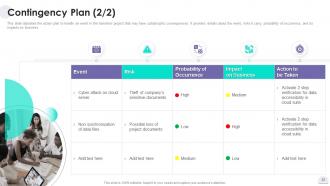
Slide 32: This slide shows action plan to handle an event in the transition project that may have catastrophic consequences.
Slide 33: This slide presents title for topics that are to be covered next in the template.
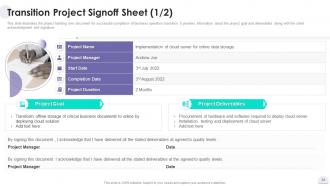
Slide 34: This slide displays Signoff Sheet for Transition Project.
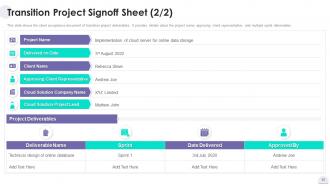
Slide 35: This slide represents the client acceptance document of transition project deliverables.
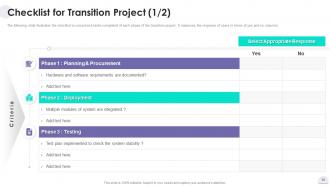
Slide 36: This slide showcases checklist to crosscheck tasks completed of each phase of the transition project.
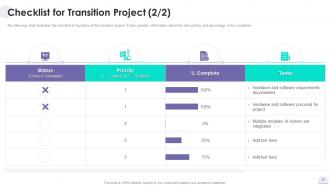
Slide 37: This slide shows checklist of key tasks of the transition project.
Slide 38: This slide showcases Icons for Project Solution Deployment Plan.
Slide 39: This slide is titled as Additional Slides for moving forward.
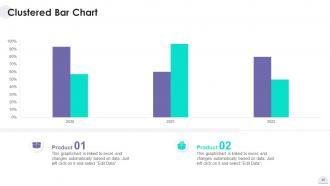
Slide 40: This slide provides Clustered Column chart with two products comparison.
Slide 41: This is Our Mission slide with related imagery and text.
Slide 42: This is Our Team slide with names and designation.
Slide 43: This is a Comparison slide to state comparison between commodities, entities etc.
Slide 44: This is a Timeline slide. Show data related to time intervals here.
Slide 45: This slide depicts Venn diagram with text boxes.
Slide 46: This is Our Target slide. State your targets here.
Slide 47: This slide contains Puzzle with related icons and text.
Slide 48: This slide presents Roadmap with additional textboxes.
Slide 49: This is a Thank You slide with address, contact numbers and email address.
Project Solution Deployment Plan Powerpoint Presentation Slides with all 54 slides:
Use our Project Solution Deployment Plan Powerpoint Presentation Slides to effectively help you save your valuable time. They are readymade to fit into any presentation structure.









FAQs for Project Solution Deployment Plan
Honestly, start with your timeline first - everything else flows from there. You'll want milestones mapped out, then figure out who's doing what and when. Risk plans are boring but necessary (learned that the hard way). Oh, and definitely build in rollback procedures because things *will* go wrong at some point. User training schedules matter too, plus you need testing phases and ways to measure if it actually worked. The main thing? Make sure someone owns each piece. I always work backwards from the timeline to see what resources I actually need versus what I think I need.
Look, get your stakeholders involved from day one - don't wait. Weekly check-ins are clutch, plus send them regular updates so they're not wondering what's happening. The thing that kills projects? Treating these people like they're just watching from the stands. Give them actual jobs - testing, feedback, decision-making when problems come up. They need to feel like they own pieces of this thing, not just wait around for you to deliver. Oh and map out who does what ASAP. Trust me, clear communication channels save your butt when things get messy. Make them participants, not spectators.
Honestly, the big stuff that'll bite you is downtime, data loss, integration breaking, and users just not adopting it. Test everything in staging first - like, really test it. Have your backup plan ready before you even think about going live. Start small with pilot groups instead of rolling out to everyone at once. Oh, and talk to people constantly about what's happening - nobody likes surprises. I swear by having a checklist of "are we actually ready for this?" Don't deploy on Fridays either unless someone's literally on fire.
Dude, you gotta get your baseline numbers first - before anything goes live. Then track the exact same stuff after launch to actually prove it worked. Pick metrics that matter to the people with budgets, like adoption rates or how much money you're saving them. I've watched so many teams obsess over pointless vanity metrics that impress nobody. Set up dashboards so you're not stuck doing manual reports every damn week. Whatever you promised to fix in your original pitch? That's what you measure. Give it like 30-60 days minimum though - real trends take time to show up.
Dude, change management is literally what saves your project from becoming a expensive paperweight. Map out who's getting hit by these changes first. Then start talking to people early - like, way before you flip the switch. Training is huge too, don't skimp on it. I've seen so many rollouts tank because teams built amazing tech but forgot humans are stubborn creatures of habit. Your stakeholder communication plan? Start it yesterday. Seriously, user adoption will make or break this whole thing, so treat the people side as seriously as your technical stuff. Don't be that person scrambling to explain everything during deployment week.
Honestly, just automate the boring stuff first. CI/CD pipelines will save your sanity - automated testing, builds, deployments, all of it. No more manual handoffs between dev and production. Docker + Kubernetes fixes those annoying "works on my machine" issues too. Infrastructure as code is clutch (Terraform's solid). Yeah, the setup sucks initially but it's so worth it later. My advice? Don't try to automate everything at once - that's overwhelming. Pick whatever manual step you absolutely hate doing and start there. You'll get addicted to automating once you see how much time it saves.
Dude, your users will literally make or break this whole thing. I've watched great systems crash and burn because nobody knew how to use them properly. Start training way before launch day - not just boring PowerPoints either, get people actually clicking around. Multiple sessions work better than cramming everything into one marathon day (people's brains just shut off). You want them excited about how this'll make their lives easier, not panicking about change. Oh, and definitely make some quick reference sheets they can keep at their desks. Trust me, your support inbox will thank you later.
Map each deployment milestone back to your actual business goals right from the start. Honestly, I swear by making a simple matrix showing how everything connects - sounds super nerdy but it'll save your sanity later. Don't skip the regular check-ins with stakeholders either. They help you catch when things start drifting off course. Document goal changes as they happen so your deployment plan can shift with them. This whole alignment thing isn't a set-it-and-forget-it deal, you've got to stay on top of it. Maybe start by comparing your project charter against your timeline this week?
Dude, trust me on this - send regular updates during deployment. Stakeholders absolutely lose it when they're left in the dark. I learned this the painful way last year. Set up brief status emails covering what's done, what's happening now, and any roadblocks. Maybe throw in a Slack channel too so people can ask quick questions without blowing up your inbox. The key thing? Figure out your escalation plan before anything goes wrong. Like, who calls who when the server crashes at 2am? Overcommunicating beats radio silence every single time. Stick to whatever schedule you pick.
So collect feedback at different points - during deployment, right after launch, then maybe 2-3 weeks later when the dust settles. Quick surveys work well for your team and users. Hold short retrospectives too (seriously, keep them under 30 mins or everyone mentally checks out). Track stuff like how long deployments take, rollback frequency, user satisfaction. Oh and make it feel normal, not like another task on their plate. Document it all somewhere everyone can access - future teams shouldn't be stumbling through the same problems you already solved.
Honestly, start by mapping out exactly what people, tools, and budget you need for each phase. Critical path stuff gets top priority since those tasks can't slip. I always build in like 15-20% buffer time because deployments are basically Murphy's Law in action - something will definitely break. Spread the workload across teams so nobody burns out. Microsoft Project works great for tracking this stuff, though I've seen people do fine with basic spreadsheets too. The real trick is staying flexible. When things go sideways (and they will), you need to move resources around fast.
Honestly, compliance stuff will completely control your timeline - there's no way around it. Build in tons of extra time for security audits and data protection reviews upfront. Healthcare is the absolute worst for this. HIPAA alone can drag things out for months, it's brutal. Don't wait until you're halfway through development to figure out what certifications you need - that's when things get really expensive. Get your legal team involved super early so they can tell you exactly what you're dealing with before launch. Trust me on this one.
Honestly, just start with whatever your team's already comfortable with - Jira or Azure DevOps work great for breaking stuff into tasks. Gantt charts are weirdly satisfying for this (I use Monday.com but Asana's solid too). You can see all the dependencies laid out visually. Jenkins dashboards are clutch if you're doing automated deployments, or GitLab's CI/CD pipelines. Oh and definitely set up Slack notifications - saves you from constantly checking status updates. Don't overthink it though, you can always add more specialized tracking tools later once you figure out what's actually missing.
Dude, definitely dig through those old deployment retrospectives and incident reports first. They're honestly goldmines for spotting what went sideways before. I always do this - look for patterns in the failures. Same bottlenecks keep happening? Communication always breaks down at the same point? Build that stuff right into your deployment checklist now. Teams that actually learn from their screwups don't keep repeating them. Oh, and pull together a quick lessons-learned doc before you lock in your timeline. Trust me on this one.
Get all your docs sorted first - runbooks, troubleshooting stuff, configs, the works. Don't just do a quick handoff either. Block out real time for knowledge transfer sessions because ops teams always have a million questions you didn't think of. Set up proper monitoring and alerts beforehand, and make sure they know who to escalate to when stuff breaks (because it will). Oh, and clear your calendar for the first few weeks after go-live. You'll basically be on call whether you planned for it or not.
-
The service is fast, and I could access any presentation after buying the subscription. I don’t think I’ll ever have to worry about a presentation in my life.
-
It saves your time and decrease your efforts in half.