

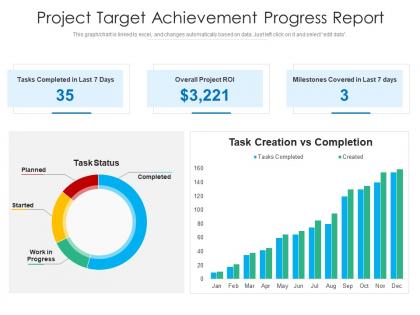
Project target achievement progress report




Try Before you Buy Download Free Sample Product
 Impress Your
 Audience
 100%
100% Editable
 Save Hours
 of Time


Our Project Target Achievement Progress Report are topically designed to provide an attractive backdrop to any subject. Use them to look like a presentation pro.
People who downloaded this PowerPoint presentation also viewed the following :
Project target achievement progress report with all 2 slides:
Use our Project Target Achievement Progress Report to effectively help you save your valuable time. They are readymade to fit into any presentation structure.


FAQs for Project target
Honestly, start with the basics - timeline stuff (are you hitting milestones?), budget tracking, and how much of the scope you've actually finished. Resource utilization is super important because it shows if your team's drowning or sitting around. Oh, and definitely track risks and blockers since those always become the main topic anyway! Quality metrics help too - like how many bugs you're finding or if deliverables are getting approved. Keep everything visual with charts because nobody wants to read paragraphs of status updates. Stick to maybe 5-7 things max or people just zone out.
Honestly, visuals are a game changer for progress reports. Charts show trends way faster than paragraphs of text ever could. I've watched executives completely zone out during text-heavy presentations, but put up a milestone timeline or budget chart? Suddenly they're paying attention. Color coding works great - that green/yellow/red system everyone gets immediately. Screenshots of actual work help too. Icons and infographics break up all the dense stuff so people don't feel overwhelmed. Your audience will actually remember the important points instead of forgetting everything five minutes later. Plus it makes you look more professional, which doesn't hurt.
Don't sugarcoat problems - execs hate surprises later. Be specific about what's actually blocking you instead of vague "we're facing some challenges" nonsense. Most leadership just wants the key points anyway, so skip the technical weeds. Always include real numbers and data. Can't stress this enough: clearly ask for what you need from them - resources, decisions, whatever. Flag dependencies on other teams early since that stuff always takes forever. Oh, and make it scannable - busy people will literally just skim for the important bits. Honest and realistic beats overly optimistic every time.
Weekly updates work best for most stuff I've dealt with. You catch problems before they blow up, but people don't start auto-deleting your emails. Daily ones? Total waste - nobody reads those. If you're in crunch mode or hitting big deadlines, maybe bump it to twice a week. Longer projects can get away with every other week, honestly. Just ask your stakeholders what they actually want though. I'd start weekly and see how they react. They'll definitely let you know if you're bugging them too much or leaving them in the dark.
Yeah, it totally depends on the industry. Kanban boards work great for IT folks - they love their sprint reports and burn-down charts. Construction teams are all about Gantt charts with actual photos of progress (which honestly makes perfect sense when you're watching a building go up). Healthcare's a whole different beast though - they need detailed narrative reports because of compliance stuff, plus all the risk assessments. My advice? Just figure out how your stakeholders actually like getting info. Some people are visual, others want the full story written out. Match whatever regulatory requirements you're stuck with too.
Honestly? Just be upfront about delays but focus on solutions. Don't make it a pity party - I've watched managers do the whole "everything's falling apart" routine and it tanks everyone's mood. Quick acknowledgment of what's late, explain why (without pointing fingers), then pivot hard to your game plan. Spend way more time on next steps than the actual problem. Oh, and always ask for what you need - resources, more time, whatever. Your stakeholders will respect the honesty, plus your team won't feel like you're selling them out. Trust me on this one.
Honestly, just ask people what they actually want to see in your reports. I know it sounds obvious but most people skip this step completely. When you get that feedback, use it - ditch the stuff nobody cares about and focus on metrics that matter to them. Your reports will go from those boring updates everyone ignores to something people actually find useful for decisions. I've watched this happen so many times. Start simple though. Ask a couple stakeholders what they'd want more of or less of. Then tweak your template based on what they say. Makes such a difference.
Honestly, project management software is a game changer for reports. It pulls data straight from your tasks and budgets automatically - no more chasing people down for updates or dealing with those awful spreadsheets. You can set up reports to go out weekly without doing anything. Most tools let you customize what each person sees too. The time you'll get back is insane. We're talking hours every week. My old boss used to spend half his Friday just compiling status reports - such a waste. Figure out what numbers your stakeholders actually want to see first, then pick something that handles those reports on autopilot.
Honestly, just call out the cool cross-team stuff you guys did - like when marketing and dev actually worked together on that API thing. Throw in some numbers about how often people communicated or shared knowledge. Document those joint problem-solving sessions too. Oh, and definitely mention any tools that made workflow smoother. Leadership eats that up since they're always worried about team dynamics. I'd add a "collaboration wins" section - sounds cheesy but it works. Don't forget the times people helped each other get unstuck. Makes the whole report way more interesting than just listing individual achievements.
Canva's probably your best bet - their project templates are ridiculously easy to use and look legit professional. PowerPoint works too if you've got decent templates already. Excel can actually look pretty slick with some conditional formatting, though I know that sounds boring. If you're feeling ambitious, Tableau and Power BI make gorgeous dashboards but they're kind of a pain to learn at first. Monday.com does auto-generated reports that save tons of time if you're doing this regularly. Honestly? Just start with Canva. You'll knock something out in like 15 minutes and it'll look way better than spending hours wrestling with Excel.
Honestly, just make a simple table or bullet list that connects your project milestones to whatever your company actually cares about. Like if they're obsessed with revenue growth, show how milestone X directly helps with that. Customer satisfaction their thing? Map your deliverables to that instead. I usually do something super basic like "Feature launch → better user experience → higher retention rates." Takes maybe 10 minutes but makes such a huge difference. Stakeholders love seeing that direct connection - suddenly your project isn't just another thing on their plate, it's tied to what keeps them up at night. Makes budget conversations way easier too.
Earned value analysis is your best bet here - compare what you planned against actual progress and costs. The schedule and cost performance indexes will tell you if you're gonna hit your deadlines and budget. I also like doing trend analysis where you just look at velocity from recent sprints and project it forward. Monte Carlo simulations are cool if you want probability ranges, but honestly that might be overkill depending on your project size. Start with earned value though. Those curves make it super obvious where things are heading.
Start with SMART goals upfront - specific metrics, deadlines, who's responsible for what. I use red/yellow/green status updates because they're dead simple. Track both the numbers stuff (budget, timeline) and the squishy things like whether stakeholders are actually happy. Here's what I've learned the hard way: "90% done" can last forever if your criteria suck. Update weekly and don't be afraid to adjust when scope changes (it always does). Your dashboard should tell the whole story at a glance - nobody has time to dig through paragraphs to figure out if you're screwed or not.
Honestly, stakeholder engagement is everything when it comes to progress reports. Your CEO just wants the big picture stuff - metrics, risks, are we on track? But your project team needs all the nitty-gritty details about tasks and what's blocking them. I made this mistake early on, sending crazy technical reports to executives who literally just wanted "are we good or not?" You've got two options: create separate versions for different audiences, or do this layered thing where you start with an executive summary then get into the weeds. Figure out who needs what info first, then build your report around that instead of throwing everything at everyone.
Honestly, dig into your old project reports first. See what actually got people's attention vs what they totally ignored. I made the mistake of writing these epic novels that went straight to the digital graveyard - not fun. Check if stakeholders kept asking for the same missing pieces every time. Timing matters too. Were you always late to the party when decisions were being made? Focus on the stuff that actually sparked real conversations or changed someone's mind. Maybe certain sections consistently fell flat? Use that intel to build something people will genuinely read and act on.
-
Colors used are bright and distinctive.
-
Very unique, user-friendly presentation interface.
-
Graphics are very appealing to eyes.
-
I discovered this website through a google search, the services matched my needs perfectly and the pricing was very reasonable. I was thrilled with the product and the customer service. I will definitely use their slides again for my presentations and recommend them to other colleagues.