


Resource Planning Powerpoint Presentation Slides





Try Before you Buy Download Free Sample Product
 Impress Your
 Audience
 100%
100% Editable
 Save Hours
 of Time


Here is Resource Planning PowerPoint Presentation Slides for you, so you can easily brief onlookers about the topic. Utilizing our building hr capacity PowerPoint introduction slides you can showcase the importance of human resourcing and planning. There are various slides like strategic human resources plan framework, company’s recruitment strategies, assessing the current hr capacity, evaluating, recruitment strategies, recruitment budget, gap analysis, hrm plan, etc. Well, this organization workforce planning PPT slideshow has additional slides like our team, our goals, timeline, comparison and many more. Also, utilizing our business workforce planning PPT slide deck, you can showcase the audience and explain to them the advantages of manpower planning. The best part is that this presentation is fully editable and you can edit the color, text etc as per your needs. So, simply click download and achieve the business results by using the organization's workforce management presentation deck of 26 slides. Elaborate on every clause of the decree with our Resource Planning Powerpoint Presentation Slides. It helps implement court directions.
People who downloaded this PowerPoint presentation also viewed the following :
Content of this Powerpoint Presentation
Slide 1: This slide introduces Resource Planning. State Your Company Name and begin.
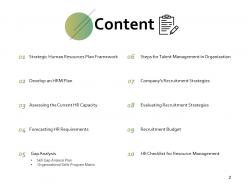
Slide 2: This slide shows Content of the presentation.
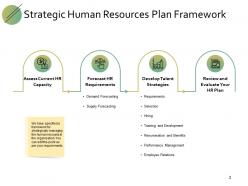
Slide 3: This slide presents Strategic Human Resources Plan Framework with categories as- Develop Talent Strategies, Assess Current HR Capacity, Forecast HR Requirements, Review and Evaluate Your HR Plan.
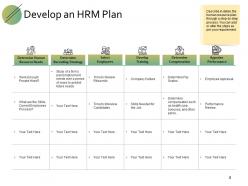
Slide 4: This slide displays Develop an HRM Plan describing in detail, the human resource plan through a step-by-step process.
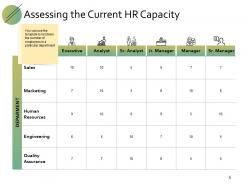
Slide 5: This slide represents Assessing the Current HR Capacity among different departments.
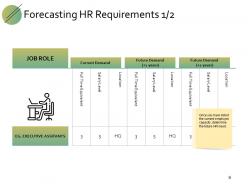
Slide 6: This slide showcases Forecasting HR Requirements with current and future demands.
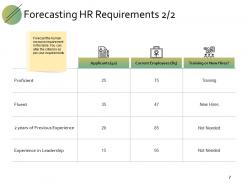
Slide 7: This is another slide for Forecasting HR Requirements.
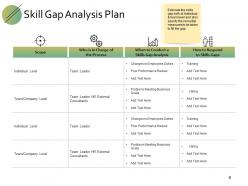
Slide 8: This slide shows Skill Gap Analysis Plan estimating the skills gap both at Individual & team level and also specify the remedial measures to be taken to fill the gap.
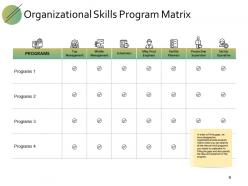
Slide 9: This slide presents Organization Skills Program Matrix where you can specify all the relevant skill programs you intend to undertake for filling the gaps and also specify the relevant audience for the program.
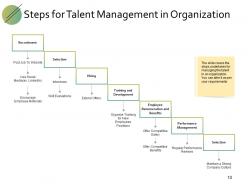
Slide 10: This slide displays Steps for Talent Management in Organization as- Recruitment, Selection, Hiring, Training and Development, Employee Renumeration and Benefits, Performance Management, Employee Relations.
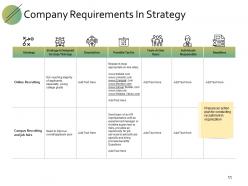
Slide 11: This slide represents Company’s Recruitment Strategies to prepare an action plan for conducting recruitment in organization.
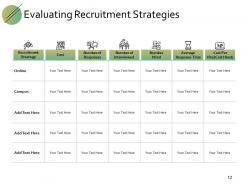
Slide 12: This slide showcases Evaluating Recruitment Strategies with categories as recruitment strategies, cost, number of interviewed, number hired, average response time and cost per hire.
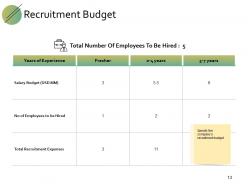
Slide 13: This slide specifies the company's Recruitment Budget.
Slide 14: This is Our Mission slide with related imagery and additional text boxes to show information.
Slide 15: This slide displays Resource Planning Icons.
Slide 16: This is slide Our Great Team with names and designation.
Slide 17: This is Our Goal slide. Show your goals here.
Slide 18: This is a Timeline slide to show information related with time period.
Slide 19: This is a Comparison slide to state comparison between commodities, entities etc.
Slide 20: This slide shows Mind Map for representing entities.
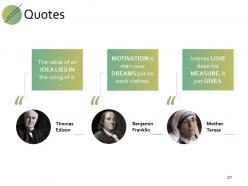
Slide 21: This is a Quotes slide to convey message, beliefs etc.
Slide 22: This is a Financial slide. Show your finance related stuff here.
Slide 23: This is a Venn slide with text boxes.
Slide 24: This is a Puzzle slide with text boxes.
Slide 25: This is a Bulb or Idea slide to state a new idea or highlight information, specifications etc.
Slide 26: This is a Thank You slide with address, contact numbers and email address.
Resource Planning Powerpoint Presentation Slides with all 26 slides:
Our Resource Planning Powerpoint Presentation Slides don't believe in the blame game. It helps home on to the cause.


FAQs for Resource Planning
So you'll need demand forecasting, resource inventory, capacity planning, and allocation optimization. Start by figuring out what resources you actually have vs what you'll need for upcoming projects. Budget constraints will make or break you - honestly, I've watched so many plans crash because someone forgot to check if we could afford everything. Build in buffer time too. Changes always happen when you least expect them. Oh, and don't just set your plan once and walk away - that's asking for trouble. Review it regularly and tweak as needed.
Honestly, resource planning is what makes or breaks projects. You've gotta map out what people, budget, and equipment you need upfront - otherwise you're just crossing your fingers. I can't tell you how many times I've watched projects completely implode because someone thought "oh, Sarah will be free next month" without actually checking. Figure out your resources early so you can spot the bottlenecks coming. When stuff changes (and it always does), you'll already know where you can shift things around. It's not the fun part of project management, but it'll save your butt later.
Oh man, so many options! Microsoft Project and Smartsheet are solid if you need the full enterprise thing. Monday.com's pretty popular too. But honestly? Sometimes those feel like overkill. Resource Guru and Float are way more focused on just the scheduling part, which might be perfect for you. I've seen people get crazy results with just Excel templates - depends on your team size really. The trick is figuring out what's actually broken first, then picking something that fixes that specific mess. Otherwise you'll end up paying for features you'll never touch.
First thing - dig into your old project data and see where you actually spent time vs what you planned. Your team knows way better than you how long stuff really takes, so ask them. I always add buffer time because honestly, when has anything ever finished early? Create a few scenarios - like best case, realistic, and the inevitable disaster version. Track your project pipeline and market shifts too. The biggest mistake people make is setting forecasts once and never touching them again. Update that thing regularly when new info comes in.
Honestly, stakeholder communication can make or break your whole resource plan. Get leadership on board early for budget stuff, and make sure project managers tell you exactly what they need upfront. Regular check-ins keep everyone on the same page with priorities. I've watched "perfect" plans completely implode because nobody talked to finance or someone changed timelines without telling anyone. Planning without those conversations is basically flying blind - you'll miss requirements or get massive pushback later. Have those talks from day one, not just when things go sideways.
Start with a solid risk assessment - map out where things usually go wrong, skill gaps, resource crunches. Check your historical data for patterns (like how marketing always implodes during launches). Cross-train people so you're not toast when someone quits unexpectedly. I always keep 10-15% buffer capacity because shit happens. Set up warning signs to catch problems early instead of firefighting later. Oh, and don't just set allocations once - review monthly. Most teams I've seen fail because they treat resource planning like a "set it and forget it" thing, which is honestly just asking for trouble.
Honestly, start with resource utilization - you want that sweet spot around 70-85%. Higher than that and people burn out fast. Track your project timelines, budget variance, and if you're actually hitting scope targets. Oh, and allocation accuracy is huge - basically how wrong your initial estimates were (spoiler: probably way off). Employee satisfaction matters more than people think because miserable teams tank productivity. Don't go crazy with metrics though. Pick like 3-4 max and stick with them consistently. The goal is high utilization without everyone being stressed out of their minds.
Honestly, it's all about how much you can risk committing upfront. Short-term stuff? Go aggressive with your resources - worst case you're only stuck for a few weeks. Pull people off other things, it won't kill anyone. Long-term projects are trickier though. I learned this the hard way last year - you've got to plan way more conservatively because so much can change. People leave, priorities shift, budgets get slashed. It's like the difference between borrowing your buddy's car versus actually buying one. I'd say start with maybe 70% resource commitment and leave yourself wiggle room.
Oh man, scope creep is the worst - projects just keep growing and growing. Time estimates? We're all terrible at those, honestly I still mess that up constantly. Then leadership changes priorities out of nowhere, or someone gets yanked for some "emergency" that probably isn't. Dependencies will blindside you too. Sometimes you'll discover halfway through that nobody actually knows how to do X thing you assumed was covered. Build in extra time though - like 20% buffer minimum. Document stuff and do weekly check-ins so problems don't explode later.
Look, you've gotta sync up your resource planning with budget cycles right from the beginning - seriously, don't make them separate things. Map each role to actual budget line items and track both at once. I totally screwed this up once by overstaffing what seemed like a reasonable project, then watched it demolish our quarterly budget. Ouch. Get some integrated planning tools so you can see cost impacts in real-time when you're making resource calls. Regular check-ins are huge too - not just waiting until month-end when it's basically too late to fix anything. Catch those overruns early and you can actually do something about them.
So here's what I'd do - start with the money stuff first. ROI and NPV calculations will show you which projects actually pay off. After that, create a scoring system for things like how well they fit your strategy, risk levels, all that jazz. It gets subjective but whatever, it works. Dependencies are huge too - some projects only make sense if you do others first. There's this thing called Portfolio Optimization Method that's pretty solid for balancing everything out. Oh, and document your criteria before you start! Trust me, you'll need to justify these decisions when people start complaining later.
Honestly, diversity makes resource planning way trickier at first - you're juggling different work styles, communication preferences, all that stuff. But it's so worth it. Diverse teams just crush homogeneous ones every time because everyone brings different problem-solving approaches. Map out people's strengths and cultural backgrounds when you're planning sprints. I always forget to do this but tracking which team combos work best for different projects is huge. Takes some trial and error though. Short version: more complex upfront, way better results.
Ok so continuous training completely changes how you think about staffing projects. Your team becomes way more flexible - like Sarah from accounting could suddenly tackle that data analysis instead of hiring someone external. You can actually plan ahead too since you'll know what skills everyone has in 6 months rather than crossing your fingers. Honestly feels like upgrading from checkers to chess, if that makes sense? The trick is timing your training with upcoming projects so people learn stuff right before they need it. Way more strategic than just winging it.
Honestly, once you start digging into your usage data, it's pretty eye-opening how many patterns emerge. You'll spot when you typically need extra people or materials, plus catch bottlenecks before they wreck your timeline. The predictive stuff is where it gets interesting though - forecasting needs based on project schedules and seasonal trends. I'd start with tracking your current resource allocation (make sure the data's clean first, trust me on this). Build some dashboards to see utilization rates. You'll probably find resources sitting idle that you're still paying for. Historical data shows future demand better than you'd expect.
Okay so first thing - get everyone talking early, whether that's in person or on Zoom. I'd start with those cross-functional planning meetings where teams can actually say what they need upfront. Saves tons of headaches later, trust me. Set up shared dashboards so people can see what resources are available in real time. Marketing and engineering especially need to know what the other is doing - it's wild how often they're completely out of sync. Regular check-ins catch problems before they blow up. Oh, and make sure someone's clearly in charge of final resource decisions when teams start fighting over stuff. Transparency is everything here.
No Reviews