Sample Budget Ppt Powerpoint Presentation Slides
Try Before you Buy Download Free Sample Product
Audience
Editable
of Time
Buoy up spirits with our Sample Budget Ppt Powerpoint Presentation Slides. Keep all the hopes afloat with your views.
People who downloaded this PowerPoint presentation also viewed the following :
Content of this Powerpoint Presentation
Slide 1: This slide introduces Sample Budget PPT. State Your Company Name and begin.
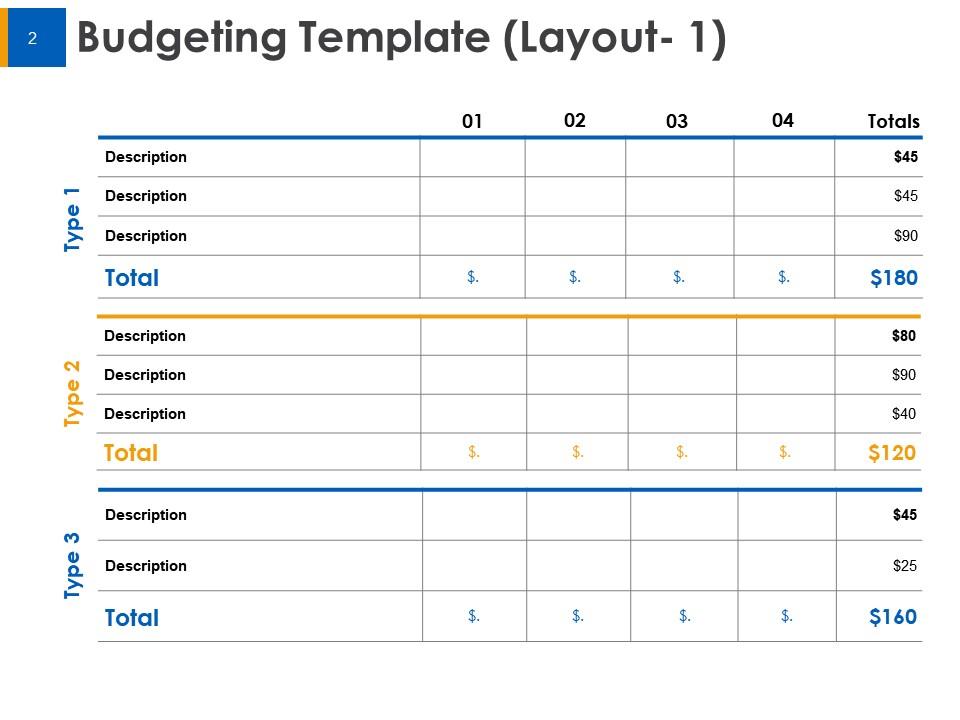
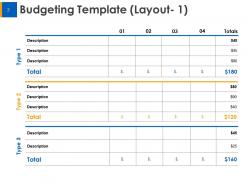
Slide 2: This slide shows Budgeting Template in table form with Type, Description, Numbers and Total budget.
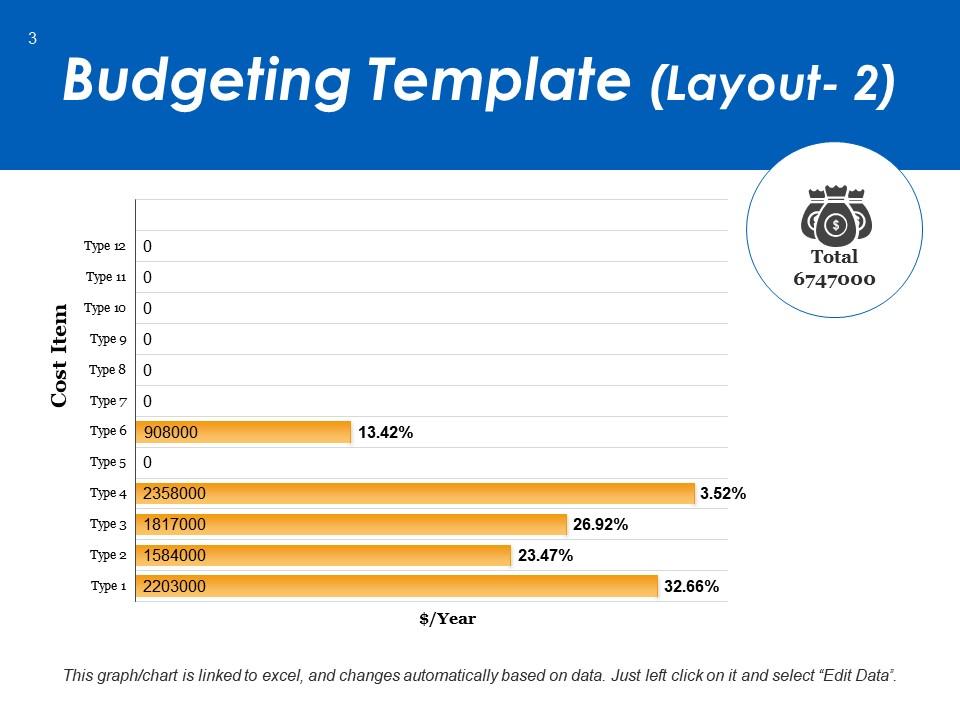
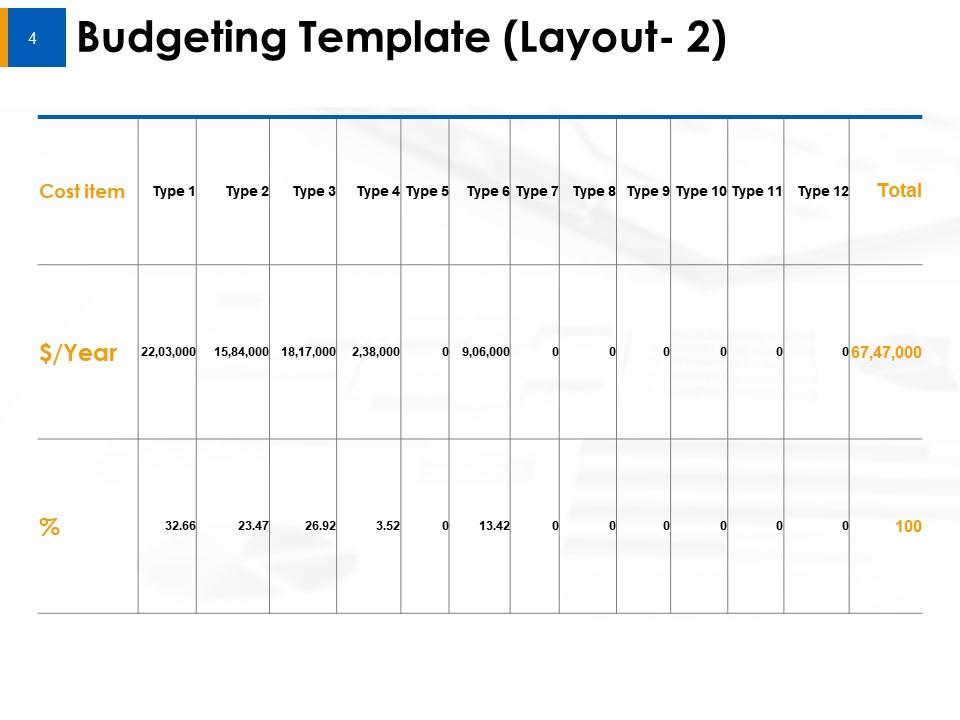
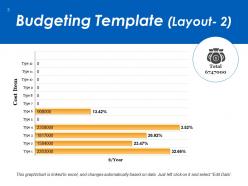
Slide 3: This slide displays another Budgeting Template in table form with Cost items, Budget per year and percentage of cost as per the budget.
Slide 4: This is an optional slide of Budget template.
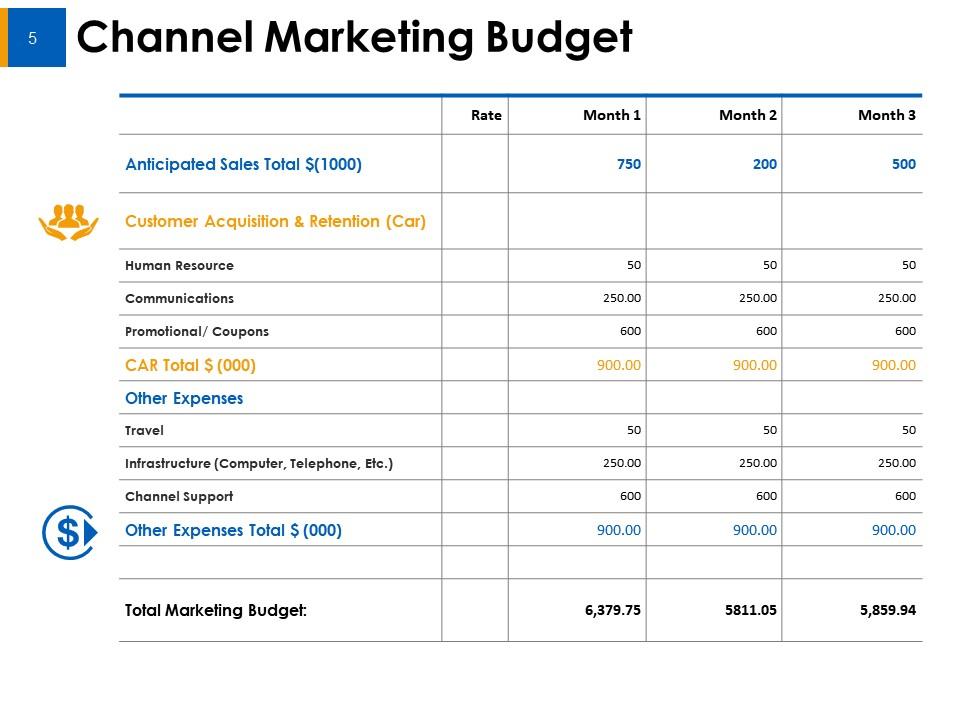
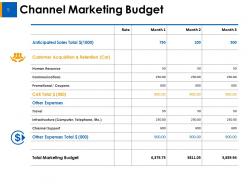
Slide 5: This slide represents Channel Marketing Budget describing Anticipated total sales, Human resource, Communications, Promotional/ Coupons, Total customer acquisition and retention cost, Other expenses like travel, infrastructure etc and Total marketing budget.
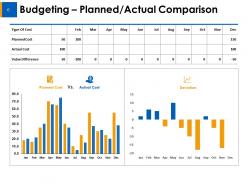
Slide 6: This slide showcases Budgeting – Planned/Actual Comparison with graphs and table. You can add or edit data as per requirements.
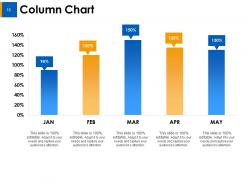
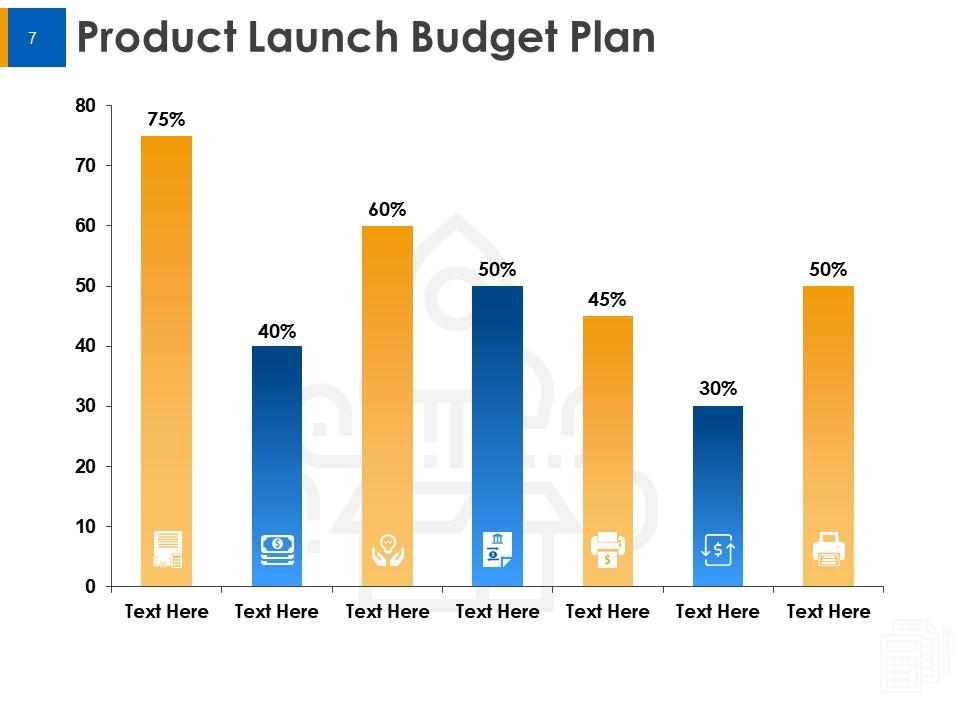
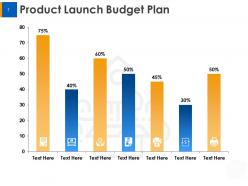
Slide 7: This slide shows Product Launch Budget Plan with the help of bar graph. This slide shows data in percentage, you can change it as per needs.
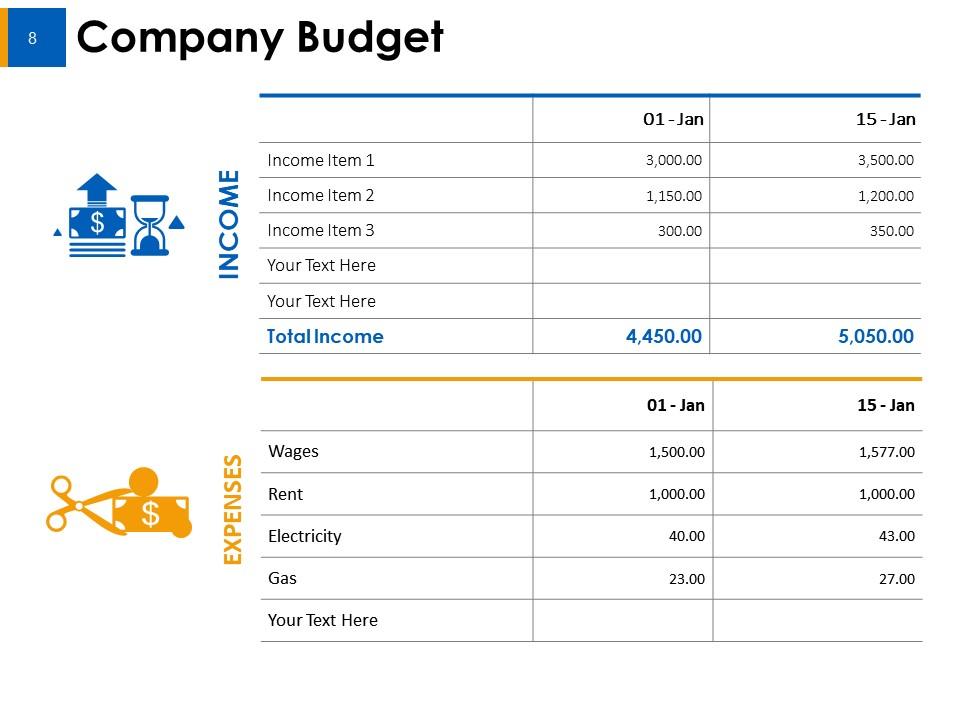
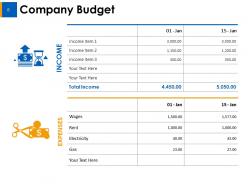
Slide 8: This slide presents Company Budget in table form describing income and expenses.
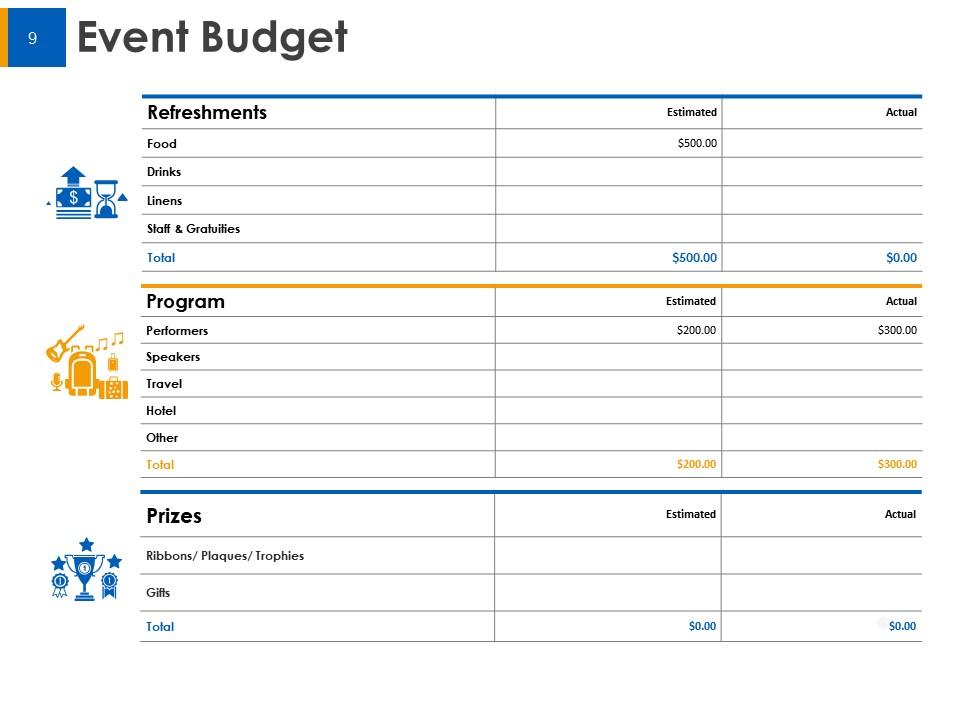
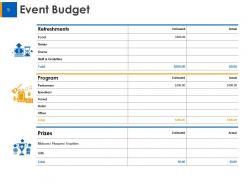
Slide 9: This slide displays Event Budget describing Refreshments, Program and prizes.
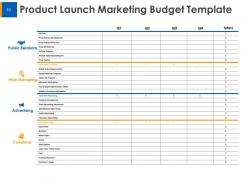
Slide 10: This slide represents Product Launch Marketing Budget Template describing- Public Relations, Web Marketing, Advertising and Collateral.
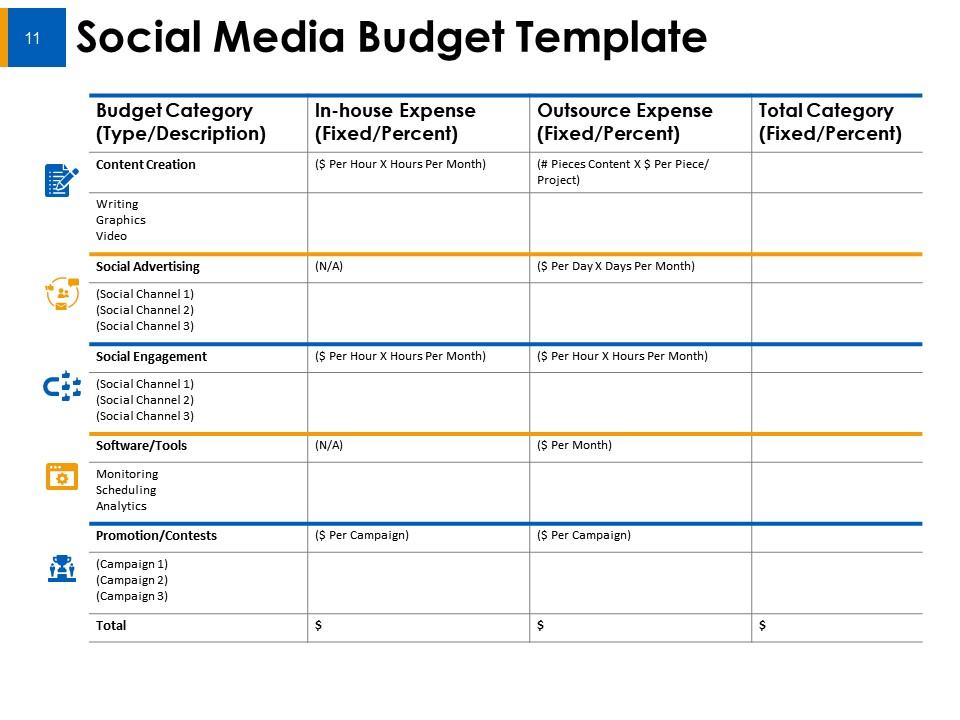
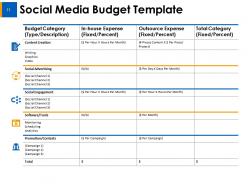
Slide 11: This slide showcases Social Media Budget Template describing In-house and outsource expenses of Content creation, Social advertising, Social engagement, Software/tools and promotion/contests.
Slide 12: This slide is titled Additional slides for moving forward. You may change the content as per need.
Slide 13: This is Our mission slide with imagery and text boxes to go with.
Slide 14: This is Meet Our team slide with names and designation.
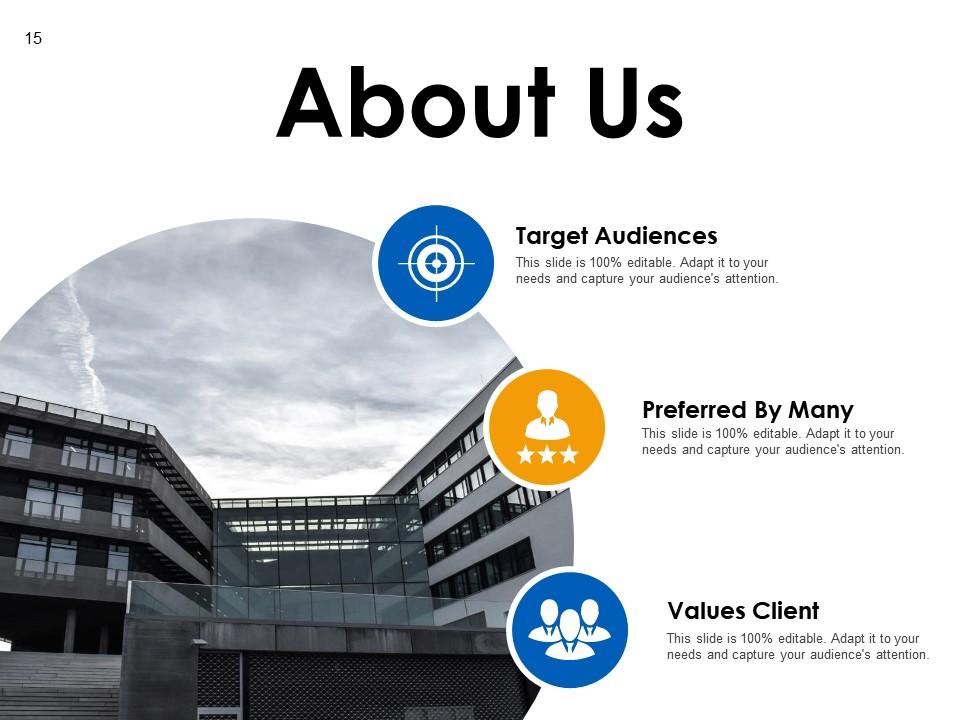
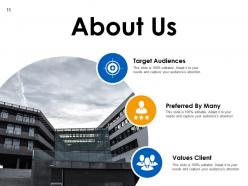
Slide 15: This is an About us slide to state company specifications etc.
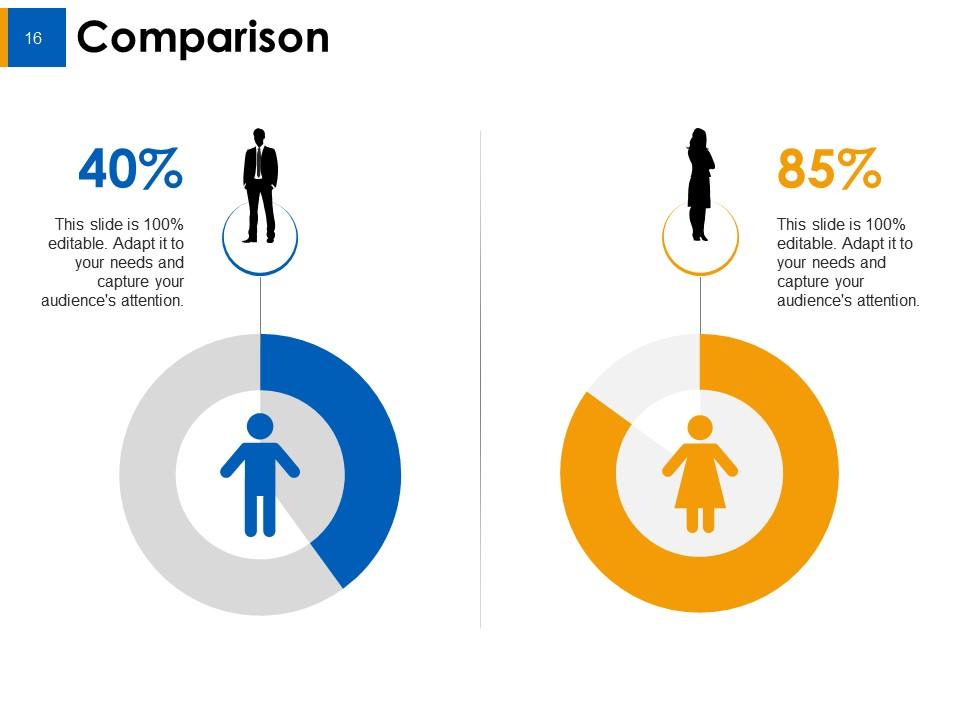
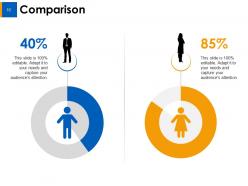
Slide 16: This is a Comparison slide to state comparison between commodities/ entities etc.
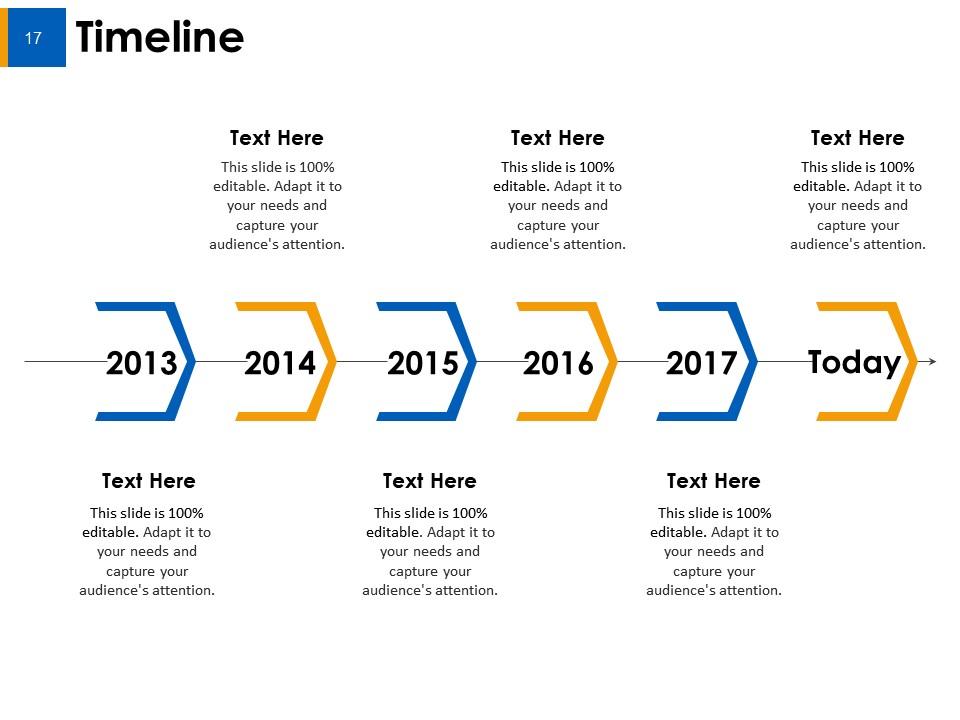
Slide 17: This is a Timeline slide. Show data related with time period here.
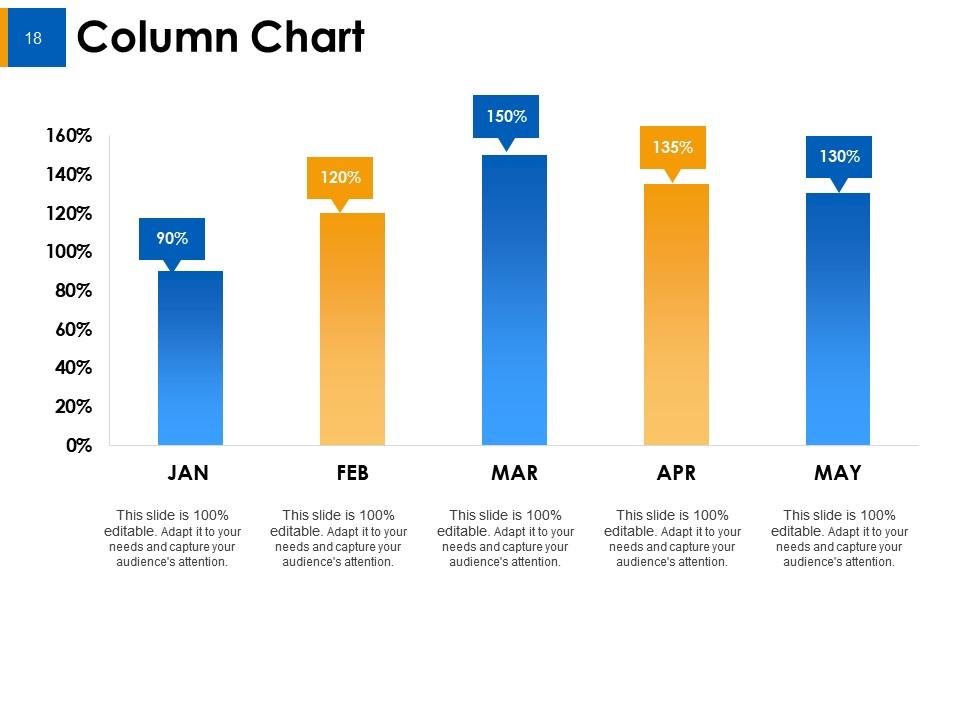
Slide 18: This slide shows Column Chart with two products comparison.
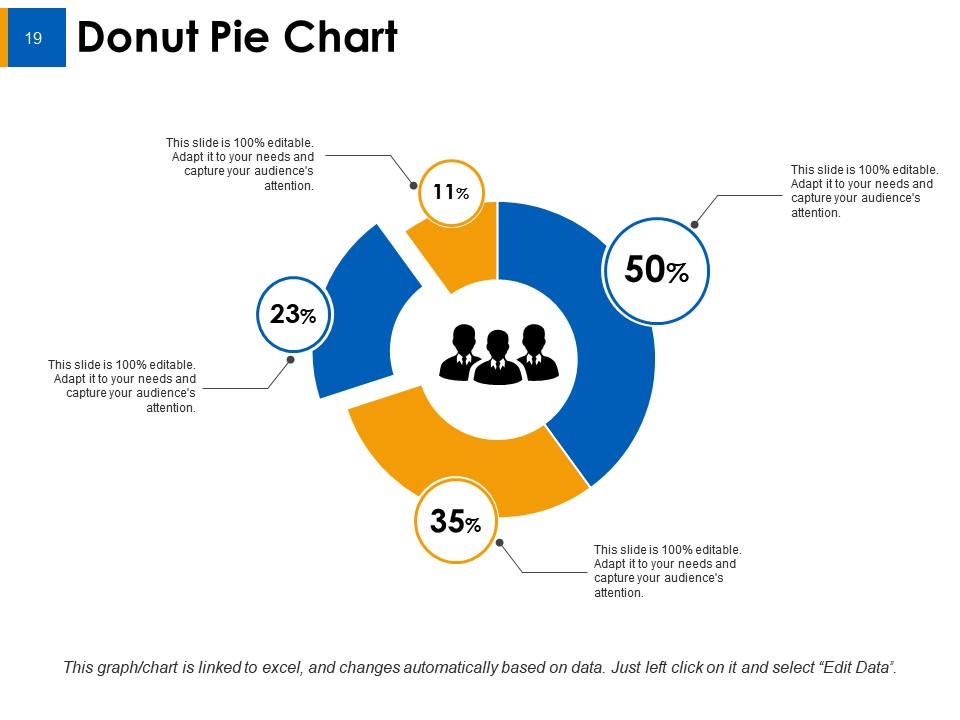
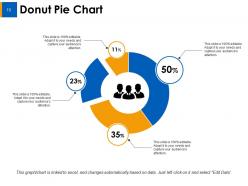
Slide 19: This slide presents Donut Pie Chart to compare products.
Slide 20: This is a Thank You slide with Address# street number, city, state, Contact Number, Email Address.
Sample Budget Ppt Powerpoint Presentation Slides with all 20 slides:
Go head to head but in a friendly fashion with our Sample Budget Ppt Powerpoint Presentation Slides. It helps conduct cordial interactions.
FAQs for Sample Budget Ppt
Start with your income, then list fixed stuff like rent and insurance. Variable expenses come next - groceries, gas, fun money. Here's what trips people up though: those sneaky annual costs like car registration or Amazon Prime that hit randomly. Been there! Also budget for savings goals and debt payments if you've got them. Emergency fund contributions too, even if it's just $20. The sweet spot is detailed enough to actually help but not so crazy complicated you'll quit after two weeks. Honestly, most people overthink budgeting when simple usually works better.
So basically, sample budgets are clutch because they show you realistic percentages for stuff like rent, groceries, savings - all that. Way better than staring at a blank spreadsheet going "now what?" They'll help you catch things you forgot about too, like car registration or whatever random annual fees always sneak up on you. I honestly think the 50/30/20 rule is overrated for most people, but any sample gives you a solid starting point. Just don't follow it religiously. Find one that fits your situation, then adjust the numbers based on what you actually make and care about.
Honestly, most people mess up by being way too optimistic with their numbers. Track your actual spending for a few weeks first - don't just guess. We always remember the cheap grocery runs, never the $150 ones lol. Irregular expenses will destroy your budget if you forget them. Car registration, insurance payments, holiday gifts - that stuff adds up fast. Oh and gas prices are insane right now so don't lowball that either. Start with realistic numbers even if they look terrifying. You can trim later once you see where your money actually goes.
Honestly, monthly is your best bet - quarterly feels too spread out. Life changes fast and your budget should keep up. New bills randomly appear, your income might shift, or you'll discover you're somehow spending $200 a month on DoorDash (how does that even happen?). Takes like 15 minutes max each time. Don't treat it as this set-in-stone thing either. Just a quick check to see what's working and what isn't. Set a phone reminder or you'll definitely forget - I always do without one.
I'd start with Excel or Google Sheets - both have templates already built in with formulas and charts. Way easier than starting from scratch. There are apps like Mint or YNAB too if you want something more automated, but honestly? I'm still obsessed with spreadsheets because you can customize everything exactly how you want. Oh, and Tiller's pretty cool - it connects your bank accounts straight to a spreadsheet so you don't have to input everything manually. That gets old fast. Just pick whatever you're already comfortable using. You can always switch later once you figure out what actually works for your situation.
Your income type totally dictates how you budget. Steady salary? You can plan monthly amounts for everything, super straightforward. Freelancing though - ugh, that's trickier. You'll need way bigger emergency funds and maybe switch to weekly budgeting instead. Commission work means your fun money should go up and down with what you earn. Oh, and if you've got multiple streams, track each one separately so you know what's actually dependable vs just bonus money. I'd start by writing down all your sources and how predictable they are, then build around whichever one's the most all-over-the-place.
Honestly, I just focus on a few key things that actually matter. Variance analysis sounds fancy but it's just comparing what you spent vs what you planned - super helpful. Track your savings rate percentage and maybe expense ratios by category if you're feeling ambitious. Emergency fund growth is the one metric people totally ignore but it's so telling about your long-term health. Monthly cash flow trends are solid too for spotting patterns. Oh, and ROI on big purchases if you're investing or whatever. Don't go crazy tracking everything though - pick 2-3 metrics max and check them weekly. You'll burn out otherwise.
So basically you split your money into percentages for different goals. I usually do like 10-15% for short-term stuff - emergency fund, maybe a trip. Then another 10-20% goes to long-term things like retirement or saving for a house. Most people don't even track this honestly, which is why they're always broke lol. The 50/30/20 rule is a good starting point - that's 50% needs, 30% wants, 20% savings. Just mess around with that last 20% depending on what you need more urgently right now. The percentages give you structure instead of just randomly throwing money at goals.
So basically you gotta flip the percentages based on what actually costs money in your field. Manufacturing? Materials and equipment eat up way more of your budget than marketing does. Service companies are backwards - they're spending tons on staff and getting clients. Retail's all about that inventory money, obviously. Oh and timing matters too - like restaurants make bank during holidays while accountants are swamped during tax season, so their budgets look completely different. Just grab a sample budget and move the money around to match what you're actually dealing with.
Honestly, budget templates have gotten way cooler lately. You've got AI that predicts your spending patterns and apps that automatically sort your expenses. Most sync directly with your bank now too. The visual goal tracking is actually kind of addictive - makes you want to hit your targets. My favorite feature? Those "what if" scenario tools where you can mess around with different spending plans. Oh, and definitely find one that works with apps you're already using. Trust me, you don't want to be manually entering receipts every week.
Charts and graphs are game-changers - you'll spot your spending patterns right away instead of drowning in spreadsheet hell. Color-code your categories (housing, food, entertainment, whatever). Makes scanning so much faster. Progress bars for savings goals? Chef's kiss. There's something weirdly satisfying about watching that bar fill up. Icons help too since your brain processes pictures way quicker than text. I'd probably start small though - just pick one or two visual tricks first. You don't need to go full graphic designer mode right off the bat. Even basic changes make your money situation way clearer.
Start with your fixed stuff - rent, insurance, loan payments. Those don't change so they're pretty straightforward. The variable ones though? That's where it gets messy. Groceries, gas, going out - they're all over the place month to month. Honestly, I learned the hard way to budget a little extra for variables because I'm horrible at guessing what I'll actually spend (especially on food lol). Once you've got all your fixed costs down, you can see what's leftover. Makes the whole thing way less overwhelming.
Sample budgets are honestly game-changers for figuring out where your money should go. I used to just guess at everything when I started out - terrible idea lol. They show you realistic spending breakdowns you probably haven't thought about, like utilities vs groceries ratios. Find ones that match your income and situation first. Then you can compare against your actual spending to see where you're going overboard or missing important stuff like emergency funds. My sister swears by this method. Just don't copy them exactly - tweak everything to fit your life.
Okay so the budgets that actually work? Most people swear by that 50/30/20 thing - needs, wants, savings. But here's what really matters: track your spending for like a month first because we're all terrible at guessing where our money goes. Start your emergency fund with literally anything, even $25. The people who stick to budgets automate everything (seriously, it's a game changer) and always leave room for fun stuff. Otherwise you'll blow it on something dumb and feel guilty. Pick whatever feels right for how you spend. Don't overthink it.
Looking at sample budgets is honestly like getting a cheat sheet for your finances. You can see exactly how other people handle emergency fund contributions and what they cut first when things get tight. Most allocate around 10-20% to savings, which gives you a solid target to aim for. I always think it's smart to check out 3-4 budgets from people in your income range – you'll start noticing patterns in how they balance essentials vs. fun stuff. Plus they're basically financial fire drills. You'll spot which spending categories they can slash quickly if needed.
No Reviews