

Spyware em Treinamento de Segurança Cibernética PPT




Try Before you Buy Download Free Sample Product
 Impress Your
 Audience
 100%
100% Editable
 Save Hours
 of Time


Ocorrência, tipos, prevenção e técnicas de remoção de spyware, um tipo de ataque cibernético.
People who downloaded this PowerPoint presentation also viewed the following :
Conteúdo desta apresentação em PowerPoint
Slide 2
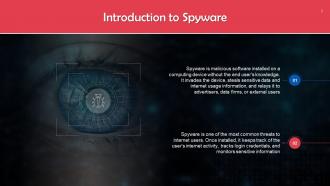
Este slide fornece uma visão geral dos ataques de spyware. Spyware é um software malicioso instalado em um dispositivo de computação sem o conhecimento do usuário final.
Slide 3
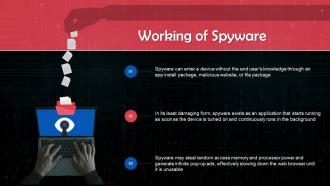
Este slide mostra o funcionamento do spyware. O spyware pode infectar um dispositivo sem o conhecimento do usuário final através de um pacote de instalação de aplicativo, site malicioso ou pacote de arquivos.
Notas do Instrutor: O spyware também pode rastrear o histórico de navegação na web, senhas e outras informações privadas, como endereços de e-mail, números de cartão de crédito, números de identificação pessoal ou informações bancárias.
Slide 4
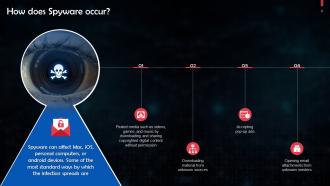
Este slide discute como ocorrem as infecções por spyware. Algumas maneiras comuns são: usuários aceitando anúncios pop-up e abrindo anexos de e-mail de remetentes desconhecidos, etc.
Slide 5
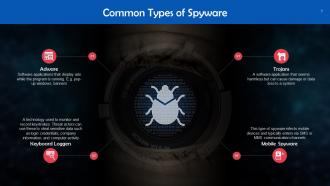
Este slide destaca os tipos de spyware. Estes são: adware, registradores de teclado, trojans e spyware móvel.
Slide 6
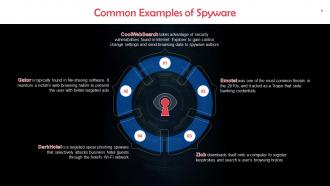
Este slide lista os tipos comuns de spyware. Estes são: CoolWeb Search, Emotet, Zlob, DarkHotel e Gator.
Slide 7
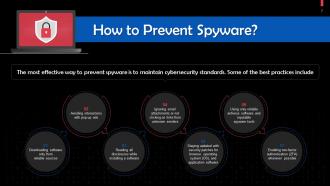
Este slide discute maneiras de prevenir o spyware. Você pode fazer isso habilitando a 2FA, baixando software apenas de fontes confiáveis, etc.
Slide 8
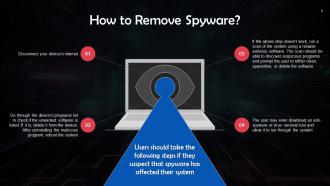
Este slide lista as etapas a serem seguidas caso um usuário detecte spyware em seu dispositivo. Eles devem desconectar a conexão de internet do dispositivo e verificar a lista de programas para excluir qualquer software suspeito.
Slide 9
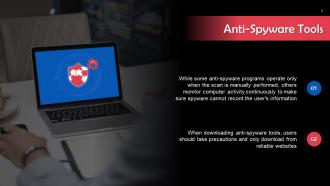
Este slide introduz as ferramentas anti-spyware. Enquanto alguns programas anti-spyware operam apenas quando a varredura é realizada manualmente, outros monitoram continuamente a atividade do computador para garantir que o spyware não possa gravar as informações do usuário.
Slide 1: Introdução ao Spyware Slide 2: O que é Spyware? Slide 3: Tipos de Spyware Slide 4: Como o Spyware Funciona Slide 5: Métodos de Distribuição de Spyware Slide 6: Impactos do Spyware Slide 7: Sintomas de Infecção por Spyware Slide 8: Prevenção contra Spyware Slide 9: Detecção de Spyware Slide 10: Remoção de Spyware Slide 11: Ferramentas de Remoção de Spyware Slide 12: Melhores Práticas de Segurança Slide 13: Criptografia e Spyware Slide 14: Firewall e Spyware Slide 15: Antivírus e Spyware Slide 16: Backup e Spyware Slide 17: Educação do Usuário e Spyware Slide 18: Políticas de Segurança e Spyware Slide 19: Monitoramento e Spyware Slide 20: Resposta a Incidentes e Spyware Slide 21: Legislação e Spyware Slide 22: Ética e Spyware Slide 23: Tendências Futuras do Spyware Slide 24: Estudos de Caso Slide 25: Desafios Emergentes Slide 26: Melhores Práticas Recomendadas Slide 27: Conclusão Slide 28: Perguntas e Respostas Slide 29: Referências
Utilize nosso Spyware In Cyber Security Training Ppt para ajudá-lo de forma eficaz a economizar seu tempo valioso. Eles estão prontos para se encaixar em qualquer estrutura de apresentação.












FAQs for Spyware In Cyber
So basically there's keyloggers that record everything you type - passwords, messages, all that stuff. Then you've got adware which is super annoying, constantly showing you ads and tracking where you go online. Browser hijackers are the worst honestly, they completely mess with your browser and redirect your searches to weird sites. Trojan spyware tricks you by looking like normal software but then steals your info once it's on your computer. They're all sneaky and run in the background without you realizing. Just keep your antivirus current and don't download random stuff.
So spyware's whole thing is sneaking around collecting your data - passwords, what you browse, keystrokes, all that personal stuff. Viruses mess up your files, ransomware locks everything down, but spyware? It just wants to stay hidden while it watches you. Super creepy if you ask me. Most malware makes noise when it hits, but spyware works best when you don't even know it's there. Your computer might run slower or you'll notice weird network stuff happening - that's usually when you realize something's been spying on you the whole time.
Ugh, malware is the worst. Your phone starts acting like it's ancient - super slow, battery dies way too fast. Random apps you never downloaded just appear out of nowhere. Pop-ups everywhere, your data usage goes crazy, and sometimes your browser homepage gets hijacked. Oh, and if people tell you they're getting spam texts from your number? Yeah, you're definitely infected. Your device might randomly overheat or crash too. Honestly, if you're seeing a bunch of these things happening at once, run a scan ASAP and back up your stuff before it gets worse.
Ugh, spyware gets in through the most annoying ways. Email attachments are huge culprits - don't open anything sketchy. Those pop-ups screaming "YOUR COMPUTER IS INFECTED!" are total traps too. Free software downloads often come with hidden garbage bundled in. I learned that one the hard way years ago. Fake software updates from random sites will also mess you up. Your browser or OS vulnerabilities? Yeah, spyware loves those gaps. The worst part is it installs silently, so you won't even know. Keep everything updated and seriously question any "free" program that seems too good to be true.
Hey! So first thing - get decent antivirus with real-time protection running. That's honestly half the battle right there. Keep everything updated too, those security patches exist for a reason. Don't download random "free" software from weird sites, they're usually packed with garbage. My cousin did that once and his laptop was basically toast lol. Watch what you click in emails obviously. Oh and scan your stuff regularly, use your firewall, the usual. Public wifi is sketchy so be careful there. Start with updates and antivirus today though.
Ugh, spyware is like having someone plant bugs in your office but way sneakier. It steals all your good stuff - trade secrets, financial data, strategic plans. Companies use it to spy on competitors, and foreign governments love targeting businesses this way. Your employees probably won't even know they installed it through some sketchy email or download. Honestly, it's become the lazy person's way to do corporate espionage since it's so much easier than old-school methods. Get decent endpoint protection and teach your team to spot suspicious links - that's really your only shot at not becoming someone's free intelligence source.
Honestly, spyware laws are a total mess depending where you live. GDPR makes unauthorized spyware pretty much illegal in the EU - they don't mess around with data protection. The US? It's this weird patchwork of federal and state stuff that's harder to navigate. Some countries basically have zero protections, which makes tracking down bad actors across borders nearly impossible. Asia-Pacific is hit or miss too. You've got places with solid cybercrime laws right next to others that are way more lenient. First thing I'd do is look up your local laws, then figure out where whoever's doing this might be based.
Ugh, spyware is seriously creepy - it steals your data without you even knowing. Your passwords, bank info, browsing history, even private texts can all get swiped. The worst part? You won't realize it's happening until your accounts get hacked or your identity's stolen. Some of this stuff even tracks where you go and watches your conversations. Honestly, data brokers probably love this kind of intel. Just keep your antivirus current and don't click random sketchy links or downloads. Learned that one the hard way once.
Dude, spyware is crazy sophisticated now. They're hiding in normal-looking apps and using AI to dodge security software. Your smart home stuff? Yeah, that can be compromised too. The worst part is they're not just after passwords anymore - they want your fingerprints, location, and they'll literally watch you through your camera. I probably sound paranoid but it's wild how creative hackers have gotten. Makes me miss the days when it was just basic keyloggers, honestly. You gotta be super picky about app permissions now and actually install those security updates when they pop up.
Definitely grab Malwarebytes or Spybot first - they're way better at catching spyware than regular antivirus programs. Boot into safe mode and run a full scan. Oh, and check your browser extensions too, some of those things are sketchy as hell even if they look legit. I'd also peek at task manager to see if anything weird is hogging your CPU. My cousin ignored that step and had some crypto miner running for months lol. Don't just set it and forget it either - scan regularly because real-time protection isn't perfect.
Honestly, mobile spyware is way worse than the desktop stuff. Your phone has everything - location, texts, contacts, camera access. Desktop spyware usually just grabs passwords and browsing data, but phones? They're basically tracking devices that never leave your side. The scary part is how you get infected too - it's usually through sketchy apps or those weird SMS links, not traditional downloads. I learned this the hard way when my cousin downloaded some "free" game that wasn't from the app store. Anyway, definitely check app permissions before installing anything and stick to Google Play or Apple's store.
Dude, the big problem is you're basically spying on people without them knowing. That's a huge violation of privacy and trust. I mean, even if you think it's for safety reasons, it still feels super sketchy to me. And honestly? This stuff always expands beyond what it was originally meant for - we've seen it happen a million times. Your data could get hacked or misused too. If you absolutely have to do something like this, at least get people's permission first and be crystal clear about what you're watching and why.
Make spyware training actually stick by using real attack examples from similar companies - that's when people actually pay attention. Cover the usual suspects: sketchy email attachments, suspicious downloads, those "free" software packages that cost you everything later. Keep sessions interactive with realistic scenarios they'll face. Phishing simulations work great for hands-on practice. Most people zone out during security talks anyway, so you've got to make it engaging. Oh, and don't make it a one-and-done thing. Regular training keeps this stuff fresh in their minds when they're clicking around.
Ugh, spyware is honestly the worst. It'll steal your passwords, bank info, all that sensitive stuff - criminals literally sell it online. Your computer becomes super slow too because this crap just eats up all your resources in the background. Identity theft is what really freaks me out though. People can open credit cards in your name or completely wipe out your accounts. Plus you'll start getting weird targeted scams since they know everything about you now. Run antivirus scans regularly - catching it early makes a huge difference.
So antivirus stuff mainly blocks known bad files with their signature databases and watching for weird behavior. Antispyware goes after the sneaky programs collecting your data - keyloggers, browser hijackers, all that creepy surveillance stuff. Most antivirus focuses on stopping infections before they happen, but antispyware's better at finding things already lurking on your computer. Honestly though, these days the difference doesn't matter as much since most decent security programs do both anyway. I'd just get something comprehensive rather than juggling multiple tools - way less headache.
-
Best way of representation of the topic.
-
I joined SlideTeam last month and there’s no doubt that I tend to find our bond only strengthening over time. Best place to find world-class themes, templates, and icons.