


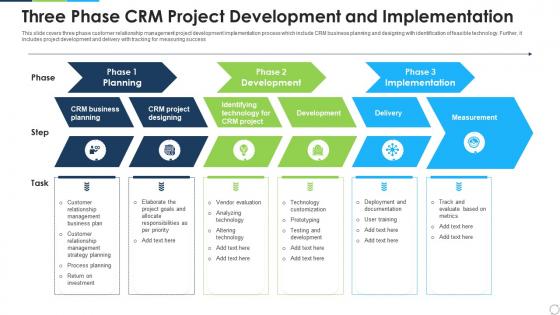
Three phase crm project development and implementation




Try Before you Buy Download Free Sample Product
 Impress Your
 Audience
 100%
100% Editable
 Save Hours
 of Time


Our Three Phase CRM Project Development And Implementation are topically designed to provide an attractive backdrop to any subject. Use them to look like a presentation pro.
People who downloaded this PowerPoint presentation also viewed the following :
Three phase crm project development and implementation with all 6 slides:
Use our Three Phase CRM Project Development And Implementation to effectively help you save your valuable time. They are readymade to fit into any presentation structure.





FAQs for Three phase crm project
So you've got six main phases to think about: planning, design, development, testing, deployment, and maintenance. Start by nailing down your requirements and user workflows. Then figure out your system design - integrations, data structures, all that fun stuff. Development's next, but honestly, this is where everything falls apart if you didn't do the planning right. Testing comes after (budget extra time here, trust me - that's where projects usually hit walls). Then you roll it out to users. Oh, and don't think you're done once it's live - CRMs need constant tweaking based on what people actually end up doing with them.
First thing - figure out what's actually broken in your current sales process. Don't get sucked into all the shiny features that sound cool but you'll literally never touch. Most CRMs are way too complicated anyway. You need contact management, pipeline stuff, and whatever connects to the tools you're already using. That's it. Demo maybe 3 or 4 options tops (trust me, more than that and you'll just confuse yourself). Have your team play around with real scenarios, not the vendor's perfect little examples. But here's the thing - pick whatever your people will actually use. I've seen so many expensive systems just sit there collecting digital dust.
Dude, you HAVE to get everyone on board early or you're screwed. Management, IT, the sales team - especially sales because they're the ones who'll actually use it daily. I learned this the hard way on a project where we basically ignored their feedback (never again). Get them involved in decisions so they don't just create their own workarounds later. They'll also spot problems upfront that would be expensive nightmares to fix down the road. Map out who matters most and set up regular touchpoints. Trust me, it's the difference between success and watching your project implode.
Honestly, do this in phases or you'll want to pull your hair out. First thing - clean up your messy data before moving anything. Get rid of duplicates and old junk records. Run both systems side by side for a few weeks to test everything. Map out where each data field goes between the old and new CRM (this part's boring but crucial). Start with your best customers and recent transactions, then work backwards. Oh, and make backups. Like, multiple ones. Set up some checkpoints to catch weird errors early. Something always breaks in unexpected ways, so plan on doing manual fixes afterward. Trust me on this one.
Start by getting your most excited users on board first - their success will do the selling for you. Train people with actual hands-on practice, not death-by-PowerPoint sessions (trust me on this one). Get users involved in designing it so they actually feel like it's theirs. Roll things out slowly instead of shocking everyone at once. Pick champions from each team who can spread the good vibes and help with problems. Most importantly? Make sure it solves real problems they're dealing with daily, not just fancy features nobody asked for. Otherwise you'll just create more headaches than you solve.
Honestly, you'll want to track the obvious stuff first - lead conversion rates, sales cycle times, revenue per customer. But here's what really matters: are people actually using the damn thing? I've seen so many CRMs that look great on paper but sales reps hate them and find sneaky workarounds instead. Watch your user adoption rates like a hawk. Data quality improvements and customer satisfaction scores matter too. Oh, and system speed - nothing kills momentum like a slow, clunky interface. Set up monthly dashboards so you can catch problems before they spiral. The soft metrics often tell you more than the hard numbers anyway.
Oh man, data migration is gonna be your worst nightmare - that stuff ALWAYS takes forever. Users will resist the change too, which is annoying but expected. Scope creep kills timelines, so be super strict about requirements from the start. Get users involved early so they don't hate you later. Testing and training phases are huge. I learned this the hard way, but add buffer time to literally everything because something weird always breaks. Also, keep everyone updated constantly or they'll freak out about delays.
Yeah, don't go crazy with customizations - they'll bite you later. Updates become a nightmare when you've tweaked everything. Maintenance costs shoot up too. And good luck finding devs who can figure out your franken-system down the road (learned this the hard way). Try working with standard features first. Only customize stuff that's actually critical for how your business runs. Oh, and write down what you changed - trust me, you'll forget and future you will be pissed. The whole vendor lock-in thing is real too since migrating custom setups is brutal.
Honestly? Start training way earlier than you think you need to. Different teams need totally different stuff - what works for sales won't work for customer service, you know? Break it into smaller chunks instead of cramming everything into one marathon session (trust me on this one). Find a few super users who actually care about the project - they'll be lifesavers when weird questions pop up later. Build a knowledge base that people can actually navigate without wanting to scream. Oh, and don't think training ends at launch. People forget things, new scenarios come up. Schedule check-ins every few months to keep everyone sharp.
So CRM integration is a total game-changer - it connects your CRM to everything else you use. Email marketing, accounting, support tickets, your online store, whatever. No more copying customer info between systems (seriously the worst). You'll get the full picture of each customer instead of scattered data everywhere. Workflows run automatically too, so leads move from marketing to sales without you lifting a finger. Honestly, just start with whatever's causing you the biggest headache right now. Those systems that never talk to each other? Connect those first.
Honestly, start with the basics - encrypt everything, both stored data and stuff moving around. Set up role-based access so your sales team can't peek at financial records or whatever. Strong passwords are a must, plus 2FA obviously. APIs are where hackers love to sneak in, so lock those down tight. Document who should see what data first - makes setting permissions way easier. Regular security audits will save your butt later, especially with customer data. One breach and you're basically toast. Oh, and don't let people share logins - I know it's tempting but just don't.
Figure out what your users actually do all day first - like the stuff they can't skip. I use this impact vs effort grid thing that just makes decisions way easier. Contact management, deal tracking, basic reports - nail those before you even think about AI bells and whistles. Honestly, half the "cool" features never get touched anyway. Talk to real sales people early (not just managers). They know what they'll actually use vs what sounds good in demos. Build something simple that fixes actual problems, then just keep tweaking based on what people tell you.
Honestly, make feedback a constant thing from day one. Do user interviews first to figure out what's actually broken, then build some quick mockups for people to react to. Your customer service team is gold here - they deal with complaints all day so they know what sucks. Set up a beta group with real users because they'll spot stuff you'd never think of. After each sprint, do feedback sessions. Oh and create something super easy like a Slack channel where people can just drop random suggestions whenever. Way better than waiting until the end and realizing you built something nobody wants to use.
So CRM analytics basically take all that customer data you've got sitting there and turn it into stuff you can actually act on. Track how people behave, figure out which segments make you the most money, spot who's about to churn. No more shooting in the dark, honestly. You can optimize your sales process, make your marketing way more personal, keep customers around longer. Plus forecasting becomes way less of a guessing game - though let's be real, it's still not perfect. Revenue predictions get better too. Just pick one burning question about your business first, then dive into the data to find patterns. Way less overwhelming that way.
Honestly, AI stuff is where it's all heading - predictive analytics, chatbots, automated workflows. Everyone's glued to their phones, so mobile-first design isn't optional anymore. GDPR and privacy regs are a pain but you've gotta build compliance in from the start. The big thing customers want now? Everything personalized just for them. Your CRM needs to crunch tons of data but still feel... I dunno, human somehow. Oh, and definitely go API-first with your architecture. Trust me on this one - when integration requests start piling up (and they will), you'll thank yourself later.
-
Topic best represented with attractive design.
-
Great designs, Easily Editable.