

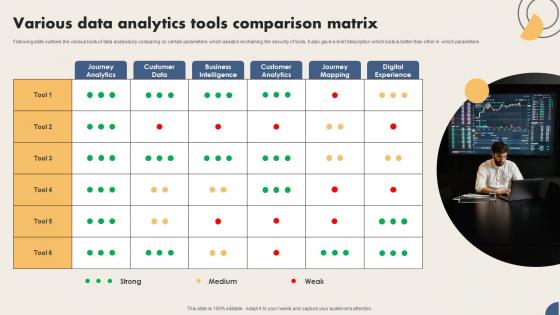
Various Data Analytics Tools Comparison Matrix




Try Before you Buy Download Free Sample Product
 Impress Your
 Audience
 100%
100% Editable
 Save Hours
 of Time


Following slide outlines the various tools of data analysis by comparing on certain parameters which assist in enchaining the security of tools. It also gave a brief description which tools is better than other in which parameters
People who downloaded this PowerPoint presentation also viewed the following :
Various Data Analytics Tools Comparison Matrix with all 6 slides:
Use our Various Data Analytics Tools Comparison Matrix to effectively help you save your valuable time. They are readymade to fit into any presentation structure.





FAQs for Various Data Analytics
Honestly, start by figuring out what you actually need vs what sounds cool. Can it connect to your data without being a total pain? The visualization should be intuitive - nobody wants to spend weeks learning how to make a basic chart. Real-time processing matters if you need live insights. Security's obviously important depending on your industry. Also check if your team can collaborate easily on it. Scalability's key too since your data will definitely grow. I'd demo a few options but go in with your must-haves already written down. Makes the whole process way less overwhelming.
So it totally depends on your team's vibe, honestly. Tableau's pretty sweet for drag-and-drop stuff - even my marketing friends can whip up decent charts. Power BI works great if you're already drowning in Microsoft apps. Python gives you insane control but yeah, the learning curve sucks. Looker's solid if everyone knows SQL, otherwise it feels kinda meh. My take? Just go with whatever your team already uses. Like, don't make Excel people suddenly learn R - that's just asking for trouble. Definitely try the free trials first though. You'll know pretty quick what feels right for your workflow.
Machine learning basically turns your analytics tools from glorified spreadsheets into something that can actually predict stuff. Think automated pattern spotting, trend forecasting, anomaly detection - all without you having to manually dig through endless rows of data. Most tools already have ML built in now, which is pretty sweet since you don't need to be a statistics wizard to use them. The cool part? They get smarter as they process more of your data. Honestly just mess around with whatever ML features your current tool has - you'll probably find some useful automated insights hiding in there.
Honestly, just start with Google Analytics - it's free and you're probably already missing tons of good info about your customers. Most businesses I know have all this data just sitting there unused, which is kinda crazy when you think about it. Track one thing that actually matters to your bottom line first, then build from there. Shopify Analytics or HubSpot's free version work great too. You'll start seeing which products sell and what marketing actually works. The key is picking that one metric and obsessing over it a bit. Once you get the hang of reading your customer patterns, you can spot trends way before competitors do.
Honestly, I'd go with Apache Kafka for streaming your data around - it's pretty much the standard. Grafana makes dashboards that don't look like garbage (which is harder to find than you'd think). If you need search stuff, Elasticsearch + Kibana works great together. Already using Tableau or Power BI? They handle real-time feeds fine too. Apache Spark's your friend for heavy processing. Really comes down to how much data you're dealing with and what your team can actually handle. Start with Grafana though - you can get something decent running in like an hour.
Honestly, analytics tools are pretty amazing for turning those "I think this is working" moments into actual proof. You'll spot trends and patterns that would take forever to find manually. The charts and graphs make everything click - no more boring spreadsheets that make people's eyes glaze over in meetings. My favorite part? Catching problems before they blow up your budget. I'd start with Google Analytics or maybe Tableau - they're not too overwhelming and you'll see results right away. Way better than just going with your gut on everything, though intuition still matters sometimes.
So basically, cloud stuff runs on someone else's servers and you access it through your browser - like Tableau Online. On-premise means it's installed right on your company's computers. Cloud's way easier to scale up when you need more juice, plus you can work with your team from anywhere. But honestly? You're screwed if your internet goes down. On-premise gives you more control but IT has to deal with all the hardware headaches. Cloud usually costs monthly while on-premise is more of a one-time purchase thing. I'd just try free trials of both and see what doesn't annoy you.
Look, data quality will probably be your biggest headache - stuff scattered everywhere, inconsistent formats, just a mess. Getting your team on board is tough too since people hate changing how they work. Oh and the technical side? Integration nightmares, picking the right tools, training everyone to actually use them. Most people don't have the skills yet, which makes everything harder. My advice? Don't go big right away. Run a small pilot first to show it actually works, then expand from there. Trust me, proving value upfront saves you so many arguments later.
Honestly, encryption is your biggest priority - both when data's moving around and just sitting there. Set up role-based access so random people can't peek at sensitive stuff. Check that your vendor has SOC 2 or ISO 27001 certs too. Here's what nobody tells you though: permissions get messy fast. Like, really messy. People leave teams, join new ones, and suddenly half your company can access things they shouldn't. Audit that stuff regularly or you'll hate yourself later. Start by digging into your current platform's security docs to spot any obvious gaps.
Honestly, I'd track four main things when picking analytics tools. Processing speed matters - nobody wants to wait forever for results. Your team actually has to want to use it though, so check adoption rates (I've seen so many expensive tools just sit there unused). Accuracy is make-or-break since bad data leads to terrible decisions. ROI tracking shows if insights actually change how you operate. Start with what you've got now as a baseline, then see how new options stack up. Quick tip - test with real scenarios, not just demos.
Integration should definitely be in your top 3 priorities when choosing a tool. Trust me, manually moving data between systems gets old fast - I've wasted way too many hours doing that. Most workflows pull from CRMs, databases, cloud stuff, so you need those connections to actually work smoothly. Look for pre-built connectors to your current tools, decent APIs, and some automated sync features. Honestly, the tools with the flashiest features aren't always the ones that play well with others. Before you decide, just map out what data sources you're using now and make sure the tool works with most of them.
Training is absolutely crucial - I can't stress this enough. So many companies blow their budgets on fancy analytics tools, then wonder why nobody uses them. People just ignore what they don't understand, or worse, they mess around and get the wrong insights. Your team needs to grasp both the technical stuff AND why the data matters. Skip those boring generic tutorials though. Set up workshops using actual problems they deal with every day. Way more engaging that way. Once people feel confident with the tools, they'll actually want to use them regularly instead of avoiding them.
Banking and healthcare see crazy good returns - fraud detection and patient predictions pay for themselves fast. Retail's killing it with personalized recommendations too. Manufacturing saves tons on predictive maintenance (my cousin's company cut downtime by like 40%). Tech companies obviously crush it, but honestly most industries benefit now. Even logistics gets major wins from supply chain stuff. Look at how much data you're sitting on and what metrics actually matter to your bottom line. If you've got both, it's probably worth the investment.
Honestly, R and Python can do pretty much everything the expensive stuff does - sometimes better. But you'll definitely need someone who knows coding. Commercial tools like Tableau are just smoother, you know? Everything's point-and-click, plus you get actual customer support when things break. With open-source you're basically Googling error messages at midnight (been there). The upside? Total control over customization and zero licensing fees. My take: start small with both and see what clicks for your team's skill level.
Dude, AI analytics tools are getting crazy accessible right now. Everything's moving to real-time streaming data - like, that's just expected now. No-code platforms are blowing up too, which is honestly pretty cool for non-technical people. Nobody's even talking about on-premise stuff anymore, it's all cloud. Oh, and you can literally ask these new tools questions in regular English instead of learning SQL or whatever. The whole "anyone can do analytics" thing is really happening. My take? Just start messing around with some AI tools on smaller projects. You don't want to be that person playing catch-up in two years.
-
They guys always go the extra mile to meet the expectations of their customers. Almost a year has been associated with them.
-
One-stop solution for all presentation needs. Great products with easy customization.