


Warehouse management system wms dashboard service logistics management optimization ppt grid




Try Before you Buy Download Free Sample Product
 Impress Your
 Audience
 100%
100% Editable
 Save Hours
 of Time


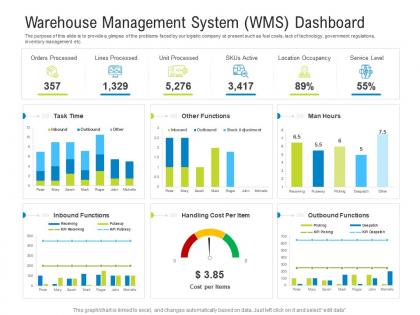
The purpose of this slide is to provide a glimpse of the problems faced by our logistic company at present such as fuel costs, lack of technology, government regulations, inventory management etc.
People who downloaded this PowerPoint presentation also viewed the following :
Warehouse management system wms dashboard service logistics management optimization ppt grid with all 2 slides:
Use our Warehouse Management System Wms Dashboard Service Logistics Management Optimization Ppt Grid to effectively help you save your valuable time. They are readymade to fit into any presentation structure.
FAQs for Warehouse management system wms dashboard service logistics management
Start with inventory tracking and order management - that's the core stuff you can't mess up. Automated picking and barcode scanning are must-haves, plus integration with whatever ERP system you're already using (switching systems is such a headache). Labor management tools honestly make a huge difference for productivity. Mobile functionality is key since your warehouse team will be using tablets or phones on the floor. Make sure it covers receiving, putaway, and cycle counting. Oh and reporting dashboards so you can actually see what's going on. List out your biggest pain points first, then demo only the systems that fix those specific problems.
So basically a WMS gives you real-time visibility into what's actually there vs what you think you have. No more guesswork. Barcode scanning and RFID automatically update everything as stuff moves around - way better than manual counts where people mess up constantly. Your warehouse team gets optimized picking routes too, which honestly saves so much time. The system catches discrepancies right away before they become bigger problems. Oh, and definitely start with your busiest areas first - you'll see the biggest difference there. It's kinda like having GPS but for all your inventory instead.
So automation basically takes over all the boring manual stuff your team hates doing anyway. Your picking gets way faster with conveyor systems, plus RFID scanning gives you real-time inventory that's actually accurate for once. The routing algorithms are pretty smart too - they'll optimize your whole warehouse flow. Honestly, the best part is your workers can focus on stuff that actually matters instead of endless data entry. These systems run all night without complaining, which is more than I can say for most employees! Start with just one process though, see how it goes, then expand from there.
So basically your WMS talks to all your other systems through APIs - it's like the middleman for everything. Your ERP feeds it inventory data and orders, while it coordinates with your TMS for shipping stuff out. When stock gets low, it pings your procurement team automatically. Honestly, the integration part can be a total headache at first, but once it's running smoothly you'll wonder how you lived without it. Real-time data sync is key though - otherwise you're constantly playing catch-up. I'd start by figuring out your most critical system connections first and build from there.
Cloud WMS is probably your best bet - way cheaper upfront since you're not buying servers, and updates happen automatically. Scaling is super easy too. On-premises gives you more control over security and customization, which matters for some companies. Honestly, I rarely see businesses choose on-premise anymore because who wants to deal with all that maintenance? Think about your budget first, then security needs. How fast do you need this thing running? My buddy's company started with a cloud pilot just to try it out - worked great for them.
WMS systems save money through better labor management and knowing exactly what inventory you have. Your picking errors drop way down, workers aren't walking back and forth across the warehouse for no reason, and tons of manual stuff gets automated. Real-time inventory tracking is probably the biggest win though - no more buying stuff you already have or scrambling for last-minute orders. You can actually set up your warehouse layout based on how things really move instead of just winging it. Oh, and definitely track your current labor hours and mistake rates first so you'll know how much you're improving later.
Dude, it's honestly a pain. Each channel wants things totally different - B2B needs case picking, ecommerce is item-level, returns are a mess. Then there's the whole inventory thing where the system has to pick favorites when you're running low on stock. Integration is brutal too since every platform speaks its own weird language. The setup process? Forget about it, we're talking months. Oh and honestly, don't try launching everything at once - you'll hate yourself. Pick your biggest volume channel first, nail that down, then slowly add the rest. Trust me on this one.
So basically you'll go from always playing catch-up to actually knowing what's happening. Instead of guessing where stuff is or why orders are stuck, you can see everything as it happens - inventory locations, picking mistakes, workflow jams. Honestly the visibility alone is worth it. When problems pop up, your team can fix them immediately rather than finding out hours later when customers are already pissed. I'd say start small though - pick your worst headache area first and focus the tracking there. You don't need to monitor everything day one.
Focus on order accuracy, picks per hour, and inventory accuracy first - those three will tell you the most. Cycle time and labor costs per order matter too. Space utilization is good to watch but honestly, don't get crazy tracking every single thing like some companies do. That just creates noise. Set up dashboards so you can see what's happening in real time. Weekly team reviews work well for catching issues before they blow up. The key is picking metrics that actually move the needle on profit, not just stuff that looks good on reports.
Honestly, a WMS is a game-changer for order fulfillment. It'll automate your picking routes and give you real-time visibility into what's actually in stock. No more "where the hell is my inventory" panic moments. Your pickers won't be walking miles anymore since it optimizes warehouse layout. Barcode scanning cuts down on errors big time. The cool part? It batches similar orders together and sends automated updates to customers. I'd say start by figuring out where you're getting bottlenecked right now - that's where you'll see the biggest wins once you implement it.
Honestly, most people think WMS is just glorified inventory software, but it does so much more. We're talking pick path optimization, labor management, dock scheduling - the whole nine yards. Small warehouses think they don't need it, which is crazy because they actually get huge efficiency boosts. Oh, and everyone assumes it's this massive, expensive rollout that takes forever. Not really true anymore with cloud options being way more reasonable. My advice? Map out what's actually broken in your current setup first. That'll show you exactly where a WMS would make the biggest difference.
So basically your WMS tracks all the stuff regulators obsess over - lot numbers, temps, expiration dates, who touched what when. Game changer when auditors roll up because you can pull reports instantly instead of digging through random paperwork (trust me, that's pure hell). FIFO gets handled automatically, expired stuff gets flagged, and you've got documentation for FDA or whatever standards you need to hit. Oh and it syncs with your other systems so everything matches up. I'd honestly start by figuring out which regulations mess with you most, then set up tracking for those first. Way less stressful than trying to do everything at once.
Most WMS platforms let you tweak workflows, add custom fields, and connect through APIs to match how you actually work. Skip the heavy coding - you can usually adjust picking routes, inventory rules, and dashboards pretty easily. Though honestly, some vendors are way more flexible than others (learned that the hard way). Set up custom user roles, automate stuff like reorder points, and link it to your ERP or e-commerce setup. Don't go crazy trying to customize everything right away though. Pick your biggest headaches first - maybe 2-3 workflows - nail those down, then build from there.
So the big thing right now is AI automation and real-time tracking - warehouses are getting crazy smart. Predictive analytics can forecast demand and optimize picking routes, IoT sensors are tracking everything that moves. Cloud systems are dominating because they scale easily and play nice with other software. Actually, it's kind of insane how much tech they're cramming into these platforms now. Short sentences work. The cool part is that newer WMS solutions are way more user-friendly even though they handle super complex stuff, so when you're shopping around, just focus on systems that'll grow with you.
Dude, training can totally make or break your WMS rollout. Seen too many good systems crash and burn because nobody knew what they were doing. Your team needs to actually get the workflows - when they're comfortable with everything, adoption happens way faster and you'll hit fewer snags. Skip proper training and you get people creating weird workarounds, messy data, and staff who hate the new system. The projects that worked best? They started training early and kept going after launch. Honestly, don't cheap out here - budget real money for this stuff. Worth every penny.
-
Best way of representation of the topic.
-
Much better than the original! Thanks for the quick turnaround.
-
Very unique and reliable designs.
-
Attractive design and informative presentation.