

Implementing warehouse management system powerpoint presentation slides




Try Before you Buy Download Free Sample Product
 Impress Your
 Audience
 100%
100% Editable
 Save Hours
 of Time


Introducing our implementing warehouse management system PowerPoint presentation on slides. Enhance warehouse workforce management with our stockroom management PowerPoint deck. This inventory setup PPT theme consists of a slide that talks about the statistics related to effective warehouse management. Assimilating this godown authority control PPT layout helps you in discussing the benefits of having a warehouse management system. This readymade storehouse standard checklist PowerPoint design contains a slide discussing the optimizing warehouse layout. Incorporating this particular storeroom inventory PPT theme allows you to label areas for effective warehouse management. This store command PowerPoint creative set contains a slide that lets you talk about the automated warehouse order picking system. Selection of this inventory authority PowerPoint template allows you to discuss the order shipping process. This warehouse management PPT deck lets you make required variations to icons and colors. Choose this depository inventory management PowerPoint design to showcase organization and assurance. Download this PPT slide to explore true perfection.
People who downloaded this PowerPoint presentation also viewed the following :
Content of this Powerpoint Presentation
In the volatile world of business, efficient warehouse management is one of the principal determinants of company success. Although there are a myriad of tools and solutions that may help establish efficient warehouse management, one of the most appropriate, but overlooked ones is warehouse management system presentation PowerPoint resources. When applied during a meeting or presentation, these explain intricate matters in a visual, straightforward, and appealing manner.
Needless to say, creating such a versatile presentation is challenging. Problems may range from the use of excessive data to the lack of visual coherence, i.e., the shortage of clear and detailed projections. Furthermore, the presentation must be correlated with the explanation of the company's needs and demands.
Here is where SlideTeam Implementing-Warehouse-Management-System PowerPoint slides come in. Our content—friendly, easy to edit, and loaded with high-end graphics slides—explains everything that you need to communicate and gets the audience to focus on relevant matters.
At the end of the slide, you will dive into the numbers that hold up effective warehouse management with convincing visuals. You will discover how feasible it is to optimize your layouts while understanding the change in how easier it is to understand the warehousing layout, ultimately guaranteeing that you can determine the areas of your godown that you can enhance.
Are you prepared to venture toward more incredible feats and undreamed-of accomplishments for you and your business through SlideTeam? Let's explore the slides in detail.
Look out for our blog on 6 Circle With Segment of Human Resource Management System to learn more.
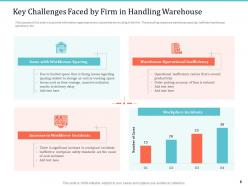
Template 1 - Key Challenges Faced by Firm in Handling Warehouse
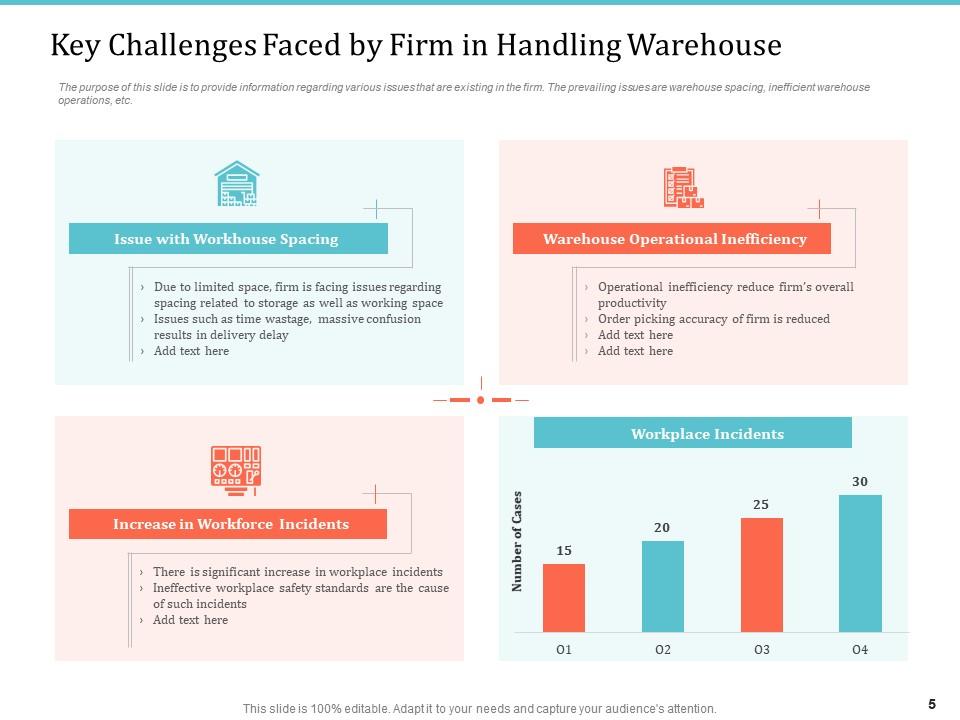
On this slide, you will review the vital hurdles that our firm faces while dealing with warehouse operations. It is necessary to pay attention to these issues since addressing them will make our processes both smoother and more effective. In particular, the problems include the limitation of warehouse spaces, growing numbers of workforce incidents, inefficiencies and worker safety concerns. Understanding these hurdles will help our team develop strategies to overcome them and improve our warehouse management system. The problem should be addressed by developing strategies that reduce risks and increase productivity.
Template 2 - Statistics Related to Effective Warehouse Management
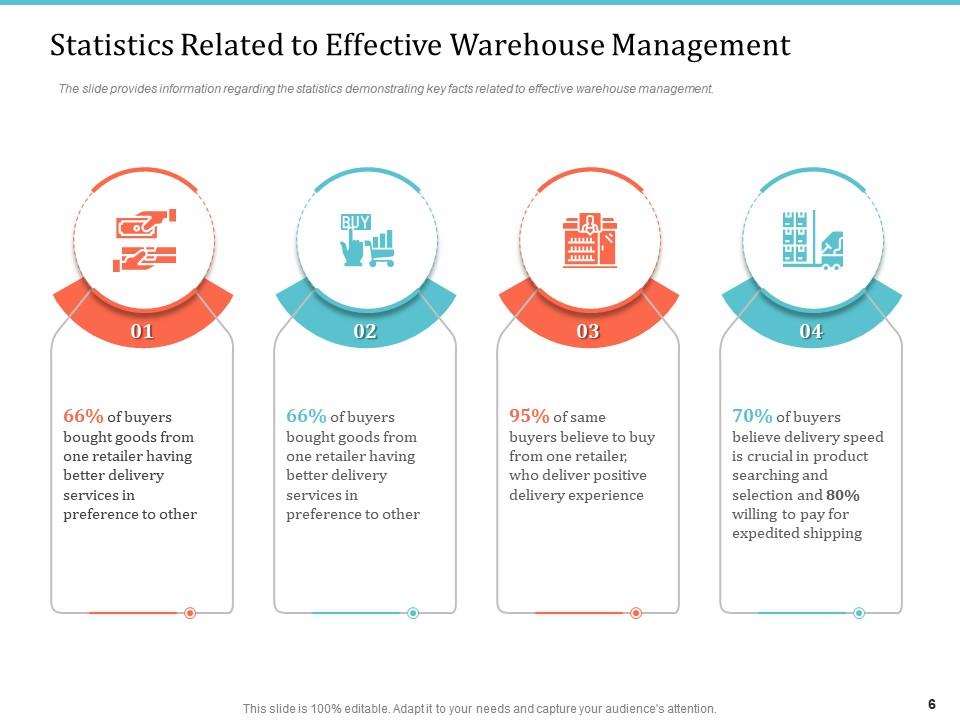
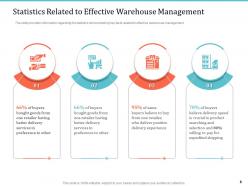
This slide includes emerging statistics concerning the efficient management of the warehouse. It defines the diverse percentages of buyers engaged in the warehouse. By adhering to this information, you can develop a profound understanding of buyer behavior, our operations, and opportunities to increase the warehouse's efficiency. This means that you will understand whether buyers are actively cooperating or choosing not to engage with offers.
Template 3 - Benefits for Warehouse Management System
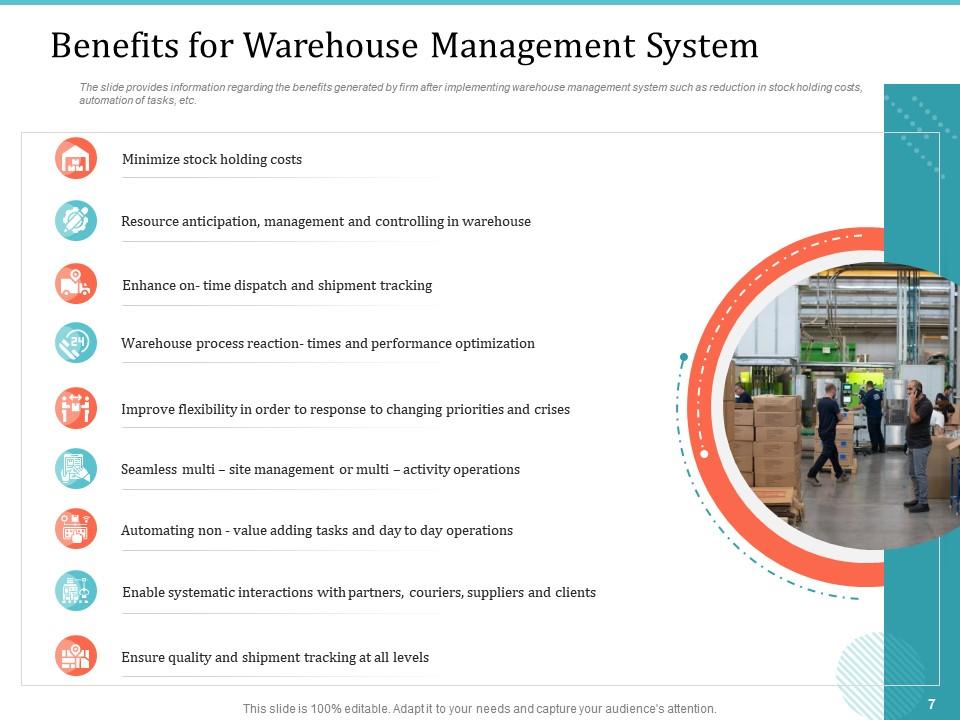
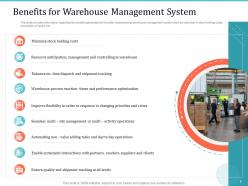
This slide includes the significant reduction of the stock holding costs, more efficient resource anticipation and control, improvement of on-time dispatch and shipment tracking, simplification of a wide range of warehouse processes and tasks, higher flexibility of operations and, therefore, the capability to respond to changes in priorities, precise management of multiple sites, automation of non-value-added steps, organized interaction with partners, and the ability to guarantee the quality and trace the shipment. Using these benefits as the basis for action, the company will be able to enhance its performance and provide customers with high-quality services.
Template 4 - Comparison between Warehouses with and without Management System
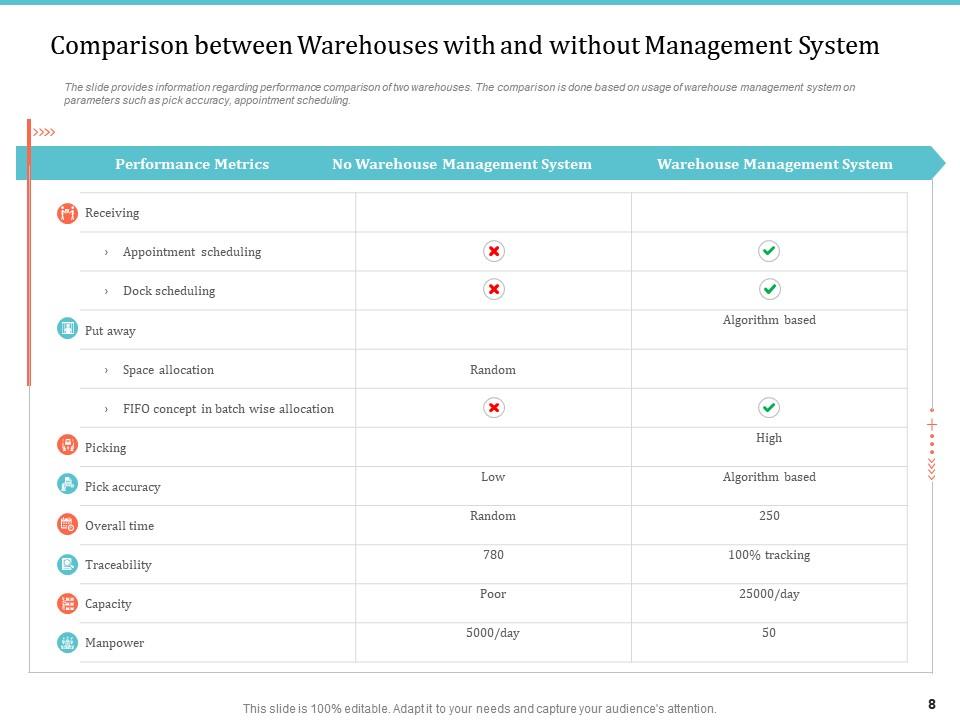
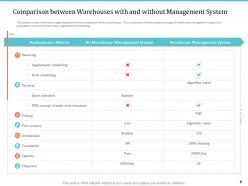
This slide provides an informative table that compares the warehouse with the Management System and without. The parameters include appointment scheduling, dock scheduling, space allocation, and picking processes. Pick accuracy, overall time efficiency, traceability, capacity utilization, and workforce management are also taken into account. All parameters show that the Warehouse Management System is advantageous when compared to the second type of enterprise. The benefits include better effectiveness, higher accuracy, and increased labor efficiency.
Template 5 - Optimizing Warehouse Layout
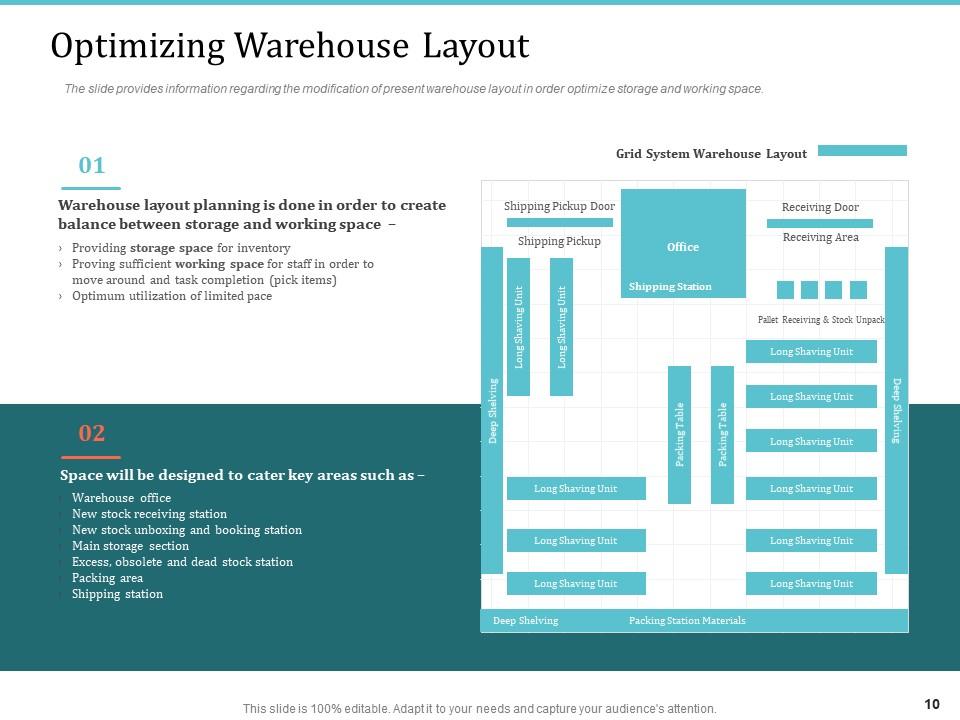
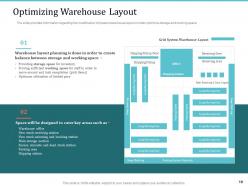
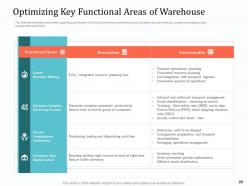
This slide is dedicated to the crucial process of Warehouse Layout Optimization and the ways in which the current warehouse layout should be modified to enhance storage efficiency and workspace use. Specifically, warehouse layout planning, shifting shipping and packing doors, locating receiving doors, and designing space for functional areas is addressed. Hence, operational flow will be improved, and the warehouse will become less cluttered.
Check out our blog on organizational management systems to manage an organization effectively.
Template 6 - Labelling Areas for Effective Warehouse Management
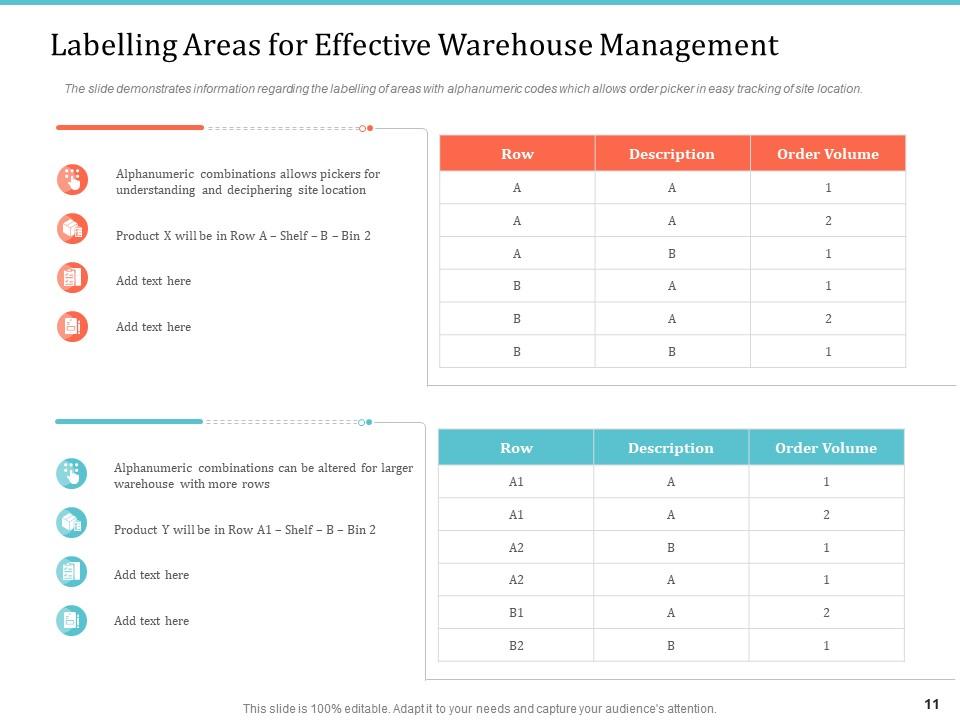
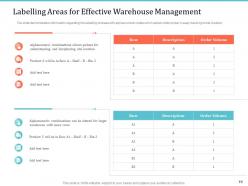
The slide below demonstrates that labeling areas within the warehouse using their alphanumeric codes plays a paramount role in the suitability of site location tracking for order pickers. Thus, the slide represents how the implementation of such clear labeling, which is shown in the tables with regard to rows, description, and order volume, can increase production and enhance effectiveness. This slide discusses how to use the influential label and address proper warehouse management to increase order accuracy.
Template 7 - Stock Inventory Arrangement in Warehouse
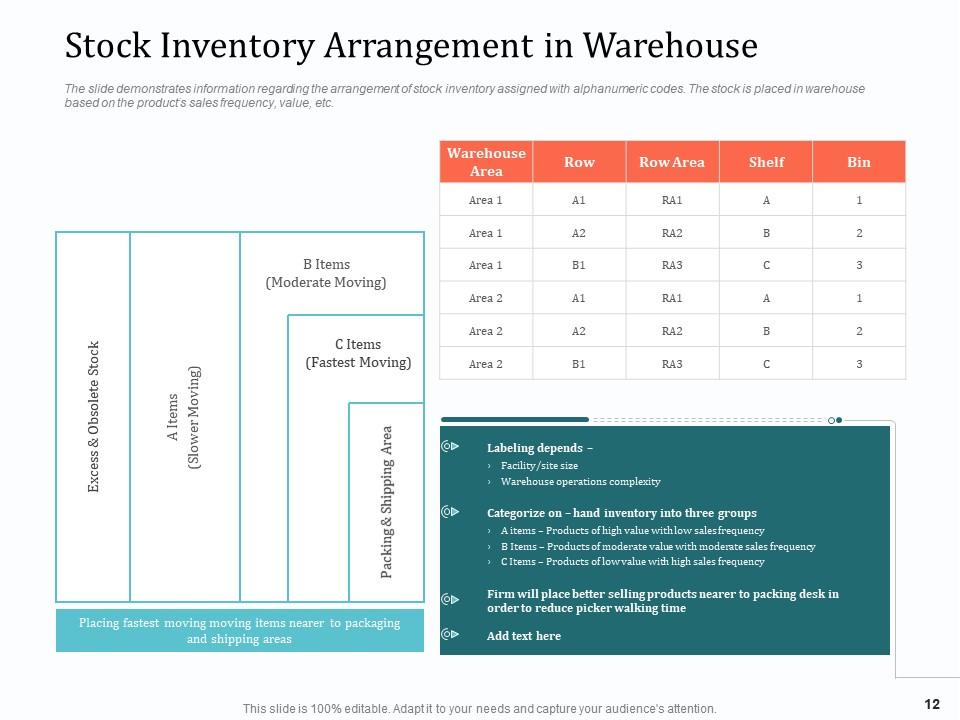
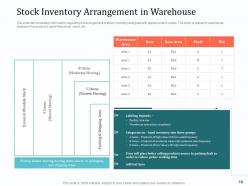
This slide presents a strategy for proper stock inventory arrangement within the warehouse, using alphanumeric codes for various items. The information provided is helpful in the planning and implementation process in that the learned approach stresses the areas where the stock should be placed. Specifically, it includes the frequencies of the products, value, shelf, and bin location. In addition, the strategy is relevant as it shows how the stock should be moved from one side of the warehouse to the section with fast-moving items. Therefore, this indicates that such an understanding can assist in arranging stocks to minimize retrieval time.
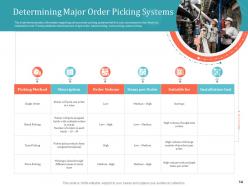
Template 8 - Determining Major Order Picking System
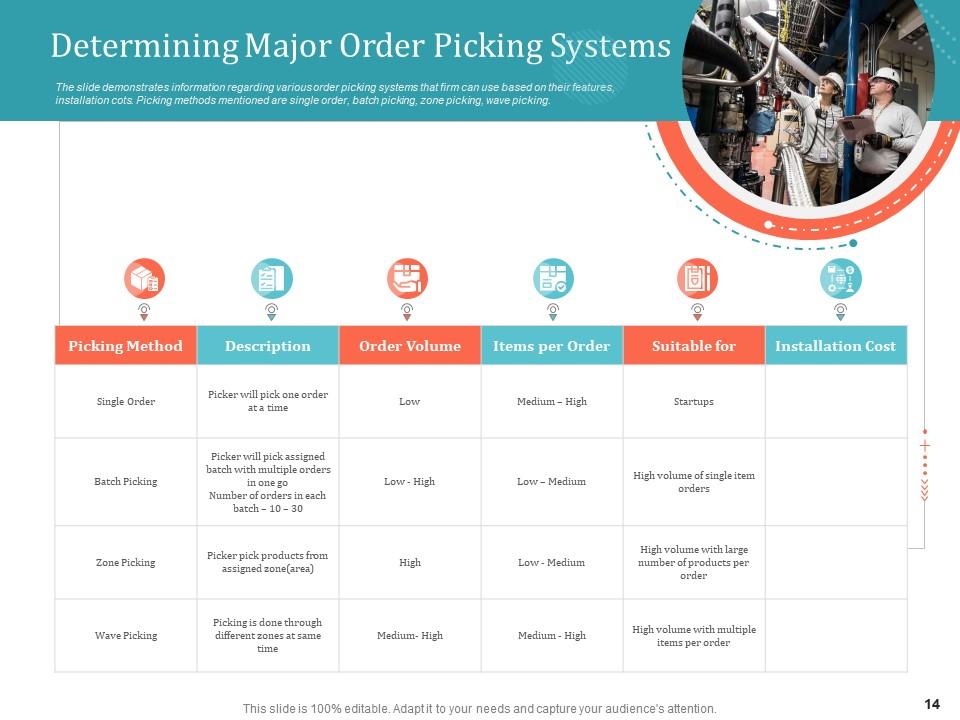
This slide provides a complete comparison of the order picking systems that the firm can use since it reflects their features, installation costs, and preferred picking methods. It contains a comparison table with the details of single order picking, batch picking, zone picking, and wave picking methods. Specifically, the table includes description, order volume, items per order, suitability, and installation cost. By comparing these order-picking options, it is possible to make a clear decision and choose the most appropriate order-picking system to be used for warehouse management.
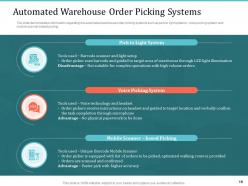
Template 9 - Automated warehouse order picking systems
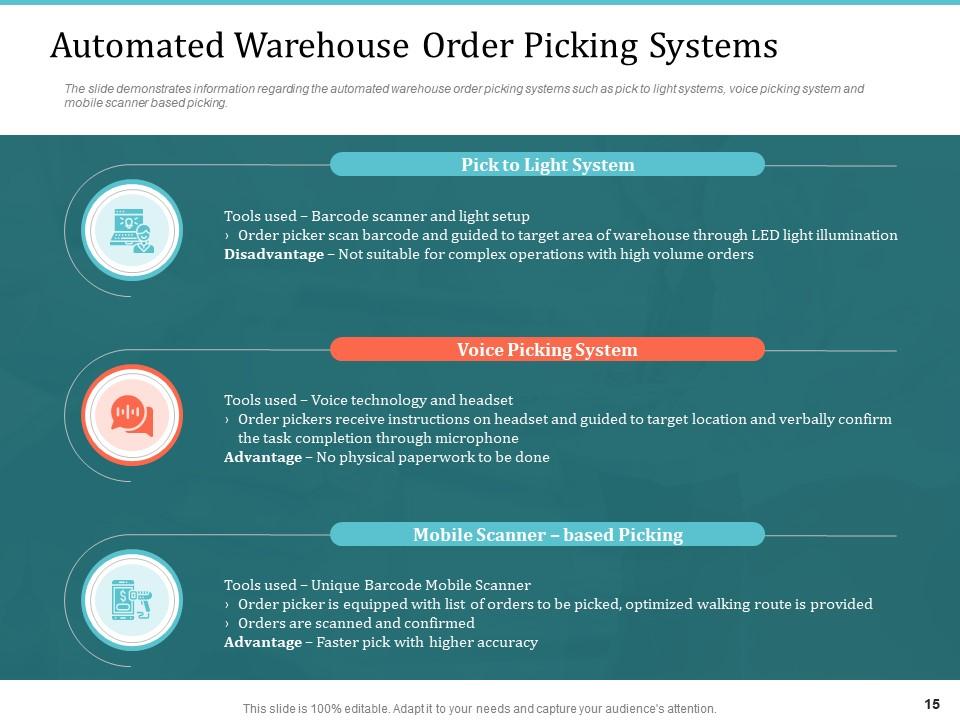
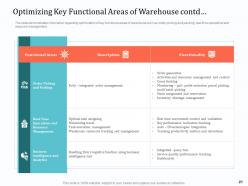
This slide has been developed with the objective of enhancing efficiency and accuracy in the order fulfilment process. The slide singles out the pick-to-light system developed through the incorporation of tools such as barcode scanners and light setup for providing visual picking guidance and the voice picking system that employs voice technology programmed on headsets, ensuring working with empty hands and enhancing productivity. The mobile scanner-based order picking is also highlighted, which involves the use of a unique barcode mobile scanner to record the orders while on the move. The slide illustrates the different types of automated approaches that can be adopted to enhance the efficiency of warehouse operations.
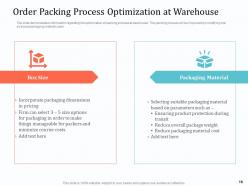
Template 10 - Order Packing Process Optimization At Warehouse
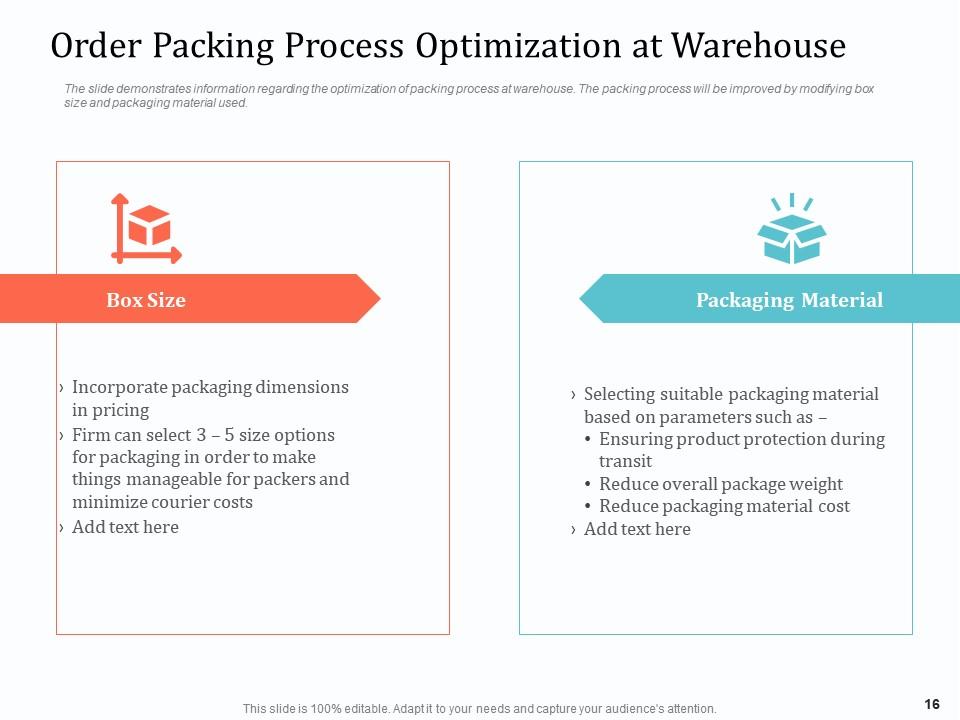
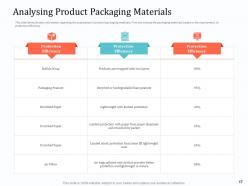
This slide is about optimizing the order packing process in the warehouse by modifying box sizes and packaging material. Packing efficiently is crucial as it minimizes waste and shipping costs and enhances overall customer satisfaction. The slide provides details on how to choose the required box size and packing material according to the size and fragility of the packages.
Disclosure
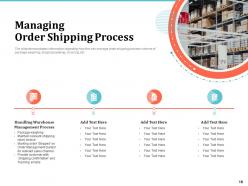
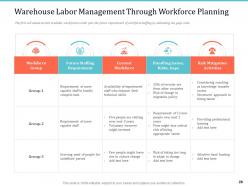
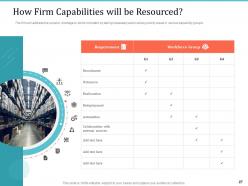
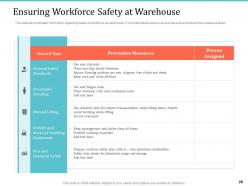
Our range of powerpoint slides empowers you to communicate the direct advantages of the warehouse management system. Our slides let you simplify the complex science of inventory stock management using visuals to make the operations more effortless and precise, assisting you in seeing the spectrum of warehouse inventory and opening your eyes to the wonders of the godown's future. Explore and download to ensure that you can routinely and flawlessly navigate the maze of order shipping.
Get an insight into our blog on Enterprise Information Resource Management System for more details.
Implementing warehouse management system powerpoint presentation slides with all 51 slides:
Use our Implementing Warehouse Management System Powerpoint Presentation Slides to effectively help you save your valuable time. They are readymade to fit into any presentation structure.



FAQs for Implementing warehouse management system
Definitely need real-time inventory tracking and order management that actually handles your picking/packing workflow smoothly. Barcode or RFID scanning is basically mandatory now - trust me on this one. Good reporting and analytics matter too, plus labor management features. Make sure whatever you pick plays nice with your current ERP or e-commerce setup. Warehouse layout optimization is clutch if you're dealing with space issues. Scalability's important but don't overthink it. Honestly, just demo 2-3 systems using your actual warehouse data and see which one your team doesn't hate using.
So basically, WMS gives you real-time tracking of everything coming and going. No more guessing games with manual counts that are always off. Every item gets scanned with barcodes or RFID, which catches mistakes instantly - wrong picks, quantity mismatches, whatever. Plus it stops theft since there's a digital trail for everything. Your shrinkage will drop big time. Oh and cycle counting is where I'd start first - you'll see results fast. Honestly saved my sanity when we switched over. Way better than the old spreadsheet chaos we had going.
Dude, barcode scanning will literally transform your warehouse. No more typing SKUs and making stupid mistakes - you'll go from like 85% accuracy to 99.9% just like that. Real-time inventory tracking means you actually know what's sitting where without constantly doing counts (which honestly nobody enjoys anyway). The speed difference is insane - we're talking seconds instead of minutes per item. I'd say start with whatever processes handle the most volume first, that's where you'll see the biggest wins right away.
So your WMS talks to your ERP through APIs or EDI - basically they sync data automatically. Inventory counts, purchase orders, shipping info all flow back and forth without you having to enter stuff twice (thank god). The WMS handles warehouse things like picking routes while ERP does the big picture business stuff. Honestly though, some systems are just better at playing together than others. I'd definitely ask for integration demos with your actual ERP before you buy anything. Also find out what syncs on its own vs what you'll need to update manually.
Dude, real-time data is a total game changer - you'll actually know what's happening instead of playing catch-up all day. Your picking gets way more accurate because everyone can see live stock counts. Plus you can move people around instantly when one area gets crushed. Honestly, the visibility alone cuts out so much of the guessing and scrambling around. It's like finally being able to see what's actually going on in there, you know? I'd probably roll it out in your busiest zones first - that's where you'll notice the difference right away.
So basically, your WMS shows you which spots are always packed vs totally empty - plus it tracks what sells fast so you can put those items in the best locations. You can see where your picking routes suck too. Most places just guess at their layout (which is kinda crazy when you think about it), but the system lets you test changes digitally first. Oh, and it'll suggest better bin sizes based on actual data. Start with a space utilization report - I bet you'll find some weird stuff. The math it does on optimal layouts is pretty solid.
So automation basically flips your warehouse from always playing catch-up to actually staying ahead of things. Manual stuff like picking and sorting gets way smoother, plus you'll finally know where everything is without hunting around forever. Yeah, the setup costs hurt upfront and your team needs training, but most places break even in like a year to 18 months. Honestly? Just start with whatever's driving you crazy - usually the boring, repetitive tasks where people keep making mistakes. That's where you'll see the biggest difference right away.
So basically, WMS systems get tweaked based on what each industry actually needs. Pharma companies are obsessed with lot tracking and expiration dates - makes sense with all those regulations. Automotive is totally different though, they're all about sequencing parts for just-in-time delivery. Food companies? They're hardcore about FIFO and temperature control because spoiled inventory is literally money down the drain. Retail needs omnichannel stuff and has to handle crazy seasonal rushes (hello, Black Friday). 3PLs are juggling multiple clients so they need flexible billing setups. Bottom line - pick WMS features based on your industry's weird quirks and compliance requirements.
Honestly, data migration is going to be your worst enemy - that stuff always breaks in weird ways. Your team will push back hard on learning new systems, especially the folks who've been there forever. Getting it to talk to your existing ERP and accounting software? Total pain. Oh, and don't get me started on training everyone at once. Some people pick it up fast, others... not so much. Expect major workflow chaos when you flip the switch - orders might get delayed and customers won't be happy. Take whatever timeline you're thinking and double it. Get your warehouse guys involved from day one, and definitely have a backup plan ready.
So basically, a WMS gives you one view of all your inventory - doesn't matter if orders come from your website, Amazon, or in-store. Everything pulls from the same stock pool. It routes orders automatically based on whatever rules you set up, handles different packaging needs, and prioritizes by channel speed. Real-time updates prevent overselling, which honestly saves you from so many headaches. The trick is nailing your routing logic from the start. Then orders just flow to whatever location makes the most sense without you micromanaging every single one.
Honestly, start with the basics - order accuracy and how fast you're picking/packing stuff. Inventory turnover is huge too since that directly hits your profits. I'd also watch fulfillment speed because customers get pissy when things take forever lol. Labor productivity and space utilization are worth tracking, plus receiving efficiency. Error rates will show you if your processes actually work or if you're just winging it. Maybe set up a simple weekly dashboard? I wouldn't go crazy with like 10 metrics right away - pick 3-4 you can actually act on, then add more later. Review trends monthly so you don't get lost in the daily noise.
Honestly, cloud-based WMS is a game changer for smaller companies. Instead of dropping huge money upfront, you're just paying monthly - way less risky. The scaling thing is clutch too since you never know if you'll suddenly need more capacity or have to cut back. Your IT folks don't have to deal with server headaches either, which is honestly such a relief. The provider handles all that backend stuff automatically. I'd probably start small with basic features - you can always add more bells and whistles later when you figure out what you actually need.
Your warehouse crew can't be running back to a computer every five minutes to update stuff or check where things go. Mobile WMS lets them scan, update inventory, and get picking orders right from their phones or handhelds while they're actually on the floor. It's honestly a game-changer for speed and accuracy. You'll cut down on data entry mistakes too. Workers can handle everything from receiving to shipping without all that back-and-forth walking. Figure out what your team does most when they're away from desks - that's where you'll see the biggest improvement first.
So machine learning in your WMS is basically like having a really smart assistant that never sleeps. It'll predict when you're about to get slammed with orders by looking at past patterns. Routes get optimized automatically, inventory adjusts itself before you run out - honestly it's pretty wild how accurate it gets. The system learns from every single move your team makes. You'll cut down on stockouts and labor costs big time, plus use your space way better. Oh, and definitely figure out what's driving you crazy first, then find AI tools that tackle those specific headaches.
Start with hands-on sessions covering the basics - receiving, picking, inventory, shipping. Video tutorials are clutch for visual people, plus when someone inevitably forgets how to do something months later, they can just rewatch. Get readable user manuals (not those massive technical nightmares nobody actually uses). Your team needs sandbox access to practice without screwing up real inventory - trust me on this one. Only train people on what they actually need to know. Pickers don't care about admin stuff. Buddy system works wonders the first couple weeks. Way faster than leaving people to figure it out alone.
-
good
-
Enough space for editing and adding your own content.
-
Designs have enough space to add content.
-
Easily Editable.
-
Much better than the original! Thanks for the quick turnaround.
-
Easily Understandable slides.
-
Much better than the original! Thanks for the quick turnaround.
-
Use of icon with content is very relateable, informative and appealing.
-
Great product with effective design. Helped a lot in our corporate presentations. Easy to edit and stunning visuals.
-
Colors used are bright and distinctive.
-
Page:
- You're currently reading page 1
- Page 2
-
