


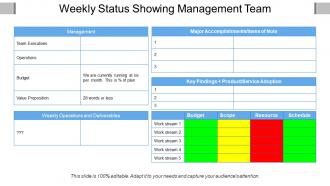
Weekly status showing management team






Try Before you Buy Download Free Sample Product
 Impress Your
 Audience
 100%
100% Editable
 Save Hours
 of Time


Advocate a good jaunt with our Weekly Status Showing Management Team. Inform folks of enjoyable holiday destinations.
People who downloaded this PowerPoint presentation also viewed the following :
Weekly status showing management team with all 5 slides:
Our Weekly Status Showing Management Team are harbingers of change. They will help you ring in the new.

FAQs for Weekly status
So basically cover four things: what you got done last week, what you're tackling now, any roadblocks, and next week's plan. Numbers help a ton - way better than just saying "made progress on whatever." Be real about where you're stuck since that's honestly what people care about most. Keep each section super short, like 2-3 bullets max or nobody reads it. Oh and pick the same day every week to write it - I learned this the hard way after forgetting half the stuff I actually did. Makes it way less painful when it's just routine.
Honestly, visuals are game-changers for status reports. Charts beat wall-of-text paragraphs every time - people can instantly see if you're crushing it or falling behind. Before/after screenshots? *Chef's kiss* - so satisfying to look at. Color coding and simple graphs help stakeholders find their stuff without reading everything (which let's be real, they won't anyway). Timeline graphics work great too. Just don't get sucked into making some elaborate masterpiece that takes three hours to build. Keep it simple. Toss one chart into your next report and watch how much faster the feedback comes back.
Track your completion percentages for big milestones and how you're burning through budget vs timeline. Any blockers or risks that might mess with delivery dates too. Team velocity metrics are weirdly helpful - makes everyone look productive even when you're debugging some stupid infinite loop for 3 hours. Don't forget deliverables done versus what you planned, plus dependency status. Charts and color-coding work great since people barely skim these in Monday meetings anyway. Give stakeholders enough to feel good without info overload.
Pick one day and actually stick to it - that's the main thing. Most people go with Friday afternoons or Monday mornings, but honestly the day doesn't matter as much as being consistent about it. Your stakeholders want to know when updates are coming so they can plan around them. I'd probably ask your key people what day works best for their schedules first. We tried doing ours randomly at my last job and it was a disaster. Once a week is perfect though - keeps everyone in the loop without being annoying.
Honestly, the biggest mistakes are being way too vague or drowning people in unnecessary details. Instead of "worked on project X," tell them what you actually got done and what's stuck. Nobody wants to read a novel though - I learned that the hard way. Break it into clear sections: wins, roadblocks, what's next. Your manager will thank you for making it scannable. Oh, and don't write these things Friday at 5pm when you can't remember Tuesday. Keep quick notes during the week so you're not sitting there like "wait, what did I even do?"
Dude, tailor those reports to whoever's reading them. Executives want the big picture stuff - outcomes, risks, budget hits. Skip the weedy details with them. Your manager though? They'll want the tactical stuff like what's blocking you and what resources you need. Teammates just care about the day-to-day reality of what's going down. Oh and switch up your language too - execs love their business metrics while tech people want the actual implementation details. Honestly, sometimes it's worth making separate reports if your audience is all over the place. Saves everyone time.
Honestly just ask people what they actually want to see in your reports. I used to write these crazy long updates that no one bothered reading - total waste of time. Then my manager mentioned keeping things short and calling out blockers more clearly. Game changer. Your stakeholders have way more specific preferences than you'd think. Some want numbers, others care about timeline changes, whatever. Once you know what they're looking for, your reports become useful instead of just another email to ignore. The conversations get better too since you're hitting what matters to them.
Look, I was exactly where you are - spending forever on these stupid reports every week. Game changer for me was connecting all my apps so they do the work. Asana pulls my finished tasks automatically, time tracking apps grab my hours without me typing anything. Set up a template in Notion or Google Docs that fills itself in with your data. Takes like an hour to configure but then you're golden. Oh, and if your team uses Slack, there's integrations that'll turn your daily updates into weekly summaries. Way better than trying to remember what you even did on Tuesday.
Honestly, just stick to simple headers like "Done," "Working On," and "Blockers" - makes everything way easier to scan. Bullet points are a lifesaver here because nobody's reading paragraphs in these things. Start with your big wins and any problems that need help. I always try to throw in actual numbers or deliverables when I can. Flag anything that'll mess with deadlines or hit other teams. Write it the same day every week so you don't forget stuff (learned this the hard way). End with what you're tackling next. Takes like 10 minutes once you get the rhythm down.
Look, I get that status reports feel like busy work, but they're actually your best defense against project disasters. Think of them as pattern detectors - when you track the same blockers and delays week after week, you'll start spotting trends before they wreck your timeline. Your stakeholders won't ambush you with "why didn't you tell us sooner" complaints either. The trick is being specific about risks and always throwing in what you'd do to fix them. Honestly, I've seen too many projects crash because nobody was paying attention to the warning signs that were right there in the reports.
Ditch the boring bullet points and tell actual stories instead. Like, share a specific win or challenge you tackled - people actually care about that stuff. Visuals help too if you can swing it. Don't just say "completed X, working on Y" because honestly that's painful to read. I'd rather see what roadblocks you hit or what you learned along the way. Oh and always end with what's next - keeps people hooked on your progress. Ask for help when you need it too, makes the whole thing feel more real.
Just be real about what's blocking you - seriously, don't try to make everything sound fine when it's not. Leadership actually wants to know this stuff! Tell them exactly what's stuck, how it's messing with your timeline, and what you need from them to fix it. Maybe you need budget approval, or someone just needs to make a damn decision already. Whatever you've already tried, mention that too so they know you're not just throwing problems at them without thinking. Short version: give them enough detail so they can actually help instead of just worrying about vague "issues."
Ask your manager for examples from high-performing leads - they'll usually share templates that actually work. The good ones hit four things: last week's wins, current priorities, blockers needing help, and metrics leadership cares about. Here's the thing though - don't make everything sound perfect. Execs want to see you're on top of problems, not pretending they don't exist. Be honest about what's broken but come with solutions. You could also just ask around in team meetings. Most people are happy to show you what format works for them. I've found the brutally honest reports get way more respect than the "everything's amazing" ones.
Honestly, tie your status reports to actual milestones instead of just random stuff you did. Like if there's a big deliverable in three weeks, show how this week gets you there. I literally copy-paste milestones into my template because otherwise I forget what matters. Talk percentages, blockers that might screw up your timeline, whether you're hitting dates. Short sentences work too. The goal is making it useful for tracking progress - not just another pointless report nobody reads. Way more helpful than listing every tiny task you completed.
Honestly, just start with Google Docs or Word - they're dead simple for sharing and formatting. Your team probably uses project management stuff like Asana or Trello already, right? Those usually have reporting features that pull data automatically, which is clutch because manual tracking sucks. Email templates work too if you're not dealing with crazy complex data. I've seen people make those look pretty decent actually. The main thing is picking something everyone can access and leave comments on. Don't overthink it - use whatever you're comfortable with first, then switch later if you need something fancier.
-
Out of the box and creative design.
-
Enough space for editing and adding your own content.