

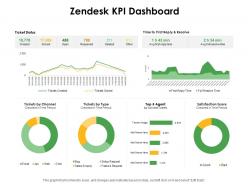
Zendesk kpi dashboard snapshot ppt powerpoint presentation infographics demonstration





Try Before you Buy Download Free Sample Product
 Impress Your
 Audience
 100%
100% Editable
 Save Hours
 of Time


Our Zendesk KPI Dashboard Snapshot Ppt Powerpoint Presentation Infographics Demonstration are explicit and effective. They combine clarity and concise expression.
People who downloaded this PowerPoint presentation also viewed the following :
Zendesk kpi dashboard snapshot ppt powerpoint presentation infographics demonstration with all 2 slides:
Give your audience a fulfilling experience. They will find our Zendesk KPI Dashboard Ppt Powerpoint Presentation Infographics Demonstration elevating.
FAQs for Zendesk kpi dashboard snapshot ppt powerpoint
Track first response time and resolution time - those are the big ones. Customer satisfaction scores too, obviously. Agent productivity like tickets per hour matters, plus ticket volume trends and SLA compliance (leadership loves those numbers). Escalation rates show if your frontline team's actually handling stuff or just passing everything up the chain. Oh, and backlog size - nobody wants that growing out of control. Customer effort scores are solid if you're already collecting them. Start with these basics, then honestly just add whatever your bosses obsess over measuring.
Honestly, don't try to track everything - just focus on what actually matters for your business. I'd start with first response time, resolution time, and customer satisfaction scores on your main dashboard. Those are the ones that count. Too many teams get obsessed with vanity metrics that look impressive but don't really help anyone. Set up some automated weekly reports and maybe create different views for agents vs managers. The whole point is telling a story about customer experience, not just counting tickets. Oh, and start simple - you can always add more complicated stuff later once everyone's comfortable with it.
Honestly, real-time data transforms your Zendesk dashboard from useless eye candy into something that actually helps. You'll catch ticket spikes and SLA disasters as they happen instead of finding out days later like "oh great, we've been failing customers all week." Response times tanking? Redistribute your team right now. Agent struggling? Jump in with coaching immediately. The instant visibility is a game-changer for spotting trends early. Just set up alerts for your most critical stuff - nobody wants to stare at dashboards all day, right?
Your Zendesk KPI dashboard basically gives you a bird's eye view of what's broken in your customer service. Track stuff like response times, how fast you're actually solving problems, and those satisfaction scores. You'll start noticing weird patterns - maybe tickets always explode on Tuesdays or Sarah needs some extra training (happens to the best of us). The visual charts make problems super obvious. Like when one product is generating a million complaints or you're constantly missing deadlines. My advice? Start with whatever metric looks the worst and dig into why it's happening.
Honestly, less is more with dashboards. Pick like 5-7 metrics that actually move the needle for your team - everything else is just clutter. Skip the vanity stuff too (who cares about total tickets created?). Focus on what matters: resolution times, customer happiness scores, that kind of thing. I've watched so many teams build these fancy dashboards that look great but tell you absolutely nothing useful. Oh, and clean up your data sources first - bad data in means bad decisions out. Test it with real users before you launch. Trust me on this one.
Honestly, just focus on what's killing you right now. Drowning in tickets? Track response times and how fast you're actually closing stuff. Those metrics hit customer happiness AND keep your team from losing their minds. After that, throw in satisfaction scores and volume trends - super helpful for spotting weird patterns. But seriously, don't be that person who tracks like 12 different things from day one. You'll burn out. Pick maybe 4-5 that actually matter for your goals (cutting churn, scaling without chaos, whatever). The rest can wait until you've got these down cold.
Dude, charts literally save your sanity when dealing with Zendesk data. Nobody wants to stare at endless spreadsheets trying to find patterns - I've been there and it's brutal. With visualizations, you'll spot ticket spikes or response time issues instantly. Bar charts for ticket volumes are perfect to start with. Line graphs work great for tracking response times over time. Honestly, stakeholders actually listen when you show them colorful dashboards instead of boring tables. You can catch bottlenecks and see which agents might need help way faster. Even seasonal trends become obvious. It's like night and day compared to raw numbers.
So you'll want to connect your other tools to get the full picture instead of just seeing tickets by themselves. Your CRM data, sales numbers, website analytics - all that stuff shows you the complete customer story. Honestly, it's pretty wild how much clearer things get when you can see support impact on actual revenue and retention, not just response times. Salesforce, HubSpot, Google Analytics all plug right into Zendesk. I'd start with whatever's your biggest gap - probably CRM if you're flying blind on customer health vs ticket loads. Makes such a difference.
Focus on first response time, resolution time, and customer satisfaction scores - honestly these three tell you everything you need to know about your agents. Tickets solved per hour matters for productivity, obviously. One-touch resolution rate is huge too since it shows who's actually fixing things versus creating that annoying back-and-forth mess. Total tickets handled sounds impressive but it's basically meaningless. I'd set up automated weekly reports for those first four metrics and go over them with your team. Way better than drowning in data that doesn't actually help.
Check your Zendesk dashboard daily for response times and resolution patterns. I literally do this every morning - makes a huge difference. Watch for agents who are consistently slow or ticket types that drag on forever. Set up alerts when response times get wonky, then dig into which categories are problematic. Honestly, focusing on just one or two metrics at first works way better than trying to track everything. Use what you find to shuffle workloads around or build better macros for repetitive stuff. The patterns become super obvious once you start looking.
Honestly, team-specific dashboards are a game changer. Your support folks need response times and ticket resolution stats front and center. Meanwhile, managers want the big picture stuff - team performance, resource planning, that kind of thing. Sales is totally different obviously. When everyone's looking at the same generic dashboard, half the data's useless to them anyway. People actually check dashboards when they show stuff that matters to their daily work. Issues get caught faster too. I'd start by asking each team what 3-5 numbers they look at every day, then build around that.
Your Zendesk historical data is honestly like having a cheat sheet for future planning. Pull those quarterly trends first - you'll start seeing patterns pretty quickly. Maybe tickets always spike during Black Friday or summer vacation season. Response times probably tell a story too about when your team gets overwhelmed. I always look at which channels are consistently dragging down performance - sometimes it's obvious stuff you just haven't noticed. Once you see these patterns repeating, staffing decisions get way easier. You might realize you need temp help during certain months or that investing in chatbots for basic questions actually makes sense.
Focus on the stuff that actually matters - ticket volume trends, first response times, resolution times, and customer satisfaction. Agent performance breakdowns are super helpful too. You'd be surprised how many dashboards are just fluff that executives love but don't help day-to-day operations. Escalation rates and backlog aging should definitely be on there. If you're doing multiple channels, throw in some channel performance data. Oh, and set up alerts for when things start going wrong - way better than just looking at old data and wondering what happened.
So basically, your Zendesk dashboard pulls in all the customer feedback automatically - CSAT scores, survey responses, satisfaction ratings from tickets and help center stuff. You can see sentiment trends right next to your usual metrics like ticket volume and resolution times. Honestly, it's pretty slick how everything connects. The cool part is correlating satisfaction with how your agents are performing, plus spotting which issues tick people off the most. Oh, and you'll want to set up custom views by team or product area - makes it way easier to catch patterns early before things blow up.
Look at your Zendesk dashboard weekly - catches problems before they get big. Monthly deep dives are where you really figure out if you're tracking stuff that actually moves the needle. Honestly, I've watched so many teams obsess over meaningless numbers that make them feel productive but don't help customers. Your support people need to be part of these reviews too. They'll spot weird patterns way before you do. Oh, and don't forget to update your KPIs every quarter or when you change how things work. Treat it like it's alive, not some static thing you built once.
No Reviews