

Cloud Computing For Efficient Project Management Powerpoint Presentation Slides




Try Before you Buy Download Free Sample Product
 Impress Your
 Audience
 100%
100% Editable
 Save Hours
 of Time


Cloud computing is a tool that integrates planning, designing, monitoring, and project delivery with cloud based technology and software. Grab our competently designed Cloud Computing for Efficient Project Management template that provides access to a comparative assessment of traditional and cloud based project management along with various features and benefits of using cloud computing in projects. Also, the PPT deck highlights multiple service models such as SaaS, PaaS, IaaS, Hybrid, Public, and Private. This presentation offers a timeline to help project managers implement cloud computing in their project management workflows. Additionally, the PowerPoint contains multiple initiatives that can support project teams, tasks, resources, schedules, and reporting. The strategies are Kanban backlog management, workflow automation, cloud collaboration, devices management, cloud timesheet and calendars, mobile device integration, etc. Furthermore, the PowerPoint slides include members, roles, responsibilities, training program, and RACI matrix of the cloud project management team. The complete deck also contains a budget allocation plan and comparative software assessment for implementing and handling projects on the cloud platform. Lastly, it provides KPI dashboards, monthly performance reports, and impact analysis for measuring the effectiveness of cloud computing on projects. Get access now.
People who downloaded this PowerPoint presentation also viewed the following :
Content of this Powerpoint Presentation
Slide 1: This slide displays title i.e.'Cloud Computing for Efficient Project Management' and your Company Name.
Slide 2: This slide presents agenda.
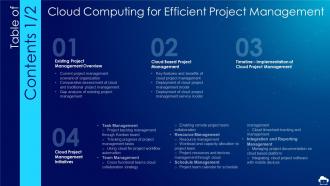
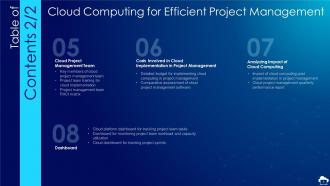
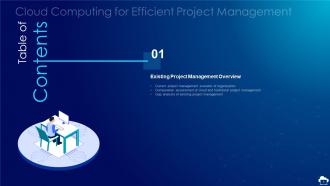
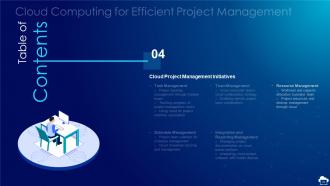
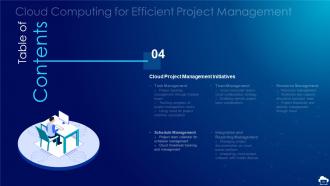
Slide 3: This slide exhibits table of contents.
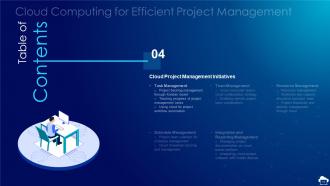
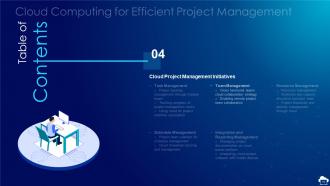
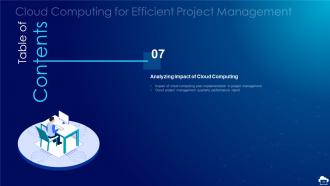
Slide 4: This slide also shows table of contents.
Slide 5: This slide depicts title for three topics that are to be covered next in the template.
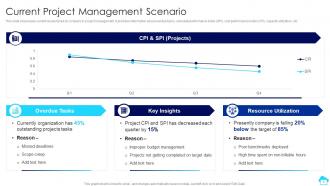
Slide 6: This slide showcases current issues faced by company in project management.
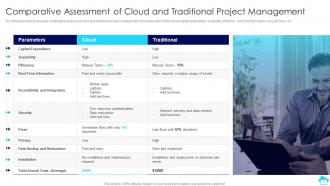
Slide 7: This slide showcases comparative analysis of cloud and traditional project management.
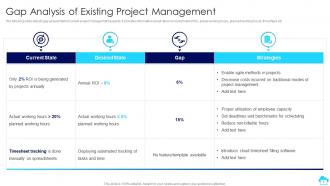
Slide 8: This slide depicts gap assessment of current project management aspects.
Slide 9: This slide depicts title for three topics that are to be covered next in the template.
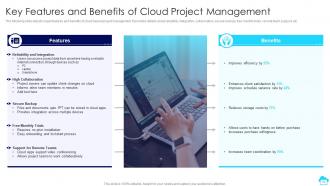
Slide 10: This slide depicts major features and benefits of cloud based project management.
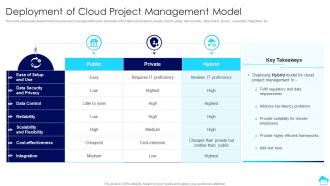
Slide 11: This slide showcases deployment of cloud project management model.
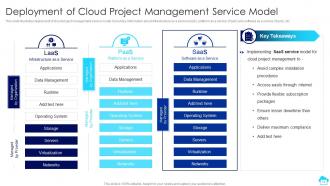
Slide 12: This slide illustrates deployment of cloud project management service model.
Slide 13: This slide depicts title for the topic that are to be covered next in the template.
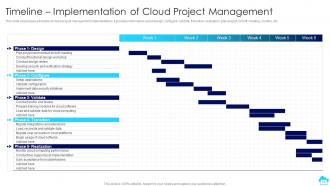
Slide 14: This slide showcases a timeline of cloud project management implementation.
Slide 15: This slide depicts title for three topics that are to be covered next in the template.
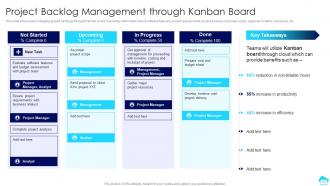
Slide 16: This slide showcases managing project backlogs through Kanban board.
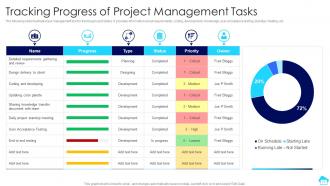
Slide 17: This slide illustrates task management tool for tracking project status.
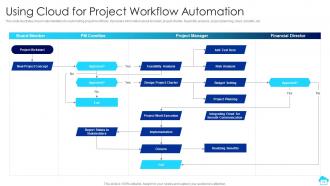
Slide 18: This slide illustrates cloud implementation for automating project workflows.
Slide 19: This slide depicts title for two topics that are to be covered next in the template.
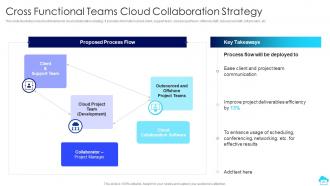
Slide 20: This slide illustrates cross functional teams cloud collaboration strategy.
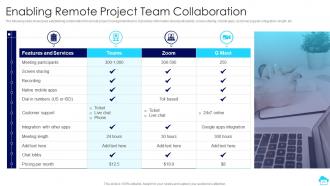
Slide 21: This slide showcases establishing collaboration for remote project management teams.
Slide 22: This slide depicts title for two topics that are to be covered next in the template.
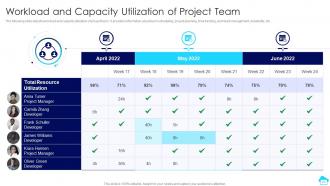
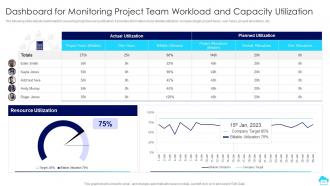
Slide 23: This slide depicts workload and capacity utilization of project team.
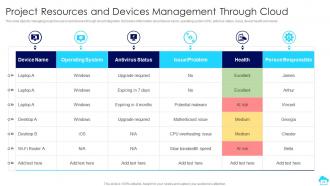
Slide 24: This slide depicts managing project resource and devices through cloud integration.
Slide 25: This slide depicts title for two topics that are to be covered next in the template.
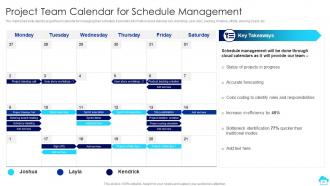
Slide 26: This slide depicts project team calendar for managing their schedule.
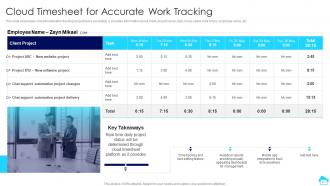
Slide 27: This slide showcases cloud timesheet for tracking project tasks accurately.
Slide 28: This slide depicts title for two topics that are to be covered next in the template.
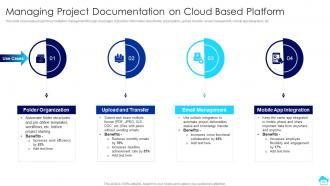
Slide 29: This slide showcases project documentation management through cloud apps.
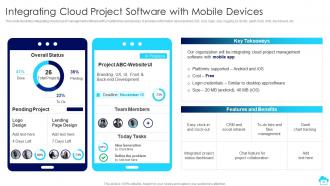
Slide 30: This slide illustrates integrating cloud project management software with smartphones and devices.
Slide 31: This slide depicts title for three topics that are to be covered next in the template.
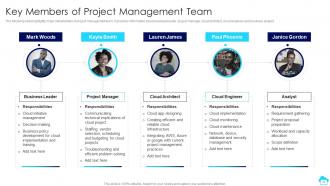
Slide 32: This slide highlights major stakeholders of project management team.
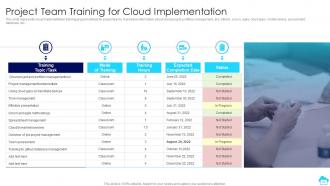
Slide 33: This slide represents cloud implementation training program details for project teams.
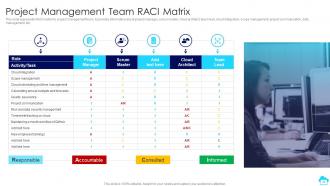
Slide 34: This slide represents RACI matrix for project management team.
Slide 35: This slide depicts title for two topics that are to be covered next in the template.
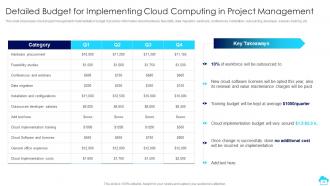
Slide 36: This slide showcases cloud project management implementation budget.
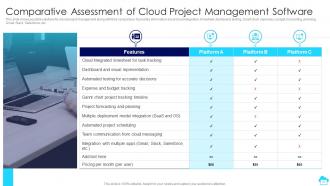
Slide 37: This slide shows possible solutions for cloud project management along with their comparison.
Slide 38: This slide depicts title for two topics that are to be covered next in the template.
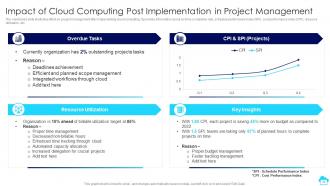
Slide 39: This slide illustrates effect on project management after implementing cloud computing.
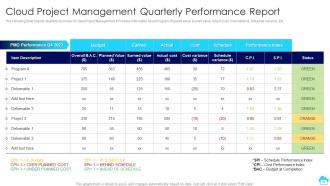
Slide 40: This Slide Depicts Quarterly Summary Of Cloud Project Management.
Slide 41: This slide depicts title for three topics that are to be covered next in the template.
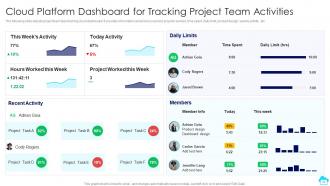
Slide 42: This slide depicts project team task tracking cloud dashboard.
Slide 43: This slide depicts dashboard for observing project resource utilization.
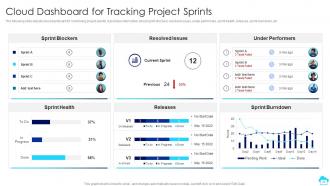
Slide 44: This slide depicts cloud dashboard for monitoring project sprints.
Slide 45: This is the icons slide.
Slide 46: This slide presents title for additional slides.
Slide 47: This slide depicts 30-60-90 days plan for projects.
Slide 48: This slide shows roadmap of company.
Slide 49: This slide depicts posts for past experiences of clients.
Slide 50: This slide exhibits yearly timeline of company.
Slide 51: This slide displays Venn.
Slide 52: This slide shows puzzle for displaying elements of company.
Slide 53: This slide showcases targets of the company.
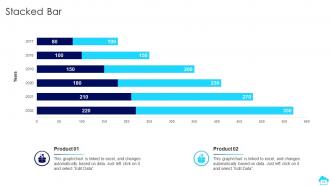
Slide 54: This slide exhibits yearly stacked bar charts for different products. The charts are linked to Excel.
Slide 55: This is thank you slide & contains contact details of company like office address, phone no., etc.
Cloud Computing For Efficient Project Management Powerpoint Presentation Slides with all 60 slides:
Use our Cloud Computing For Efficient Project Management Powerpoint Presentation Slides to effectively help you save your valuable time. They are readymade to fit into any presentation structure.






FAQs for Cloud Computing For Efficient Project Management
Think of it like renting different levels of a house. With IaaS you're getting a bare server - total control but you handle all the setup yourself. PaaS is more like a furnished apartment where the platform's ready to go (Heroku's actually pretty solid for this). SaaS? That's just using the final product - Gmail, Salesforce, whatever. More control means more headaches, but also more flexibility. Less control means someone else deals with the tech stuff while you focus on your actual work. Really depends on what your team can handle and wants to mess with.
First thing - figure out which apps can move to cloud easily vs ones that need major work. Most companies totally underestimate the skills gap though, so check if your team actually knows cloud stuff. Run the numbers on costs over 2-3 years because honestly, the math can go either way and shock you. Also look at your compliance rules and whether your internet can handle it. Oh, and definitely test with something unimportant first. I can't tell you how many hidden issues that'll surface. Way better than finding out when it matters.
Dude, watch out for data breaches and API vulnerabilities - hackers love those entry points. Misconfigurations are probably the worst offender though. Like, I can't believe how many S3 buckets I've stumbled across that are just sitting there exposed. Multi-factor auth is your best friend, turn it on everywhere. Don't forget about insider threats either, from your own people or even cloud staff. If you're in healthcare or finance, compliance stuff gets messy fast. Oh, and here's the kicker - just because it's "cloud" doesn't mean you're off the hook for security. Keep auditing those permissions regularly.
First thing - figure out what regulations hit your industry and data. Then hunt for cloud providers with the right certifications (SOC 2, HIPAA, whatever applies). AWS and Azure honestly make this way easier than it used to be. Set up solid data governance and audit regularly. Your contracts need to spell out who handles what - trust me on this one. Oh, and document everything you do for compliance. I know it's boring, but auditors eat that stuff up and you'll thank yourself later when they come knocking.
Start with the boring stuff - security and compliance will kill a deal fast if they're not right. Pricing too, obviously. Performance matters a ton: uptime guarantees, where their data centers actually are, how it'll play with your current setup. Good support is criminally underrated until you're panicking at 2am and nobody answers. Also think about getting stuck with them forever - do they make it easy to leave if needed? Honestly, just make a simple scorecard of must-haves vs nice-to-haves. Test their free trials before you commit to anything big.
So edge computing is pretty cool - it puts processing power right where your data gets created instead of shipping everything to distant cloud servers. Your IoT devices, self-driving cars, stuff like that can handle time-sensitive operations locally. Think mini data centers everywhere rather than one huge facility miles away. Latency drops massively and you don't need as much bandwidth. Honestly, the cloud vs edge debate is kinda overblown - just use edge for real-time stuff and cloud for the heavy lifting like analytics. Worth considering if you're dealing with anything where milliseconds actually matter.
Dude, first thing - you're probably way overpaying. Most companies provision like 30% more than they need, which is insane. Get auto-scaling set up ASAP so you only pay for what you're actually using. Reserved instances are your friend for steady workloads - they're so much cheaper than on-demand. Set up cost alerts too because those bills can get ugly fast if you're not watching. Oh, and this sounds obvious but shut down your dev environments when you're done with them. My team forgot about a staging server for 3 months once... ouch. Monthly cost reviews help catch this stuff.
So multi-cloud is just using different cloud providers instead of sticking with one. AWS for compute power, Google for their AI tools, Azure if you're heavy on Microsoft stuff - you get the idea. Major plus is you're not stuck with one vendor, and honestly the redundancy saves your butt when things go wrong. But dude, the management headache is real. Your costs can spiral if you're not watching, and unless your team knows what they're doing, you'll be pulling your hair out. I'd say pick two providers tops when you're starting out.
Honestly, cloud computing is a game-changer for disaster recovery. Your stuff's already sitting in data centers across the country, so if your office floods or gets hacked, you just log in from anywhere and keep working. No scrambling for new servers or digging through old backup drives. The cloud handles all that redundancy automatically - pretty neat how it just works in the background. You're only paying for what you actually use too, instead of buying duplicate everything that collects dust. My advice? Set this up now while you're not panicking. Trust me on this one.
Here's my take on backing up your stuff - do the 3-2-1 thing where you keep 3 copies total, 2 on different local devices, and 1 in the cloud. Encrypt everything before it goes online (trust me on this one). Set up automatic backups because honestly, who remembers to do it manually? Also test your restores occasionally - I learned this the hard way when my "backup" turned out to be completely useless. Pick a decent cloud service and start with your most important files first. Oh, and version control is clutch if you accidentally mess something up.
Dude, cloud computing is a total game-changer for small businesses. Instead of dropping crazy money upfront, you get access to the same enterprise tools big companies use. AI, machine learning, analytics - stuff that used to be impossible to afford. What I love most? You can scale instantly. No more playing the guessing game about server needs (ugh, been burned by that before). Launch prototypes in weeks, not months. My buddy's startup went from idea to beta testing in like three weeks using AWS. Just pick one service and try it out.
Track uptime, response times, and how much traffic you can handle - those are your main numbers. Built-in dashboards from cloud providers? They're decent but sometimes make things look better than reality. I'd set up CloudWatch, Datadog, or New Relic for the actual story. Error rates matter more than fancy charts anyway. Don't forget SLA compliance and latency from where your users sit. For reliability stuff, MTBF and MTTR are solid metrics. Bottom line: watch what breaks your users' experience, not what makes your reports pretty.
So cloud's getting pretty wild right now. Edge computing is blowing up because nobody wants to wait for data to travel halfway across the world. AI services are way easier to access now - you don't need a PhD to use them anymore. Most companies I know are doing multi-cloud setups, spreading between AWS, Azure, Google Cloud. Smart move honestly, keeps you from getting trapped with one vendor. Serverless is huge too since you just write code and forget about servers. Oh and security tools actually don't suck anymore, which is nice. Definitely worth keeping up with this stuff.
Honestly, most places just throw way too much money at cloud stuff without thinking. Start by actually looking at what you're using vs what you're paying for - that's where the big savings are hiding. Auto-scaling is clutch for not paying when nothing's happening, and reserved instances will save you tons if you know your usage patterns. Oh, and this sounds dumb but just turn off your dev environments at night! You'd be amazed how much that adds up. Set up some basic monitoring so you catch things getting expensive before your next bill hits. The whole thing's really about not being lazy with resource management.
So basically with serverless you're not dealing with any server stuff - the cloud provider just handles it all and you only get charged when your code actually runs. Traditional cloud? You're still stuck provisioning VMs or containers that sit there burning money even when idle. Honestly it's kind of a relief once you adjust to it. Sure, you lose some control over the infrastructure (which personally I think is overrated anyway), but most apps don't need that level of control. If you just want to write code without the scaling headaches, definitely worth considering.
-
I can say with full confidence that all your business, academic, or professional work requirements will be sufficed with SlideTeam. Their gallery is as rich as 2Million+!!
-
Great product, helpful indeed!