


Comprehensive Guide To Mobile Cloud Computing Powerpoint Presentation Slides




Try Before you Buy Download Free Sample Product
 Impress Your
 Audience
 100%
100% Editable
 Save Hours
 of Time


Mobile cloud computing refers to the integration of cloud computing technologies with mobile devices, enabling access to cloud-based services, data storage, and computational resources on mobile platforms. It combines the power of cloud computing and mobile technology to provide users with on-demand access to a wide range of applications. Our meticulously crafted deck titled, Comprehensive Guide To Mobile Cloud Computing covers an overview and working architecture of mobile cloud computing along with its benefits and key challenges. Additionally, our Cloud Mobility deck describes various service models such as SaaS, PaaS, and IaaS that aid in the smooth functioning of mobile cloud solutions. This Mobile Cloud Collaboration PPT also outlines various platforms that provide solutions for mobile cloud computing such as AWS- Amazon web services, Microsoft Azure Mobile App Service, IBM Mobile Cloud App, and Google Cloud Platform. This deck also outlines various application areas that have adopted mobile cloud computing to streamline current processes of various industries such as mobile media streaming services. Lastly, our Cloud-enabled Mobile Applications cover social media, mobile learning and education, healthcare, and gaming applications. Get access to our cloud computing ppt now.
People who downloaded this PowerPoint presentation also viewed the following :
Content of this Powerpoint Presentation
Slide 1: This slide introduces Comprehensive Guide to Mobile Cloud Computing. State Your Company Name and begin.
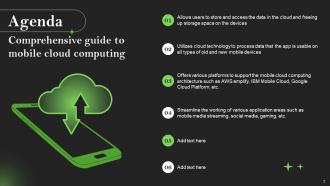
Slide 2: This slide is an Agenda slide. State your agendas here.
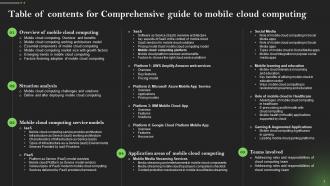
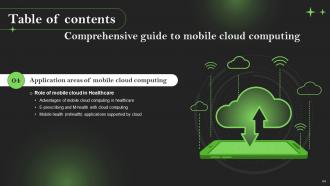
Slide 3: This slide shows a Table of Contents for the presentation.
Slide 4: This slide is an introductory slide.
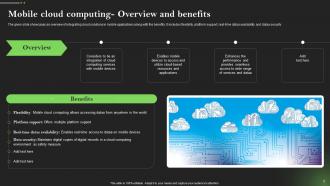
Slide 5: This slide showcases an overview of integrating cloud solutions in mobile applications along with the benefits.
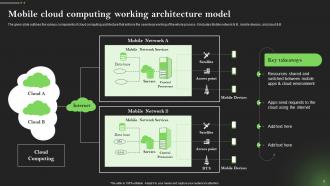
Slide 6: This slide outlines the various components of cloud computing architecture that enforce the seamless working of the whole process.
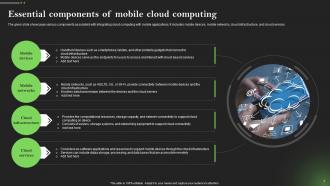
Slide 7: This slide shows various components associated with integrating cloud computing with mobile applications.
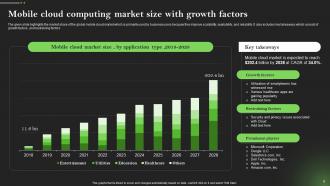
Slide 8: This slide highlights the market share of the global mobile cloud market which is primarily used by business users.
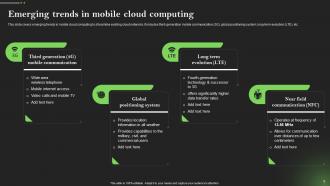
Slide 9: This slide covers emerging trends in mobile cloud computing to streamline existing cloud networks.
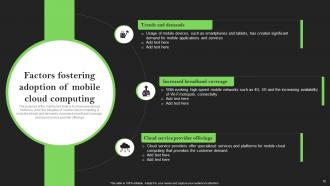
Slide 10: This slide mentions various factors to drive the adoption of mobile cloud computing.
Slide 11: This slide is an introductory slide.
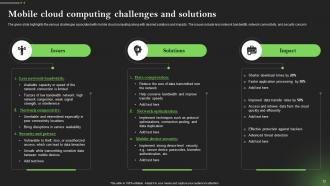
Slide 12: This slide illustrates the various challenges associated with mobile cloud computing along with desired solutions and impacts.
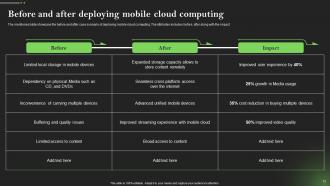
Slide 13: This slide caters to the before and after case scenario of deploying mobile cloud computing.
Slide 14: This slide is an introductory slide.
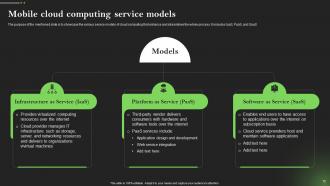
Slide 15: This slide contains the various service models of cloud computing that enhance and streamlines the whole process.
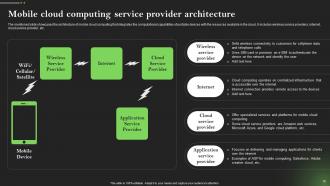
Slide 16: This slide depicts the architecture of mobile cloud computing that integrates the computational capabilities of portable devices.
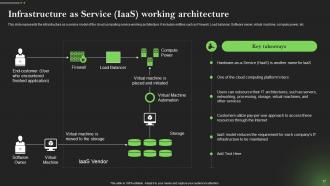
Slide 17: This slide represents the infrastructure as a service model of the cloud computing service working architecture.
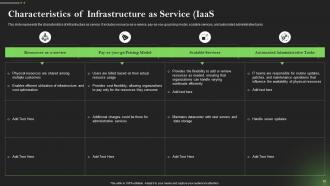
Slide 18: This slide focuses on the characteristics of infrastructure as service.
Slide 19: This slide is an introductory slide.
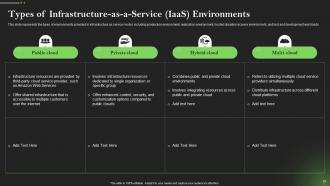
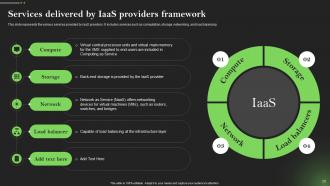
Slide 20: This slide entails the various services provided by IaaS providers.
Slide 21: This slide is an introductory slide.
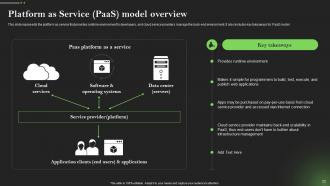
Slide 22: This slide showcases the platform as service that provides runtime environment to developers, and cloud service providers.
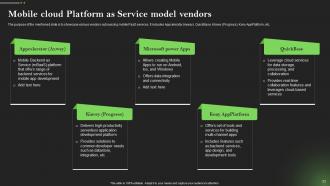
Slide 23: This slide puts various vendors outsourcing mobile PaaS services.
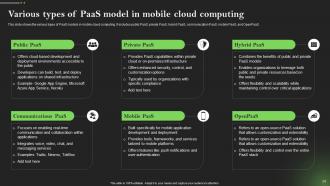
Slide 24: This slide introduces the various types of PaaS models in mobile cloud computing.
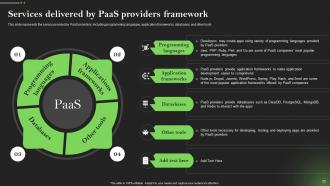
Slide 25: This slide represents the service provided by PaaS providers.
Slide 26: This slide is an introductory slide.
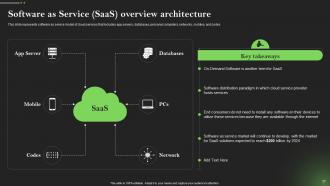
Slide 27: This slide demonstrates software as service model of cloud services.
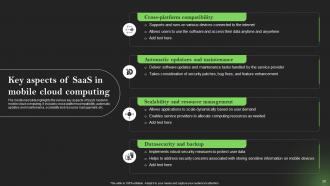
Slide 28: This slide illustrates the various key aspects of SaaS model in mobile cloud computing.
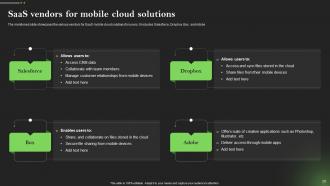
Slide 29: This slide portrays the various vendors for SaaS mobile cloud solutions for users.
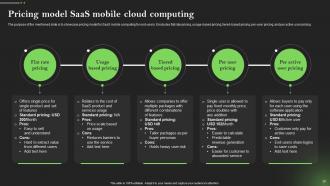
Slide 30: This slide marks the pricing model for SaaS mobile computing for end-users.
Slide 31: This slide is an introductory slide.
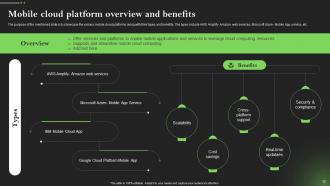
Slide 32: This slide chanenelises various mobile cloud platforms along with their types and benefits.
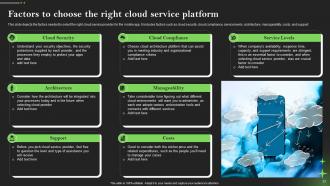
Slide 33: This slide depicts the factors needed to select the right cloud service provider for the mobile app.
Slide 34: This slide is an introductory slide.
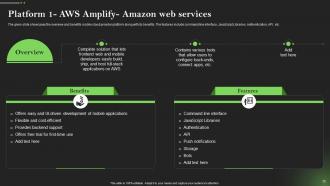
Slide 35: This slide outlines the overview and benefits mobile cloud provider platform along with its benefits.
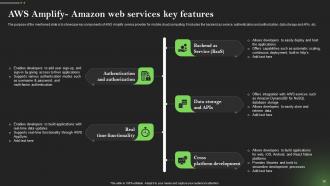
Slide 36: This slide showcases key components of AWS Amplify service provider for mobile cloud computing.
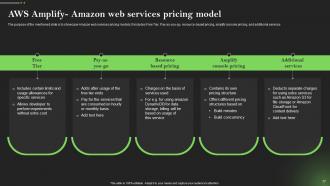
Slide 37: This slide represenyts Amazon web services pricing models.
Slide 38: This slide is an introductory slide.
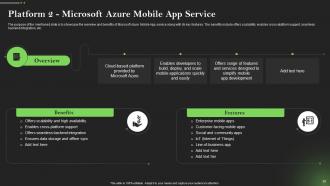
Slide 39: This slide outlines the overview and benefits of Microsoft Azure Mobile App service along with its key features.
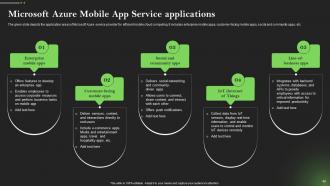
Slide 40: This slide depicts the application areas of Microsoft Azure service provider for efficient mobile cloud computing.
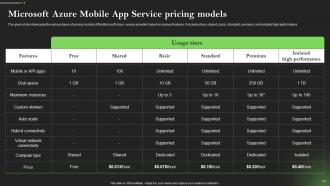
Slide 41: This slide showcases the various types of pricing models of the Microsoft Azure service provider based on various features.
Slide 42: This slide is an introductory slide.
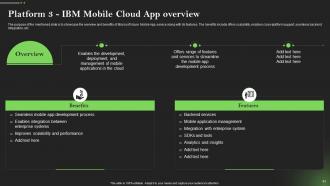
Slide 43: This slide showcases the overview and benefits of Microsoft Azure Mobile App service along with its features.
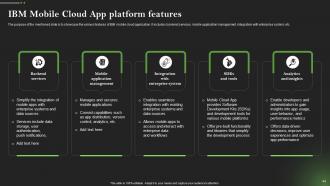
Slide 44: This slide shows the various features of IBM mobile cloud application.
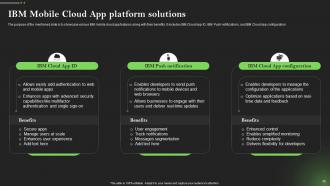
Slide 45: This slide marks various IBM mobile cloud app features along with their benefits.
Slide 46: This slide is an introductory slide.
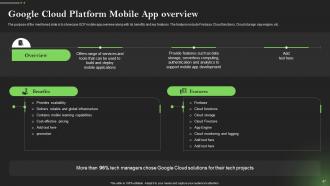
Slide 47: This slide puts GCP mobile app overview along with its benefits and key features.
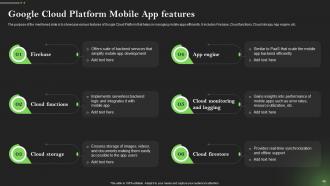
Slide 48: This slide illustrates various features of Google Cloud Platform that helps in managing mobile apps efficiently.
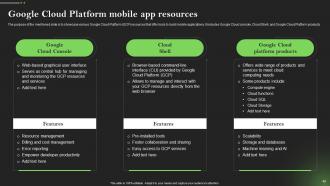
Slide 49: This slide highlights various Google Cloud Platform (GCP) resources that offer tools to build mobile applications.
Slide 50: This slide is an introductory slide.
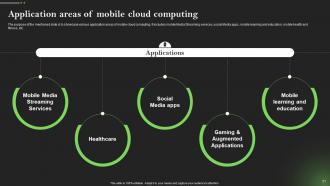
Slide 51: This slide entails various application areas of mobile cloud computing.
Slide 52: This slide is an introductory slide.
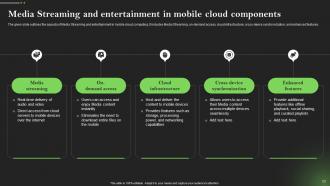
Slide 53: This slide outlines the aspects of Media Streaming and entertainment in mobile cloud computing.
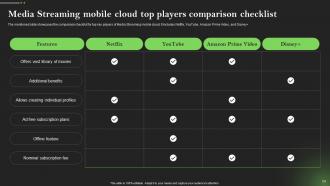
Slide 54: This slide showcases the comparison checklist for top key players of Media Streaming mobile cloud.
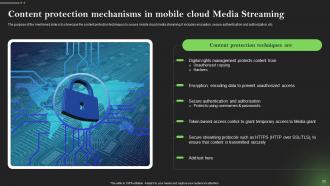
Slide 55: This slide marks the content protection techniques to secure mobile cloud media streaming.
Slide 56: This slide is an introductory slide.
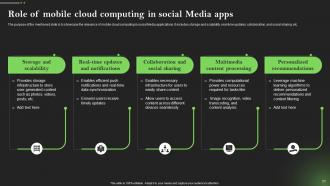
Slide 57: This slide depicts the relevance of mobile cloud computing in social Media applications.
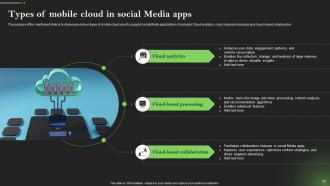
Slide 58: This slide demonstrates various types of mobile cloud used to support social Media applications.
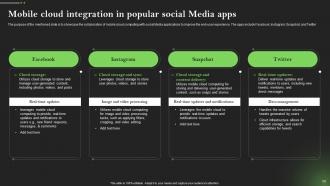
Slide 59: This slide puts the collaboration of mobile cloud computing with social Media applications to improve the end-user experience.
Slide 60: This slide is an introductory slide.
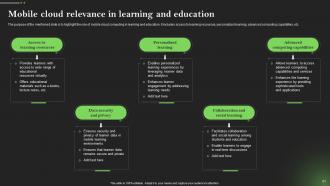
Slide 61: This slide highlights the role of mobile cloud computing in learning and education.
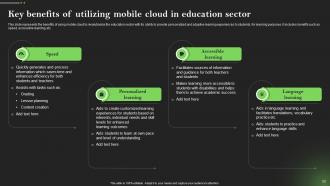
Slide 62: This slide represents the benefits of using mobile cloud to revolutionize the education sector.
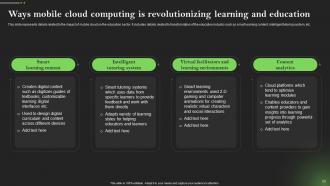
Slide 63: This slide gives details related to the impact of mobile cloud on the education sector.
Slide 64: This slide is an introductory slide.
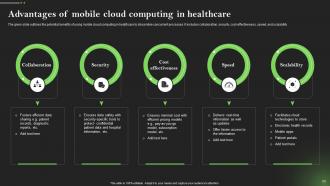
Slide 65: This slide outlines the potential benefits of using mobile cloud computing in healthcare to streamline concurrent processes.
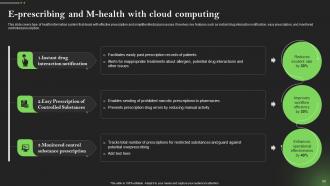
Slide 66: This slide covers type of health information system that deals with effective prescription and simplifies Medical processes.
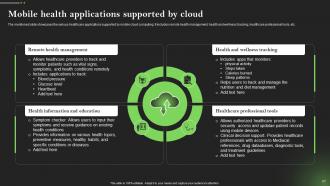
Slide 67: This slide includes the various healthcare applications supported by mobile cloud computing.
Slide 68: This slide is an introductory slide.
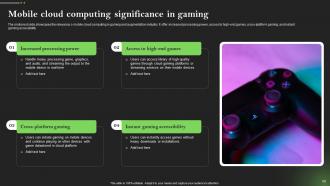
Slide 69: This slide illustrates the relevance o mobile cloud computing in gaming and augmentation industry.
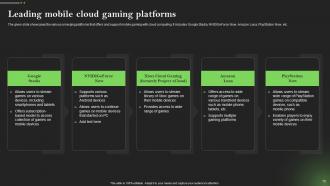
Slide 70: This slide puts the various emerging platforms that offers and support mobile gaming with cloud computing.
Slide 71: This slide is an introductory slide.
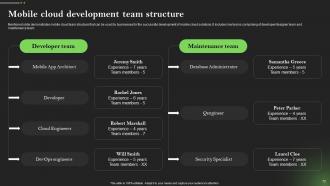
Slide 72: This slide demonstrates mobile cloud team structure that can be used by businesses for the successful development of mobile cloud solutions.
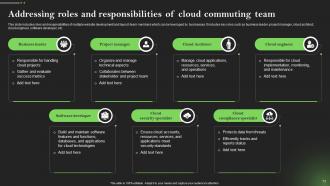
Slide 73: This slide includes roles and responsibilities of multiple website development and launch team members which can be leveraged by businesses.
Slide 74: This slide shows all the icons included in the presentation.
Slide 75: This slide is titled Additional Slides for moving forward.
Slide 76: This slide shows Post-It Notes. Post your important notes here.
Slide 77: This slide is Our Goal slide. State your firm's goals here.
Slide 78: This slide is a Timeline slide. Show data related to time intervals here.
Slide 79: This slide displays Mind Map with related imagery.
Slide 80: This slide depicts a Venn diagram with text boxes.
Slide 81: This slide presents a Roadmap with additional text boxes.
Slide 82: This slide is a Timeline slide. Show data related to time intervals here.
Slide 83: This slide provides a 30-60-90-day plan with text boxes.
Slide 84: This slide is a thank-you slide with address, contact numbers, and email address.
Comprehensive Guide To Mobile Cloud Computing Powerpoint Presentation Slides with all 92 slides:
Use our Comprehensive Guide To Mobile Cloud Computing Powerpoint Presentation Slides to effectively help you save your valuable time. They are readymade to fit into any presentation structure.
-
Comprehensive Guide To Mobile Cloud Computing Powerpoint Presentation Slides
-
Comprehensive Guide To Mobile Cloud Computing Powerpoint Presentation Slides
-
Comprehensive Guide To Mobile Cloud Computing Powerpoint Presentation Slides
-
Comprehensive Guide To Mobile Cloud Computing Powerpoint Presentation Slides
-
Comprehensive Guide To Mobile Cloud Computing Powerpoint Presentation Slides
-
Comprehensive Guide To Mobile Cloud Computing Powerpoint Presentation Slides
-
Comprehensive Guide To Mobile Cloud Computing Powerpoint Presentation Slides
-
Comprehensive Guide To Mobile Cloud Computing Powerpoint Presentation Slides
-
Comprehensive Guide To Mobile Cloud Computing Powerpoint Presentation Slides
-
Comprehensive Guide To Mobile Cloud Computing Powerpoint Presentation Slides
-
Comprehensive Guide To Mobile Cloud Computing Powerpoint Presentation Slides
-
Comprehensive Guide To Mobile Cloud Computing Powerpoint Presentation Slides
-
Comprehensive Guide To Mobile Cloud Computing Powerpoint Presentation Slides
-
Comprehensive Guide To Mobile Cloud Computing Powerpoint Presentation Slides
-
Comprehensive Guide To Mobile Cloud Computing Powerpoint Presentation Slides
-
Comprehensive Guide To Mobile Cloud Computing Powerpoint Presentation Slides
-
Comprehensive Guide To Mobile Cloud Computing Powerpoint Presentation Slides
-
Comprehensive Guide To Mobile Cloud Computing Powerpoint Presentation Slides
-
Comprehensive Guide To Mobile Cloud Computing Powerpoint Presentation Slides
-
Comprehensive Guide To Mobile Cloud Computing Powerpoint Presentation Slides
-
Comprehensive Guide To Mobile Cloud Computing Powerpoint Presentation Slides
-
Comprehensive Guide To Mobile Cloud Computing Powerpoint Presentation Slides
-
Comprehensive Guide To Mobile Cloud Computing Powerpoint Presentation Slides
-
Comprehensive Guide To Mobile Cloud Computing Powerpoint Presentation Slides
-
Comprehensive Guide To Mobile Cloud Computing Powerpoint Presentation Slides
-
Comprehensive Guide To Mobile Cloud Computing Powerpoint Presentation Slides
-
Comprehensive Guide To Mobile Cloud Computing Powerpoint Presentation Slides
-
Comprehensive Guide To Mobile Cloud Computing Powerpoint Presentation Slides
-
Comprehensive Guide To Mobile Cloud Computing Powerpoint Presentation Slides
-
Comprehensive Guide To Mobile Cloud Computing Powerpoint Presentation Slides
-
Comprehensive Guide To Mobile Cloud Computing Powerpoint Presentation Slides
-
Comprehensive Guide To Mobile Cloud Computing Powerpoint Presentation Slides
-
Comprehensive Guide To Mobile Cloud Computing Powerpoint Presentation Slides
-
Comprehensive Guide To Mobile Cloud Computing Powerpoint Presentation Slides
-
Comprehensive Guide To Mobile Cloud Computing Powerpoint Presentation Slides
-
Comprehensive Guide To Mobile Cloud Computing Powerpoint Presentation Slides
-
Comprehensive Guide To Mobile Cloud Computing Powerpoint Presentation Slides
-
Comprehensive Guide To Mobile Cloud Computing Powerpoint Presentation Slides
-
Comprehensive Guide To Mobile Cloud Computing Powerpoint Presentation Slides
-
Comprehensive Guide To Mobile Cloud Computing Powerpoint Presentation Slides
-
Comprehensive Guide To Mobile Cloud Computing Powerpoint Presentation Slides
-
Comprehensive Guide To Mobile Cloud Computing Powerpoint Presentation Slides
-
Comprehensive Guide To Mobile Cloud Computing Powerpoint Presentation Slides
-
Comprehensive Guide To Mobile Cloud Computing Powerpoint Presentation Slides
-
Comprehensive Guide To Mobile Cloud Computing Powerpoint Presentation Slides
-
Comprehensive Guide To Mobile Cloud Computing Powerpoint Presentation Slides
-
Comprehensive Guide To Mobile Cloud Computing Powerpoint Presentation Slides
-
Comprehensive Guide To Mobile Cloud Computing Powerpoint Presentation Slides
-
Comprehensive Guide To Mobile Cloud Computing Powerpoint Presentation Slides
-
Comprehensive Guide To Mobile Cloud Computing Powerpoint Presentation Slides
-
Comprehensive Guide To Mobile Cloud Computing Powerpoint Presentation Slides
-
Comprehensive Guide To Mobile Cloud Computing Powerpoint Presentation Slides
-
Comprehensive Guide To Mobile Cloud Computing Powerpoint Presentation Slides
-
Comprehensive Guide To Mobile Cloud Computing Powerpoint Presentation Slides
-
Comprehensive Guide To Mobile Cloud Computing Powerpoint Presentation Slides
-
Comprehensive Guide To Mobile Cloud Computing Powerpoint Presentation Slides
-
Comprehensive Guide To Mobile Cloud Computing Powerpoint Presentation Slides
-
Comprehensive Guide To Mobile Cloud Computing Powerpoint Presentation Slides
-
Comprehensive Guide To Mobile Cloud Computing Powerpoint Presentation Slides
-
Comprehensive Guide To Mobile Cloud Computing Powerpoint Presentation Slides
-
Comprehensive Guide To Mobile Cloud Computing Powerpoint Presentation Slides
-
Comprehensive Guide To Mobile Cloud Computing Powerpoint Presentation Slides
-
Comprehensive Guide To Mobile Cloud Computing Powerpoint Presentation Slides
-
Comprehensive Guide To Mobile Cloud Computing Powerpoint Presentation Slides
-
Comprehensive Guide To Mobile Cloud Computing Powerpoint Presentation Slides
-
Comprehensive Guide To Mobile Cloud Computing Powerpoint Presentation Slides
-
Comprehensive Guide To Mobile Cloud Computing Powerpoint Presentation Slides
-
Comprehensive Guide To Mobile Cloud Computing Powerpoint Presentation Slides
-
Comprehensive Guide To Mobile Cloud Computing Powerpoint Presentation Slides
-
Comprehensive Guide To Mobile Cloud Computing Powerpoint Presentation Slides
-
Comprehensive Guide To Mobile Cloud Computing Powerpoint Presentation Slides
-
Comprehensive Guide To Mobile Cloud Computing Powerpoint Presentation Slides
-
Comprehensive Guide To Mobile Cloud Computing Powerpoint Presentation Slides
-
Comprehensive Guide To Mobile Cloud Computing Powerpoint Presentation Slides
-
Comprehensive Guide To Mobile Cloud Computing Powerpoint Presentation Slides
-
Comprehensive Guide To Mobile Cloud Computing Powerpoint Presentation Slides
-
Comprehensive Guide To Mobile Cloud Computing Powerpoint Presentation Slides
-
Comprehensive Guide To Mobile Cloud Computing Powerpoint Presentation Slides
-
Comprehensive Guide To Mobile Cloud Computing Powerpoint Presentation Slides
-
Comprehensive Guide To Mobile Cloud Computing Powerpoint Presentation Slides
-
Comprehensive Guide To Mobile Cloud Computing Powerpoint Presentation Slides
-
Comprehensive Guide To Mobile Cloud Computing Powerpoint Presentation Slides
-
Comprehensive Guide To Mobile Cloud Computing Powerpoint Presentation Slides
-
Comprehensive Guide To Mobile Cloud Computing Powerpoint Presentation Slides
-

Comprehensive Guide To Mobile Cloud Computing Powerpoint Presentation Slides
-

Comprehensive Guide To Mobile Cloud Computing Powerpoint Presentation Slides
-

Comprehensive Guide To Mobile Cloud Computing Powerpoint Presentation Slides
-

Comprehensive Guide To Mobile Cloud Computing Powerpoint Presentation Slides
-

Comprehensive Guide To Mobile Cloud Computing Powerpoint Presentation Slides
-

Comprehensive Guide To Mobile Cloud Computing Powerpoint Presentation Slides
-

Comprehensive Guide To Mobile Cloud Computing Powerpoint Presentation Slides
-

Comprehensive Guide To Mobile Cloud Computing Powerpoint Presentation Slides
FAQs for Comprehensive Guide To Mobile Cloud Computing
Honestly, the money savings alone make it worth it - no more dropping cash on hardware you might not even need. Your team can grab data from anywhere, which is clutch if people work remotely or you've got field crews. Security's probably gonna be better too since these cloud companies have whole departments obsessing over that stuff (way more than your average IT person can handle). Updates and backups just happen automatically. I'd say try it with just one app first though - see how it goes before you go all in.
So basically your phone sends the heavy lifting to powerful servers instead of trying to do everything locally. Apps can tap into way more storage and processing power without killing your battery. Everything syncs across your devices too, which is honestly pretty sweet when it actually works. Users get features their phone could never handle alone - like real-time AI stuff or tons of file storage. The trick is making it invisible though. People shouldn't even realize you're using cloud tech. They'll just notice their apps don't suck anymore.
Honestly, the biggest pain points are data getting intercepted when it's moving around, crappy device security, and not knowing exactly where your stuff ends up in the cloud. Mobile devices are basically security nightmares - people use "password123" and connect to sketchy airport WiFi all the time. Strong encryption helps a ton for data that's moving or stored. Multi-factor authentication is clutch too. Pick cloud providers with decent compliance certs, and definitely set up mobile device policies. Oh, and train your users on basic security stuff because they'll click on anything. I'd start with encryption and MFA first - biggest impact for the effort.
Honestly, mobile cloud stuff is gonna be slower than regular cloud because you're stuck with cellular networks instead of those fast wired connections. Real-time apps and heavy processing? Yeah, you'll definitely feel the lag. Plus your battery gets drained way faster since it's constantly chatting with the network - super frustrating when you need to actually get stuff done. 5G is helping close that gap though, which is nice. For your apps, try caching the important data locally and use async processing when you can. Makes a huge difference in how snappy everything feels.
So edge computing is pretty cool - it puts processing power way closer to your phone instead of sending everything to some server farm across the country. Your data gets handled at nearby spots like cell towers. Gaming and video calls benefit the most since lag literally kills the experience. Peak hours aren't as brutal either because the workload spreads out instead of crushing one central location. Honestly, when you're building your next mobile app, just think about what stuff actually needs the full cloud treatment versus what could work fine at the edge.
So basically you're shifting the heavy lifting to cloud servers instead of making your phone do all the work. Your app stays light and fast while the real processing happens remotely with way more computing power than your device could handle. Raw data gets sent up, crunched in real-time, then results ping back super quick. Honestly, it's pretty clever - you get enterprise-level analytics without killing your battery or making your phone sluggish. I'd start by figuring out what's currently bogging down your app the most.
So you'll want to go offline-first - cache the important stuff locally and sync smartly. Progressive loading helps too. APIs should be lightweight with pagination because nobody has patience for slow loads these days. CDNs are your friend for static content, and edge computing cuts down latency if you can swing it. Token-based auth is the way to go, plus encrypt everything. Honestly, I'd start by figuring out what absolutely has to work offline first. Then build your cloud stuff around that. Oh, and don't forget solid error handling when the network craps out - it always does at the worst times.
GDPR and CCPA totally mess with your mobile app strategy - you can't just throw everything on the cheapest cloud server anymore. Now you've got to worry about where data actually lives, getting proper user consent, and having breach notifications ready to go. Honestly, the whole thing seems overwhelming at first. But here's what worked for me: map out exactly what user data you're collecting and where it goes. That's your starting point. Then build in privacy controls and encrypt everything. The documentation part is boring but you'll thank yourself later when audits come around.
Dude, 5G is gonna be insane for mobile apps. The latency drops to like milliseconds, so cloud processing becomes instant basically. Your phone can handle crazy AR stuff, stream HD video without buffering, run AI tasks - all without killing your battery since the heavy lifting happens in the cloud. Honestly, the connection will be so good you won't even notice if something's running locally or remotely. If you're working on anything with real-time features or graphics-heavy stuff, now's the time to start planning how you'd use this. Game changer.
So basically with mobile cloud computing, your team can grab all their work stuff from anywhere - just needs internet. Files and apps sync instantly across whatever device you're using. Real-time document editing works great, plus video calls and you can literally start something on your laptop then finish it on your phone later. Honestly think it's pretty clutch for remote teams. The cloud does all the heavy lifting too, so you don't need fancy expensive computers or anything. Just make sure everyone's got decent wifi and you've figured out how you want to handle file sharing and security stuff.
Dude, mobile cloud computing is literally everywhere now. Healthcare apps let doctors pull up patient files instantly on their phones. Netflix and Spotify obviously stream everything from the cloud so your phone doesn't explode from storage issues. Gaming companies run stuff like Fortnite partly in the cloud for better performance. Banks do it too - mobile deposits, fraud detection, all that. I honestly can't think of a major app that doesn't use cloud computing somehow. Oh, and if you're building something, figure out what heavy processes you can move off the device first. That's usually the biggest win.
Dude, 5G is finally getting real and it's making everything lightning fast. Edge computing is huge too - basically processing happens right near your device instead of some distant server. AI's getting baked into almost every app now, which is pretty cool but also kinda creepy if you think about it. Companies are going serverless like crazy, so less infrastructure headaches. Multi-cloud setups are getting way better too. But here's the thing - when all this stuff combines, we're gonna see insane AR/VR experiences on phones. Seriously, start messing around with edge computing now.
Start with standardized APIs and consistent data formats - that's your foundation. OAuth 2.0 is clutch for authentication because security nightmares will slow you down later. I'd go with microservices so components don't break each other when something inevitably goes wrong. Build in solid error handling and offline sync since mobile connections are trash half the time. Honestly, testing on different devices early saves so much headache. Different network conditions too. Oh, and don't try to do everything at once - pick one app-to-cloud integration first, work out the bugs, then scale up from there.
Honestly, mobile cloud computing could save you a ton upfront - no need to drop serious cash on servers and all that IT stuff. You'll just pay monthly subscription fees instead, which is way easier on cash flow. The cool part? You only pay for what you actually use. Sure, your monthly costs go up a bit, but you'll save big on IT maintenance and staff. Hardware replacements won't blindside you anymore either. Oh, and scaling up when business picks up is super easy - no massive investments required. I'd definitely run the numbers comparing your current IT spending to cloud options first though.
So there are three main types of mobile cloud services, and honestly it depends on how hands-on you want to be. IaaS gives you the bare bones - virtual servers, storage, all that infrastructure stuff. You're basically managing everything yourself (AWS EC2 is the classic example). Then there's PaaS which I actually prefer for most projects - they handle the infrastructure headaches while you focus on building your app. Google App Engine works like this. SaaS is when you just use ready-made mobile apps like Office 365. Way less work but obviously less customization. Pick whatever matches your comfort level with tech stuff.
-
PowerPoint for this mobile cloud computing application models are great
-
SlideTeam, Please don’t stop sharing discount coupons! I love your occasional discounts and tend to buy your products around that corner.
-
SlideTeam is very efficient when it comes to saving time. I am happy that I chose them for my presentation.