


Diapositivas de presentación de PowerPoint sobre seguridad informática






Try Before you Buy Download Free Sample Product
 Impress Your
 Audience
 100%
100% Editable
 Save Hours
 of Time


Siga importantes consejos de seguridad cibernética para proteger sus sistemas informáticos contra robos o daños utilizando las diapositivas de presentación de PowerPoint sobre seguridad informática listas para el contenido. Esta plataforma de presentación de PowerPoint de seguridad informática lista para usar le permite usar sus sistemas informáticos mientras los mantiene a salvo de daños. Proporcionar confidencialidad, integridad, disponibilidad y autenticación a los componentes de los sistemas informáticos, que incluyen hardware, software y firmware. Obtenga acceso a la presentación de diapositivas de PowerPoint sobre seguridad informática para todo tipo de problemas de seguridad cibernética. Toda esta baraja es personalizable. Puede personalizar fácilmente las plantillas según sus necesidades. Cambie el color, el texto, el icono y el tamaño de fuente según sus necesidades. Agregue o elimine el contenido, si es necesario. Evite que sus sistemas informáticos roben datos, caigan, cuentas sociales falsas, imágenes pornográficas, etc. Obtenga acceso a las plantillas PPT de seguridad cibernética para salvar sus sistemas de tales daños. Ponga fin a un crimen cibernético con la ayuda de la presentación de PowerPoint sobre seguridad informática de TI. Los administradores de TI pueden obtener acceso a este PPT diseñado profesionalmente para su uso. Nuestras diapositivas de presentación de PowerPoint sobre seguridad informática fomentan un desarrollo excelente. Permiten que sus ideas nazcan.
People who downloaded this PowerPoint presentation also viewed the following :
Contenido de esta presentación de Powerpoint
Diapositiva 1 : esta diapositiva presenta la seguridad informática con imágenes. Agregue el nombre de su empresa y continúe.
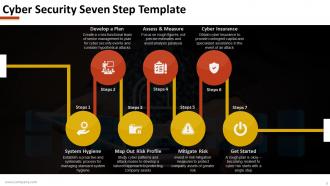
Diapositiva 2 : Esta diapositiva presenta la plantilla de siete pasos de seguridad cibernética. Estos pasos son: Higiene del sistema, Desarrollar un plan, Mapear el perfil de riesgo, Evaluar y medir, Mitigar el riesgo, Ciberseguro, Comenzar.
Diapositiva 3 : Esta diapositiva presenta la Plantilla 1 de seguridad cibernética con cuadros de texto.
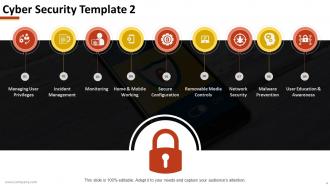
Diapositiva 4 : Esta diapositiva muestra la Plantilla de seguridad cibernética 2 con las siguientes características: Administración de privilegios de usuario, Trabajo en el hogar y móvil, Configuración segura, Monitoreo, Controles de medios extraíbles, Seguridad de red, Educación y conciencia del usuario, Administración de incidentes, Prevención de malware.
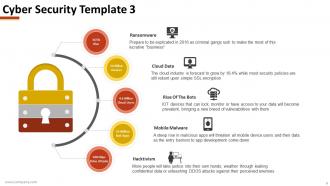
Diapositiva 5 : Esta es la presentación de diapositivas de la plantilla 3 de seguridad cibernética: ransomware, datos en la nube, Rise Of The Bots, malware móvil, hacktivismo.
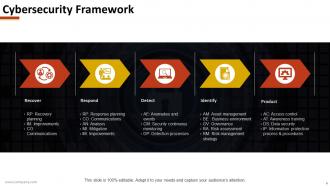
Diapositiva 6 : Esta diapositiva muestra el marco de ciberseguridad con los siguientes pasos: recuperar, responder, detectar, identificar, producto.
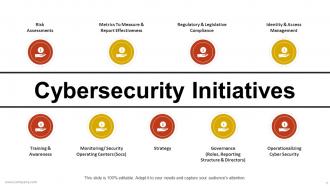
Diapositiva 7 : Esta diapositiva indica las iniciativas de ciberseguridad. Hemos enumerado algunos aquí: evaluaciones de riesgos, métricas para medir e informar la efectividad, cumplimiento normativo y legislativo, gestión de identidad y acceso, capacitación y concientización, centros operativos de monitoreo / seguridad (Socs), estrategia, seguridad cibernética operativa, gobernanza (roles, Estructura de informes y directores). Puede hacer uso de estos y agregar los suyos propios.
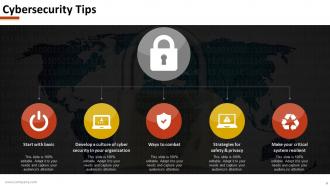
Diapositiva 8 : Esta diapositiva indica los Consejos de seguridad cibernética enumerados como: Comience con lo básico, Desarrolle una cultura de seguridad cibernética en su organización, Formas de combatir, Estrategias para la seguridad y privacidad, Haga que su sistema crítico sea resistente.
Diapositiva 9 : Esta es la diapositiva del icono de seguridad informática. Agregue sus propios iconos según sea necesario.
Diapositiva 10 : Esta es una diapositiva de imagen de La hora del café. Altere / modifique el contenido según sea necesario.
Diapositiva 11 : Esta diapositiva avanza a Cuadros y gráficos. Altere / modifique el contenido según sea necesario.
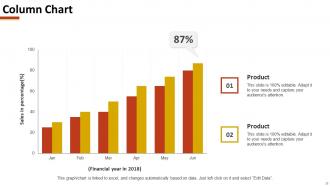
Diapositiva 12 : Esta diapositiva presenta un gráfico de columnas para mostrar el crecimiento del producto / empresa, comparación, etc.
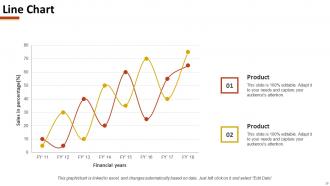
Diapositiva 13 : Esta diapositiva presenta un gráfico de líneas para mostrar el crecimiento de productos / empresas, comparaciones, etc.
Diapositiva 14 : esta diapositiva se titula Diapositivas adicionales para avanzar. Puede modificar el contenido según sus necesidades.
Diapositiva 15 : Esta es una diapositiva Acerca de nosotros. Indique aquí las especificaciones del equipo / empresa.
Diapositiva 16 : Esta diapositiva muestra nuestro equipo con nombre y designación para completar.
Diapositiva 17 : Esta es una diapositiva de agradecimiento con correo electrónico, número de dirección, número de calle, ciudad, estado y números de contacto.
Diapositivas de presentación de PowerPoint sobre seguridad informática con las 17 diapositivas:
Construya atracciones eternas con nuestras diapositivas de presentación de PowerPoint sobre seguridad informática. La gente se sentirá atraída por su pensamiento.



FAQs for Computer security
Ransomware's the worst one right now - it'll literally lock up everything until you pay. Phishing emails are everywhere too, trying to steal logins or get people to click sketchy links. Then you've got regular malware, data breaches, insider threats... oh and DDoS attacks that just kill your website. Honestly though? Most of this stuff works because someone messes up, not because hackers are geniuses. Your team needs training on spotting this crap, and don't forget to actually update your software when those annoying notifications pop up.
Honestly, ditch those boring hour-long training sessions - nobody's paying attention anyway. Break it into 15-20 minute chunks monthly and make it actually relevant to what your team deals with. Instead of generic phishing examples, focus on real threats hitting your industry. Run fake phishing tests but here's the thing - reward people who report sketchy emails rather than shaming the ones who click. Leadership needs to visibly participate too, otherwise employees think it's just another box to check. Track the stuff that matters: are people actually reporting incidents? Are they using security tools? Behavior change beats completion rates every time.
So encryption is like scrambling your data into gibberish that only you can unscramble. Picture locking your stuff in a safe - even if someone steals it, they can't open it without your combo. When hackers breach a system, encrypted files just look like random nonsense to them. You'll want something strong like AES-256 encryption. Oh, and definitely keep your decryption keys stored somewhere totally separate from the encrypted data. I learned that one the hard way! It's honestly saved my butt more times than I can count.
So firewalls are basically like having a bouncer for your network - they check every piece of data trying to get in or out. You set up rules for what's allowed through and what gets blocked. Pretty much like that club bouncer checking IDs, but way more reliable and won't let random people slip by because they "know someone." The trick is configuring it right so you're actually protected but can still access the stuff you need for work. Otherwise you'll just end up frustrated when legitimate apps get blocked.
Go for at least 12 characters mixing uppercase, lowercase, numbers, and symbols. Passphrases work great - something like "Coffee!Tastes4Better" beats random nonsense you'll never remember. Don't recycle passwords, especially for banking or work stuff. Password managers are total game-changers here, honestly. They create strong passwords and store everything so you don't have to. Skip the obvious personal details like birthdays. Oh, and turn on two-factor authentication wherever you can - it's annoying but worth it. Start with your most critical accounts first, then tackle the rest.
Train your people to spot those sketchy phishing emails - you know, the "urgent payment required" nonsense. Multi-factor authentication is a lifesaver too. Software updates are boring but do them anyway. Email filters help catch the obvious stuff. Here's the thing though - people will mess up no matter what, so don't make them scared to report weird emails. Actually had a coworker who clicked on something last month and freaked out. Having a response plan ready saved us major headaches when it inevitably happens.
Honestly, antivirus is the old-school term - it mainly caught traditional viruses back in the day. Anti-malware is way broader, covering ransomware, spyware, trojans, all that nasty stuff. Most antivirus programs now include anti-malware features anyway, so the whole distinction is kinda messy. Anti-malware is usually better at spotting newer threats that slip through. I'd skip anything that just says "antivirus" and look for something that specifically mentions comprehensive malware protection instead. Way safer bet.
Okay so first thing - map out where all your data goes and document everything because auditors are obsessed with paper trails. Only collect what you actually need, get real consent (not those sneaky pre-checked boxes), and set up processes for when people want their data deleted or whatever. Obviously you need encryption and proper access controls. Here's what most people miss though: this isn't a one-and-done thing. You'll need regular privacy assessments and someone on your team who genuinely gets this stuff - like a Data Protection Officer or at least a point person. Also train everyone on data handling because Karen from accounting will definitely mess something up otherwise.
Okay so first things first - turn on multi-factor authentication everywhere, like seriously everywhere. Most data breaches happen because someone had access they shouldn't have (which is honestly pretty terrifying when you think about it). You'll want to encrypt everything - both when it's moving around and when it's just sitting there. Set up proper access controls so people can only see what they actually need for their job. Oh and do an access audit this week if you haven't already - you'd be surprised how many old accounts are still floating around. Keep your APIs locked down tight too.
Ugh, data breaches are brutal for trust. Once customers' info gets compromised, they're like "nope, never again" - and can you really blame them? Even perfect damage control won't save half your customer base from bailing. Social media makes it worse because bad news travels at light speed now. The whole mess follows your brand around for years too. Honestly, I've seen companies spend 10x more trying to win people back than they would've spent just locking things down properly in the first place. Prevention beats cleanup every single time.
So zero-trust is basically "trust nobody, verify everybody" - sounds crazy but it works. Even if someone's already inside your network, you're still checking their credentials and devices before they touch anything. Makes it way harder for hackers to just wander around once they break in. Plus you get much better visibility into who's doing what (which honestly should've been standard years ago). The old approach of just protecting the network edge is pretty much dead. I'd start with your most sensitive stuff first and put tight access controls around that before expanding out.
Start with vulnerability scans - tools like Nessus or OpenVAS work great for regular network checks. Monthly scans are solid. Pen testing is your next move, bring in ethical hackers quarterly to catch what automated tools miss. Fair warning though, those scan alerts can be pretty overwhelming at first, but you gotta deal with them. Don't forget the human side either - social engineering tests and security audits of your training programs. People mess up way more than tech does, honestly. Oh, and audit your actual security policies too, not just the technical stuff.
Honestly, AI threat detection is probably the biggest thing right now - way better at catching weird patterns than old-school systems. Zero-trust is everywhere too, which makes sense since it assumes your whole network could be compromised instead of just protecting the edges. Quantum-resistant encryption is ramping up fast because quantum computers will eventually break everything we use now. There's also behavioral stuff that learns your habits and calls out suspicious activity. Zero-trust is probably your best bet to start with though, most practical for actual implementation. Way more doable than some of the other fancy options.
Honestly, get your incident response plan down on paper now - not just "we'll wing it" when shit hits the fan. Draft those breach notification templates while your brain isn't melting from stress. Someone needs to be your designated spokesperson so you don't have multiple people saying different things to customers. Cyber insurance is clutch if you don't have it yet. Practice tabletop scenarios with your team regularly. Keep legal contacts handy. Document your current security setup so you'll know what got hit. Trust me, future panicked you will thank present organized you.
Look, incident response is your backup plan for when (not if) your security stuff breaks down. It's a structured way to spot breaches fast, contain them, and get back to normal without losing your mind or your data. Without one? You're basically winging it during a crisis - which honestly never ends well. Takes longer to fix things, costs way more money, and you might lose critical info. The trick is having everything mapped out beforehand. That way when disaster strikes, everyone knows their role instead of running around like headless chickens.
No Reviews