

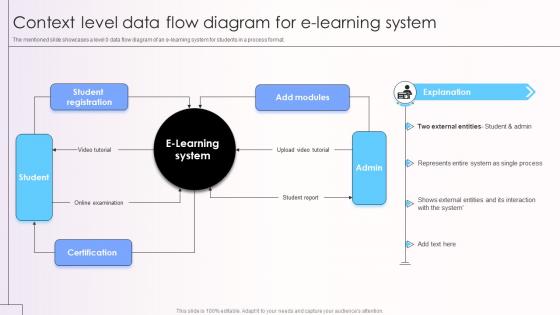
Context Level Data Flow Diagram For E Learning System




Try Before you Buy Download Free Sample Product
 Impress Your
 Audience
 100%
100% Editable
 Save Hours
 of Time


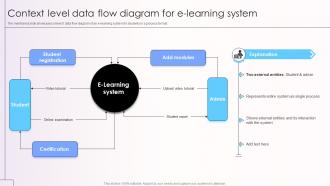
The mentioned slide showcases a level 0 data flow diagram of an e-learning system for students in a process format.
People who downloaded this PowerPoint presentation also viewed the following :
Context Level Data Flow Diagram For E Learning System with all 9 slides:
Use our Context Level Data Flow Diagram For E Learning System to effectively help you save your valuable time. They are readymade to fit into any presentation structure.








FAQs for Context Level Data Flow Diagram For
Honestly, e-learning is pretty solid for three big reasons. Students can jump in whenever they want, 24/7 from wherever - total lifesaver for people juggling work or kids. You'll save a ton on printing, classroom rentals, all that overhead stuff. The data side is actually really cool though - you can see exactly who's stuck on what topics and track completion rates in real time. Oh, and you can scale to like hundreds of students without hiring anyone new. I'd say just try it with one course first to figure out what clicks with your crowd.
Honestly, gamification works because it tricks your brain into thinking learning is fun. Points, badges, leaderboards - that stuff taps into our competitive side and makes studying feel more like gaming. Your completion rates will go through the roof since people actually want to unlock achievements and beat their scores. The social aspect is huge too when learners can compete with each other. I've seen it work so well, even my laziest students get hooked on progress bars (weird but true). Just add some basic achievement tracking to your course. Doesn't have to be fancy - simple gamification can totally transform how motivated people stay.
Honestly? Start with a good LMS - Moodle or Canvas work great. Zoom's pretty much essential for live stuff. Cloud storage is huge too, Google Drive or AWS if you're feeling fancy. Most people learn on their phones now, so make sure everything works on mobile. Oh, and interactive bits like H5P quizzes keep people actually engaged (boring courses are the worst). Analytics help you see who's struggling. But here's the thing - don't just grab every cool new tool you see. Figure out what your learners actually want first, then pick tech that fits your budget. Way better approach than going crazy with features nobody uses.
Hey! So first thing - survey your learners about what they actually need, then focus on the stuff that'll help the most people. Mix up your content formats with videos, audio, text, interactive bits. That way visual, auditory, and kinesthetic learners aren't left hanging. Adaptive assessments are clutch - they adjust difficulty based on how someone's doing. Don't forget pacing options too, since some people fly through material while others need more time. Oh and multilingual support plus accessibility features like screen reader compatibility. I've honestly seen engagement rates jump way up when you get this mix right.
Honestly, if people can't figure out how to use your e-learning platform, they'll just bail. Navigation needs to be dead simple - like, so intuitive that users don't even think about it. Make sure everything works smoothly on phones and tablets too. Bad UX is honestly worse than bad content sometimes because it kills motivation instantly. When students hit friction points, completion rates tank. I'd start by walking through the whole user experience yourself and note where you get annoyed or confused. Clear visual design matters way more than you'd think for keeping people engaged.
Honestly, analytics are a game changer - you finally stop guessing what's broken in your courses. I'd start with completion rates and time-on-task stuff, that usually shows the biggest problems right away. You can see exactly where students bail out or get stuck on certain modules. Once you dig into the data (and trust me, it gets addictive), you'll spot patterns in engagement and figure out when to deliver content for max impact. Then you can fix the weak spots, add help where it's needed most, and even customize learning paths. Way better than flying blind.
The biggest pain points are definitely tech stuff and time - like, way more time than you'd expect. Learning new platforms while rebuilding your whole curriculum is honestly brutal if you're not super tech-savvy. Students struggle too, which means more hand-holding on your end. Creating good digital content takes forever compared to regular lesson planning. Oh, and figuring out how to actually assess learning online? That's a whole other headache. You'll also need fresh ways to keep people engaged since staring at screens gets old fast. My advice? Test run just one course first - don't dive into the deep end right away.
So basically these e-learning platforms throw everything at you - videos, text, audio, interactive stuff. Visual people get their charts and diagrams, while others can just listen to lectures. The pacing thing is huge though - you're not stuck keeping up with everyone else. Most have quizzes and discussion boards too, which honestly some people love but I find kind of annoying. Your best bet is checking what formats they actually offer before you sign up. Some platforms are way better than others at giving you options.
Honestly, start with your login system - that's where most breaches happen. Get two-factor authentication set up ASAP. SSL encryption is non-negotiable for anything moving data around. Role-based access is huge too - like, why would a teacher need to see every student's financial aid info, you know? Store everything securely and have actual privacy policies that make sense. I'd also run security audits pretty regularly because hackers get creative. Oh, and make sure people understand what data you're collecting - transparency goes a long way with parents and students.
Check if your LMS already has mobile capabilities first - might save you tons of work. Most platforms like Moodle or Canvas have APIs you can connect to, or you could set up SSO so everything syncs automatically. The tricky part is making sure progress goes both ways between mobile and desktop. Push notifications honestly make a huge difference for keeping people engaged. Your IT team will probably need to help customize whatever framework you end up with. Oh, and make sure the content actually looks good on phones - I've seen too many mobile apps that are basically just terrible desktop versions squeezed onto a tiny screen.
Focus on three main things: specific learning goals, mixed-up content, and staying connected with students. Don't just say "they'll understand the topic" - get really concrete about what they should DO by the end. Videos work great, but throw in some interactive stuff and discussion boards too. Oh, and answer their questions fast - like within a day or two max. I'd also do regular check-ins so people don't just disappear halfway through. Honestly, the worst courses just dump a million PDFs and expect magic to happen. Build in some actual engagement instead.
Online platforms actually have some pretty solid collaboration stuff built in. Discussion boards, group workspaces, live chat - the usual suspects. Video breakout rooms are clutch for team projects. Most have peer review tools too, which is great because students can critique each other's work (less grading for you, honestly). The messaging features let them create study groups on their own. Oh, and turn on the group settings from day one - otherwise they'll just work alone the whole semester and miss out on connecting with classmates.
Yeah, e-learning is definitely changing classrooms but it's not wiping them out completely. Most teachers are mixing digital stuff with regular teaching now. Kids expect way more interactive content - like, sitting through boring lectures just doesn't cut it anymore. Teachers are becoming more like guides instead of just talking at students all day. The cool part is students can review basic material online, so classroom time gets used for actual discussions and hands-on work. Oh, and everyone wants personalized learning paths now. If you're thinking about trying this, don't go crazy - just pick one digital thing first and see how it goes.
Honestly, e-learning is a game changer for training stuff. Build your content once, then everyone can access it whenever they want - no more coordinating schedules or booking conference rooms. I've watched companies cut thousands in travel costs alone, which is pretty wild when you think about it. You'll get instant data on who's done what and how they're scoring too. Start small though - pick whatever training you're doing most often and turn that into your first digital program. Once that's working, you can tackle the rest. Way easier than trying to digitize everything at once.
Honestly, you've got to keep an eye on AI personalization - it's wild how it adapts to different learning styles now. Microlearning is everywhere too, which makes sense since everyone's crazy busy. VR and AR are starting to pop up more, though I'm still not 100% sold on how practical they are yet. Mobile-first design is basically mandatory at this point. Social learning features are getting people way more engaged than I expected. Oh, and blockchain for credentials is picking up steam. I'd mess around with at least one of these in your next project - probably start with the AI stuff since it's the most accessible right now.
-
Great templates that you can use in your next keynote or conference. They are perfect for quick and visually-engaging delivery.
-
This visual representation is stunning and easy to understand. I like how organized it is and informative it is.