


Crm vendor evaluation matrix ppt example





Try Before you Buy Download Free Sample Product
 Impress Your
 Audience
 100%
100% Editable
 Save Hours
 of Time


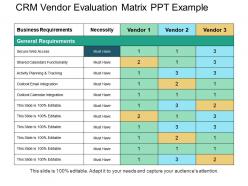
In the case, if you want to evaluate your vendor’s performance then use our CRM vendor evaluation matrix PPT image design. It will help in evaluating the performance framework of your business vendors. You can also use this vendor management PowerPoint layout to define the list of criteria for your CRM vendors on the basis of which their performance can be evaluated. Such as value of products, quality, quantity, price, delivery and more. Thus, analyze all your existing vendors with the above mentioned parameters. It can also be used to assess your business potential CRM vendors. This CRM evaluation matrix Presentation layout design also helps the management to take control of your business resource. You can even define the process of vendor’s approval which should route through your tem of business management. Explain its benefits for the business with this vendor selection matrix PowerPoint diagram image. Such as, it helps in improving your product quality. Start working over this PPT template now. Delve deep into the details of any investment with our Crm Vendor Evaluation Matrix Ppt Example. It helps you get intensely involved.
People who downloaded this PowerPoint presentation also viewed the following :
Crm vendor evaluation matrix ppt example with all 5 slides:
Handle internal disputes with our Crm Vendor Evaluation Matrix Ppt Example. Bring interdepartmental differences to an end.


FAQs for Crm vendor evaluation
Start with integration - does it work with what you already have? That's huge. User adoption is next because fancy features are useless if nobody wants to use the thing. Check the interface and mobile setup. Customization and reporting matter too, plus make sure it can grow with you. Oh, and don't skip the security stuff for your industry. I'd make a scoring sheet with all this and bring your actual users to demos. They'll catch weird quirks you won't notice from the backend.
Dude, seriously - check how well it plays with your current tools first. Your CRM needs to sync with email, accounting, marketing stuff, whatever you're already using. Otherwise you'll be copying data between systems all day and wanting to throw your laptop out the window. Look for pre-built connections to your existing apps, decent APIs if you need custom stuff. Oh, and test everything during the trial period! I learned that the hard way - don't wait until after you've signed the contract. Good integrations will literally save you hours every week.
Dude, scalability matters way more than people think. You'll hit a brick wall fast if your CRM can't grow with you - and switching systems mid-growth? Total disaster. I learned this the hard way at my last job. Pick something that handles at least 3x your current users and data without crazy price hikes. Performance tanks are real too once you scale up. Check if they work internationally if that's in your plans. Honestly, most people just look at what they need now, but you gotta think ahead or you'll regret it later.
Honestly, UX should be in your top 3 priorities when picking a CRM. Your team won't use it if it's a pain to navigate - I've watched companies blow serious money on feature-packed systems that just collect digital dust. Clean dashboards matter. Make sure the workflow makes sense and it works well on mobile since sales people are always running around. Here's what I'd do: bring actual users to the demo, not just IT guys. They'll spot issues right away. Also push for a trial period so you can test it with real work before signing anything.
Response times are huge - check if they do phone, chat, or just email. Also see what hours they're actually available, especially if you're in different time zones. Their knowledge base matters way more than some flashy support portal that looks impressive but is useless when you're stuck. I'd honestly test them out during your trial period to see if they're actually helpful or just give you the runaround. Does your plan include good support or do you have to pay extra? For bigger accounts, ask about dedicated managers. Training resources are a nice bonus too.
Ugh, pricing models are such a trap if you're not careful. Per-user sounds simple but costs explode when you scale - learned that one the hard way. Contact-based pricing? Great for tiny teams, brutal once your database grows. Tiered plans look appealing until you're stuck paying for random features you'll never touch. What actually matters is thinking ahead - like, what will this cost you in a year when your team doubles? I always tell people to run those numbers first because today's "great deal" can become tomorrow's budget nightmare real quick.
Look for CRMs that actually let you customize stuff - fields, workflows, dashboards, whatever matches how your team works. Pipeline stages are super important too. Don't get stuck with some cookie-cutter template that makes zero sense. Most decent platforms should handle custom data fields and automated assignments. User permissions matter more than you'd think - nobody wants notifications for random stuff they don't care about. Oh, and definitely test out the customization process during demos. Some of these platforms claim they're "flexible" but are actually a pain to set up.
Data security can totally make or break your CRM decision. Look for encryption, regular audits, and whatever compliance you need - GDPR, HIPAA, all that stuff. SOC 2 certification is clutch. I've watched companies pick something pretty but then panic when they realized it couldn't handle their regulations. Check their backup processes too - you don't want your data vanishing. Oh, and if you're dealing internationally, data residency matters more than you'd think. Make a security checklist first and stick to it, even if other shiny features try to distract you.
Honestly, start with whether people are actually using the damn thing - adoption rates, data quality, activity logging. A fancy CRM sitting empty is just expensive software. Business metrics matter more though: sales cycle times, conversion rates, customer retention. Pipeline accuracy is clutch. Revenue per rep tells the real story. Oh, and track time saved on boring admin stuff - that's what actually makes your team happy. Just make sure you measure everything before you launch, otherwise you'll never prove it was worth the money when your boss asks.
Reviews are honestly where you'll find the real dirt - way better than those fancy demos they show you. Look for patterns in complaints about customer service being trash or features that don't work like they promised. I always hit up G2 and Capterra, but LinkedIn is where people really go off about their software nightmares lol. Focus on recent stuff though, maybe last 6-12 months since companies do actually fix things sometimes. Reviews from similar businesses are clutch - they'll call out problems you'd probably run into too.
Oh man, you're gonna hate the data migration part - your old stuff is definitely messier than you think. Budget way more time for cleaning that up. People will resist the new system hard too, so start training early or you'll get pushback forever. Integration never works as smoothly as they promise either. Honestly, whatever timeline you're thinking? Double it. The downtime during switchover always sucks more than expected. At least the training investment pays off later when people aren't constantly asking how to do basic stuff.
Dude, mobile access is absolutely critical when you're picking a CRM. Your sales team can't be running back to the office every time they need to update a lead after a meeting - that's just insane. Support folks traveling? They need to pull up cases on the fly. Don't settle for some watered-down mobile version that only lets you view stuff. You want the full deal: editing, reports, real-time syncing. I learned this the hard way with our old system - half the features just didn't work on mobile and it was a nightmare. Make mobile a big part of how you score these vendors, especially if your people are always out and about.
First thing I'd do is check their SLA - 99.9% uptime minimum, anything less is sketchy. Don't just trust their promises though, ask for actual historical data. What's their disaster recovery look like? Do they have backup systems and redundant data centers? Here's what really matters: when stuff breaks (and it will), how fast do they fix it? Make sure they've got 24/7 support. Oh, and definitely ask about maintenance windows - some hosts are terrible about timing those. Get references from companies your size too. That'll give you the real story on whether they're actually reliable or just good at marketing.
Look at their roadmap to see if they're actually building stuff you'll need in a few years - AI automation, better integrations, whatever's on your list. Don't get sucked in by flashy features that sound cool but won't help your business. Stagnant roadmaps are huge red flags. You'll either outgrow the system or get stuck with old tech. Here's what I'd do: make them walk through their recent releases to prove they actually deliver. I've seen too many vendors promise the world and deliver nothing. Score higher if their future plans match where your company's going.
Honestly, training makes or breaks the whole thing. I've watched companies blow tons of money on fancy CRMs that nobody uses because the training sucked. People just go back to their old spreadsheets - it's maddening. You want vendors with different training options: videos, live sessions, actual documentation that doesn't suck. Role-specific stuff is huge too. Don't let them rush the onboarding timeline either. Ask about their success rates with user adoption. If they can't give you real numbers, that's... not great. The support better continue after launch because questions always come up later.
-
Good research work and creative work done on every template.
-
Top Quality presentations that are easily editable.