

Dashboard For Retail Store Inventory Management Process




Try Before you Buy Download Free Sample Product
 Impress Your
 Audience
 100%
100% Editable
 Save Hours
 of Time


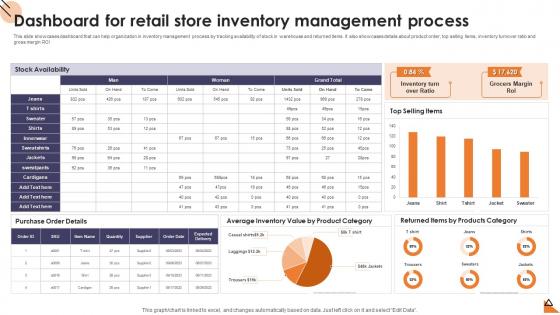
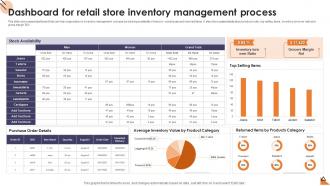
This slide showcases dashboard that can help organization in inventory management process by tracking availability of stock in warehouse and returned items. It also showcases details about product order, top selling items, inventory turnover ratio and gross margin ROI.
People who downloaded this PowerPoint presentation also viewed the following :
Dashboard For Retail Store Inventory Management Process with all 7 slides:
Use our Dashboard For Retail Store Inventory Management Process to effectively help you save your valuable time. They are readymade to fit into any presentation structure.






FAQs for Dashboard For Retail Store
Honestly, just focus on getting your most important metrics right up front - don't bury the good stuff. Make sure people can actually navigate without getting lost, and use colors that won't give anyone a headache (seriously, some of those rainbow dashboards are brutal). Keep things loading fast and let users filter down into the details when they need to. Oh, and this is huge - build it for whoever's actually using it. What an exec wants to see is totally different from what the ops team needs day-to-day. Start by figuring out what decisions they're trying to make, then work backwards from there.
Good dashboards are all about making users' lives easier. Use color and size to draw attention to the important stuff - basically let the data do the talking. Pick chart types that actually make sense (seriously, stop with the crazy pie charts). Bar charts work great for comparisons, line charts for trends over time. Keep things clean and consistent throughout. Here's what I'd do: figure out the top 3 questions your users always ask, then design everything around answering those right away. Less hunting, more "oh yeah, there it is." The goal is reducing brain work so people can spot insights faster.
Honestly, user feedback makes or breaks dashboards. I've watched so many pretty ones just sit there unused because nobody bothered asking users what they actually need. Talk to people first - figure out their daily grind and what questions they're trying to answer. Then keep checking in while you build it, otherwise you'll end up with something that looks great but solves the wrong problems. Oh, and don't forget to set up ways for them to give feedback after launch. Real usage always reveals stuff you didn't think of during planning.
So finance dashboards are all about that real-time stuff - trading data, risk exposure, market movements that literally change every second. Miss something and you're talking millions lost. Healthcare's totally different though. Patient outcomes, bed occupancy, clinical workflows - way more focused on longer trends rather than split-second calls. Honestly, the tech behind both is pretty similar, but the KPIs and how often you refresh data? Completely depends on what actually matters for success in each space. Finance needs instant updates, healthcare can breathe a little.
Honestly, just pick the stuff that actually matters to your bottom line - revenue, customer acquisition cost, lifetime value, conversion rates. Don't try cramming everything on one screen though, it gets messy real quick. Stick to maybe 5-7 metrics that your team looks at every day or week. Mix some forward-looking stuff (pipeline health) with backward-looking numbers (monthly revenue). Here's my rule: if a metric changes and nobody would do anything different, why's it even there? I see so many dashboards that are just... visual noise. Keep it simple and actionable.
So basically, interactive dashboards are way better than static ones because people can actually dig into the data themselves. You know how frustrating it is when you're looking at a report and can't click on anything? With filters and drill-downs, users feel like they're in control instead of just staring at charts. It's honestly like the difference between TV and gaming - one's obviously more engaging. Plus people can find what they actually need without getting overwhelmed by random data they don't care about. I'd start with simple stuff like basic filters, then add fancier features once people get the hang of it.
So Tableau's honestly your best bet if you want something that looks good without much effort - their stuff just works. Power BI's solid too, especially if you're already using Microsoft products. Looker Studio is free and decent for simpler projects. I'd probably sketch out what you want first though, like what's the main point you're trying to show? That helps narrow down which tool makes sense. If you're feeling ambitious, D3.js gives you crazy control but it's more work. Oh and don't sleep on just mocking things up in Figma first - saves time later.
Honestly, dashboards are game-changers for catching stuff as it happens. No more waiting around for those weekly reports that are already outdated by the time you see them. All your data gets pulled into one spot, so when something goes sideways, you're not frantically clicking through five different systems. Set up some alerts for the really critical numbers and you'll know right away if you're hitting your targets or if things are going off the rails. Oh, and don't go crazy adding every metric you can think of - that just creates noise. Stick with what actually helps you make decisions.
Don't cram everything onto one screen - that's the fastest way to confuse people. Start with 3-5 key questions your dashboard should answer, then stick to those. Skip the vanity metrics that look cool but don't help anyone make decisions. Your charts should be dead simple to read. If someone needs a tutorial, you've gone too far. I learned this the hard way on my first project - made this beautiful complex thing that nobody used. Poor visual hierarchy kills dashboards too. Users need to instantly spot what matters most. Less really is more here.
First thing - double-check your data sources are actually pulling from the right places. I'd set up automated checks that catch weird outliers or missing values before they mess up your reports. Trust me, our customer count "doubled" overnight once and I looked like an idiot until we found the duplicate table issue. Keep your dashboards on a regular refresh schedule (stale data is useless data). Document how you're calculating stuff so people can actually follow your logic later. Oh, and get someone else to review your main metrics monthly - you'll be amazed what errors you miss when you're too close to the work.
Monthly reviews are your friend here - seriously, those unused widgets multiply like rabbits if you don't stay on top of them. Test everything in staging first (learned that one the hard way). Different audiences need totally different views - execs want the 30,000-foot stuff while team leads need the nitty-gritty details. Set up alerts for wonky data because you'll catch issues way faster that way. Oh, and actually talk to people using the dashboard! Sounds obvious but most folks skip this step. The whole point is helping people make better decisions, so if it's not doing that, what's the point?
Honestly, colors are doing way more psychological heavy lifting than most people realize. Your users see red and immediately think "something's broken" before they even look at the actual numbers. Green feels like good news, blue seems trustworthy for boring metrics. But here's where it gets tricky - that red = bad thing doesn't work everywhere globally, so if you've got international users, you might be accidentally sending mixed signals. I'd definitely test how people react to the same data with different color schemes. Don't just go with whatever looks nice in your design system.
Honestly, audience makes or breaks a dashboard. Executives just want the big picture stuff they can glance at quickly - they're not diving deep into anything. But analysts? They want all the messy details they can slice and dice. Sales teams are obsessed with real-time numbers and those little trend arrows (seriously, they go crazy for those). Finance people are the opposite - they need rock-solid historical data with clear sources. I always ask stakeholders what specific decisions they're making first, then work backwards. Way easier than guessing what they actually need versus what they think they want.
Honestly, the biggest thing happening right now is AI-powered analytics - it's everywhere. Real-time data visualization too. What I love is that self-service tools finally let regular people build dashboards without bothering developers constantly. Everyone's checking metrics on mobile now, so mobile-first design is basically required. Oh, and interactive storytelling is getting huge - those guided insights that actually walk you through what the data means. Super helpful when you're drowning in charts. My take? Don't build another separate dashboard that'll just collect dust. Embed analytics directly into whatever tools your team already uses daily.
Think of your dashboard like telling a story to someone who's never seen the data before. Start with a headline that hooks them - pose a question or drop your biggest insight right up front. Then arrange your charts so they flow logically, like you're building an argument piece by piece. Honestly, the biggest mistake I see is cramming everything onto one page. Break it up! Use multiple screens that naturally lead from "here's the problem" to "here's what we should do." Add little annotations to call out the surprising stuff - those moments where the data takes an unexpected turn. Each visualization should back up your main point, otherwise why include it?
-
Nothing beats the well-formatted and professionally designed templates offered. Kudos to SlideTeam for their amazing collection of PPT slides.
-
Qualitative and comprehensive slides.