

KPI Dashboard For Retail Business Efficient Management Retail Store Operations




Try Before you Buy Download Free Sample Product
 Impress Your
 Audience
 100%
100% Editable
 Save Hours
 of Time


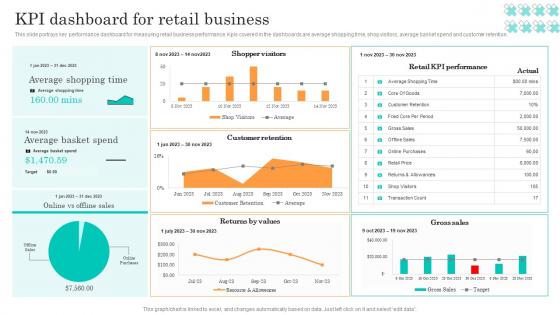
This slide portrays key performance dashboard for measuring retail business performance. Kpis covered in the dashboards are average shopping time, shop visitors, average basket spend and customer retention.
People who downloaded this PowerPoint presentation also viewed the following :
KPI Dashboard For Retail Business Efficient Management Retail Store Operations with all 7 slides:
Use our KPI Dashboard For Retail Business Efficient Management Retail Store Operations to effectively help you save your valuable time. They are readymade to fit into any presentation structure.







FAQs for KPI Dashboard For Retail Business Efficient Management
Honestly, it comes down to what you're actually trying to track day-to-day. Revenue stuff is obvious - conversion rates, monthly recurring revenue if that applies to you. Then you've got your operational things like how efficiently processes are running, resource usage, that sort of thing. Customer metrics matter too - satisfaction scores, how many people stick around. Oh, and don't forget the money side: profit margins, ROI. I'd keep it to maybe 5-7 KPIs tops because otherwise you'll just get decision paralysis staring at a cluttered dashboard. Think about what questions you need answered each morning, then pick the numbers that'll actually help you make those calls.
Most people mess this up by setting KPIs once and never touching them again - I've definitely been guilty of this too. You've gotta do quarterly check-ins where you honestly ask "do these metrics still matter?" Business priorities change constantly, so your dashboard should follow. Get rid of the dead weight metrics. Add new ones that actually reflect what you're focusing on now. Having other people in these reviews helps tons since they'll catch stuff you're blind to. Treat it like a living document, not some report you built six months ago and forgot about.
Put your biggest KPIs top-left - that's where people look first. Group similar stuff together and make important numbers bigger. Don't cram everything in like you're playing Tetris lol. Use white space! Colors should actually mean something (red = bad, green = good, you know the drill). Make it mobile-friendly because everyone's gonna check it on their phone anyway. Test with real users first though - I learned this the hard way when I thought my layout was brilliant but confused literally everyone else.
Monthly updates are the bare minimum, but weekly's way better if you can pull it off. Depends on your business though - tracking daily sales with month-old data is pretty pointless. I'd skip quarterly unless you're dealing with those really slow-moving strategic metrics. Match your dashboard refresh to when you actually make decisions. Like if your team meets every Tuesday to review performance, you need Tuesday-fresh numbers. Honestly, start monthly and see how often people bug you for newer data. That'll tell you everything.
Tableau and Power BI are probably your best bet if you want something robust - they're pricey but handle complex stuff well. Google Data Studio is free and works great with Analytics data, which is nice. I'll be honest, Excel still gets the job done for quick dashboards when I'm being lazy. Power BI makes sense if you're already using Microsoft everything. There's also Klipfolio and Geckoboard but those are more niche. My advice? Check what licenses your company already pays for first, then see if you actually need to upgrade from there.
Honestly, visualizing your KPIs is a game changer - your brain just processes charts way faster than endless spreadsheet rows. Heat maps instantly show you performance patterns, while sparklines reveal momentum (love those for quick trend checks). Color-coding highlights outliers immediately, and progress bars give you that satisfying visual feedback when you're hitting goals. Don't just throw everything into bar charts though - match the visual to what you actually need. Quick gut check? Use gauges. Trend analysis over time? Go with line charts. Figure out which metrics need immediate attention first, then pick your visuals from there.
Don't cram everything onto one screen - it becomes a hot mess where nothing matters. Also skip the vanity metrics that look cool but won't help you decide anything important. I swear, half the dashboards I see track like 20 things but none of them are actually useful! Pick 5-7 metrics that tie to real business goals, not just whatever's easiest to pull. Keep asking "okay, so what does this number tell me?" for each one. Oh, and figure out what decisions you're trying to make first, then work backwards from there. Way easier than building something random and hoping it sticks.
Make KPIs personal - show people how their daily work actually moves the needle on company goals. Individual dashboards work way better than company-wide stuff that feels totally disconnected from what they do. Honestly, the transparency thing is everything here. People love that scoreboard feeling where they want to beat their own numbers. Celebrate wins publicly when someone nails their targets, and use the data for real coaching conversations instead of just reviews. Oh, and don't overwhelm them - pick like 2-3 metrics per person that actually matter. Game-changer approach.
Honestly, start with the stuff that actually makes you money - conversion rates, cost per acquisition, and customer lifetime value. Those are your bread and butter. Track which channels are bringing in quality leads too, not just random traffic (I've seen too many people get excited about pageviews that convert at like 0.1%). Bounce rate and time on page are fine to monitor, but don't obsess over them. Oh, and seriously - pick maybe 5-6 metrics tops. I made the mistake early on of tracking everything and it just becomes overwhelming. Focus on what moves the needle for revenue first.
Honestly, real-time data is a game changer for dashboards. You're seeing what's happening NOW instead of last week's numbers. I've watched teams scramble to fix problems that started days ago because they were only checking weekly reports - such a mess. When your KPIs update live, you catch issues early. Performance drops? You'll spot it immediately and fix things before they snowball. Just don't forget to set up alerts for your biggest metrics so you're not glued to your screen all day.
Honestly, getting feedback from your dashboard users is make-or-break stuff. What makes perfect sense to you might be completely confusing to someone trying to make actual decisions from it. I'd set up quick monthly check-ins - doesn't have to be formal - just ask what's working and what isn't. They'll tell you which metrics matter most and help you spot usability problems you'd never catch on your own. Sometimes the prettiest dashboard is useless if people can't figure out what they're looking at. Regular feedback keeps everything relevant instead of just... existing.
Stick to the "5-7-5 rule" - max 5-7 KPIs per view, and people should get it in 5 seconds. Figure out your team's 3 biggest goals first, then find metrics that actually move the needle on those. I built way too many dashboards that looked like airplane cockpits before learning this lesson. Everything else? Just clutter. You can always add detailed views later, but your main dashboard needs to tell one clear story. Here's the real test - show it to someone on your team. If they're confused or squinting at it, you've crammed too much stuff in there. Keep it simple.
Healthcare's probably the biggest one - they're constantly monitoring patient outcomes and wait times. Manufacturing too, since they've got all that equipment data flowing in. I walked through a plant once and literally every wall had screens showing production metrics. Financial services and retail are obsessed with them because they're dealing with data from like 20 different systems. SaaS companies love them too. Basically, if you're in an industry with tons of moving parts or strict regulations, you'll probably end up needing one. Most industries use dashboards now, but those ones really can't function without them.
Think of KPI dashboards as giving everyone the right info for their actual job. Your CEO needs big-picture trends, middle managers want department stats, and floor supervisors need real-time stuff. No more endless spreadsheets nobody understands. Honestly, half the meetings I've sat through are just people arguing over conflicting reports - so annoying. Set up role-based views so each person sees what matters to them. They'll catch problems faster and actually make decisions instead of drowning in random data they can't use.
Honestly, just nail three things and you'll be fine. First - clean visuals with consistent colors, because nobody has time for confusing rainbow charts. Role-based access is huge too. Don't show executives every tiny operational detail or they'll hate you for it. Each group should only see what matters to them. Also test everything across different devices and browsers - learned that one the hard way! Always explain what each metric actually means too. Most people won't admit they're confused. Oh, and definitely ask each team what they want to see upfront. Saves so much back-and-forth later.
-
Incredibly beautiful designs that will help you get noticed! These eye-catching templates are perfect for corporate presentations that can be altered to fit any occasion or taste.
-
SlideTeam is the way to go when you are in a time crunch. Their templates have saved me many times in the past three months.