


KPI Dashboard Analytics In Retail Banking Services




Try Before you Buy Download Free Sample Product
 Impress Your
 Audience
 100%
100% Editable
 Save Hours
 of Time


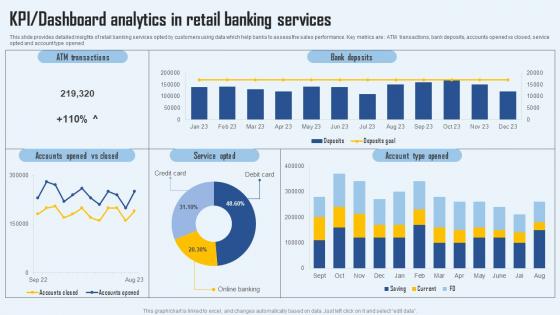
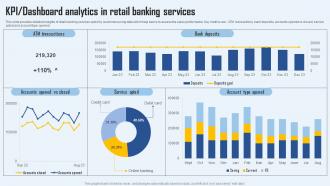
This slide provides detailed insights of retail banking services opted by customers using data which help banks to assess the sales performance. Key metrics are ATM transactions, bank deposits, accounts opened vs closed, service opted and account type opened.
People who downloaded this PowerPoint presentation also viewed the following :
KPI Dashboard Analytics In Retail Banking Services with all 7 slides:
Use our KPI Dashboard Analytics In Retail Banking Services to effectively help you save your valuable time. They are readymade to fit into any presentation structure.





FAQs for KPI Dashboard Analytics In
Honestly, keep it simple - pick 5-7 metrics that actually matter to your goals. I've seen way too many dashboards that look like NASA control rooms and they're useless. Connect your data sources so everything updates automatically (checking stuff manually is the worst). Make sure it works on mobile since you'll definitely end up checking it while waiting for coffee or whatever. Use charts and colors that make sense at a quick glance - the whole point is seeing problems fast. Oh, and set up alerts for when things go sideways. Nobody has time to babysit dashboards all day.
Start backwards from your actual business goals - what drives revenue and keeps customers happy in YOUR industry. Don't just steal metrics from other companies (seriously, that never works). Pick 3-5 numbers that would scream "we're in trouble" if they went sideways. Here's the thing though - only track stuff you can actually fix. If a metric tanks and there's nothing you can do about it, why stress yourself out watching it? Focus on the ones where you can take action when things go wrong. Makes way more sense.
Honestly, data visualization is a game changer for KPI dashboards. It transforms boring spreadsheets into something your team will actually pay attention to. Charts and graphs make it super easy to spot trends and outliers right away - way faster than scanning through endless rows of numbers. Nobody has time for that anyway. Your stakeholders can understand what's happening at a glance instead of trying to decode raw data. The key is picking the right chart types for each KPI you're tracking. Good visuals tell the performance story without making people's eyes glaze over.
Honestly? Monthly works for most stuff, but it really depends what you're tracking. Daily sales or web traffic move fast, so maybe check those weekly. Bigger picture things like customer lifetime value - quarterly's totally fine. Pick whatever schedule actually works and stick to it instead of just panicking and checking when numbers look weird (we've all been there). Don't forget to question if your KPIs even matter anymore - goals shift, right? Set calendar reminders or you'll never actually do the reviews. Trust me on that one.
Honestly, the worst thing you can do is jam like 15 different metrics onto one screen. Nobody wants to decode that mess. Pick maybe 5-7 that actually matter to what your team's trying to accomplish - not just stuff that looks cool in meetings. Double-check your data updates regularly too, because outdated numbers will tank people's confidence real fast. Oh and definitely test it with whoever's gonna use it daily before you launch. Trust me on that one. Vanity metrics are tempting but they won't help anyone make real decisions.
Honestly, just figure out what each team actually cares about first. Sales wants their revenue numbers, conversion rates, pipeline stuff - the usual suspects. HR's more about turnover and hiring metrics. Marketing obsesses over leads and campaign ROI (though half of them can't agree on what "engagement" even means). Here's the thing though - timing matters way more than people think. Sales needs everything updated constantly, but finance is totally fine checking monthly reports. I'd literally just ask each department "what do you look at every morning?" and build around that. Don't overthink the fancy visuals until you nail down what decisions they're actually making.
So for KPI dashboards - Tableau and Power BI are the big names but they're kinda complex to learn. Looker Studio is free and way easier if you're just starting out. Klipfolio's decent too. Honestly? I've built some pretty good dashboards just using Google Sheets when I was being cheap lol. Excel works too if you get creative with it. My advice is start with whatever your team already uses. You can always upgrade later if you need fancier stuff. Just pick something that plays nice with your data sources and won't make everyone's heads explode trying to figure it out.
Dude, real-time data integration is a game changer for your KPIs. You'll stop looking at yesterday's mess and actually see what's happening now. Like checking current weather instead of last week's forecast - makes way more sense, right? Your team can jump on problems immediately rather than finding out about disasters later. Honestly, I think most companies are still flying blind with old data. Set up alerts for the important stuff so you're not glued to dashboards 24/7. It's basically turning your rearview mirror into a proper speedometer.
So basically, leading KPIs show what's probably gonna happen next - stuff like how healthy your sales pipeline looks or customer satisfaction scores. Lagging ones tell you what already went down, like actual revenue or how many customers you lost. I'd put the leading indicators at the top of your dashboard since you can actually do something about those day-to-day. Then show the historical stuff below. You need both though - otherwise you're just driving by looking in the rearview mirror, which never ends well. Short sentences mixed with longer explanations work better for readability too.
Honestly, dashboards are a game changer - you get to see what's actually going down in your business without drowning in endless Excel sheets (which is the worst). Instead of guessing, you're making calls based on real data. The visual setup makes it obvious when you're crushing it or when something's about to blow up. Oh, and your team actually stays on the same page for once since everyone's watching the same numbers. Pro tip though: stick to like 3-5 metrics that actually move the needle. Don't go crazy tracking every little thing.
Yeah, context is everything with KPIs. A startup will obsess over user growth while some established manufacturer cares way more about operational efficiency. Your industry matters too - if you're in something heavily regulated, compliance metrics become huge. But in competitive consumer stuff? Customer satisfaction rules. I've honestly watched so many dashboards crash and burn because teams just copied what worked elsewhere. Big mistake. You gotta think about who's actually using this thing and what decisions they're making. What works for your neighbor might be completely wrong for you.
Definitely start with NPS - everyone uses it for a reason. CSAT scores from surveys are solid too, plus customer effort score shows if you're making things annoying for people. First-call resolution is huge, and churn rate obviously tells the real story. Support ticket response times matter more than most people think. Customer lifetime value trends are worth watching since satisfied customers actually stick around and spend more. Just don't go crazy with like 15 different metrics or you'll spend all day staring at charts instead of fixing problems. Five to seven max.
Honestly, just make it simple - focus on what people actually need to see. Clean layouts work best. Don't make users think too hard about your charts and graphs. I swear, half the dashboards I've seen look like someone just threw everything at a wall to see what stuck! Get feedback from your team regularly about what's annoying them. Test stuff before you launch it. And here's the thing - you don't need to squeeze everything onto one screen. Sometimes cutting features makes the whole thing way better. Your users will actually appreciate not having to hunt through a million widgets just to find basic info.
Look, you can't just copy someone else's dashboard and call it a day. Retail companies obsess over conversion rates and inventory turnover, while healthcare is all about patient satisfaction and readmission rates. Manufacturing? They're tracking OEE and defect rates religiously. SaaS businesses live and die by their churn rates and monthly recurring revenue - honestly, they probably check those numbers way too often. The trick is finding 5-7 metrics that actually help you make real decisions, not just pretty numbers that make your boss happy.
Get your stakeholders involved from day one - seriously, don't wait. Interview different user groups first to figure out which metrics they actually care about for their jobs. Then show them wireframes and ask stuff like "would you actually use this filter?" Skip the "do you like it" questions though, they're pretty much worthless. Set up quick 15-minute feedback sessions every couple weeks during development. Way better than waiting until the end when fixes cost a fortune. Oh and watch how they really use the dashboard once it's live - that's where you'll spot the real issues. Keep tweaking based on their actual behavior patterns.
-
Satisfied with the way SlideTeam resolved my query regarding the right business PPTs that I was having difficulty finding. I found the perfect match with their assistance.
-
Perfect template with attractive color combination.