


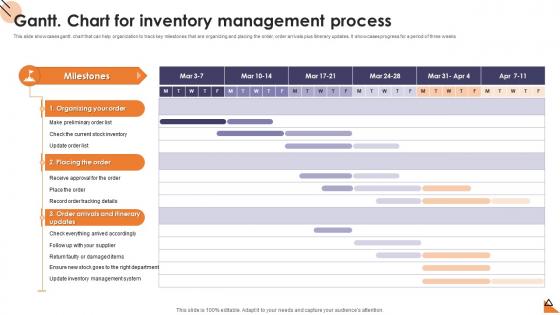
Gantt Chart For Inventory Management Process




Try Before you Buy Download Free Sample Product
 Impress Your
 Audience
 100%
100% Editable
 Save Hours
 of Time


This slide showcases gantt. chart that can help organization to track key milestones that are organizing and placing the order, order arrivals plus itinerary updates. It showcases progress for a period of three weeks.
People who downloaded this PowerPoint presentation also viewed the following :
Gantt Chart For Inventory Management Process with all 6 slides:
Use our Gantt Chart For Inventory Management Process to effectively help you save your valuable time. They are readymade to fit into any presentation structure.





FAQs for Gantt Chart For
So you'll need tasks listed down the side, then a timeline across the top with bars showing how long each thing takes. Dependencies are honestly the hardest part - like when Task B can't start until Task A is done. But they're super important for catching problems early. Add your start/end dates, who's doing what, and track progress as you go. Oh, and throw in some milestones for big deliverables. I'd say start basic with your first gantt chart - my team was totally overwhelmed when I made ours too detailed right away. Build up complexity once everyone gets the hang of reading it.
Dude, Gantt charts are actually game-changers. You get this overview of your whole project timeline that makes spotting problems way easier. Dependencies become super clear too - like when Task A is holding up everything else. I totally used to skip them thinking they were too much work, but after one disaster project... yeah, lesson learned. Real-time progress tracking saves you from those awkward "um, we're still figuring out timing" meetings with your boss. Honestly just try something basic like Asana first - don't overthink it.
So for Gantt charts, Microsoft Project is obviously the heavyweight champion, but it's honestly way too much if you're just tracking a basic project. Asana's got a really clean Gantt view that doesn't make you want to pull your hair out. Monday.com is solid too for team stuff. If you're cheap like me, draw.io works surprisingly well for quick charts - totally free. Google Sheets templates aren't terrible either, especially if your whole team's already on Google everything. My advice? Start with whatever project tool you're already using. You can always switch later if you need fancier scheduling features.
Honestly, Gantt charts are amazing when your project has tons of dependencies - like when Task A has to finish before Task B can even start. Think construction projects or software releases where everything's connected. Super helpful for showing stakeholders progress too since the visual timeline just makes sense to everyone. But real talk? They're way too much for simple stuff. If you're dealing with mostly independent tasks or things that can move around flexibly, just go with Kanban boards instead. Way less headache and you won't spend forever setting it up.
Oh, there's tons you can do! First thing I'd change is the timeline - switch between days/weeks/months based on how long your project is. Color-coding is a game changer too, honestly. I always do different colors for each team or priority level. Makes spotting issues so much easier. You can also mess with the column headers, add custom fields for whatever weird data you're tracking, and filter by who's doing what. Dependencies can be tweaked too if they look cluttered. Start with timeline stuff first though - that's usually what breaks people's brains if it's wrong.
Don't get crazy detailed right away or you'll hate your life updating every little thing. Missing dependencies is worse though - suddenly half your team's twiddling their thumbs waiting. I learned this the hard way lol. Skip the fancy formatting for now, nobody cares if it's pretty when deadlines are shifting every week. Major milestones first, then fill in details once things solidify. But seriously, if you don't update it regularly the whole thing becomes pointless. Start simple with the big stuff and key dependencies. You can always make it fancier later when the chaos settles down.
Yeah, Gantt charts work fine in agile - just don't treat them like gospel. I use them to show sprint timelines and track how epics move across sprints. Dependencies between user stories become way clearer too. Some agile folks will roll their eyes and call it too waterfall-ish, but whatever - stakeholders love seeing the big picture laid out visually. Since priorities change constantly, you'll need to update yours after every retro. Keep it loose though. Think roadmap, not rigid schedule. Perfect for showing progress and rough timelines without locking yourself into impossible deadlines.
So basically, dependencies are those connecting lines that show which tasks need to happen before others can start. Like you can't launch without getting approval first, right? Most Gantt tools let you just drag and drop to link stuff together. Here's the thing though - if one task gets delayed, everything connected to it automatically shifts too, which honestly saves you from going insane trying to track it all manually. I'd say start by figuring out your most critical dependencies first. That way you can catch potential bottlenecks before they completely mess up your timeline.
Start with your work breakdown structure - that's your foundation. Break down deliverables into actual tasks, then map out which ones depend on others. After that, plug in your resources and timelines. They're basically the nice-looking version of your messy project notes that you can actually show your boss without embarrassment. Keep updating it though - seriously, nothing's worse than presenting a chart that's three weeks behind reality. Oh, and don't go crazy with fancy features right away. Simple works better until you figure out what you actually need.
Honestly, I update mine every week or whenever something major changes. Just bump those completion percentages and shift dates around as things actually happen - don't stress about making it perfect though. The real trick is telling your team right away when stuff gets delayed or the scope changes. I always color-code overdue tasks red so they're super obvious during reviews. Oh, and here's something I learned the hard way - use your updated chart as a conversation starter with stakeholders instead of just quietly fixing it yourself. Way more effective that way.
So there's a few ways to handle this. Add resource names right on the task bars, or use different colors for each person. Most tools let you stack multiple people on one task too. Short tasks work better honestly - less messy. Some folks add swim lanes below showing assignments but that gets chaotic real quick (learned that the hard way). You can also split bars when someone's only working part-time on something. Main thing is keeping it visual so you'll spot when people are overloaded. Just try different setups until something clicks for your team.
Honestly, the real-time collaboration is a game changer. No more of that nightmare where you're emailing Excel files back and forth - everyone just sees updates instantly. The drag-and-drop thing makes rescheduling stuff so much easier too. You'll get notifications automatically, plus it tracks all those annoying dependencies for you. What I really love though is accessing it from my phone when I'm stuck in meetings. Integration with other tools is pretty solid too. Start with something free like Asana or Monday.com - you'll see what I mean once you try it.
Dude, collaborative Gantt charts are honestly a game-changer. Your stakeholders can check project progress whenever they want instead of constantly hitting you up for updates. They'll see all the dependencies and deadlines right there - saves you from so many awkward "where are we at?" meetings. The interactive stuff is pretty cool too. People can drop comments or flag problems directly on the timeline. Way better than those never-ending email threads about status updates, trust me. Oh, and pro tip - give most people view-only access but let your key players actually edit things.
Honestly, your Gantt chart's already got tons of useful data hiding in it. Schedule variance shows if you're ahead or behind. Critical path stuff reveals which tasks could mess up your whole timeline - that one's clutch. Resource utilization tells you if people are swamped or sitting around doing nothing. Task duration accuracy is huge too, though let's be real, everyone's terrible at time estimates when they start out. Milestone tracking and spotting bottlenecks where everything gets stuck are pretty straightforward to pull. Just do a quick weekly check-in to update everything and crunch these numbers regularly. Makes a difference.
Seriously, Gantt charts cut down on all those "what's the status?" texts by like 80%. Your team finally has one place to check who's doing what and when stuff's due. Remote teams especially love this - way fewer pointless meetings because people stop constantly asking for updates. The visual timeline thing really helps too, makes it super obvious when one delay screws up everything else. I'd say start small though - just get everyone updating their progress weekly. That's honestly when you'll see the biggest difference in how your team talks to each other. Dependencies become way clearer and handoffs actually work smoothly for once.
-
“I required a slide for a board meeting and was so satisfied with the final result !! So much went into designing the slide and the communication was amazing! Can’t wait to have my next slide!”
-
“The presentation template I got from you was a very useful one.My presentation went very well and the comments were positive.Thank you for the support. Kudos to the team!”