


Dashboard To Evaluate Workforce Management In Future Resource Planning With Workforce




Try Before you Buy Download Free Sample Product
 Impress Your
 Audience
 100%
100% Editable
 Save Hours
 of Time


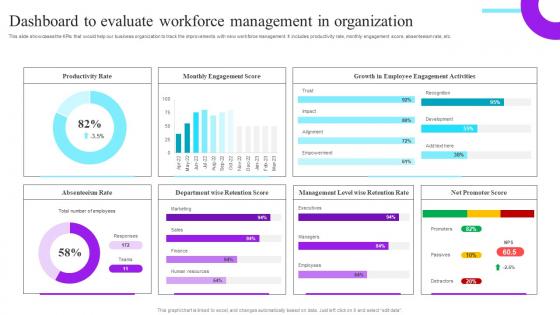
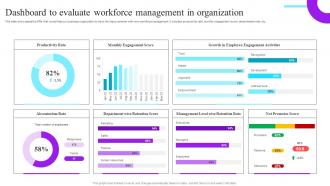
This slide showcases the KPIs that would help our business organization to track the improvements with new workforce management. It includes productivity rate, monthly engagement score, absenteeism rate, etc.
People who downloaded this PowerPoint presentation also viewed the following :
Dashboard To Evaluate Workforce Management In Future Resource Planning With Workforce with all 10 slides:
Use our Dashboard To Evaluate Workforce Management In Future Resource Planning With Workforce to effectively help you save your valuable time. They are readymade to fit into any presentation structure.









FAQs for Dashboard To Evaluate Workforce Management In Future Resource
Start with headcount, productivity rates, and attendance tracking - those are your bread and butter metrics. Labor costs as a percentage of revenue is huge too. I'd definitely add employee satisfaction surveys because miserable workers tank everything else. Schedule adherence matters more than people think - shows who's actually sticking to their shifts. Oh, and set up real-time alerts for the crazy stuff like unexpected absences or overtime going nuts. Honestly though, don't overthink it at first. Pick these core ones and build from there once you see what your team actually cares about tracking day-to-day.
Real-time visibility is huge - you'll actually see where your team's time goes and catch bottlenecks before they wreck your day. I swear, you'll discover inefficiencies you never knew existed. Better scheduling becomes way easier too. No more panic when someone calls out sick or deadlines creep up. The pattern recognition stuff is pretty cool - like seeing which tasks consistently take forever or figuring out who needs backup. My advice? Start small with maybe 2-3 metrics max. Trust me, diving into every data point right away just makes your brain hurt.
Grab a solid BI tool first - Tableau, Power BI, or Looker work great. Then connect your HRIS (Workday, BambooHR), scheduling systems, and payroll. Fair warning: the integration stuff is usually a pain, but totally worth it once it's done. I'd throw Excel or Google Sheets in the mix too for quick calculations before you build anything fancy. Clean data feeds are everything here - garbage in, garbage out, you know? Oh, and stick with one visualization tool instead of bouncing around. Trust me on that one.
Dude, you'll love what data viz does for workforce dashboards. Charts and graphs beat scrolling through endless spreadsheet rows any day. Heat maps show you staffing problems instantly - like when you're about to blow your overtime budget or Tuesday's looking scary thin. It's honestly night and day compared to staring at raw numbers. Color-coded alerts are clutch for catching issues early. Oh, and pro tip: start with whatever visuals answer the questions your boss asks you most. Trust me on that one.
Put your big metrics like headcount and attendance right at the top - managers need to see that stuff immediately. Charts work way better than boring tables, trust me on this one. Make sure it loads quickly because people get impatient fast. Keep your color coding consistent so red always means urgent across everything. The drill-down should make sense - you want supervisors clicking from team overviews straight into individual details without getting confused. Oh, and definitely test this with actual managers first. They'll spot problems you'd never notice.
Oh man, real-time data is seriously worth it for workforce planning. Instead of finding out about problems weeks later, you catch things as they're happening - like sudden absences or productivity drops. Way better than playing catch-up, you know? Your decisions get so much more accurate since you're not working with stale info. When patterns pop up, you can instantly shuffle schedules around or call in temp workers. I'd say start with whatever metrics change most in your business - that's where you'll see the biggest impact first. Makes reactive management actually manageable.
Dude, you absolutely need employee feedback or you'll end up with a dashboard nobody touches. Trust me on this one - I've seen too many fancy data displays collecting digital dust. Talk to your actual users first. Find out what metrics they care about and how they like seeing info presented. Their daily headaches? That's what your dashboard should fix. Keep checking in while you're building it too. Catches the "wait, this makes no sense" moments early. Way better than launching something beautiful but totally useless. Oh, and interview a few key people before you even start designing. Saves you from rebuilding everything later.
So basically you can use predictive analytics to figure out your staffing needs ahead of time - like looking at past hiring patterns and seasonal stuff to see when you'll be swamped. Pretty handy for spotting skill gaps before they bite you in the ass. It'll also predict which employees might bounce soon, which honestly is super valuable these days. Peak workload periods? The system can tell you when those are coming and suggest how to shuffle people around. I'd start with whatever's causing you the biggest headaches right now and work backwards from there.
Honestly, the data thing is gonna be your worst nightmare - employee info is usually a mess spread across like 5 different systems that hate each other. Managers will push back hard because they think you're trying to Big Brother everyone (and let's be real, you kinda are). Privacy stuff becomes this whole ordeal too. Your IT folks won't be thrilled about piecing everything together either. Here's what actually works though: pick one small department first. Show them real numbers that matter, then slowly roll it out from there. Don't try to fix everything at once or you'll just create chaos.
Honestly, these dashboards are lifesavers for compliance stuff. They'll automatically track overtime limits and break schedules so you don't have to babysit spreadsheets all day. Real-time monitoring across your whole team is pretty sweet too. What I love most is how they catch violations before they actually happen - saves you from those "oh crap" moments later. Plus the audit trails get generated automatically, which is huge when inspectors show up. My advice? Figure out what's causing you the biggest headaches first, then find a dashboard that tackles those specific problems. Way better than trying to do everything at once.
Oh man, there's so much stuff you can pull from that dashboard. Start with basic attendance and overtime reports - those are your bread and butter. The scheduling efficiency ones are clutch for seeing staffing patterns. Real-time dashboards show who's clocked in, running late, all that. Labor cost breakdowns, productivity metrics - honestly it's kind of overwhelming at first. The forecasting reports use your old data to help plan ahead, which is pretty cool. My advice? Don't dive into the fancy analytics right away or you'll get lost. Stick to the basics until you know your way around.
Honestly, dashboards are game-changers for cutting through all that office BS. Everyone sees the same live data - schedules, who's crushing it, who's struggling. No more awkward check-ins where nobody knows what's actually going on. Your boss can spot problems early instead of panicking later, and you can track your own stuff without guessing what they want. Plus it kills that annoying telephone game with updates. Though you'll need to figure out what data actually matters first - don't just throw everything on there. Makes one source everyone trusts instead of five different versions of the truth.
Dude, mobile access is honestly such a lifesaver. You can approve time-off requests from literally anywhere - I've done it while waiting in line at Starbucks. Your team can clock in, swap shifts, and update availability straight from their phones. No more endless email chains about coverage! Plus you'll get alerts about scheduling conflicts instantly instead of finding out the hard way. Response times get so much faster when everyone isn't tied to a computer. Trust me, once you set it up you'll wonder how you managed without it. Game changer for sure.
Your KPIs and benchmarks basically control everything - what metrics to show, how to display them, when alerts go off. Put your most important workforce stuff right up front where managers can see it instantly. I'd definitely use color-coding because it makes spotting problems super obvious. Show both internal performance and industry standards so you can catch gaps fast. Compare current numbers to your historical data too - gives way better context. Oh and start simple - pick your top 5 workforce KPIs first, then worry about finding benchmark data you can actually get your hands on.
Start with access controls - only let authorized people see sensitive stuff like schedules and PTO balances. Role-based permissions work great so managers just see their own teams. Oh, and check those external sharing links aren't public (I've definitely messed that up before). Mask personal details like employee IDs if stakeholders don't really need them. Honestly, quarterly access audits are a pain but worth it. When in doubt, show less info rather than more - people always complain they can't see enough but never the opposite.
-
Great designs, Easily Editable.
-
Definitely recommend SlideTeam to all who need help with PowerPoint presentations. Their design team can create anything you need.