


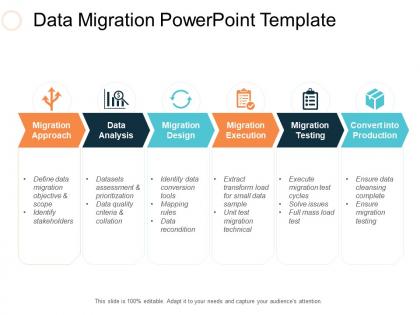
Data migration powerpoint template ppt slides deck




Try Before you Buy Download Free Sample Product
 Impress Your
Audience
 100%
Editable
 Save Hours
of Time


SlideTeam’s data migration powerpoint template is the perfect way to get started with your data analytics journey. With over 100 slides of content, this set will provide you with all the templates and tools you need to get insights from your data. Plus, it’s easy to use – simply download and start using today. So don’t wait any longer, download these amazing set of data analytics powerpoint templates now.
People who downloaded this PowerPoint presentation also viewed the following :
Data migration powerpoint template ppt slides deck with all 5 slides:
Use our Data Migration Powerpoint Template Ppt Slides Deck to effectively help you save your valuable time. They are readymade to fit into any presentation structure.


FAQs for Data migration powerpoint template
Honestly, don't touch any data until you've mapped everything out first. Start with figuring out what you have and where it's all going, then build your timeline from there. Testing is absolutely critical - and I mean test everything at least twice because data quality issues will bite you later. Try running pilots on smaller chunks before doing the full thing, ideally when traffic's low. Oh, and definitely have a rollback plan ready because Murphy's law loves data migrations. Once it's done, double-check that nothing got corrupted or went missing. It's tedious but saves you from major headaches down the road.
Start with data profiling - look for duplicates, missing stuff, wonky formats, and outliers across all your systems. Talend works great for this, or just write some basic SQL queries to see the mess you're dealing with. Automated tools are solid but honestly, you still need to manually check things because they miss the really weird edge cases that'll screw you over later. Check your business rules and how tables connect to each other too. Document everything in a scorecard so you can figure out what absolutely has to be fixed versus what you can maybe ignore after migration.
Data quality problems are probably gonna be your biggest nightmare - you'll find so much garbage data once you actually start moving things. Downtime during cutover sucks too. Oh, and mapping between old/new systems never goes as smooth as you think. Run a data audit before you do anything else. Test everything multiple times in staging first. I learned this the hard way on my last project, but seriously do a pilot migration if possible. Have a rollback plan ready because something will definitely go wrong. The small test run will save you from wanting to throw your laptop out the window later.
So you've got a few solid options here. Talend and Informatica PowerCenter are pretty standard choices - though fair warning, the enterprise stuff gets expensive quick. If you're doing cloud work, AWS Database Migration Service is decent. SSIS works great if you're already stuck in Microsoft land (been there). Honestly though? Your data volume matters way more than the fancy names. I've seen small migrations work perfectly fine with just Python scripts and pandas - way cheaper too. Map out what you're moving first, then worry about which tool handles your weird data formats best.
Look at your data size and complexity first - how much downtime can you actually handle? Massive datasets usually mean you'll need to do this in phases instead of all at once. Your team's skills matter too, obviously. Don't plan some elaborate setup if you can't pull it off. Budget's probably tight anyway, right? Map out which systems depend on each other since that'll determine your order. Honestly, just run a small test migration first. Way better to catch problems early than scramble when you're halfway through the real thing.
So data mapping is like your game plan for moving stuff between systems. You're figuring out how fields match up - like "Customer_ID becomes ClientNumber" or whatever. It's basically translation work but for databases, which sounds boring but trust me, skip this step and you're screwed. I always start with listing everything in the source system first. Then figure out what the new system wants. Format changes are a pain but you gotta deal with them. My old boss used to say it's like fitting puzzle pieces together, except half the pieces are the wrong shape and you have to make them fit anyway.
Encrypt everything - data moving around AND stored data. SFTP or HTTPS for transfers, obviously. Never email files (seriously, people still do this and it's painful to watch). Lock down access so random people can't mess with your migration. Run validation checks constantly - before, during, after. You'll want audit logs tracking who touched what. Oh, and test your security setup on a tiny batch first. Way better to catch issues early than explain to your boss why everything's compromised.
Dude, cloud migration is honestly a game changer. No more waiting around for hardware approvals or dropping crazy money upfront on servers. You can just scale stuff up when you need it, then dial it back down - saves so much cash. The automation tools do most of the heavy lifting too, which is nice because who wants to babysit migrations all day? Built-in backup and disaster recovery comes standard, whereas setting that up yourself costs a ridiculous amount. I mean, our old on-prem setup felt like driving a truck through mud compared to this. Try a small pilot first - you'll see the difference immediately.
First thing - did all your records actually transfer? That's the big one. Compare some sample data between the old and new systems to spot any weird formatting stuff or corrupted fields. Response times matter too, so test how fast queries run now versus before. Your users will definitely complain if things feel sluggish (trust me on that). Keep an eye on whether you hit your timeline estimates and how much downtime you had. Set up some automated checks to run the first couple weeks - way easier than manually hunting for problems later.
Honestly, data migration can totally screw up your compliance if you're not paying attention. GDPR, HIPAA, whatever regs you deal with - they don't pause just because you're moving stuff around. The annoying part is when data gets restructured and suddenly your compliance mappings are broken. Document everything as you go and check data integrity at each step. Oh, and loop in your compliance people from day one - learned that the hard way at my last job. Don't just treat it like a tech project because regulators definitely won't see it that way.
Start with a data cleanup before you even think about migrating. Run quality audits to catch duplicates and ancient records nobody's touched in forever - you'd be shocked how much junk accumulates. Archive anything historically valuable but useless day-to-day. Be ruthless with deduplication and pick one source as your truth. Otherwise you're just moving garbage to a prettier system, which honestly defeats the whole point. Set retention policies now or you'll regret it later.
So big bang migration is ripping the band-aid off - move everything during one planned downtime window. Phased means spreading it over weeks/months, moving chunks while keeping systems running parallel. Big bang's definitely faster but super risky. If stuff breaks, your whole system's toast (trust me on this one). Phased costs more and takes forever, but you get rollback options and won't panic at 3am. Really depends how much downtime you can handle and if you're feeling brave. Oh, and map your data dependencies first - that part's crucial regardless of which route you pick.
Yeah, expect things to get sluggish right after you migrate - totally normal. The system needs time to rebuild indexes and figure out the new setup. Queries will drag, especially if you switched database types. It's honestly like unpacking after moving houses, everything's just... off for a while. Usually takes a few days to a couple weeks to settle down. Oh, and definitely keep an eye on your performance metrics that first month. I'd run some tests before calling it done too - better safe than sorry when you're dealing with production data.
So you're gonna need three main things: technical training for your IT folks, end-user training for everyone else touching the data, and change management stuff. Trust me, people are terrible at handling change - you'll need way more hand-holding than you think. Mix up your training styles too. Some people want documentation, others need those hands-on sessions. Oh, and pick some super users in each department who can help out after launch. We learned that the hard way last time. Start training early and do refresher sessions later.
Dude, start with a solid data audit way before you go live. Seriously map out every source and dependency - I swear there's always more stuff lurking than you expect. Test everything in sandbox with real data chunks, not fake stuff. Multiple runs will save your butt later. Oh, and don't forget rollback plans because Murphy's Law is real. Keep everyone posted on timelines and downtime windows or they'll panic. Set up monitoring dashboards so you can catch problems the second they happen. The testing part honestly can't be stressed enough - it's where you'll find most issues.
-
Great quality slides in rapid time.
-
Excellent Designs.