

Data security it powerpoint presentation slides




Try Before you Buy Download Free Sample Product
 Impress Your
 Audience
 100%
100% Editable
 Save Hours
 of Time


Data Security is the process of protecting electronic devices such as computers, servers, mobile gadgets, data, electronic systems, and networks from cyber-attacks. Check out our competently designed Data Security template that illustrates important details about IT. Incorporating this PPT, you can present and share details on the common threats against data and information systems and the process to identify the information that needs to be protected. This presentation will be helpful to throw light on the current scenario of the organization, the requirement of data security in different sectors, etc. In addition, PPT contains the critical security elements, data risk identification and assessment, steps to mitigate those risks, benefits, and automations role in data security. Further, this presentation comes with a checklist to implement data security in the organization, a 30-60-90-day plan to manage it, and the budget to implement the same. The deck also showcases a roadmap to monitor safety and a timeline to implement data security in the organization. Lastly, this PPT shows the effects of data security implementation on the organization and dashboard for threat tracking. Download this 100 percent editable template now.
People who downloaded this PowerPoint presentation also viewed the following :
Content of this Powerpoint Presentation
Slide 1: This slide introduces Data Security. State Your Company Name and begin.
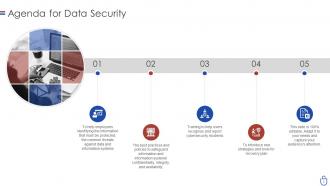
Slide 2: This is an Agenda slide. State your agendas here.
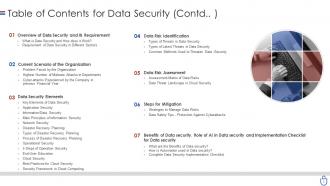
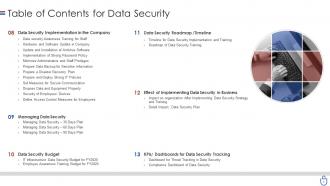
Slide 3: This slide shows Table of Contents for Data Security.
Slide 4: This is another slide continuing Table of Contents for Data Security.
Slide 5: This is another slide continuing Table of Contents for Data Security.
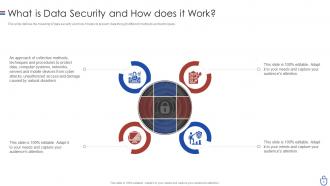
Slide 6: This slide defines the meaning of data security and how it helps to prevent data through different methods and techniques.
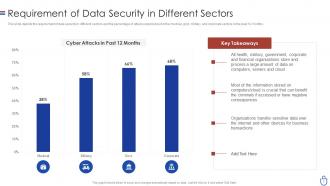
Slide 7: This slide shows Requirement of Data Security in Different Sectors.
Slide 8: This slide presents Table of Contents for Data Security.
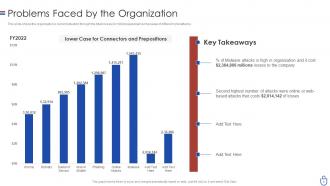
Slide 9: This slide shows the organization's current situation through the total losses experienced because of different cyberattacks.
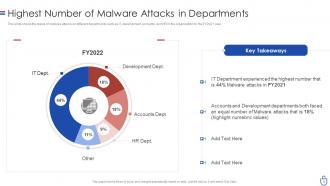
Slide 10: This slide displays Highest Number of Malware Attacks in Departments.
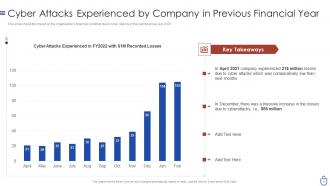
Slide 11: This slide shows Cyber Attacks Experienced by Company in Previous Financial Year.
Slide 12: This slide shows Table of Contents for Data Security.
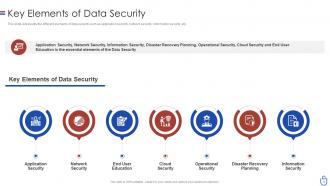
Slide 13: This slide represents the different elements of data security such as application security, network security, information security, etc.
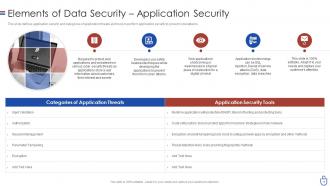
Slide 14: This slide defines application security and categories of application threats and tools to perform application security.
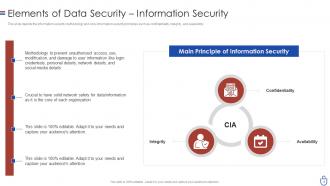
Slide 15: This slide displays Elements of Data Security – Information Security.
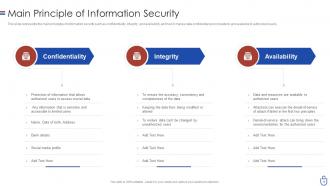
Slide 16: This slide represents the main principles of information security such as confidentiality, integrity, and availability.
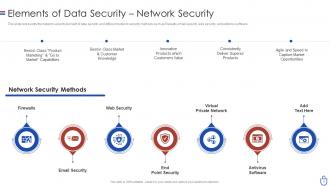
Slide 17: This slide represents the network security element of data security and different network security methods.
Slide 18: This slide presents Elements of Data Security – Disaster Recovery Planning.
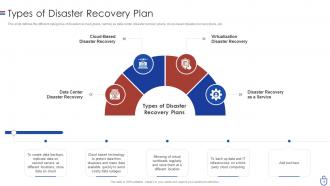
Slide 19: This slide defines the different categories of disaster recovery plans, namely as data center disaster recovery plans, cloud-based disaster recovery plans, etc.
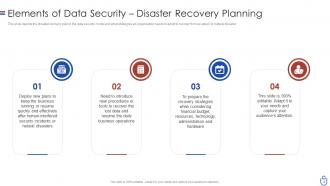
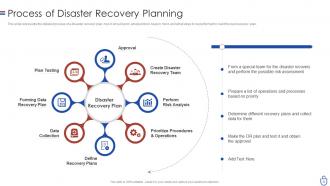
Slide 20: This slide represents the detailed process of a disaster recovery plan, how it should work, what points to keep in mind, etc.
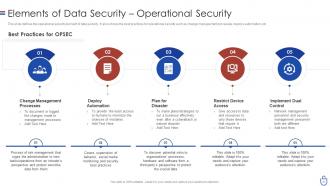
Slide 21: This slide defines the operational security element of data security.
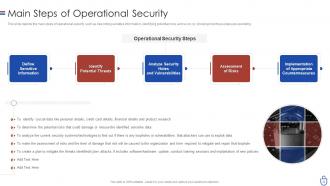
Slide 22: This slide depicts the main steps of operational security, such as describing sensitive information, identifying potential risks, etc.
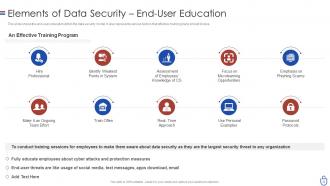
Slide 23: This slide presents the end-user education within the data security model.
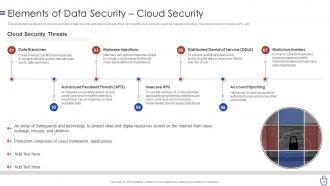
Slide 24: This slide shows Elements of Data Security – Cloud Security.
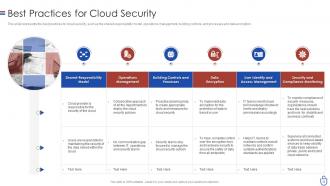
Slide 25: This slide represents the best practices for cloud security, such as the shared responsibility model, operations management, etc.
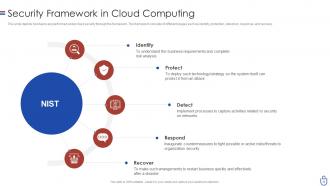
Slide 26: This slide shows Security Framework in Cloud Computing.
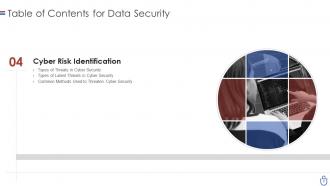
Slide 27: This slide shows Table of Contents for Data Security.
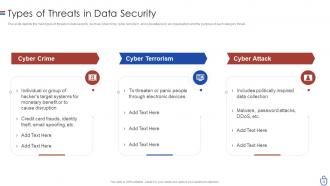
Slide 28: This slide presents the main types of threats in data security, such as cybercrime, cyber terrorism, etc.
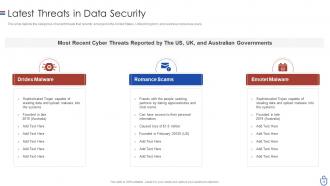
Slide 29: This slide depicts the categories of recent threats that recently emerged in the United States, United Kingdom, etc.
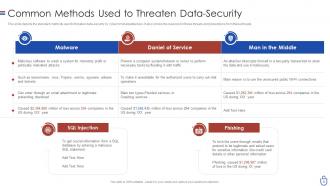
Slide 30: This slide displays Common Methods Used to Threaten Data-Security.
Slide 31: This slide shows Table of Contents for Data Security.
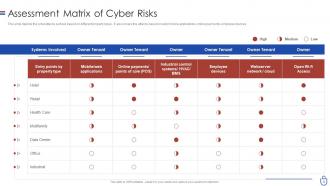
Slide 32: This slide depicts the cyberattacks surface based on different property types.
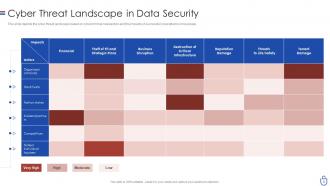
Slide 33: This slide presents Cyber Threat Landscape in Data Security.
Slide 34: This slide shows Table of Contents for Data Security.
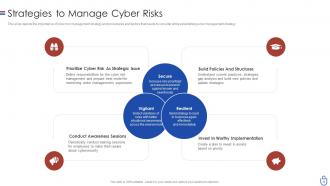
Slide 35: This slide depicts the importance of cyber risk management strategy and procedures.
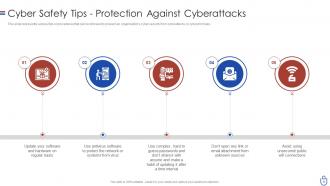
Slide 36: This slide shows Cyber Safety Tips - Protection Against Cyberattacks.
Slide 37: This slide shows Table of Contents for Data Security.
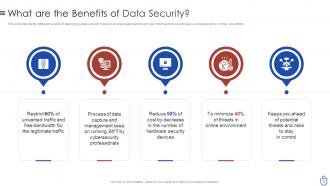
Slide 38: This slide presents the different benefits of deploying a data security model in an organization.
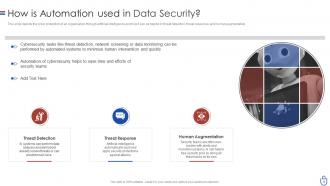
Slide 39: This slide depicts the cyber protection of an organization through artificial intelligence.
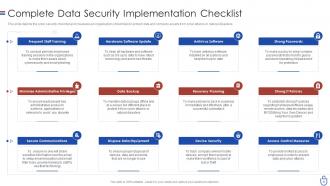
Slide 40: This slide displays Complete Data Security Implementation Checklist.
Slide 41: This slide shows Table of Contents for Data Security.
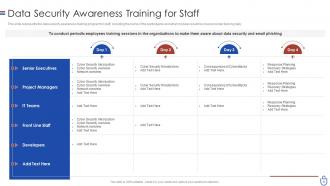
Slide 42: This slide represents the data security awareness training program for staff, including the name of the participants.
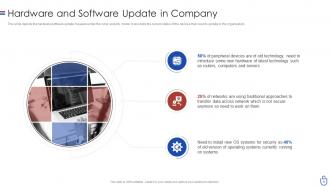
Slide 43: This slide presents Hardware and Software Update in Company.
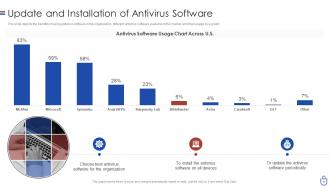
Slide 44: This slide depicts the benefits of using antivirus software in the organization.
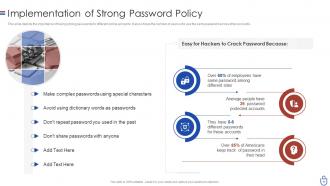
Slide 45: This slide displays the importance of having strong passwords for different online accounts.
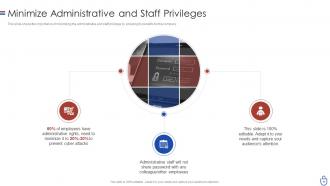
Slide 46: This slide shows the importance of minimizing the administrative and staff privilege by showing its benefits for the company.
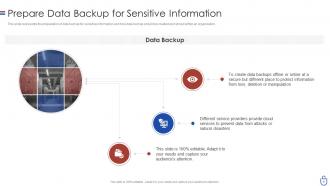
Slide 47: This slide displays Prepare Data Backup for Sensitive Information.
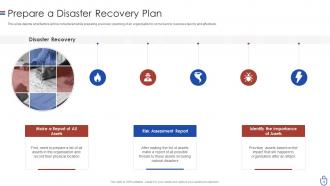
Slide 48: This slide depicts what factors will be considered while preparing a recovery planning of an organization.
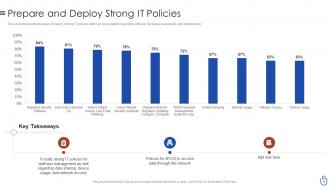
Slide 49: This slide represents the value of having strong IT policies within an organization.
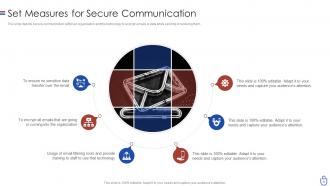
Slide 50: This slide depicts secure communication within an organization and the technology to encrypt emails.
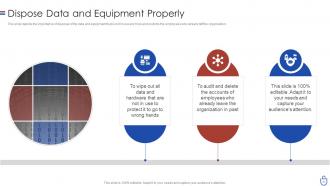
Slide 51: This slide displays the importance of disposal of the data and equipment that is not in use anymore.
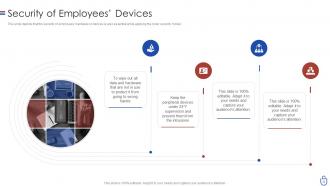
Slide 52: This slide depicts that the security of employees’ hardware or devices is also essential while applying the cyber security model.
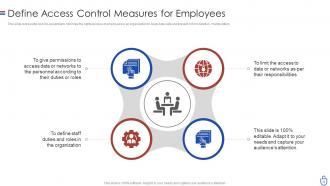
Slide 53: This slide presents Define Access Control Measures for Employees.
Slide 54: This slide shows Table of Contents for Data Security.
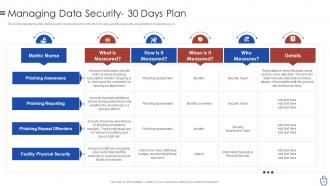
Slide 55: This slide depicts how the data security model will work in the first 30 days and the tasks the organization should focus on.
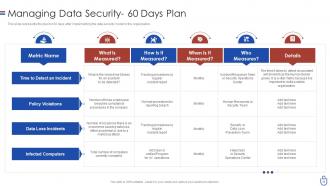
Slide 56: This slide represents the plan for 60 days after implementing the data security model in the organization.
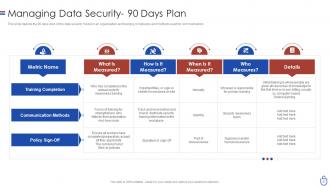
Slide 57: This slide depicts the 90 days plan of the data security model in an organization and training compliance.
Slide 58: This slide presents Table of Contents for Data Security.
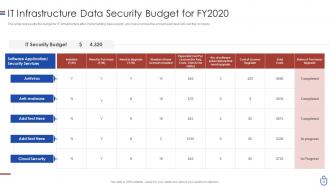
Slide 59: This slide represents the budget for IT infrastructure after implementing data security.
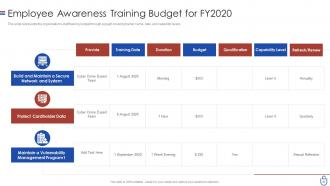
Slide 60: This slide displays the organization's staff training budget through a graph covering trainer name, date, and capability levels.
Slide 61: This slide shows Table of Contents for Data Security.
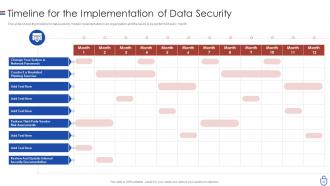
Slide 62: This slide displays Timeline for the Implementation of Data Security.
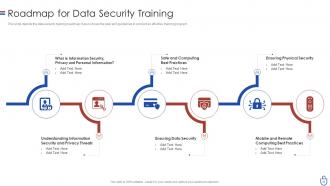
Slide 63: This slide depicts the data security training roadmap.
Slide 64: This slide shows Table of Contents for Data Security.
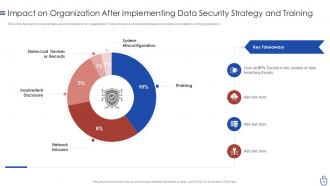
Slide 65: This slide displays Impact on Organization After Implementing Data Security Strategy and Training.
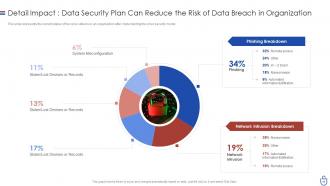
Slide 66: This slide represents the current status of the cyber attacks in an organization after implementing the cyber security model.
Slide 67: This slide shows Table of Contents for Data Security.
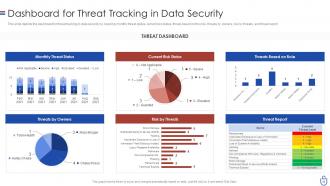
Slide 68: This slide presents Dashboard for Threat Tracking in Data Security.
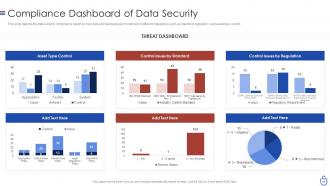
Slide 69: This slide depicts the data security compliance report on how data and hardware are monitored in different categories.
Slide 70: This slide displays Icons for Data Security (IT).
Slide 71: This slide is titled as Additional Slides for moving forward.
Slide 72: This is About Us slide to show company specifications etc.
Slide 73: This slide presents Post It Notes. Post your important notes here.
Slide 74: This slide shows Roadmap with additional textboxes.
Slide 75: This slide displays 30 60 90 Days Plan with text boxes.
Slide 76: This slide shows Circular Diagram with additional textboxes.
Slide 77: This is Our Goal slide. State your firm's goals here.
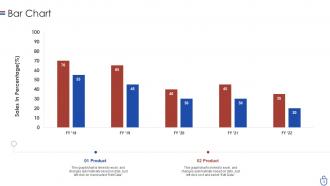
Slide 78: This slide presents Bar Chart with two products comparison.
Slide 79: This slide shows Venn diagram with text boxes.
Slide 80: This is a Thank You slide with address, contact numbers and email address.
Data security it powerpoint presentation slides with all 80 slides:
Use our Data Security IT Powerpoint Presentation Slides to effectively help you save your valuable time. They are readymade to fit into any presentation structure.
FAQs for Data security it
Dude, ransomware is probably your biggest headache right now - it'll lock everything down until you pay those bastards. Phishing emails are super sneaky too, tricking people into clicking bad links or giving up passwords. Your own employees can be risky whether they mean to be or not. Oh, and don't sleep on cloud misconfigurations - seen that bite companies hard. Outdated software is like leaving your front door unlocked. Train everyone to spot sketchy emails first. That's honestly where most attacks start. Regular updates are boring but they'll save your ass.
First thing - map out what you actually have on your network and where people can get in. That's your starting point. After that, verify everyone and every device trying to access stuff, doesn't matter if they're sitting right next to you or working from Bali. I know "never trust, always verify" sounds super corporate but honestly it works. Multi-factor auth everywhere you can manage it. Break your network into smaller chunks so if someone gets hacked they can't just waltz around everywhere. Oh and don't go crazy trying to fix everything at once - pick one important system first, nail that down, then move on.
So encryption is basically like putting your data in a lockbox that only you have the key to. It scrambles all your sensitive info so random people can't just peek at it. Works whether your data's sitting in storage or moving around between systems. I know it sounds super techy but it's really not that complicated once you wrap your head around it. Oh and definitely go with something like AES-256 if you're dealing with anything actually important - don't mess around with weak encryption. It's honestly one of the best ways to keep your stuff safe.
Honestly, you've gotta do regular training sessions covering phishing emails, sketchy links, password basics, and social engineering tricks. Skip the boring PowerPoints though - nobody retains that stuff. Use real examples and simulations instead. Teach your people to actually pause before clicking or sharing info. Build a culture where they won't get blasted for reporting weird emails or suspicious activity. The tricky part? Attack methods change constantly, so quarterly refreshers are pretty much mandatory. Oh, and definitely run mock phishing tests - you'll be shocked how many people still fall for obvious scams.
Honestly, start with encrypting everything - your stored data and anything moving between systems. Set up proper access controls with multi-factor auth, and don't give people more access than they need. Backups are obvious but here's the thing - tons of companies never actually test if they can restore stuff, which is kinda pointless. Keep your systems patched and watch for weird activity. Document what data is sensitive vs public so your team isn't guessing. Those first two things I mentioned? They'll handle most of your big security holes right there.
Honestly, GDPR will push you to seriously upgrade your security setup. You'll need encryption, proper access controls, regular security checks - all that stuff. The 72-hour breach reporting rule is brutal though, so monitoring becomes crucial. Privacy impact assessments are required for anything high-risk too. But here's the thing - don't just see it as legal compliance nonsense. It actually forces you to build way better, more secure systems. Your data protection will be miles ahead once you're done with it.
You'll want to look into SIEM platforms - Splunk and IBM QRadar are solid choices for catching breaches in real-time. They pull logs from everywhere and spot weird patterns using machine learning. UEBA tools are pretty awesome too since they learn how users normally behave and flag anything suspicious. Network monitoring catches data theft as it's happening, which is huge. I've seen way too many companies rely on just one solution though - bad idea. Attackers aren't stupid. If you're starting from scratch, get a decent SIEM first. Everything else builds on that foundation.
Honestly, start with encrypting everything - both when it's moving around and just sitting there. Most cloud providers have this built in but you gotta turn it on yourself. Multi-factor auth is non-negotiable, and don't give everyone admin access (I learned that one the hard way). Back up your stuff regularly, preferably in different regions so if one crashes you're not screwed. Also worth checking what security certifications your provider actually has. The whole thing works best when you stack these protections together instead of just picking one and hoping for the best.
OK so breach containment first - pull those affected systems offline ASAP and lock down whatever data you can. Your legal team needs to know immediately (ugh, the compliance timelines are brutal). Document literally everything - what got hit, when it happened, which data was exposed. Tell your customers what went down, but be straight with them about it. Nobody likes corporate BS during a crisis. After the chaos dies down, do a deep dive on how this mess started so you can patch those holes. Move quick but don't skip the paperwork trail - you'll thank yourself later when regulators come knocking.
Honestly, just nail the boring stuff first - it'll block most attacks anyway. Get Bitwarden (it's free) for strong passwords, turn on two-factor auth wherever you can, and actually update your software when it bugs you. Yeah I know, super exciting stuff. Your team needs to learn how to spot sketchy emails too - that's huge. Throw in some cloud backups and basic antivirus. Don't blow money on fancy enterprise tools yet. Once you've got this foundation locked down and you're making more money, then you can get all fancy with additional security layers.
Honestly, insider threats are scarier than hackers breaking in from outside. These people already know your systems and where the valuable data lives - they're behind like 60% of breaches. Some are malicious, others just mess up accidentally. Give employees minimum access they need for their job, nothing extra. Monitor who's accessing what data and when. The biggest mistake? Forgetting to cut off access when someone quits. I've seen companies where ex-employees still had login credentials months later - it's wild. Start by figuring out who currently has access to your sensitive stuff.
So basically you want role-based access controls - give people only what they need for their job. First, categorize your data by how sensitive it is. Then set up permissions that automatically match someone's role and clearance. Zero-trust architecture actually works despite sounding like corporate nonsense. For dev environments, use data masking so they get realistic datasets without the sensitive stuff exposed. Oh, and audit your permissions every quarter because people accumulate access over time like digital hoarding. Revoke anything that looks weird or outdated.
Ugh, IoT devices are such a pain for security. Every smart gadget becomes another way hackers can get in - and there are thousands of them now. Most come with terrible default passwords that nobody changes. Plus they barely get security updates. Traditional security just doesn't work anymore when your data's flowing through random smart thermostats, you know? You need zero-trust setup, network segmentation, proper device authentication. First step though - figure out what IoT stuff you actually have running. Then lock down who can access what. Can't just protect the perimeter when everything's connected.
Yeah, third-party vendors can really mess up your security game. You're basically letting them into your digital house, and some of these companies are way sketchier than their fancy websites make them seem. The main problems? Their security might suck, they could get breached, and suddenly your data's everywhere. Before working with any vendor, dig into their actual security practices - don't just read their marketing fluff. Make them show you certifications and keep checking up on them. I've seen too many companies get burned because they trusted a vendor's promises without doing the homework first.
Dude, AI threats and deepfakes are getting insanely good - like, legitimately terrifying stuff. Zero-trust is basically the new gold standard now, so you'll want to start planning that transition. Quantum attacks are still years away, but honestly? That stuff genuinely worries me. Supply chain hits through third-party vendors are huge right now. Plus ransomware-as-a-service is letting basically anyone launch attacks these days. My cousin's company got hit last month, it was brutal. Start with a zero-trust readiness check and definitely update your incident response plan to cover AI-generated attacks.
-
Awesomely designed templates, Easy to understand.
-
Amazing product with appealing content and design.
-
The content is very helpful from business point of view.
-
Easily Understandable slides.