


Digital Playbook Powerpoint Presentation Slides




Try Before you Buy Download Free Sample Product
 Impress Your
 Audience
 100%
100% Editable
 Save Hours
 of Time


The digital playbook is a set of strategies and best practices that help the organization manage its transformation process successfully. Grab our competently designed Digital Playbook template that will guide the organization as it outlines vital steps required in effectively managing digital change. The following presentation is helpful for digital managers intending to manage the process of transformation in their organization and optimize organization operations. The first section of this presentation initially introduces the playbook and how digital transformation can impact the organization. The second part of the playbook highlights critical steps of implementing digital change, such as analyzing, designing a roadmap, and executing a vision. The third portion of the playbook provides a detailed roadmap to guide the organization during the transformation process. These steps can be performing internal analysis, etc. The fourth section of the playbook highlights the impact analysis of this transformation. In the end, a case study is highlighted to help the organization understand how the process of digital transformation can impact their organization. Get access now.
People who downloaded this PowerPoint presentation also viewed the following :
Content of this Powerpoint Presentation
Slide 1: This slide displays title i.e. 'Digital Playbook' and your Company Name.
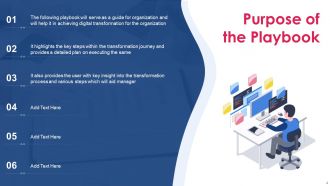
Slide 2: This slide presents purpose of the playbook.
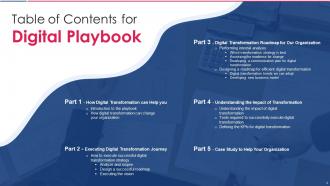
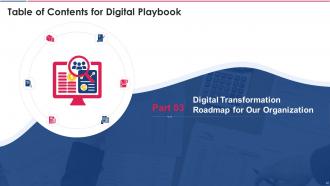
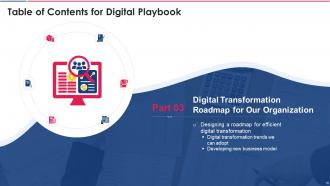
Slide 3: This slide exhibits table of contents.
Slide 4: This slide depicts title for two topics that are to be covered next in the template.
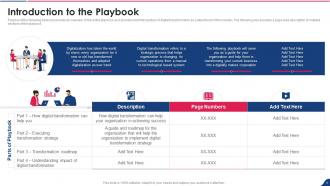
Slide 5: This slide provide an overview of the entire playbook as it provides brief introduction of digital transformation as a latest trend of the industry.
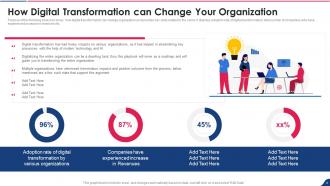
Slide 6: This slide show how digital transformation can change organization as it provides key stats related to the same.
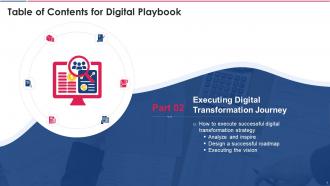
Slide 7: This slide depicts title for four topics that are to be covered next in the template.
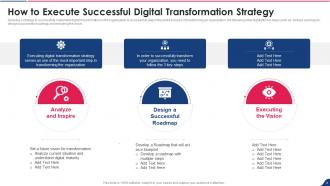
Slide 8: This slide highlights key steps such as: analyze and inspire, design a successful roadmap and executing the vision.
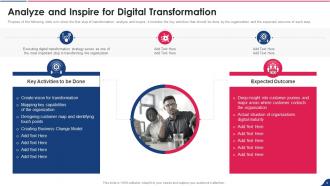
Slide 9: This slide show the first step of transformation: analyze and inspire.
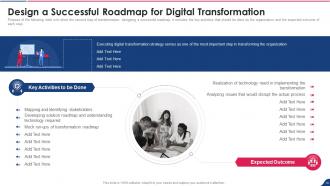
Slide 10: This slide show the second step of transformation: designing a successful roadmap.
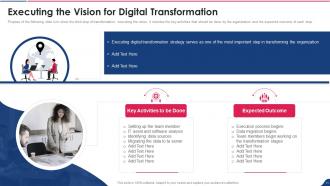
Slide 11: This slide show the third step of transformation: executing the vision.
Slide 12: This slide depicts title for the topic that is to be covered next in the template.
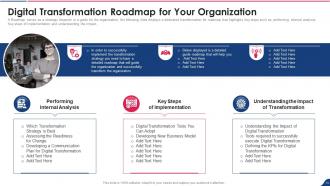
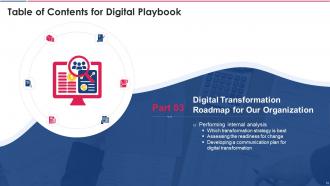
Slide 13: This slide displays a dedicated transformation for roadmap that highlights key steps such as: performing internal analysis, etc.
Slide 14: This slide depicts title for three topics that are to be covered next in the template.
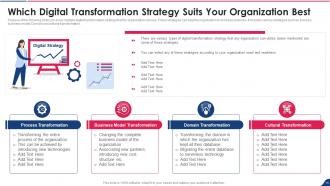
Slide 15: This slide show multiple digital transformation strategy that the organization can use.
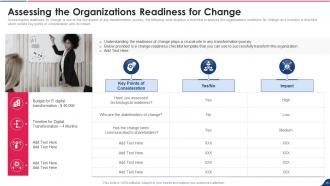
Slide 16: This slide displays a checklist to analyze the organizations readiness for change as it includes a checklist.
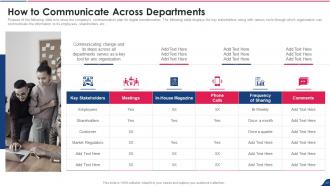
Slide 17: This slide show the company's communication plan for digital transformation.
Slide 18: This slide depicts title for two topics that are to be covered next in the template.
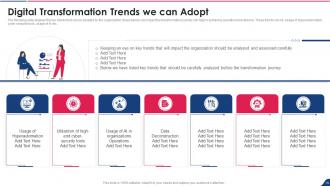
Slide 19: This slide displays the key trends that can be adopted by the organization.
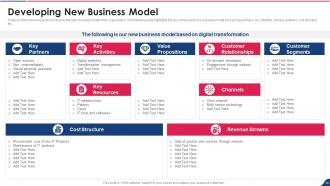
Slide 20: This slide is to display the new business model of the organization.
Slide 21: This slide depicts title for three topics that are to be covered next in the template.
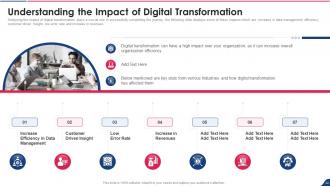
Slide 22: This slide displays some of these impacts which are: increase in data management efficiency, customer driven insight, low error rate and increase in revenues.
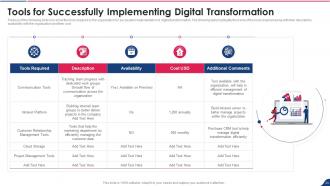
Slide 23: This slide show the tools required by the organization for successful implementation of digital transformation.
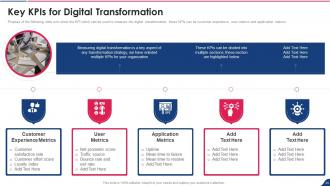
Slide 24: This slide show the KPI which can be used to measure the digital transformation.
Slide 25: This slide depicts title for the topic that is to be covered next in the template.
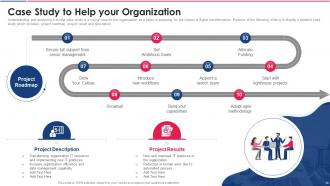
Slide 26: This slide display a detailed case study which includes: project roadmap, project result and description.
Slide 27: This is the icons slide.
Slide 28: This slide presents title for additional slides.
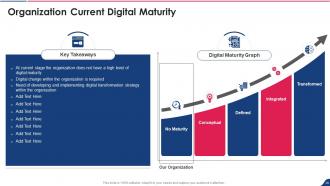
Slide 29: This slide shows Organization Current Digital Maturity.
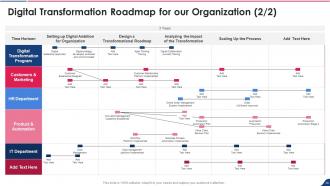
Slide 30: This slide highlights Digital Transformation Roadmap for our Organization.
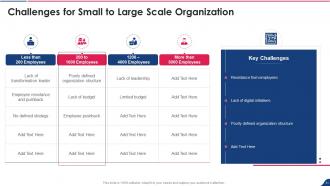
Slide 31: This slide illustrates Challenges for Small to Large Scale Organization.
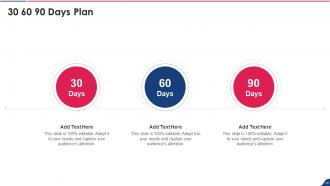
Slide 32: This slide depicts 30-60-90 days plan for projects.
Slide 33: This slide depicts posts for past experiences of clients.
Slide 34: This slide exhibits ideas generated.
Slide 35: This slide showcases financials.
Slide 36: This slide displays Venn.
Slide 37: This slide displays puzzle.
Slide 38: This slide exhibits yearly timeline.
Slide 39: This slide presents circular process.
Slide 40: This slide shows goals of the company.
Slide 41: This is thank you slide & contains contact details of company like office address, phone no., etc.
Digital Playbook Powerpoint Presentation Slides with all 46 slides:
Use our Digital Playbook Powerpoint Presentation Slides to effectively help you save your valuable time. They are readymade to fit into any presentation structure.







FAQs for Digital Playbook
So for your digital playbook, you'll want four main things. Communication rules first - like which tools to use when, how fast people should respond, meeting basics. Document all your workflows too because nobody wants to keep explaining the same processes over and over. Define who does what (trust me, unclear ownership is the worst). Oh and don't forget your tech guidelines and who can access what. The really good playbooks I've seen throw in troubleshooting sections for stuff that always breaks. Start there, then just add whatever your team keeps messing up.
Think of it like having one spot where all your remote team stuff lives - processes, tools, workflows, whatever. No more digging through old Slack messages when you need something. Onboarding new people becomes so much easier. Plus when Sarah's out with the flu, someone can actually figure out how to do her job. The trick is keeping it simple and somewhere people will actually look at it. Don't overcomplicate it at first. Just start with the stuff you use most and add more later. Trust me, it saves so much headache.
Honestly, just keep it clean with lots of white space - nobody wants to read a cluttered mess. Throw in some good screenshots and diagrams to break things up. I'd stick to maybe 2 fonts max (3 if you're feeling fancy). Headers and bullets are your friend for organizing everything. If you're going digital, those clickable sections are pretty neat. But here's the thing - test it with real people first! I can't tell you how many times something looks perfect to me but confuses everyone else. Start simple with a basic template. You can always jazz it up later, but don't go overboard right away.
Honestly, it's a game changer for getting new people up to speed. Instead of hunting through random emails or those ancient PDF documents nobody updates, everything lives in one searchable spot. You can build interactive guides, throw in videos, even create those "if this, then that" decision trees so newbies don't have to bug you constantly. Managers love it because they can see where someone's actually struggling. Best part? Updates happen automatically, so you're not stuck teaching people stuff that changed three months ago. Way better than the old "figure it out yourself" approach most places still use.
Think of data analytics like having x-ray vision for your digital stuff. You can see exactly where people bail on your site, what content actually gets them to take action, and which posts are total duds. Honestly, the timing insights alone are gold - I was shocked when I found out my audience was most active at like 2pm on Tuesdays. Instead of throwing spaghetti at the wall, you're making moves based on real patterns. Pick maybe 4-5 metrics that matter for your goals and just watch those consistently. Way better than guessing.
Your playbook's gonna get stale fast if you don't stay on top of it. I'd do quarterly check-ups where you actually dig into what's working. Assign different people to own sections - spreads the work around. Tech changes so damn quick that yearly updates are useless. Your front-line team knows what's broken better than anyone, so ask them. Oh, and make it super easy for people to flag outdated stuff when they see it. Honestly? Just block out 2 hours next month for your first pass. You'll be shocked how much is already wrong.
Honestly, presentation templates are a game changer for your digital playbook. Your team won't be reinventing the wheel every single time they need to present something. Plus everything stays consistent with your branding – which looks way more professional than random designs everywhere. I'd start with maybe 3-4 templates for your most common stuff. Your people can actually focus on what they're saying instead of spending hours moving text boxes around (ugh, the worst). Trust me, you'll notice the difference right away once everyone's using them.
So basically, a digital playbook stops departments from hoarding all their secrets. Everyone gets access to the same processes and templates in one spot you can actually search through. Marketing's campaign tricks, sales objection handling, support fixes - it's all there. Honestly, it's like finally having a company memory that doesn't suck. You'll start seeing how other teams work and maybe steal their good ideas (in a good way). Cross-team collaboration becomes way easier when you're not guessing what everyone else does. I'd start small though - have each department dump their top 3-5 processes first.
Don't get stuck making it too theoretical - nobody wants a playbook they can't actually use. Focus on your most critical stuff first, then expand once people are buying in. I've seen teams waste forever on making it look pretty when honestly, the content is what counts. Keep it simple and steal good ideas from other teams (why reinvent the wheel?). Most important thing though? Actually update it. Outdated playbooks are literally worse than having nothing. Oh and skip the fancy formatting - step-by-step processes that people can follow beat beautiful documents every time.
Start with simple stuff like collapsible sections and clickable navigation - don't overwhelm people right away. Interactive checklists are gold because everyone loves checking boxes off (seriously, it's weirdly satisfying). Tabs and accordions let people move through content at their own speed. I've seen some really clever playbooks that use quizzes and decision trees - suddenly learning doesn't feel like a chore anymore. Oh, and hover tooltips work great for quick explanations. Comment sections are smart too since teams can drop insights right in the doc. Build it up gradually and see what actually gets used.
Look at adoption rates first - are people actually using it or just ignoring it? Then track how fast new hires hit their performance targets compared to before. Task completion and error rates matter too. Honestly, engagement stuff is pretty useless if they're just mindlessly clicking around. What you really want are real outcomes - better customer scores, faster project turnaround, shorter onboarding. I'd pick like 3-4 solid metrics and throw them on a simple dashboard. Otherwise you'll just end up with tons of data you never look at anyway.
Oh man, culture stuff is massive for digital playbooks! You've gotta research local communication styles, which social platforms people actually use, color meanings - even how they prefer consuming content. What crushes it in the US could be a total disaster in Japan, you know? Definitely get your local team involved early - they'll spot things you'd completely miss. Your playbook needs different examples for each market and clear guidelines for tweaking campaigns. I learned this the hard way when we launched something that seemed fine but bombed because of cultural context we didn't think about.
Dude, there's so many ways to do this. Notion and Confluence are solid for collaborative stuff, or just stick with Google Docs if you want simple. Canva makes things look pretty without much effort - though honestly I've seen great playbooks that were just markdown files, so don't overthink the fancy design part. Distribution's where it gets tricky though. You could use internal wikis, Gitiles, or even pin stuff in Slack for quick reference. But here's the thing - pick whatever your team will actually keep updated. I've watched too many beautiful playbooks turn into digital graveyards because nobody bothered maintaining them after week one.
Honestly, just throw some comment boxes or quick rating buttons on each page - makes it super easy for people to give feedback right when they're using it. Set up quarterly team check-ins too where everyone can suggest changes or call out stuff that's outdated. The key is catching feedback in the moment because people totally forget what was confusing by the next week lol. I'd start small though - maybe just add a basic feedback thing to whatever sections get used most. Way better than waiting for some formal review meeting that half the team will skip anyway.
Copyright stuff first - make sure you actually own or can use any images/videos you're putting in there. Privacy laws are a nightmare if you're dealing with customer data, so watch out for that. Accessibility requirements are mandatory now too. Honestly, some industries have their own weird regulations you'll need to check. Don't forget disclaimers if you're giving advice people might actually follow. Seriously though, just call your legal team now. I made the mistake of waiting once and had to redo everything. Way more painful than just asking upfront.
-
I discovered this website through a google search, the services matched my needs perfectly and the pricing was very reasonable. I was thrilled with the product and the customer service. I will definitely use their slides again for my presentations and recommend them to other colleagues.
-
Very unique and reliable designs.