


Dos and donts presentation diagram





Try Before you Buy Download Free Sample Product
 Impress Your
 Audience
 100%
100% Editable
 Save Hours
 of Time


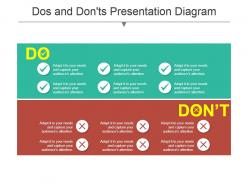
If you want to add a dos and don’ts presentation slide to your presentation, go ahead for this Dos And Don’ts Presentation Diagram. The dos and don’ts instructions template divides the slide into two colors – green for the actions recommended to be done and red for the forbidden things. With the help of this layout, you can give a detailed list of dos and don’ts as applicable in your organization. This slide can be of help for listing out the dos and don’ts of social media marketing, email marketing or for general guidelines on effective marketing strategies. It is apt for laying down the rules of dos and don’ts for a startup or a new business establishment. You can also use this for displaying the business etiquettes dos and don’ts. This design is a must have for giving a detailed plan of the actions to be taken and those to be restricted in any environment. Download it now at the click of a button! Finish the job with our Dos And Donts Presentation Diagram. Ensure full closure from every angle.
People who downloaded this PowerPoint presentation also viewed the following :
Dos and donts presentation diagram with all 5 slides:
Experience the extraordinary benefits our Dos And Donts Presentation Diagram bring. You will find them absolutely delightful.


FAQs for Dos and
Every effective presentation should include a compelling opening hook, clearly defined objectives, well-structured content flow, engaging visuals, relevant data or examples, and a strong call-to-action conclusion. These elements work together by capturing audience attention, maintaining engagement throughout, and driving desired outcomes, with many successful presenters finding that strategic combination of storytelling and data ultimately delivers memorable experiences and measurable business results.
Tailoring presentation style involves adjusting content complexity, communication approach, visual design, and engagement methods based on audience expertise, role, and expectations. Executive audiences prefer concise, strategic overviews with ROI focus, while technical teams need detailed data and implementation specifics, and general audiences respond to storytelling with relatable examples, ultimately ensuring maximum impact and comprehension.
Common presentation mistakes include reading directly from slides, overloading content with excessive text, failing to engage the audience, speaking too quickly or quietly, and lacking clear structure or flow. These errors undermine message effectiveness by creating disconnect between presenter and audience, overwhelming viewers with information, and reducing comprehension, with many organizations finding that structured presentation training significantly enhances communication outcomes and professional credibility.
Visuals are crucial for presentations, enhancing comprehension by 400% and retention by 65%, with the most effective types including clean charts, high-quality images, infographics, process diagrams, and strategic animations. These visual elements streamline complex information delivery while maintaining audience engagement, with many organizations finding that well-designed slides significantly reduce presentation time and improve decision-making outcomes.
Effective engagement strategies include interactive polls, strategic storytelling, visual variety, purposeful movement, and regular audience check-ins. These techniques work by breaking monotony, creating participation touchpoints, and maintaining energy flow, with many presenters finding that combining multiple approaches throughout different presentation segments ultimately delivers sustained attention and improved message retention.
Design presentation templates with consistent fonts, strategic white space, high-contrast colors, and clear visual hierarchy that guides audience attention from key points to supporting details. Templates should incorporate chunked information blocks, relevant icons or graphics that reinforce messages, and sufficient breathing room between elements, with many organizations finding that standardized layouts across slides significantly enhance audience comprehension and information retention while streamlining presenter preparation time.
Storytelling transforms presentations by creating emotional connections, improving information retention, and making complex concepts more relatable and memorable for audiences. Through narrative structures, presenters can guide audiences through logical progressions, illustrate key points with concrete examples, and maintain engagement throughout, with many organizations finding that story-driven presentations deliver significantly higher audience recall and stronger persuasive outcomes.
During presentations, acknowledge questions briefly and defer detailed responses to maintain flow, while encouraging note-taking for post-presentation discussion. After presenting, create dedicated Q&A time where you listen actively, provide concise answers, and admit when you don't know something, ultimately building credibility and engagement with your audience.
Best practices for presenting data effectively include using clear visualizations, limiting information per slide, choosing appropriate chart types, highlighting key insights, and providing context for numbers. These approaches streamline complex information by making statistics digestible, emphasizing actionable findings, and maintaining audience engagement, with many organizations finding that strategic data presentation ultimately delivers stronger decision-making and enhanced stakeholder buy-in.
Ensuring presentations stay within time limits requires strategic planning through structured outlines, rehearsal timing, and content prioritization based on audience needs. Successful presenters streamline complex topics, allocate specific minutes per section, and prepare concise backup slides, with many professionals finding that focused practice sessions and strategic content cuts ultimately deliver more impactful, memorable presentations.
Technical aspects for virtual presentations include reliable internet connectivity, high-quality audio equipment, proper lighting setup, backup power sources, and platform familiarity testing. These elements work together to ensure seamless delivery, minimize technical disruptions, and maintain professional credibility, with many presenters finding that investing in quality microphones and conducting pre-presentation tech rehearsals ultimately delivers enhanced audience engagement and reduced presentation anxiety.
Rehearsing your presentation enhances delivery by improving timing, refining transitions, and identifying potential technical issues, while building confidence through familiarity with content flow and audience interaction points. Through repeated practice, speakers develop natural gestures, smoother vocal delivery, and stronger message retention, with many professionals finding that multiple rehearsal sessions ultimately reduce anxiety and enable more engaging, authentic presentations.
**Presentation text dos include using large, readable fonts, limiting bullet points, maintaining consistent formatting, and ensuring high contrast between text and background colors. Don'ts involve avoiding overcrowded slides, excessive animations, all-caps text, and small fonts that strain audience visibility, with many organizations finding that clean, minimal text design enhances message retention and audience engagement significantly.**
Effective presentation closings combine a compelling call-to-action, memorable summary of key points, thought-provoking questions, or inspiring stories that resonate with your audience's goals. These techniques create lasting impact by reinforcing your core message, encouraging immediate next steps, and connecting emotionally with listeners, ultimately delivering stronger engagement and higher conversion rates across business contexts.
Techniques to overcome presentation anxiety include deep breathing exercises, thorough preparation and rehearsal, visualization of successful outcomes, positive self-talk, and arriving early to familiarize yourself with the venue. These methods work by reducing physical tension, building confidence through practice, and creating mental readiness, with many professionals finding that combining preparation with relaxation techniques ultimately delivers greater composure and more engaging presentations.
-
Top Quality presentations that are easily editable.
-
Commendable slides with attractive designs. Extremely pleased with the fact that they are easy to modify. Great work!