


Edtech pitch deck investor funding elevator pitch deck ppt template





Try Before you Buy Download Free Sample Product
 Impress Your
 Audience
 100%
100% Editable
 Save Hours
 of Time


Digital educational resources create a strong link between teachers and students, making the outside classroom transit easy. Education pitch decks demonstrate the importance and quality of your tech and the ability to conduct the proposed research. It is an excellent way to pitch and state your idea and requirements and act knowing the full implications of the decision. Here is a professionally designed pitch deck on EdTech for delivering personalized coaching in the best possible way. The purpose of this is to study continuous reinforcement, customized learning, quality experts, and its impact. The template presents the need for EdTech to emphasize the phases involved in the framework. Organizations can exhibit the scope of areas associated with the education sector, such as content, technology, ecosystem support, etc. You get to learn the process for proposal utilization based on different services offered, go-to-market strategy, launch plan, costs, revenue, etc. The time frame for the benefits of education technology presents the seed fund investment required by the company. The template also mentions the details of team management, client testimonials, reasons to choose us, etc. Remove all your queries by talking to our experts and grab the markets best editable proposal. Download the template now.
People who downloaded this PowerPoint presentation also viewed the following :
Content of this Powerpoint Presentation
Slide 1: This slide introduces EdTech Pitch Deck Investor Funding Elevator Pitch deck. State Your Company Name and begin.
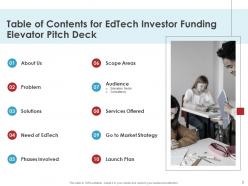
Slide 2: This slide shows Table of Content for the presentation.
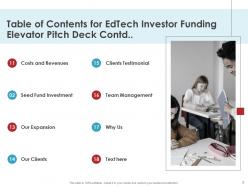
Slide 3: This is another slide continuing Table of Content for the presentation.
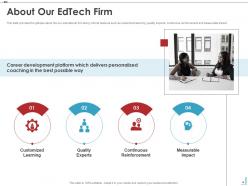
Slide 4: This slide provides the glimpse about the our educational firm along with its features such as customized learning, quality experts, continuous reinforcement and measurable impact.
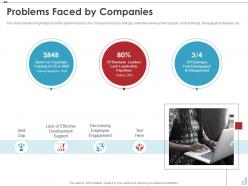
Slide 5: This slide shows the glimpse about the problem faced by the companies such as skill gap, ineffective development support, costly trainings, disengaged employees, etc.
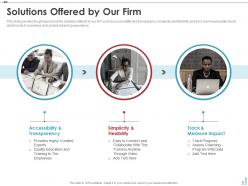
Slide 6: This slide presents the glimpse about the solutions offered by our firm.
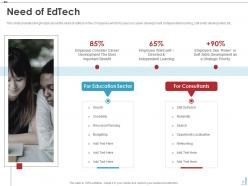
Slide 7: This slide displays the glimpse about the need of edtech in the companies which focuses on career development, independent learning, soft skills development, etc.
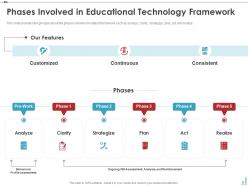
Slide 8: This slide provides the glimpse about the phases involved in edtech framework such as analyze, clarify, strategize, plan, act and realize.
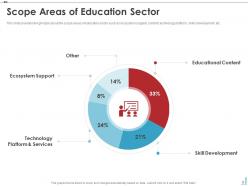
Slide 9: This slide represents the glimpse about the scope areas of education sector such as ecosystem support, content, technology platform, skills development, etc.
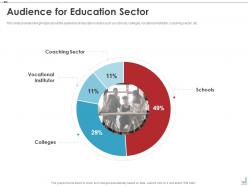
Slide 10: This slide shows the glimpse about the audience of education sector such as schools, colleges, vocational institutor, coaching sector, etc.
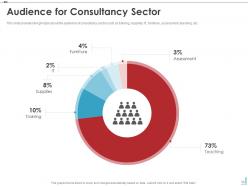
Slide 11: This slide presents the glimpse about the audience of consultancy sector such as training, supplies, IT, furniture, assessment, teaching, etc.
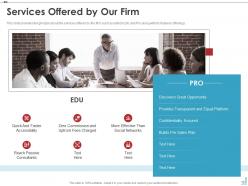
Slide 12: This slide displays the glimpse about the services offered by the firm such as edtech Edu and Pro along with its features offerings.
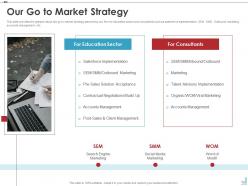
Slide 13: This slide provides the glimpse about the go to market strategy planned by our firm for education sector and consultants such as salesforce implementation, SEM, SMM, Outbound marketing accounts management, etc.
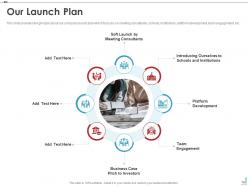
Slide 14: This slide represents the glimpse about our company launch plan which focuses on meeting consultants, schools, institutions, platform development, team engagement, etc.
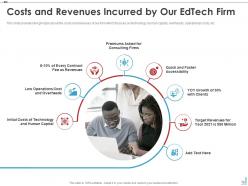
Slide 15: This slide shows the glimpse about the costs and revenues of our firm which focuses on technology, human capital, overheads, operational costs, etc.
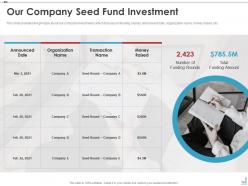
Slide 16: This slide presents the glimpse about our company investments which focuses on funding rounds, announced date, organization name, money raised, etc.
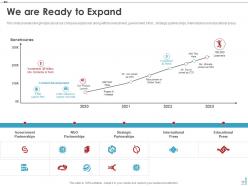
Slide 17: This slide displays the glimpse about our company expansion along with its investment, government, NGO , strategic partnerships, international and educational press.
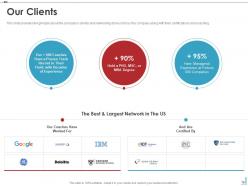
Slide 18: This slide provides the glimpse about the company’s clients and networking done so far by the company along with their certifications and coaching.
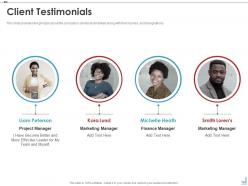
Slide 19: This slide represents the glimpse about the company’s clients testimonials along with their names, and designations.
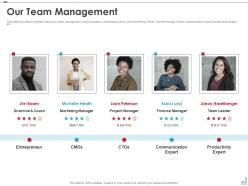
Slide 20: This slide shows the glimpse about our team management which focuses on leadership coach, chief marketing officer, chief technology officer, etc.
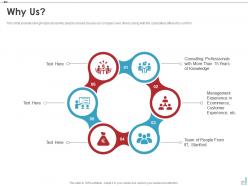
Slide 21: This slide presents the glimpse about why people should choose our company over others along with the specialties offered by our firm.
Slide 22: This slide shows Icons for EdTech Pitch Deck Investor Funding Elevator.
Slide 23: This slide is titled as Additional Slides for moving forward.
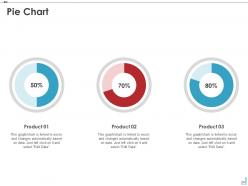
Slide 24: This slide shows Pie Chart with data in percentage.
Slide 25: This is Our Goal slide. State your firm's goals here.
Slide 26: This slide shows Venn diagram with text boxes.
Slide 27: This slide shows Roadmap with text boxes.
Slide 28: This slide shows Post It Notes. Post your important notes here.
Slide 29: This is a Timeline slide. Show data related to time intervals here.
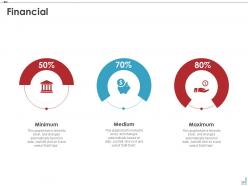
Slide 30: This is a Financial slide. Show your finance related stuff here.
Slide 31: This is an Idea Generation slide to state a new idea or highlight information, specifications etc.
Slide 32: This is a Thank You slide with address, contact numbers and email address.
Edtech pitch deck investor funding elevator pitch deck ppt template with all 32 slides:
Use our EdTech Pitch Deck Investor Funding Elevator Pitch Deck Ppt Template to effectively help you save your valuable time. They are readymade to fit into any presentation structure.

FAQs for Edtech pitch deck investor funding elevator pitch
Honestly, pick 2-3 solid tools and actually get good at them instead of chasing every shiny new app. I've watched teachers burn out trying to use like 15 different platforms - it's exhausting. Start with stuff that fixes real problems you're having. Collaborative tools work great for group work, simulations help with tricky concepts. But here's the thing - tech should make what you're already doing better, not completely flip your whole approach. Some of those flashy apps are just distractions anyway. Try one new thing per semester, ask your students what's actually helping them (they'll tell you straight up), and focus on tools that get them thinking and talking to each other.
Honestly, start with pilot groups before rolling anything out everywhere - way easier to actually see what's working. Get your baseline data first: test scores, how engaged kids are, completion rates, that stuff. Then track the exact same things after you implement the new tools. A/B testing is clutch if you can swing it with different student groups. The annoying thing is there's always a million variables affecting learning, so it's hard to know what's actually making the difference. Don't just look at grades though - get feedback from teachers and students too. Most edtech platforms have decent analytics built in anyway, which helps. Mix the hard data with the real human perspective and you'll get a clearer picture.
So AI is basically like having a tutor that actually pays attention to how each kid learns. It watches what they're struggling with, how fast they work, what clicks for them - then adjusts everything automatically. Harder problems for the smart kids, extra help for the ones who need it. Happens instantly too, which is pretty wild. Think Netflix but for homework (yeah, I know that sounds nerdy). When you're looking at new tools, definitely check if they have this adaptive thing built in. Makes a huge difference.
Dude, VR is honestly a game-changer for this stuff. Students can actually walk through a cell or mess around with molecular structures instead of just staring at diagrams. History becomes way cooler too - why read about the Colosseum when you can stand in it? Kids retain info better because they're doing things, not just sitting there. Chemistry and physics turn into these interactive playgrounds where they experiment without blowing anything up (which is probably for the best lol). I'd say start with just one VR lesson for your trickiest unit and watch how much more engaged they get.
Ugh, honestly the biggest pain is time - you're already drowning in lesson plans and grading, then boom, here's another platform to master. Most schools are terrible at this btw, they just dump new tech on teachers without any real training. So you end up googling tutorials at 11pm trying to figure it out yourself. Technical glitches happen constantly. Half your students can't even access it from home. My advice? Fight for actual training sessions before they make you use anything new. And make sure there's IT support that doesn't take three days to respond.
Yeah, mobile apps are totally changing how students study - mostly for the better. Students break things into smaller chunks now since they can learn anywhere. The game-like features actually keep them more consistent with daily practice, which is awesome. Plus they're doing more self-paced learning instead of cramming (though honestly, some kids will always wait until the last second lol). Studying feels way less formal now - it's just woven into their regular day. Oh, and if you're making curriculum stuff, definitely think about bite-sized content that works on phones alongside your usual materials.
Honestly, FERPA compliance is your starting point - don't mess around with that. End-to-end encryption too, obviously. Here's the thing though: only grab data you actually need. I see so many people collecting everything "just in case" and it becomes a nightmare later. Get parental consent for K-12 kids, set up role-based access so teachers aren't seeing admin stuff. Regular security audits are clutch. Oh, and have a breach response plan ready because that's what everyone forgets until it's too late. Start by looking at what you're already collecting - bet you don't need half of it.
Adaptive platforms are huge for this - they automatically adjust to different skill levels and speeds. I'd definitely start with accessibility features like text-to-speech and closed captions since they help way more students than you'd think. Mix up your content formats too: videos, interactive stuff, audio recordings. That way visual, auditory, and hands-on learners all get something that clicks. Oh, and check what tools you're already paying for first - most have accessibility features buried in settings that nobody uses. Personalization is honestly where the magic happens though.
Honestly, AI tutoring is where most of your budget talks will probably end up, so definitely get familiar with that. Personalized learning powered by AI is massive right now - it's creating custom paths for each student. The whole hybrid thing isn't going anywhere either; people got comfortable with mixing online and in-person during COVID. Micro-credentials are blowing up too. Students want those stackable skills they can earn fast and actually use for jobs. VR/AR is finally gaining some real momentum, especially for STEM stuff. Those are the main ones I'd focus on if I were you.
So basically gamification works because we're all secretly competitive and love getting rewarded for stuff. You add points, badges, those progress bars - boom, instant dopamine hit every time someone completes something. It's like tricking your brain into thinking homework is actually a video game (which is kinda genius tbh). People stick with hard material way longer instead of just rage-quitting. Just don't go overboard with flashy stuff that doesn't actually help them learn anything. I'd start simple - maybe progress tracking and some achievement badges first.
Honestly, skip those boring demo sessions and just throw teachers into hands-on workshops. They need to actually mess around with the tools themselves. Pair your tech geeks with the teachers who still call IT when their mouse stops working - that buddy system is gold. Break training into small chunks because nobody wants to sit through a 6-hour tech marathon. Oh, and getting students to teach teachers? That actually works better than you'd think. The real magic happens after though - keep checking in with everyone and make it okay to ask dumb questions. Connect everything to what they're already teaching so they get why they're learning this stuff.
So these platforms totally fix that lonely feeling you get with regular online classes. Students can chat in real time, instantly share stuff, and actually work together on projects from wherever. The messaging thing is clutch - no more waiting until next week to ask your question. Plus you can see who's actually participating way better than in a regular classroom, which is weird but true. Oh, and definitely make separate channels for different topics or you'll have chaos. Trust me on that one.
Honestly, admin buy-in is everything - without that you're screwed from the start. Teachers need to actually want this stuff too, not just have it shoved at them. Free tools like Google Classroom and Khan Academy are your best friends here. Training's massive but has to be ongoing. Those one-day workshops? Total waste of time. You'll need decent internet and devices that don't constantly crash. Oh, and start with small pilot programs first - way easier to show results before rolling out district-wide.
Honestly, edtech can really help close that gap if done right. Schools need to tackle three things - getting devices to kids, making internet affordable, and teaching people how to actually use the tech. The best programs I've seen partner with internet companies for cheaper broadband, then hand out laptops or tablets to students. But here's the thing - you can't just dump devices on families and walk away. Parents need training too, which people forget about a lot. Figure out what your biggest obstacle is first. Some places it's crappy internet, others it's that families can't afford computers. Start there.
Focus on three things: learning outcomes, engagement, and ROI. Are test scores actually improving? What about completion rates? Those matter way more than login counts, which honestly tell you nothing useful. Track how much people are actually using it - session time, adoption rates among faculty and students. ROI is harder to pin down but look at cost per student and whether you're getting fewer support tickets. Most schools just measure the wrong stuff. Start small - pick one metric from each area and go from there. You can always add more later.
-
I discovered this website through a google search, the services matched my needs perfectly and the pricing was very reasonable. I was thrilled with the product and the customer service. I will definitely use their slides again for my presentations and recommend them to other colleagues.
-
Content of slide is easy to understand and edit.
-
Content of slide is easy to understand and edit.
-
Unique research projects to present in meeting.
-
Design layout is very impressive.