


Five staged arrow stair timeline with years powerpoint slides




Try Before you Buy Download Free Sample Product
 Impress Your
 Audience
 100%
100% Editable
 Save Hours
 of Time


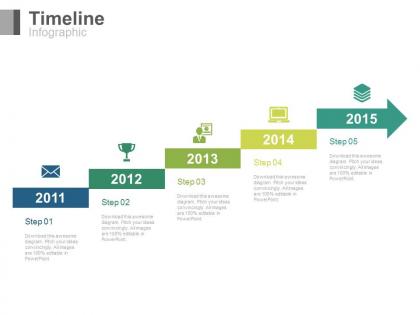
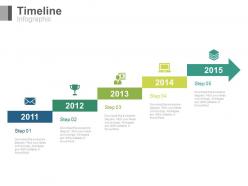
Here is our five staged arrow stair timeline with years PowerPoint slide for you to highlight the business success. Our PPT template shows the five steps with the professionally designed icons. You can download and insert it in your presentation as required. Timeline is the most engaging and impressive way to show the factors that makes the business successful. Not only has this it also assist you to highlight the achievements been accomplished after complete dedication and hard work. The Presentation diagram enables you to share the five years timeline i.e. from 2011 to 2015 to your audience. In this, you can either highlight your business journey, the beginning and the current status of the business or can how to achieve success in professional as well as in personal life. The PowerPoint slide is easily editable so you can make whatever changes you want with the design. Download and let this timeline Presentation design assist you to communicate your ideas to your audience. Bridge the gulf with our Five Staged Arrow Stair Timeline With Years Powerpoint Slides. Cut down on all the differences.
People who downloaded this PowerPoint presentation also viewed the following :
Five staged arrow stair timeline with years powerpoint slides with all 4 slides:
Feel as if in heaven with our Five Staged Arrow Stair Timeline With Years Powerpoint Slides. Your happiness will know no bounds.
FAQs for Five staged arrow stair timeline with
You'll want clear start/end dates and logical flow - that's baseline stuff. Color coding is a game changer for grouping phases or milestones. Makes it so much easier to scan quickly. Keep text concise but don't be cryptic - stakeholders need to actually understand what's happening. White space matters more than people think. Cramped timelines are a nightmare during presentations (learned this the hard way). Make your critical deadlines pop visually. Oh, and always build in buffer time even if you don't explicitly show it. Trust me on that one.
Dude, color psychology is like a cheat code for timelines! Warm colors (reds, oranges) make critical moments pop - perfect for conflicts or big turning points. Cool blues and greens work better for calm periods or wins. Here's the thing though - don't just pick what looks nice. Actually map your colors to match the story's emotional flow. Like, I learned this the hard way on a project last year where I went all aesthetic and it fell flat. When you're intentional about it, people will remember your timeline way more. It's honestly pretty wild how much difference it makes.
Don't cram everything onto one timeline - it's overwhelming. Make your text big enough to actually read (seems obvious but trust me). Spacing between events should be consistent, otherwise it looks sloppy and people can't follow the timeframe. I used to think more colors = better design... big mistake. Pick 2-3 max. Visual hierarchy matters - bold the important stuff. Oh, and if you're presenting in person, walk to the back of the room first. Can you read it from there? If not, make it bigger.
Honestly, progressive reveals are your best bet - make events pop up one by one as people scroll through. Way more engaging than dumping everything at once. Hover effects on timeline dots work well for extra details too. And smooth zooming between time periods? Chef's kiss. Like going from decades down to specific dates feels so satisfying. Oh, and sometimes I'll animate the actual timeline drawing itself across the screen - probably overkill but looks cool. Just don't go crazy with animations for no reason. Each one should either grab attention or actually add to your story, you know?
Honestly, go with clean sans-serif fonts like Helvetica or Arial - they're way easier to scan quickly. I'd skip serifs completely, even for headers. Sounds boring but trust me, consistency wins here. Make your dates a bit smaller than the event text, and don't go below 12pt or people will squint. Oh, and avoid anything fancy or script-y (learned that the hard way on a project once). Your font sizes should create a clear hierarchy so readers know what's most important. Quick test: step back a few feet - can you still read the key stuff? If not, time to make changes.
Lucidchart or Visio are solid picks if you need something fancy with collaboration features - perfect for complex stuff with lots of people involved. Canva's great for making things look pretty, and Adobe Creative Suite obviously works too. PowerPoint isn't awful for basic ones, just a bit annoying to work with sometimes. You'd be surprised what people create in random tools like Figma or even Google Sheets if they're creative enough. My advice? Just start with whatever you already know how to use, then switch later if you end up making timelines all the time.
Honestly, icons are a game changer for timelines. Your brain processes visuals way faster than text, so you're giving people a shortcut. A rocket icon = product launch, graduation cap = education stuff – you get it. Dense blocks of text are brutal to scan through. Colors and symbols create this nice visual hierarchy that breaks things up. I always assign the same icons to similar events (keeps it consistent, ya know?). Plus it just looks way more professional than a wall of text. People can spot what they're looking for instantly.
Stick to 3-5 events max on each timeline slide. Trust me, nobody wants to squint at a wall of dates while you're presenting. I've sat through way too many presentations where someone crammed their entire project history onto one slide - it's brutal. Got more stuff to cover? Just use multiple slides or chunk related events together. Pick the milestones that actually move your story forward. White space isn't wasted space, btw. Here's my go-to test: stand at the back of the room. If you can't read it clearly from there, you've packed too much in.
Oh man, this is huge for timeline design! Different cultures read in totally different directions - right-to-left, top-to-bottom - so your chronological flow can get completely misunderstood. Colors are tricky too. Red screams danger here but means good luck in China. I bombed a Tokyo presentation because of this stuff, honestly. Some cultures don't even think about time linearly - they see it as circular instead. My advice? Label your timeline direction clearly, stick with neutral colors, and maybe go vertical or circular depending on your audience. Horizontal isn't always the answer.
Look, chronological order is what makes timelines actually work - without it, you've got nothing. People need to see how events connect and build on each other. I've watched so many projects fail because someone thought they'd be clever and jump around. Your brain wants that logical sequence, right? When you mess with the order, users just get lost and can't follow the story anymore. Honestly, it's like trying to tell someone about your day by starting with dinner. Just stick to the timeline - trust me on this one, your users will actually understand what happened.
Yeah totally! Timelines work really well for showing trends - like, you can spot patterns immediately. Use different dot sizes or color gradients to show your data values at each point. Honestly I'm probably obsessed with them because they look so clean when done right. Just keep your time intervals consistent and make the visual stuff intuitive. Bigger dots = more data, darker colors = higher values, that kind of thing. Oh and test it out with a few key points first - if the story doesn't come through clearly then you know something's off before you add everything else.
Start with the big milestones - skip all the tiny stuff that just creates clutter. I'd group similar events together into chunks, then use colors to show what matters most (but seriously, don't make it look like a rainbow exploded). White space helps people actually process what they're looking at. If it gets too messy, maybe split it into two views - one overview plus detailed sections. Honestly, the best test? Show it to someone who wasn't involved. They'll immediately point out the confusing parts you missed.
Oh man, whitespace is everything for timelines! Cramped designs literally stress people out - like, who wants to squint at a wall of text? Give each event room to breathe so your audience can actually absorb what they're seeing. I always start with way too much space between milestones, then pull it back if needed. Way easier than trying to jam more space in later. The gaps create this natural flow that pulls your eye along the timeline. Honestly, generous spacing makes even boring data look professional. Short version: more space = happier viewers.
So linear timelines are great when order actually matters - like project deadlines, onboarding steps, or historical stuff where A leads to B leads to C. Pretty straightforward. But non-linear works better for messy, real-world scenarios. Customer journeys are a good example - people don't interact with your product in some neat, orderly way. They bounce around, come back later, whatever. I'd say pick linear if you're telling a story that unfolds step by step. Go non-linear when you want people exploring freely or when things happen simultaneously. Honestly, most real situations are way messier than we think.
Honestly, user feedback is pure gold when you're designing timelines. People will straight-up tell you when something's confusing - and trust me, what makes total sense to you might be completely baffling to them. I've watched designers create these gorgeous timelines that users just... couldn't follow at all. Quick usability tests work wonders. Ask stuff like "What happened between these two events?" You'll catch overloaded sections, weird labels, missing context - all the stuff you'd never notice yourself. Users spot the gaps that make them go "wait, what?" way better than we do.
-
Great product with effective design. Helped a lot in our corporate presentations. Easy to edit and stunning visuals.
-
Graphics are very appealing to eyes.