


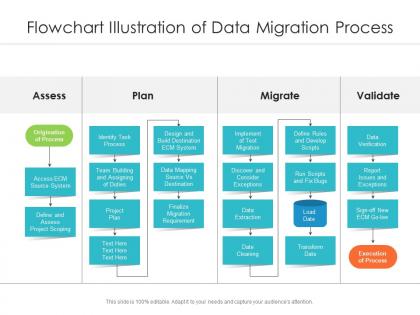
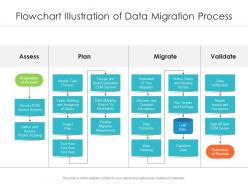
Diagrama de flujo que ilustra el proceso de migración de datos




Try Before you Buy Download Free Sample Product
 Impress Your
 Audience
 100%
100% Editable
 Save Hours
 of Time


Nuestro diagrama de flujo de la ilustración del proceso de migración de datos está diseñado temáticamente para proporcionar un fondo atractivo a cualquier tema. Úselos para parecer un profesional de las presentaciones.
People who downloaded this PowerPoint presentation also viewed the following :
Diagrama de flujo que ilustra el proceso de migración de datos con 2 diapositivas:
Utilice nuestro Diagrama de flujo de ilustración del proceso de migración de datos para ayudarlo a ahorrar tiempo valioso. Están listos para adaptarse a cualquier estructura de presentación.
FAQs for Flowchart illustration of
Honestly, it's just ETL with some extra steps on each end. First you'll map out your current data and figure out where everything needs to go. Then comes extraction from your source systems. Transformation is where projects usually go sideways - that's the messy part where you're cleaning and reformatting everything. Loading comes next, obviously. Here's the thing though: don't you dare skip validation at the end. I've seen too many people rush this part. Run those comparison reports between source and target or you'll hate yourself later when something's missing.
Honestly, flowcharts are lifesavers for data migration because everyone gets the same visual map of what's happening. No more confusing email threads trying to explain complicated steps - you just point to the box and say "this is where we check the data" or "here's the handoff point." Non-tech people can actually follow along without drowning in technical terms, which is huge. Dependencies become super obvious too. When stuff inevitably breaks (and it will), you can instantly show where things went wrong and what comes next. Way better than trying to talk through it.
Honestly, I'd go with Lucidchart or Draw.io first - they've got solid templates for data flows and aren't a pain to figure out. Draw.io's free version is pretty decent, plus it works with Google Drive which is nice. Visio's good if you're already stuck in Microsoft land. I've actually seen people throw together decent flowcharts in PowerPoint when they're desperate, though you won't get the fancy database symbols. The main thing is making sure everyone on your team can actually open and edit the files. Try Draw.io first - it has all the database icons you need.
First thing - hunt down every single place your data lives. Databases, spreadsheets, that weird CSV file Janet updates manually (we all have one). This part's actually a nightmare because data hides in the strangest places. Once you've got everything mapped, figure out where it all goes in your new system. Draw boxes for each source and destination with actual system names. Don't forget staging areas if you need them. Being super thorough here saves you from those "oh crap, what about this database?" moments later. Trust me on this one.
Map out every step - source analysis, transformation rules, target schema, the whole thing. Include data validation checkpoints and rollback procedures because stuff WILL break (learned this the hard way). Error handling paths are crucial, not just happy-path scenarios. Test at multiple stages, not just the end. Document your data quality checks and decision points for halting the process. Oh, and build in stakeholder review gates since they always want approval at random moments. Make it detailed enough that someone else could run it without texting you every five minutes asking "wait, what does this mean?"
Definitely throw in the major pain points - data quality issues, format incompatibilities, system downtime. Those are always the worst culprits. Add decision points for duplicate records and validation failures too, since they love showing up at the worst possible moments. Rollback procedures are huge - I've seen so many migrations go completely off the rails. Network bandwidth and processing limits will bottleneck you hard, so map those out clearly. The visual aspect is clutch for getting stakeholders on board. They need to see exactly where things can break so you can actually plan for it instead of scrambling later.
Use diamond shapes for your validation checkpoints - they're perfect for yes/no decisions. Before each diamond, throw in a rectangle that says what you're actually checking (like "verify data format" or whatever). If validation passes, data flows to the next step. Fails? Send it to error handling or cleaning. The feedback loops are clutch here - you want failed stuff to circle back to earlier steps. I learned this the hard way after spending hours tracking down issues that could've been caught upfront. Label everything super clearly so your team doesn't have to guess what's getting validated where.
So data quality assessment is like your early warning system - you want to run it right after you figure out what data you're actually dealing with. It catches all the messy stuff: duplicates, missing chunks, weird formatting. Way better than discovering your data is trash after you've already moved everything (been there, not fun). The whole point is finding problems early so your cleaning steps actually know what to fix. Oh, and definitely write down what you find - trust me, someone's gonna ask why you changed their precious spreadsheet data six months from now.
Honestly, just slap time estimates on each box and use clear arrows between tasks. Swimlanes are a game changer - separates different teams so you can actually see where things get stuck. Color-code your arrows too - I do red for critical stuff, blue for tasks that can run parallel. Oh, and label your dependencies properly like "must finish first" or "can overlap." Visio's solid for this, or Lucidchart if you're feeling fancy. Just don't go crazy with details - stakeholders need to glance at it and immediately get what's blocking what. Trust me, simple wins every time.
Start with data classification and access controls right up front. Then build in encryption for stuff moving around and stored data. Validation checkpoints are key - you need to verify nothing got messed with during transfers. Logging gets ignored constantly but you'll regret skipping it later, especially for compliance stuff. Map out your backup plans now before things break. Oh, and throw in a security audit before launch. Trust me, there's always something you missed the first time through. Short bursts work better than trying to catch everything at once.
So the big thing with cloud migrations is you've got way more upfront checks to worry about. Bandwidth assessment, security compliance, API testing - basically a ton of "will this even work?" steps before you start. On-premises stuff is simpler since you control everything. But cloud rollbacks are trickier too because you're dealing with someone else's infrastructure and whatever limits they have. I'd definitely throw in a network connectivity test early in your flowchart - learned that one the hard way. Also budget more time for validation than you think you'll need.
So definitely call out data loss and corruption during extraction - that stuff will haunt you. Mapping errors in transformation are brutal too. Security gets dicey during transfers, and validation can fail once data reaches the target. Performance bottlenecks are a nightmare with huge datasets, trust me on that one. Rollback gets messy fast if things break. Also flag downtime and user access problems. Oh, and make sure your flowchart has decision points where the team can actually stop and think before pushing forward - saved my butt more than once.
So start with "Migration Complete" at the top, then split into your main monitoring streams - data quality, performance, user feedback, errors. Each one needs decision diamonds asking "Issues detected?" Yes goes to incident response, No keeps the cycle running. Oh and definitely throw in those time-based checkpoints (daily/weekly) because honestly, some problems are sneaky and take forever to show up. Don't forget escalation paths either. The tricky part is figuring out when you can dial back from that intense post-migration watching to normal ops monitoring.
Dude, feedback loops are basically your safety net during data migration. They catch problems before everything goes to hell. Set up validation checkpoints so you can spot transformation errors early instead of finding out later that half your data is corrupted. I learned this the hard way on my last project - thought we could just run everything once and call it done. What a mess that was. The loops give you natural stopping points to check data quality and get approval from stakeholders. You'll want at least 2-3 checkpoints minimum. Trust me, it's way easier to fix issues as you go than trying to untangle everything afterward.
Put compliance checkpoints throughout your flowchart - not just dumped at the end. Right after data extraction is perfect, then again before final validation. Trust me, catching problems early saves so much headache later. Each checkpoint needs to call out the specific regs you're dealing with (GDPR, HIPAA, whatever applies) with clear yes/no paths. Failed data? Route it straight to remediation before moving forward. Oh and definitely add that final audit step before you go live. I made the mistake of leaving compliance til the end once - never again!
-
Topic best represented with attractive design.