

IT Risk Management Dashboard Highlighting Network Enterprise Risk Management




Try Before you Buy Download Free Sample Product
 Impress Your
 Audience
 100%
100% Editable
 Save Hours
 of Time


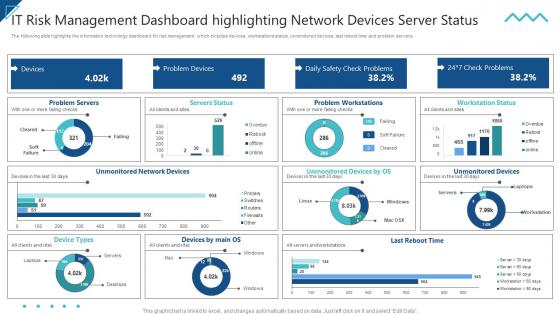
The following slide highlights the information technology dashboard for risk management which includes devices, workstations status, unmonitored devices, last reboot time and problem servers.
People who downloaded this PowerPoint presentation also viewed the following :
IT Risk Management Dashboard Highlighting Network Enterprise Risk Management with all 7 slides:
Use our IT Risk Management Dashboard Highlighting Network Enterprise Risk Management to effectively help you save your valuable time. They are readymade to fit into any presentation structure.





FAQs for IT Risk Management Dashboard Highlighting Network
So you need five main things to actually make IT risk management work. Start with a solid risk assessment process - seriously, most teams half-ass this part and wonder why everything falls apart later. Good governance comes next with clear roles so people know who's responsible for what. Then you want continuous monitoring systems, incident response procedures, and regular training programs. Oh, and the monitoring thing is huge because threats change literally every day with new tech. I'd honestly just map out what assets and vulnerabilities you have first, then figure out which pieces you're missing from there.
Start with a full risk assessment - map out all your IT stuff like hardware, software, data flows, vendors, the works. Check each piece for weak spots: outdated software, crappy access controls, backup systems that suck. NIST or ISO 27001 frameworks are honestly lifesavers for keeping this organized. Don't just think external threats either - employee mistakes happen way more than people admit. Natural disasters, cyberattacks, internal screw-ups, cover it all. Document everything and update regularly when things change. Sounds overwhelming but breaking it into chunks makes it manageable.
Look, cybersecurity is your frontline defense against the nasty stuff - ransomware, data breaches, hackers trying to mess with your systems. IT risk management is broader, covering all tech-related risks. But cybersecurity? That's specifically about blocking malicious threats. Honestly, I think of it like your digital immune system fighting off infections. The ransomware attacks lately have been brutal, so this stuff matters more than ever. Start by checking your current security controls against whatever IT risks you've identified. You'll spot the gaps pretty quickly, and that's where you need to focus first.
Honestly, just throw together a simple risk matrix - likelihood vs impact on a basic grid. The high/high stuff is a no-brainer for priority. Medium risks are where it gets weird, but don't overthink it too much. I'd focus budget and energy on anything that'll wreck your operations or cost serious money. Keep it in a spreadsheet (nothing fancy) and check it every few months. Pick your top 3-5 risks first and make actual plans for those. The rest can wait - you'll drive yourself crazy trying to plan for everything at once.
So you're looking at frameworks - NIST's Risk Management Framework is probably where I'd start since it won't cost you anything and the documentation is solid. ISO 27005 and OCTAVE are common too. FAIR's good if your company wants actual numbers instead of just "high/medium/low" ratings, which honestly makes presentations way easier. CRAMM pops up a lot in government work. They're all basically the same drill though: find your assets, spot the threats, check vulnerabilities, figure out what breaks if something goes wrong. Just pick whatever fits your industry's compliance stuff - seriously, don't spend weeks debating it.
So basically regulations totally dictate your risk priorities whether you like it or not. SOX, HIPAA, GDPR - they all force specific controls and reporting requirements on you. Can't just wing it based on what seems important. It's super restrictive honestly, but I guess it gives you structure? Your risk assessments have to match these mandates, which means compliance ends up driving where your budget goes. Really annoying sometimes. Start by mapping what risks you have now against whatever regulations hit you - that'll show you exactly where your strategy needs to change. Trust me on this one.
Build your incident response team first and make sure everyone knows their role beforehand. Trust me, you don't want people figuring that out during an actual crisis. Write down all your procedures - communication plans, who to call, the whole thing. Those tabletop exercises everyone talks about? Actually do them, they're weirdly helpful. Draft your emergency communications ahead of time because writing PR stuff while everything's broken is nightmare fuel. Oh, and keep those contact lists fresh - nothing worse than calling someone's old number. Always do a post-mortem afterward to fix whatever went wrong.
Look, AI and cloud stuff can really help your risk management - the automation is nuts, and AI catches threats way faster than we ever could. Plus most cloud providers have way better security than what you'd build yourself (honestly, their budgets are insane). But you're also opening up new ways to get attacked, and you lose some control over your data. The AI decisions can be pretty much impossible to explain sometimes. Cloud dependencies? Yeah, those can bite you if something goes down. I'd say start small and figure out your risk assessment game as you go. Don't go all-in right away.
Dude, train your people - it's honestly your biggest bang for buck. Most security disasters happen because someone clicked a sketchy email or used "password123" again. Yeah I know, people hate being told they're the problem, but here we are. When your team actually knows what phishing looks like and follows basic protocols, you'll prevent most incidents before they start. Make it regular training too, not some boring annual thing they forget immediately. Oh, and if people understand WHY the rules exist, they won't spend all day trying to get around them. Response times get way better when everyone knows their role during an actual incident.
Honestly? Do them yearly at minimum, but that's pretty bare bones. Fast-moving companies should probably go quarterly - especially if you're constantly updating systems or dealing with new regulations. Waiting a full year when you've had major changes is kinda pointless. I'd throw in quick spot checks too whenever there's big infrastructure updates or security incidents. The whole point is keeping your risk assessment current, not looking at outdated info from six months ago. Oh, and regulatory stuff changes so fast these days it's nuts.
Start with whatever aligns to your biggest headaches - maybe 3-4 metrics max. I always look at mean time to detect incidents and how fast we respond. Vulnerability remediation numbers matter too, plus patch coverage percentages. Don't sleep on the business stuff though - downtime costs hit hard and compliance scores keep executives happy. Honestly, incident recurrence rates tell you more than most metrics about whether you're actually fixing root problems or just putting band-aids on things. Risk exposure trends over time are solid gold too. Security training completion is boring but necessary. Build the habit with a few key ones first, then add more once you're not drowning in data.
Ugh, third-party vendors are such a headache for IT security. Basically you're giving outside companies access to your stuff, but you can't control how well they protect it. If their security sucks, yours does too. I've seen companies get totally screwed because some random vendor got hacked and exposed everything. You inherit all their problems - bad compliance, sketchy data practices, whatever. Most places don't even track what access vendors actually have, which is insane. Map out who touches what systems first, then make them prove they're not a disaster waiting to happen.
So basically, you want your whole IT team to just naturally think about security stuff instead of scrambling after something goes wrong. Like when devs automatically code defensively, or someone questions sketchy network activity without being told to. Users start flagging weird emails on their own too. Honestly sounds kinda obvious but it actually works - you catch way more problems early instead of dealing with major headaches later. I'd just start weaving security talk into your regular team meetings and make people feel good about speaking up when something feels off. It's one of those cultural shifts that takes time but pays off.
You need a solid risk framework first - figure out how much risk you're cool with for different project types. Create those "innovation sandboxes" where teams can mess around with new tech without breaking your main systems. Honestly, most companies either play it way too safe and fall behind, or they go completely nuts and wreck everything. Start with small pilots, set up regular check-ins to see what's actually working, and always have backup plans ready. The whole point is failing quickly and cheaply instead of trying to avoid failure completely.
Dude, IT risk management is changing fast right now. AI and automation are basically mandatory for catching threats - there's just too much happening to do it manually anymore. Zero trust is taking over from old-school perimeter security, so you're verifying everyone and everything constantly. Cloud security's obviously massive since everyone's moving that direction. Oh, and supply chain attacks are nuts lately, so third-party vendor risks are a huge deal now. Honestly? Start with a zero trust assessment if you haven't - that'll set you up for tackling the rest of this stuff.
-
I discovered this website through a google search, the services matched my needs perfectly and the pricing was very reasonable. I was thrilled with the product and the customer service. I will definitely use their slides again for my presentations and recommend them to other colleagues.
-
SlideTeam has helped me take my presentation to the next level. Everyone at the office is impressed! I’ll be using their designs for a long-long time.