


Key metrics ppt design






Try Before you Buy Download Free Sample Product
 Impress Your
 Audience
 100%
100% Editable
 Save Hours
 of Time


Take your thoughts for a deep dive. Oxygenate them with our Key Metrics Ppt Design.
People who downloaded this PowerPoint presentation also viewed the following :
Key metrics ppt design with all 5 slides:
Climb the charts with our Key Metrics Ppt Design. Your ideas will be an enduring hit.
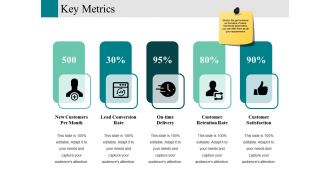

FAQs for Key
Honestly, it depends who you're presenting to, but revenue and customer acquisition are non-negotiables. Your executives only care about profit margins and growth - trust me on this one. I'd add some retention stats because they explain the "why" behind your numbers. Don't go crazy though - maybe 5-7 metrics tops or everyone's eyes will glaze over. Oh, and always include context like year-over-year comparisons. Makes a huge difference when people can actually see if you're winning or not.
Your metrics need better visual design - trust me on this one. Color helps guide people's eyes to the important stuff. Size things based on what matters most. Give your data room to breathe with white space, because cramped layouts are the worst. Charts and icons beat walls of numbers every single time. Nobody wants to stare at spreadsheet hell. Group similar metrics together so people can actually scan for patterns. Keep your formatting consistent. The whole point? Make your key insights jump out instead of getting lost in a mess of visual noise.
Honestly, just strip out anything that doesn't support your main point. Stick to 2-3 colors max and make your biggest data points literally the biggest things on screen. Don't be afraid of white space - cramming everything together looks messy as hell. Bar charts and line graphs work way better than those fancy visualizations that confuse people. Put your headline number first, then add context below it. Oh, and group similar stuff together so it makes sense. Test it on someone fresh who wasn't involved - they'll catch things you missed.
Honestly, colors totally mess with how people read your data. Red screams "bad news" and green says "we're winning" - though that can flip depending on culture, which is kinda weird when you think about it. Pick your colors once and don't change them or you'll confuse everyone. Bright colors make people look at the important stuff first. Muted ones push less critical data to the background. Oh, and definitely check if colorblind people can still read everything - that's like 8% of viewers who'll be lost otherwise. Just stay consistent across all your slides.
Honestly, infographics are a game-changer for making your data actually readable. Nobody wants to dig through spreadsheets - I sure don't. Visual stories with icons and color coding help people grasp your key metrics in like 3 seconds flat. Pick the right chart type for whatever you're showing. Bar graphs for comparisons, line charts for trends, that kind of thing. Start with your most critical numbers first. You can always layer in the supporting stuff later. I've seen boring quarterly reports turn into something people actually want to look at just by switching to a good visual format.
Think of your data like telling a story - start with the problem you're trying to solve, then show how the numbers prove you're making progress. I honestly hate decks that just throw percentages at people without context. Use conversational hooks like "here's what we discovered" to keep them hooked. Each metric should connect back to your main storyline instead of feeling random. Short sentences work great for emphasis. Longer ones help you walk through the journey your team took to get results. Pick one big question your data answers and build everything around that. Works every time.
Oh man, don't cram like 20 metrics on one slide - people's eyes just glaze over. I made the mistake once of using tiny fonts and nobody could read anything from the back row, so embarrassing. Always give context too - like is 15% conversion rate actually good? Include benchmarks or last quarter's numbers so people know. Keep animations simple (or skip them entirely tbh). Focus on maybe 3-4 key metrics max per slide. Clear labels are your friend. And honestly? Sometimes less fancy is more effective - just make sure your main point hits hard.
Dude, visualizations are a game changer for presenting metrics. People's brains just work better with charts and graphs than endless spreadsheet rows - I swear half my old team would zone out the second I pulled up a table. Tools like Tableau transform those boring numbers into something that actually tells a story. You'll catch trends way faster too. Even basic chart builders work if you're not trying to get fancy. The key is picking your most important metric first and experimenting with different ways to show it. Trust me, your stakeholders will thank you for not making them decode raw data anymore.
Honestly, most people overthink this stuff. Start with the right chart - bars for comparing things, lines when you're showing changes over time. Pie charts? Skip them unless you absolutely have to show parts of a whole (they're pretty much always confusing anyway). Keep your labels clear and don't get fancy with colors or 3D nonsense that just makes everything harder to read. Here's the thing - if someone can't get your main point in like 3 seconds, you've lost them. Oh, and put your actual insight right in the title instead of making people hunt for it in the data.
Dude, audience analysis is everything when showing metrics. Execs want the big picture - clean dashboards, clear trends, no clutter. They're busy and don't want to dig into details. But your team or analysts? Go nuts with the granular stuff and technical breakdowns. Honestly, it makes me cringe seeing people use identical presentations for both groups. Colors, charts, even which metrics you highlight - it all needs to shift based on who's sitting there. Oh, and here's the key question that always helps me: what actual decisions will they make with this data? That'll guide everything else.
Go with a grid layout and give those numbers room to breathe - white space is your friend here. I'm totally obsessed with the "big number, small context" thing where your main KPI dominates and all the extra details are tiny underneath. Card layouts work great too, each metric in its own little box. Don't cram stuff together or go crazy with competing colors. Size and positioning should make your hierarchy obvious. Oh, and try grouping related metrics in threes max - your brain processes that way better than random clusters of five or whatever.
Monthly updates are the bare minimum - shoot for every 2-3 weeks if you can. Fast-moving business? You might need weekly refreshes. Nothing tanks a presentation faster than showing three-month-old conversion rates like they're breaking news. Your audience spots stale data instantly and your credibility goes out the window. I learned this the hard way once, honestly. Set up a calendar reminder to grab fresh numbers, and always slap the data collection date right on your slides. That way everyone knows exactly what they're seeing.
Honestly, most metric slides are just chaos - people dump everything on there and expect it to make sense. Start with your most important number and make it impossible to miss. Use size and color to create a clear hierarchy so people know where to look first. Add context that non-technical folks can actually understand (like, what do these numbers mean for the business?). Keep colors simple and ditch the jargon in your labels. Oh, and always end with a clear takeaway - don't make people guess what they're supposed to do with this info. Quick test: can someone "get it" in 10 seconds?
Yeah, animations can totally make your metrics pop if you don't go overboard with them. Simple stuff works best - numbers counting up, bars growing in smoothly. That kind of thing helps people actually follow what you're showing them. But god, I've sat through so many presentations where someone went crazy with flashy transitions and it just becomes this annoying distraction. You stop paying attention to the data because there's all this movement happening. Before adding any animation, just ask yourself: does this actually help explain the metric or am I being extra? Test it on someone first too.
Dude, you HAVE to explain your metrics or people will just stare at numbers like deer in headlights. Seriously, is 47% conversion good or bad? Nobody knows without context! I've watched so many presentations where someone throws up a chart and expects everyone to magically understand what it means. Not happening. Your explanations are what connect the dots - they show benchmarks, point out trends, and actually explain why anyone should care. Just add 1-2 sentences next to your key numbers explaining what they mean and why they matter for your goals. Makes all the difference.
-
Thanks for all your great templates they have saved me lots of time and accelerate my presentations. Great product, keep them up!
-
Easy to edit slides with easy to understand instructions.