


Mobile App UI UX Maintenance Proposal Powerpoint Presentation Slides




Try Before you Buy Download Free Sample Product
 Impress Your
 Audience
 100%
100% Editable
 Save Hours
 of Time


Every organization wants to stay ahead of its competition, and for that, they engage in adopting modern digital technologies for their business operations. Companies are rapidly inclining towards getting their products and services online. They look for expert graphic designers to create mobile apps for their businesses. Take the opportunity to expand your business in this digitizing marketplace. Introduce your application building skills by employing this attractive and innovative Mobile App UI UX Maintenance Proposal Powerpoint Presentation Slides. Take the assistance of this invigorating PPT layout to elaborate on your company's goals like creating a framework for mobile app designs; designing functional prototypes; curating source codes. Elaborate on the project context and objectives to provide clarity to your clients about your services with the help of this app development PPT template. Develop a suitable plan of action for project initiation, design, testing, and development support by taking the aid of this software design PPT slide. Mention the scope of your services like research, UX chart, app screen wireframe, initial mockups, and interactive prototype with these interactive proposal slides. Exhibit your tools for branding the app with content and media campaigns through this ready-made PPT presentation. Create a timeline with the help of this software development PPT slide to give a deadline for completion of each task. Highlight the additional services your company renders like website design, logo design, game development, and augmented reality to help your clients make an informed decision by taking the aid of this mobile app design PPT visual. Showcase the financial layout to explain the funds and investment required to avail your company's services for each activity with this proposal template. Gain the trust of your audience by providing your company's background, strengths, weaknesses, and core values using this web interface PPT presentation.
People who downloaded this PowerPoint presentation also viewed the following :
Content of this Powerpoint Presentation
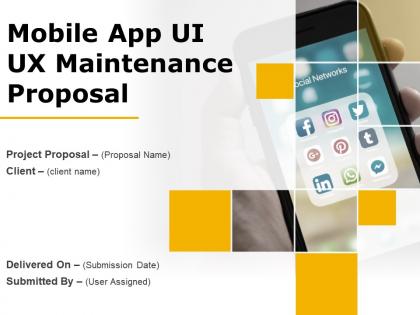
Slide 1: This slide introduces Mobile App UI UX Maintenance Proposal. State Client name, Submission date and User assigned.
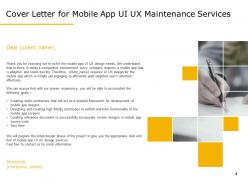
Slide 2: This slide shows Cover Letter for Mobile App UI UX Maintenance Services.
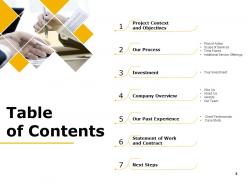
Slide 3: This slide describes Table of Contents.
Slide 4: This slide describes Project Context and Objectives.
Slide 5: This slide showcases Project Context and Objectives forMobile App UI UX Maintenance Services
Slide 6: This is Our Process slide with- Plan of Action, Scope of Services, Time Frame, Additional Service Offerings.
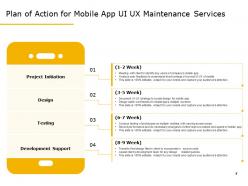
Slide 7: This slide showcases Plan of Action for Mobile App UI UX Maintenance Services.
Slide 8: This slide showcases Scope for Mobile App UI UX Maintenance Services.
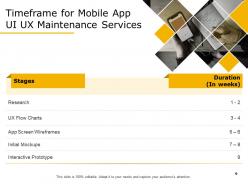
Slide 9: This slide represents Timeframe for Mobile App UI UX Maintenance Services
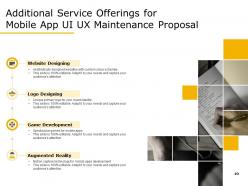
Slide 10: This slide shows Additional Service Offerings for Mobile App UI UX Maintenance Proposal
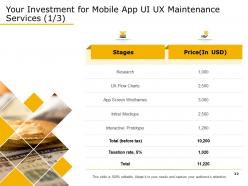
Slide 11: This slide represents Investment details.
Slide 12: This slide represents Investment details.
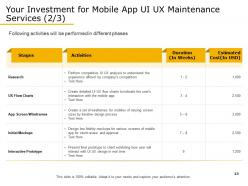
Slide 13: This slide also represents Investment details. Following activities will be performed in different phases – Research, App Screen Wireframes, Interactive Prototype, Initial Mockups, UX Flow Charts.
Slide 14: This slide showcases Investment details for Mobile App UI UX Maintenance.
Slide 15: This slide showcases Company Overview with- Why Us, About Us, Awards, Our Team.
Slide 16: This slide shows reasons for choosing us for Mobile App UI UX Maintenance.
Slide 17: This is About Us slide with Mission, Vision and Core Values of The Company.
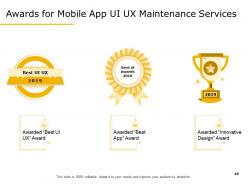
Slide 18: This slide represents Awards for Mobile App UI UX Maintenance.
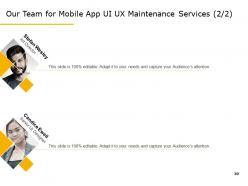
Slide 19: This is Our Team slide with Names and Designations.
Slide 20: This is Our Team slide with Names and Designations.
Slide 21: This slide shows Our Past Experience with- Client Testimonials, Case Study.
Slide 22: This slide represents Client Testimonials.
Slide 23: This slide shows Client Testimonials.
Slide 24: This slide showcases Case Study for Mobile App UI UX Maintenance.
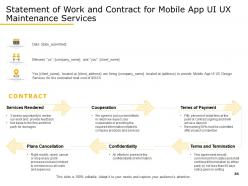
Slide 25: This slide represents Statement of Work and Contract.
Slide 26: This slide represents Statement of Work and Contract.
Slide 27: This slide depicts Next Steps.
Slide 28: This slide showcases Next Steps for Mobile App UI UX Maintenance.
Slide 29: This is Contact Us slide with Address, Email address and Contact number.
Slide 30: This is Icon Slides for Mobile App UI UX Maintenance Proposal.
Slide 31: This slide is titled as Additional Slides for moving forward.
Slide 32: This is About Us slide to showcase Company Specifications.
Slide 33: This is Our Mission slide with Vision, Goal and Mission.
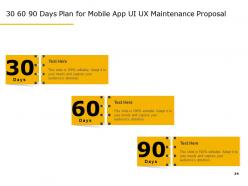
Slide 34: This is 30 60 90 Days Plan slide.
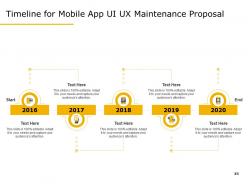
Slide 35: This slide shows Timeline process.
Slide 36: This slide shows Roadmap process.
Mobile App UI UX Maintenance Proposal Powerpoint Presentation Slides with all 36 slides:
Use our Mobile App UI UX Maintenance Proposal Powerpoint Presentation Slides to effectively help you save your valuable time. They are readymade to fit into any presentation structure.






















FAQs for Mobile App UI UX Maintenance Proposal
Key indicators include declining user engagement metrics, increased app abandonment rates, outdated design elements that clash with current platform standards, slow loading times, and rising negative reviews citing usability issues. These warning signs often emerge when apps fall behind evolving user expectations or platform updates, with many successful companies finding that proactive UI/UX maintenance prevents costly redesigns while maintaining competitive advantage.
Mobile apps should undergo UI/UX evaluations quarterly for comprehensive assessments, with monthly monitoring for user analytics and performance metrics, and immediate reviews following major updates or user feedback spikes. This strategic approach enables organizations to maintain competitive interfaces, address usability issues proactively, and optimize user experiences continuously, with many successful apps finding that regular evaluations significantly enhance user retention and business outcomes.
**INPUT**: What strategies can be implemented to gather user feedback effectively for UI/UX improvements? **OUTPUT**: Effective user feedback strategies include in-app surveys, usability testing sessions, analytics tracking, beta testing programs, and social media monitoring. These approaches enable organizations to capture real-time user experiences, identify pain points, and prioritize improvements, with many companies finding that combining multiple feedback channels delivers comprehensive insights and ultimately enhances user satisfaction while reducing development costs. *[Word count: 56 words]*
Usability testing can be incorporated through regular user feedback sessions, A/B testing of interface elements, heat mapping analysis, task completion assessments, and iterative prototype evaluations. These methods enable development teams to identify pain points, optimize navigation flows, and enhance user interactions continuously, with many mobile app companies finding that systematic usability testing reduces support tickets while improving user retention and overall app performance.
Analytics plays a crucial role by tracking user behavior patterns, identifying navigation bottlenecks, measuring engagement rates, monitoring conversion funnels, and revealing abandonment points throughout the app experience. Through heatmaps, session recordings, and performance metrics, development teams can pinpoint specific interface elements causing friction, optimize user flows, and enhance overall usability, ultimately delivering improved user satisfaction and increased app retention rates.
App accessibility can be ensured during UI/UX maintenance by conducting regular accessibility audits, implementing automated testing tools, following WCAG guidelines, and incorporating user feedback from diverse accessibility needs. These approaches streamline compliance by integrating accessibility checks into development workflows, testing with assistive technologies, and validating updates across various disabilities, ultimately delivering inclusive experiences that enhance user satisfaction while meeting regulatory requirements.
**INPUT**: What are the best practices for maintaining consistency in UI/UX across multiple app versions? **OUTPUT**: Best practices include establishing comprehensive design systems, maintaining centralized component libraries, implementing version control for design assets, conducting regular cross-version audits, and standardizing user interaction patterns. These approaches streamline development workflows by ensuring unified visual languages, reducing design debt, and accelerating update cycles, with many organizations finding that systematic consistency protocols ultimately deliver enhanced user experiences and significantly lower maintenance costs across their entire app ecosystem. [Word count: 60 words]
**INPUT**: How can design trends be balanced with user familiarity during app UI/UX maintenance? **OUTPUT**: Balancing design trends with user familiarity involves implementing gradual interface updates, conducting A/B testing with existing users, and maintaining core navigation patterns while introducing modern visual elements. Through strategic phased rollouts, organizations can enhance user experiences without disrupting established workflows, with many finding that incremental design evolution delivers improved engagement while preserving user confidence and adoption rates. [Word count: 58 words]
Tools for tracking mobile app UI/UX performance include Firebase Analytics, Mixpanel, Hotjar, Adobe Analytics, and Amplitude, which monitor user behavior, screen flows, and engagement patterns. These platforms enable organizations to measure conversion rates, identify drop-off points, and optimize user experiences through heat maps and session recordings, ultimately delivering enhanced customer satisfaction and competitive advantage.
Mobile app teams can prioritize UI/UX fixes by focusing on user-critical pain points, crash-inducing issues, conversion-blocking elements, and accessibility compliance problems first. This strategic approach enables teams to maximize impact with limited resources, with many organizations finding that addressing high-traffic user flows and revenue-generating features delivers immediate ROI while building momentum for comprehensive improvements.
Common pitfalls include neglecting user feedback analysis, inconsistent design updates across platforms, ignoring accessibility standards, over-complicating interfaces with unnecessary features, and failing to test changes thoroughly before deployment. These maintenance missteps significantly impact user retention and brand credibility, with many retail and financial services apps finding that systematic testing, consistent design language, and regular user behavior analysis ultimately deliver smoother experiences and sustained competitive advantage.
User segmentation informs tailored UI/UX maintenance by identifying distinct user behaviors, preferences, demographics, and usage patterns across different customer groups. Through targeted analytics and feedback collection, organizations can prioritize feature updates, optimize navigation flows, and customize interface elements for specific segments, with retail apps finding that personalized experiences significantly enhance user engagement and retention rates.
Regular UI/UX maintenance significantly enhances user retention and engagement by streamlining navigation, optimizing performance, reducing bounce rates, and ensuring consistent functionality across updates. Through strategic interface improvements and user experience refinements, businesses achieve higher customer satisfaction, increased session durations, and improved conversion rates, with many mobile app companies finding that proactive maintenance delivers competitive advantage and sustainable user growth.
Iterative design principles enable continuous mobile app UI/UX improvement through regular user testing, data-driven analysis, incremental feature updates, and feedback integration cycles. These methodologies streamline enhancement processes by identifying pain points, testing solutions with targeted user groups, and implementing changes systematically, with many app development teams finding that this approach delivers higher user retention, improved engagement metrics, and sustained competitive advantage.
Cross-platform compatibility in mobile app UI/UX maintenance ensures consistent user experiences across iOS, Android, and web platforms while streamlining development workflows and reducing maintenance costs. This strategic approach enables organizations to maintain unified branding, accelerate update deployments, and maximize user engagement across diverse device ecosystems, ultimately delivering broader market reach and operational efficiency.
-
Presentation Design is very nice, good work with the content as well.
-
Excellent template with unique design.