


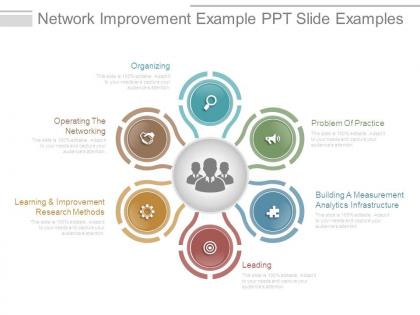
Network improvement example ppt slide examples




Try Before you Buy Download Free Sample Product
 Impress Your
 Audience
 100%
100% Editable
 Save Hours
 of Time


Our Network Improvement Example Ppt Slide Examples are excellent for grooming. They will develop into actual assets.
People who downloaded this PowerPoint presentation also viewed the following :
Network improvement example ppt slide examples with all 7 slides:
Discredit irrational ideas with our Network Improvement Example Ppt Slide Examples. Explain the elements that appear illogical.






FAQs for Network improvement example
Track latency first - that's how long data takes to get around. Throughput shows your actual transfer speeds. Packet loss tells you about dropped connections, which is super annoying. Bandwidth utilization shows how much capacity you're actually using versus what's available. Oh, and jitter matters big time for video calls - trust me, choppy Zoom calls make everyone hate IT. Uptime's obviously crucial too because great performance doesn't matter if the network's dead. Set up baselines when everything's running smooth so you can catch problems before users start complaining.
Hey! So first thing - grab something like SolarWinds or PRTG to monitor your network. They'll show you bandwidth, latency, all that stuff. Run throughput tests when everyone's online since that's when things get messy. Check if your switch ports are maxed out too - happens more than you'd think. Your ISP might just suck though, so don't rule that out. Oh, and set alerts at 80% utilization. Trust me, catching problems before users start freaking out is way better than playing damage control later.
Oh man, network latency will absolutely wreck your app if you're not careful. It's that annoying delay between sending data and actually getting it back. I've watched so many projects crash and burn over this stuff - users just won't stick around for slow loading times. Try running some ping tests first to see where the worst delays are happening. Traceroutes help too. Then you can look into caching or maybe a CDN to speed things up. Edge computing's pretty solid for this too, though it gets pricey fast.
So basically, network optimization cuts down latency and makes your bandwidth way more efficient - which means faster loading apps that don't make users want to throw their phone. Optimizing routes, compressing data, using CDNs in smart spots... all that stuff eliminates the junk that bogs everything down. I've literally watched apps transform from "ugh why won't this work" to actually usable just from tweaking the network setup. Focus on reducing round trips, smart caching, and putting your data centers close to users. Oh and measure your current performance first - can't fix what you can't see, right?
Honestly, the biggest myth is thinking more bandwidth fixes everything - like getting a bigger pipe when your drains are clogged. Network optimization isn't a "set it and forget it" thing either. Your network's constantly changing, so you need ongoing monitoring. Expensive gear doesn't automatically mean better performance (learned that one the hard way). Configuration beats price every time. Oh, and here's something that'll save you headaches - tons of "network problems" are actually application issues in disguise. Before you change anything though, measure your current performance first. Can't fix what you don't actually understand.
So traffic shaping is like having a bouncer for your network - it decides what gets through first. You can set it up so your video calls don't get murdered by someone downloading a massive file (seriously, why do people always do this during meetings?). It gives priority to the stuff that actually matters, like VoIP or streaming, while throttling the bandwidth hogs. Your network stays smooth instead of randomly dying. Just figure out what apps you can't live without and prioritize those. Pretty straightforward once you get the hang of it.
Start with something like SolarWinds, PRTG, or Nagios - they'll show you bandwidth, latency, all that good stuff in real time. Wireshark's a must-have for when you need to get into the weeds with packet analysis. I swear I live in that tool sometimes. New Relic or Dynatrace are solid for seeing how network problems mess with your users' experience. Basic command line stuff like ping and traceroute will save your butt for quick fixes too. Honestly, pick one main platform first then build from there - don't go crazy buying everything at once.
Dude, AI and ML are game-changers for network stuff. They analyze traffic patterns and predict where things might get clogged up before it actually happens. No more staring at dashboards all day - these systems automatically reroute traffic and adjust bandwidth on their own. The algorithms catch performance issues way faster than you ever could manually. Honestly, it's like having a network admin who's had way too much coffee and never needs sleep. Over time, they get smarter about your specific setup too. Start with basic traffic analysis tools first - you'll notice faster response times pretty quickly.
Checksums and hash functions are super helpful for catching data corruption - definitely start there. I'd also set up redundant pathways so if one connection dies, you've got backups ready to go. Error correction codes are honestly a lifesaver, can't tell you how many times they've bailed me out. Oh, and monitoring/logging is crucial for spotting problems early. The big thing though? Test your failover stuff regularly. Trust me, discovering your backup systems are broken during an actual emergency is absolutely brutal timing.
Your hardware basically caps how much you can optimize your network. Outdated switches or routers with weak processors? Even perfect algorithms will choke. CPU power, memory, network cards - they all affect traffic shaping and load balancing big time. I've watched teams waste months tweaking settings when their hardware was just trash to begin with. But here's the thing - once you figure out what's actually bottlenecking you, upgrades become way more targeted. No more throwing money at random components hoping something sticks.
So network optimization actually helps with security - weird but true. Better traffic flow means you can see what's happening more clearly, which makes spotting threats way easier. Your firewalls won't slow everything down when the network's running smoothly either. There's one downside though - compressed traffic can mess with deep packet inspection (learned that the hard way). But honestly, most security tools work so much better when they're not fighting network lag. I'd just take a look at what you've got now and see where cleaning things up might actually help your monitoring stuff work better.
Look at what's actually breaking first - are people bitching about slow file transfers or video calls cutting out? That's where your money should go, not some shiny new router that won't fix anything. Honestly, I've watched companies waste so much cash on equipment that just sits there looking pretty. Don't rip everything out at once either. Do it in phases so you're not scrambling when half your network's down. Cloud-managed stuff is worth checking out too since it cuts down the headache of maintaining everything yourself. But seriously, get some usage data before you buy anything.
Honestly, the biggest pain is gonna be latency - it's all over the place between AWS, Azure, and GCP. Each one handles networking totally differently, which is fun to figure out. Security policies become this weird juggling act across environments. You'll lose visibility into where your traffic actually goes, so debugging turns into a guessing game. Oh, and watch those data transfer costs - they add up crazy fast if you're bouncing between clouds constantly. Before you do anything else though, map out your current traffic patterns. Can't optimize what you can't measure, right?
Start with cloud stuff and SD-WAN - they scale way better than traditional setups. Load balancing is honestly a lifesaver, don't skip it. Keep an eye on your bandwidth patterns so you can see problems coming. Build in redundancy at key spots and use automation for traffic management (saves you so much headache later). The whole point is making things flexible from the start instead of constantly patching fixes. Oh, and set up monitoring dashboards now - catching bottlenecks early beats dealing with angry users any day.
Start with monitoring - get automated alerts for bandwidth, latency, packet loss. Honestly, being proactive here saves so much headache later vs scrambling when things break. Baseline your current performance first, then do quarterly reviews to spot bottlenecks before they bite you. Document everything too - network changes, what worked, what didn't. I know it's boring but you'll be glad you did when you're troubleshooting at 2am or trying to scale up. Traffic pattern analysis during those reviews is clutch for catching issues early.
-
Very well designed and informative templates.
-
Easily Understandable slides.