

Online banking powerpoint presentation slides





Try Before you Buy Download Free Sample Product
 Impress Your
 Audience
 100%
100% Editable
 Save Hours
 of Time


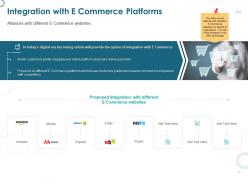
Banking professionals can now take advantage of our well-structured and subject-oriented Online Banking PowerPoint Presentation Slides. This electronic banking PPT theme helps you to showcase the obstacles faced by the banking sector that still operates offline. Further, present the problem statement through financial impact, projected revenue, and competition benchmark using our E-banking PowerPoint template. Get access to key stats on online banking, and customer channel preference to present a convincing web banking PPT presentation. Elucidate retail, corporate, or any other online banking type through this easy-to-understand internet banking PowerPoint theme. The digital banking PPT template deck helps you illustrate the leading players in the industry along with the services they offer. This E-banking PowerPoint presentation helps you convey the federal rules and regulations concerning online banking to your audience. Web banking PPT deck helps you in highlighting the implementation process. You can easily explain E-banking software providers, workforce training, costing, and integration with E-commerce platforms.
People who downloaded this PowerPoint presentation also viewed the following :
Content of this Powerpoint Presentation
A decade back , who would have ever imagined sending or receiving money in bank accounts while sitting at home? With digitalization, banking was one of the first sectors to revolutionize.
Online banking has transformed how we manage our finances. We can check balances,transfer money, pay bills, and more, from anywhere with a computer, tablet or a smartphone. This goes beyond personal banking. Businesses also benefit from online banking as they can integrate it for payroll, cash management, invoicing, etc. The encryption and multi-factor authentication makes it a secure mode of transaction.
Showcase 13 stages for online banking services using our pre-designed PowerPoint Template that highlights a wheel to showcase the services.
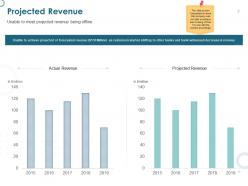
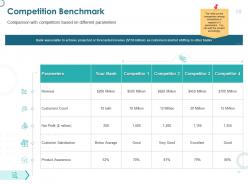
The twenty-four access to banking makes it convenient to manage money, without being confined to banking hours. This eliminates the trips to a bank branch and gives unparalleled control over your money from anywhere. While online banking has made our lives much easier there are still some hiccups faced by the banking sector that still operates offline. This PPT Template bundle on Online Banking has a total of 61 well-structured and subject-oriented slides. It presents the problem statement through financial impact, competition benchmark, projected revenue, and more. Using these pre-designed and 100% editable and customizable slides you can highlight the agenda of online banking, federal regulations, company overview and more.
Let's explore a few of the slides from the deck now!
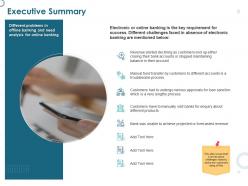
Template 1: Executive Summary
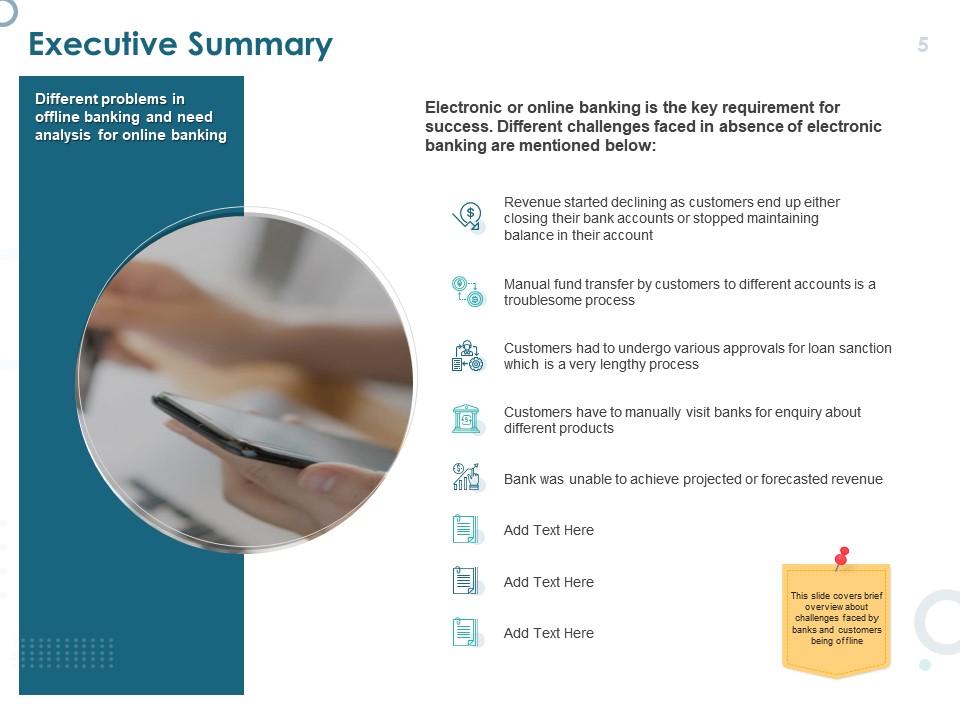
This given slide highlights a summary on different problems in offline banking and need analysis for online banking. The slide engagingly displays the challenges faced in the absence of online banking. The visuals and unique icons included in the template ensures more engagement.
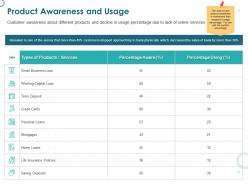
Template 2: Product Awareness and Usage
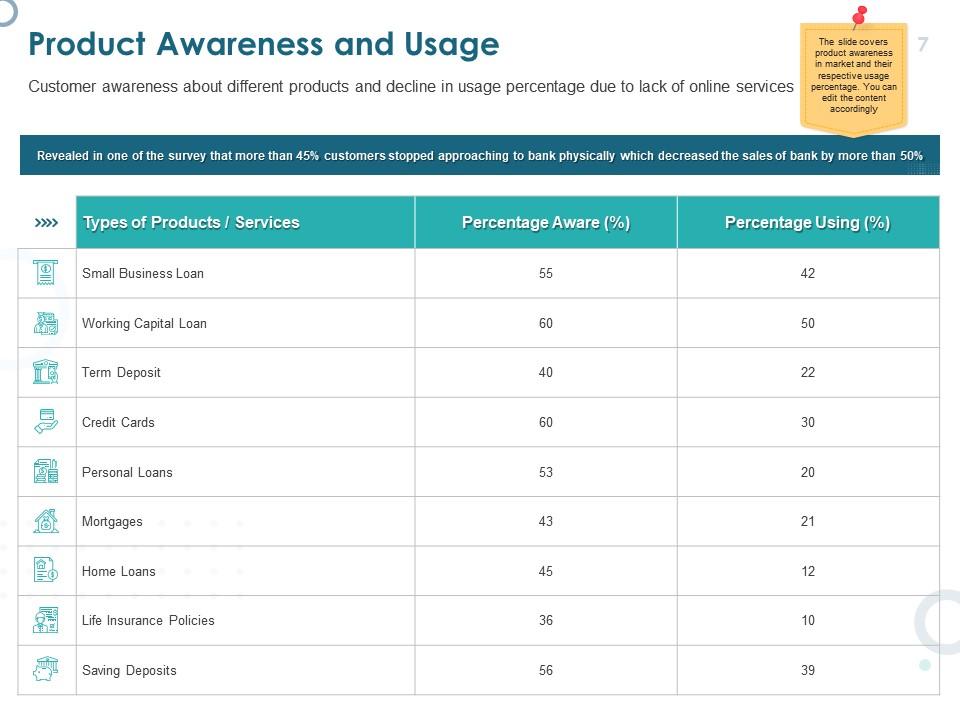
This PPT slide showcases customer awareness of several banking products with usage percentages impacted by limited online services. It includes a table to offer clarity and easy understanding. In addition, it shows the gap between product awareness and actual usage, pointing out the need of improving online banking solutions to satisfy customer needs and promote usage growth.
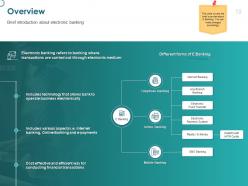
Template 3: Overview
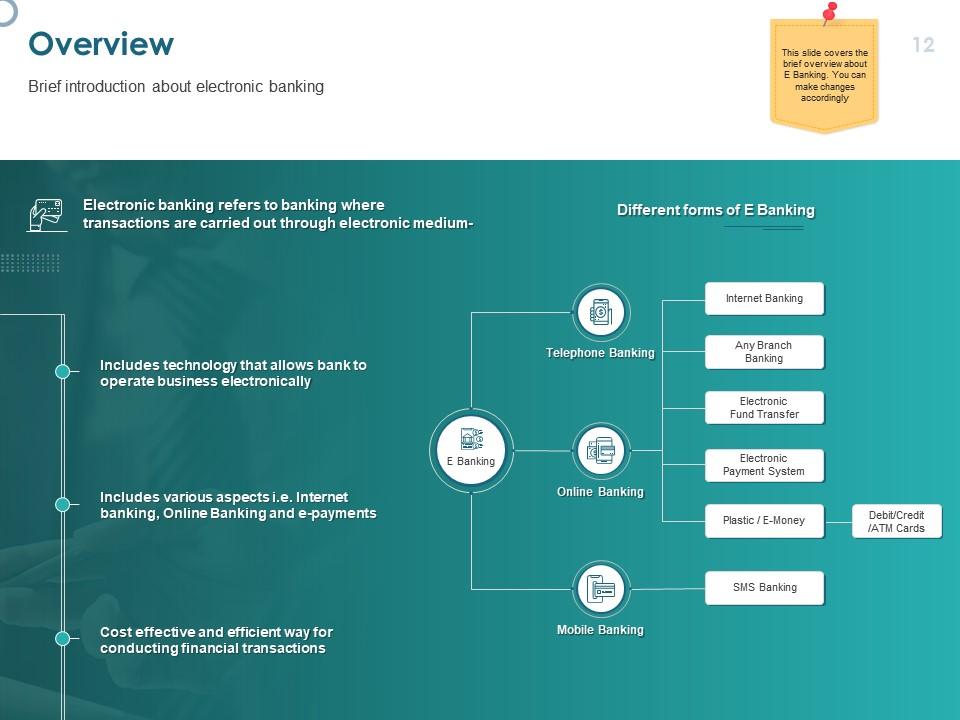
This Slide showcases a brief introduction about electronic banking. It includes different forms of E-banking such as telephone banking, online banking, mobile banking and more. It also highlights use of technology, cost effective and efficient way for conducting financial transactions and more.
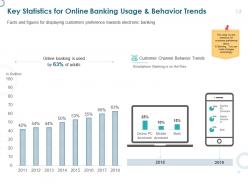
Template 4: Key Statistics for Online Banking Usage and Behavior Trends
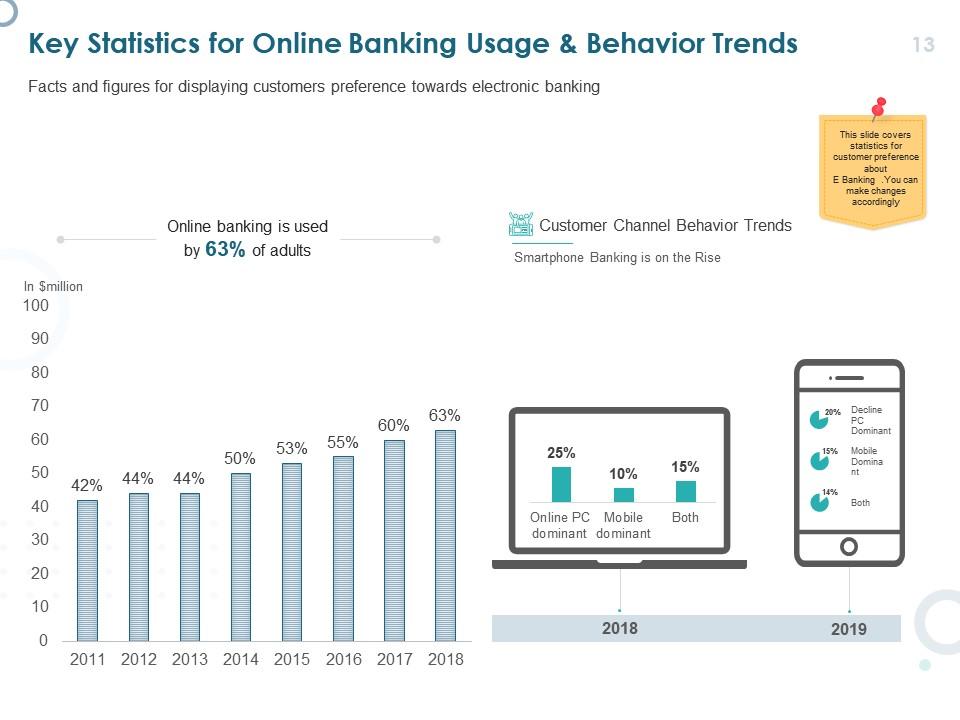
This Slide highlights relevant data on customer online bank usage and behavior trends. It includes a trend chart which displays a trend of customers shifting towards online banking from regular banking. It also highlights which mode of online banking like Online PC, or mobile, or both is preferred more.
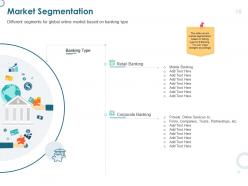
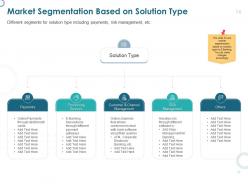
Template 5: Market Segmentation Based on Solution Type
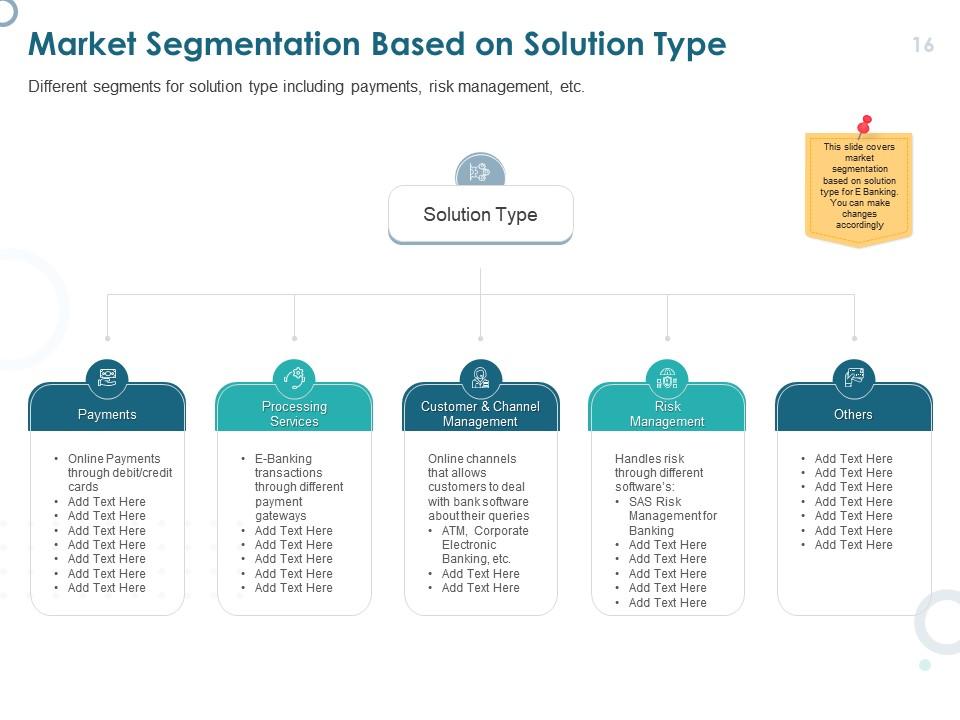
This Slide showcases multiple solution categories such as payment, processing services, customer and channel management, risk management and others. It includes a tree graph highlighting each of these solutions for better clarity and understanding of the segmentation process. This enables stakeholders in strategic decision making and focusing their efforts for each solution type.
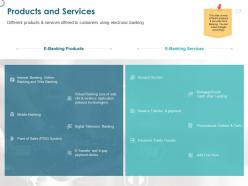
Template 6: Products and Services
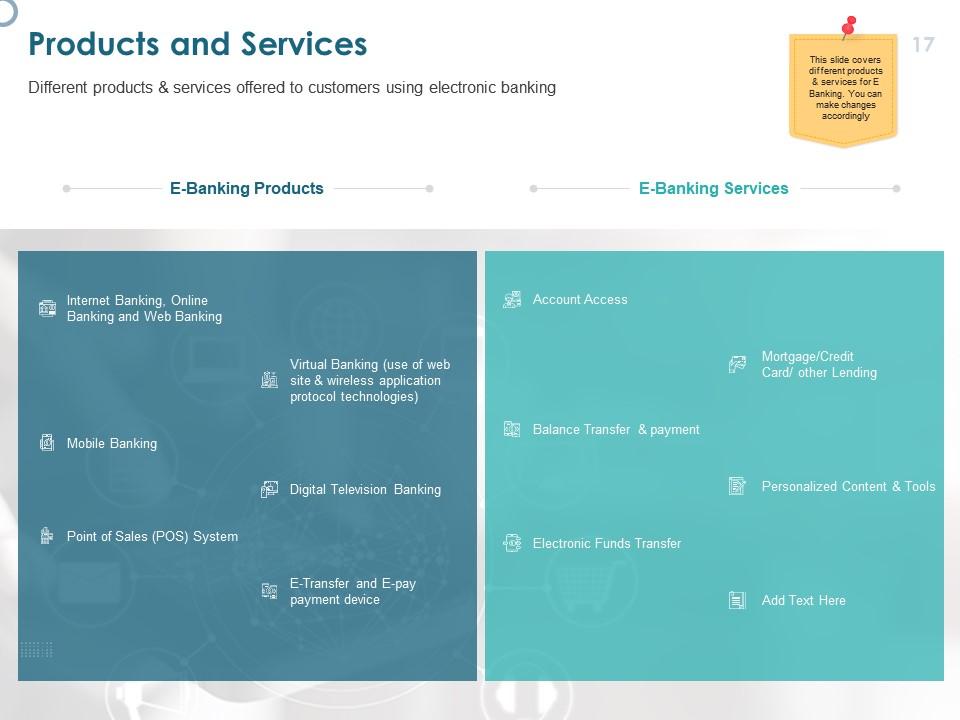
This Slide showcases different products and services offered to customers using electronic banking. Products like online banking, mobile banking, e-transfer and e-payment devices, and more are included in this template. It also includes services like account access, electronic funds transfer, balance transfer and payment, etc.
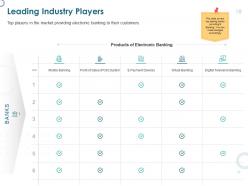
Template 7: Leading Industry Players
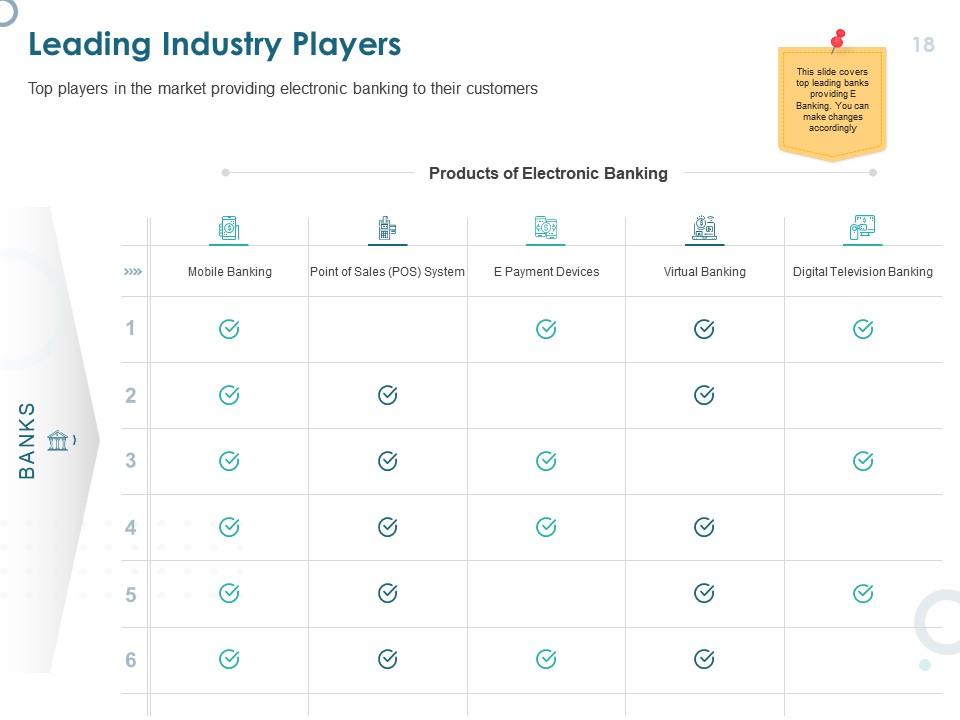
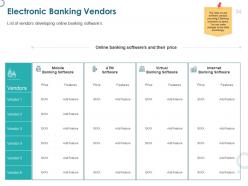
This Slide showcases top players in the market providing electronic banking to their customers. The template includes a chart highlighting the services offered such as mobile banking, point of sales, e-payment devices, virtual banking and digital television banking. The unique icons representing these key attributes enhance the visual appeal of the template, resulting in better engagement and understanding.
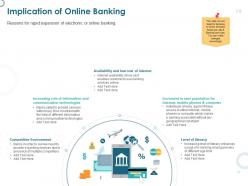
Template 8: Implication of Online Banking

This Template showcases all the different effects of digital banking. It includes key attributes such as availability and low cost of internet, increasing role of information and communication technologies, competitive environment, level of literacy and increment in user population for internet, mobile phones and computer. The layout of the slide with appealing visuals enhances understanding and engagement.
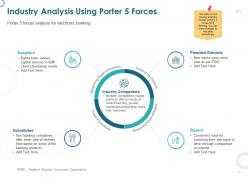
Template 9: Industry Analysis Using Porter 5 Forces

This Slide illustrates the key aspects controlling industrial competitiveness. It includes five key factors, namely threat newcomers, bargaining power of buyers and suppliers, threat of substitutes, and industrial rivalry. Each of these key factors included in this template are highlighted with the use of engaging icons and graphics, for clear visualization.
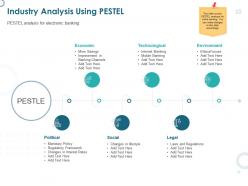
Template 10: Industry Analysis Using PESTEL
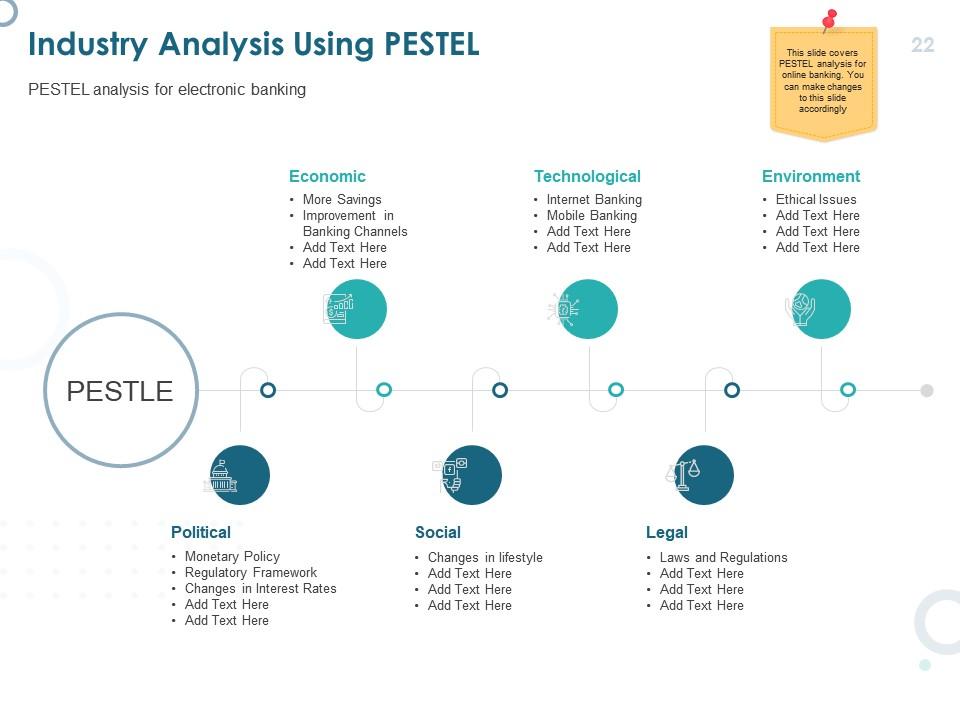
This PowerPoint Slide showcases a logical framework for understanding the external forces which influence the working of an industry. The engaging icons in the template highlight these key factors like economic, technological, environment, political, social and legal factors that play an important role in the working of the industry. This assists decision-makers in analyzing risks, finding opportunities and developing profitable strategies.
Transformation of Banking
Online banking facilitates customers and business with convenient financial management from anywhere and anytime. Employ these pre-designed powerpoint templates that save your valuable time with its professional structured layout.
PS: Also explore our PowerPoint Slides on Online Banking E-Payments and address the unique requirements of the amount made through online payments.
Online banking powerpoint presentation slides with all 61 slides:
Use our Online Banking Powerpoint Presentation Slides to effectively help you save your valuable time. They are readymade to fit into any presentation structure.


FAQs for Online banking
Honestly, the convenience is huge - you can do everything from your phone whenever you want instead of dealing with bank hours. No more waiting in those awful lines either. Digital statements are actually pretty handy since you can search through old transactions if you need to find something. Oh, and a lot of online banks give you better interest rates because they don't have all those physical branches to pay for. Definitely turn on mobile alerts though, it's the easiest way to keep tabs on your accounts and you'll know right away if something weird happens.
Honestly, banking's gotten so much better in the last 10 years. Mobile apps are where it's at now - I can't remember the last time I logged in on my computer. You can deposit checks just by taking a picture, which still feels like magic to me. Instant transfers through Zelle, fingerprint login, and those fraud alerts that pop up immediately when you spend money. Oh, and all those budgeting apps can sync with your bank now too. Pretty much the only reason to visit a branch anymore is if you need cash from a human teller. You should definitely check what features your bank offers - some of this stuff's been around for years but people don't realize it's there.
Yeah so online banks actually have pretty solid security these days. They encrypt everything when you're sending data back and forth, plus they'll text you codes for that two-factor authentication thing. Most of them watch for weird activity around the clock too. Oh and they use this tokenization thing - basically hides your real account numbers during purchases which is kinda neat. They'll boot you off if you're inactive too long, and honestly the fraud alerts are clutch - your phone buzzes immediately if something looks off. Just turn on all their security stuff, use a decent password, and don't bank on sketchy public wifi.
Dude, watch out for those pushy emails trying to rush you into clicking stuff. The sender address is usually sketchy - like it'll say "bankofamerica" but the domain is totally wrong. Your actual bank will NEVER ask for passwords through email, that's basically scamming 101. Instead of clicking their links, just open your banking app or go to the website yourself. I always double-check URLs because scammers love using fake ones that look almost right but have weird typos. Honestly, if something feels weird about an email, just call your bank directly. The number's right on your debit card anyway.
Yeah so basically all banks let you check balances, move money around, pay bills, and do mobile check deposits with your camera. Auto-pay setup is standard too. The apps have gotten way better lately - I actually prefer using my phone now over logging in on my laptop. You can download old statements, set up text alerts for low balances or whatever. Most banks throw in some budgeting tools and spending breakdowns, which are hit or miss honestly. Some even have basic investing stuff. Just poke around your bank's app because they're all different - some are surprisingly good, others kinda suck.
Dude, online banking is seriously a game changer for tracking your money. You can see spending patterns instantly and set up categories so you actually know where everything's going. The visual stuff is pretty cool too - charts and breakdowns that don't make your brain hurt. I used to avoid checking my account like the plague, but now I check it all the time because it's so easy. Honestly, the budget alerts are clutch. They'll ping you before you blow through your limits. Set those up first thing - trust me on this one.
Honestly, mobile apps are perfect for quick stuff - checking your balance, moving money around, depositing checks by just snapping a photo. But when you need to dig deeper? Desktop's where it's at. You get full transaction histories, better budgeting tools, loan applications, all that heavy-duty stuff. Though let's be real, half those investment features are pretty much useless for most of us. Mobile's super clean and easy to navigate, while desktop still feels like old-school banking software. I usually stick to mobile for daily banking, then hop on my computer when I'm doing actual financial planning.
Honestly, customer service makes or breaks online banking these days. Most apps do basically the same stuff, so it really comes down to support when things go wrong. And trust me, things will go wrong - you'll get locked out or some feature won't work right. That's when you need chat or phone support that actually gets it, not someone reading from a script. Quick response times matter huge here. I've seen people switch banks over one bad support experience when they couldn't access their account. Banks with solid tech-savvy support teams just keep customers way longer.
Honestly, online banking is a total game-changer for people who've been locked out of traditional banking. No more driving 30 minutes to the nearest branch or dealing with ridiculous minimum balance fees. You can literally check your account at 2am if you want - which is huge when you're juggling two jobs and can't make it during normal business hours. The budgeting tools and loan apps that used to be exclusive to wealthy customers? Now everyone gets them. The tricky part is that you still need decent internet and some basic tech skills. But once people get the hang of it, it really levels the playing field financially.
Honestly, banks are basically becoming tech companies now - it's crazy how fast this happened. Most customer service runs through AI chatbots. Predictive analytics catch fraud before it even hits your account. Your banking app can literally predict how you'll spend money and auto-sort your expenses without anyone touching it. Robo-advisors are handling investments, and some places can approve loans in minutes instead of waiting days. The whole conversational banking thing is huge too - everyone's doing voice and chat interfaces now. Oh, and those automated financial planning tools are getting scary good at suggesting budget changes.
So basically whenever new regulations hit, online banks have to scramble and update everything - their tech, how they verify you're actually you, sometimes even what services they can offer. PSD2 was a perfect example of this chaos. Banks hate it because it means constantly rebuilding their systems and processes. New anti-money laundering rules? Same story. It's actually pretty crazy how much work goes into staying compliant behind the scenes. But hey, at least it keeps your money safer I guess. Just make sure to check with your bank about compliance stuff when big regulatory changes happen - you don't want any surprises.
Dude, banks are shutting down branches left and right because nobody walks in anymore - we all just use our phones. The ones that are staying open? They're trying to become more like advice centers instead of places where you cash checks, though some are way better at this transition than others. Cost-wise it makes total sense since rent and staffing is crazy expensive. But honestly, they're kind of screwing themselves by losing those random conversations that used to build loyalty. If you're working in banking, figure out what your branch can do that an app can't. Maybe financial planning sessions or something more personal.
Oh definitely check out your bank app's budgeting stuff! Most of them automatically sort your spending into categories now - groceries, entertainment, whatever. I'd set up alerts for low balances and big purchases too, just so you don't get blindsided. The search feature is actually pretty solid for figuring out where all your money went last month (I was shocked by my coffee spending lol). If you can link all your accounts in one place, do it. Also schedule some automatic transfers to savings. Honestly just poke around the app for like 10 minutes - you'll probably find features you didn't know existed.
Online banking security is honestly a nightmare for banks right now. Hackers are constantly coming up with new phishing scams and malware attacks - it's like they never sleep. Plus banks have to deal with crazy strict regulations while somehow not making login so annoying that customers bail. The worst part? Most banks are stuck with ancient computer systems that weren't built for today's threats. Oh, and they're targeting customers directly now too, not just the bank itself. If you're working with any bank partners, definitely grill them about their fraud monitoring upfront. Trust me on this one.
So here's the thing about online banking - age is massive. Younger people are all over mobile apps while older folks still want to walk into a branch. Income and education levels definitely matter too. College grads and higher earners jump on digital stuff way faster. Geography's pretty interesting though - city people adopt new features instantly, but rural customers lag behind. Could be crappy internet or maybe they just like talking to actual humans? I mean, I get it. If you're rolling out features, don't blast everyone at once. Segment by demographics first.
-
Great designs, really helpful.