

Operating System Hardening Checklist For Cybersecurity




Try Before you Buy Download Free Sample Product
 Impress Your
 Audience
 100%
100% Editable
 Save Hours
 of Time


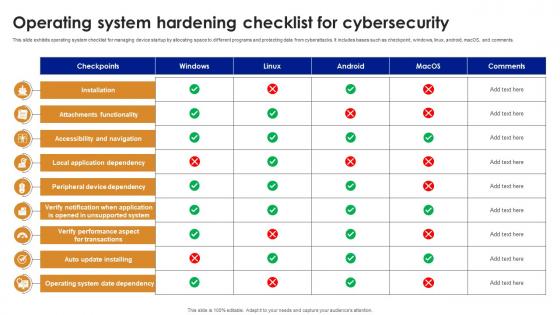
This slide exhibits operating system checklist for managing device startup by allocating space to different programs and protecting data from cyberattacks. It includes bases such as checkpoint, windows, linux, android, macOS, and comments.
People who downloaded this PowerPoint presentation also viewed the following :
Operating System Hardening Checklist For Cybersecurity with all 9 slides:
Use our Operating System Hardening Checklist For Cybersecurity to effectively help you save your valuable time. They are readymade to fit into any presentation structure.








FAQs for Operating System Hardening
So basically you want to shut down anything you don't actually use - kill unnecessary services, delete random software you installed once. Lock down user accounts so people only get access to what they need for their job. Strong passwords obviously, and turn on logging so you can actually see if something sketchy happens. It's kind of like cleaning out your garage, except way more tedious. Work through a proper hardening checklist instead of just winging it. Oh and keep stuff updated - I know it's annoying but those patches matter.
Look, updates are honestly your best protection against hackers. They fix those security holes that bad guys love to exploit. I get it - updates pop up at the worst times when you're trying to get stuff done. But they're patching zero-day exploits and other scary vulnerabilities that could mess up your whole system. Your OS company finds new flaws constantly and rushes out fixes. Skip the updates? You're basically leaving your front door wide open. Just turn on automatic updates if you can. Way less hassle than doing it yourself every time.
User access controls are your main defense against system breaches. Give people only the bare minimum permissions they need - seriously, most users have way too much access and don't even realize it. Multi-factor authentication is non-negotiable these days since passwords are basically worthless on their own. Set up role-based access so permissions make sense for each job function. Oh, and audit your users regularly - I always find random people with admin rights who definitely shouldn't have them. Start by reviewing current permissions and stripping unnecessary admin access. You'll probably find some surprises lurking in there.
So your firewall is like a bouncer - it blocks sketchy network traffic before it hits your system. Security policies are different though, they control what users and apps can actually do once they're already inside. Like restricting who gets admin access or which programs can run. Honestly, most people have way too many permissions enabled by default. These two things work together to shrink your attack surface. Even if something bad gets through, the damage stays contained. Just turn on your built-in firewall first and check your user permissions - you'll probably be shocked at what you find.
Honestly, start with application whitelisting - it's a game changer. Only let signed packages run and stick to your trusted repos. I learned this the hard way after dealing with some nasty malware last year. Turn off auto-updates for anything mission-critical and test stuff in staging first. Regular users shouldn't be able to install system-wide apps, so lock down those permissions. Remove bloatware you don't use since each program is another way in for attackers. Audit what's already installed and make that your approved baseline going forward.
So basically, turning off services you don't need cuts down your attack surface. Think of it like this - every service running is another door hackers can try to break through. Why give them extra chances, right? You'll also notice better performance since your system isn't burning resources on random stuff. I usually start with `netstat -tuln` or `systemctl list-units` to see what's actually running. Then just kill whatever you don't recognize or need. Honestly, most people are shocked by how much unnecessary crap is running by default.
So security baselines are basically your starting point for locking down systems. You get a standardized checklist of configurations to roll out everywhere. Honestly saves tons of time since you're not reinventing the wheel - just grab something like CIS benchmarks or DISA STIGs and go from there. The consistency is what makes them worth it though. All your boxes end up with the same security posture, plus you've got something solid to audit against later. I'd start with whatever fits your setup best and tweak it as needed.
Honestly, patch management is your best defense against hackers finding ways into your system. Stay on top of security updates and you're closing doors that attackers constantly try to pry open. The hard part? You don't want to rush patches and accidentally break everything (learned that one the hard way). But waiting too long just gives the bad guys more time to figure out exploits. Set up a regular patching schedule with a test environment first. Focus on the critical security stuff immediately. Always have a rollback plan ready because Murphy's Law is real.
Honestly, start with the basics - Nessus, OpenVAS, or Qualys will catch most vulnerabilities pretty fast. CIS-CAT Pro is solid for checking if you're actually following security standards. I've been using Lynis for Linux boxes lately and it's way better than I expected for a free tool. Windows has some decent built-ins too like Security Configuration Wizard, though nobody really talks about those much. Microsoft Security Compliance Toolkit is another good one. Just don't do this assessment thing once and forget about it - stuff changes constantly with patches and updates, so you gotta keep running these scans regularly.
Think of encryption as your backup plan when everything else goes wrong. Someone steals your laptop? They're stuck with meaningless gibberish without your keys. Full-disk encryption is totally worth turning on - BitLocker or FileVault won't slow your computer down much these days. Physical access used to mean game over, but not anymore if you've got solid encryption running. Just don't use some sketchy algorithm from 2005, obviously. The tricky part is actually key management, but that's honestly a whole other conversation.
Look, default OS setups are basically asking for trouble. They ship with tons of unnecessary services running because the vendors want everything to "just work" out of the box. You've got weak password requirements, users with way too many privileges, and sometimes those ridiculous default admin accounts everyone knows about. Honestly, it's like putting a giant "hack me" sign on your server. Attackers love this stuff because they know exactly what they're dealing with on fresh installs. First thing I always do? Go through and shut down anything that's not actually needed.
Think of logging and monitoring as your tripwire system - catches attacks before they wreck everything. Track stuff like failed logins, privilege escalations, file changes, and sketchy network connections. Yeah, it's a ton of data (honestly overwhelming at first), but automated alerts save your sanity. Set rules for weird patterns - like someone failing to login 20 times or random admin access popping up. The real trick? Actually review those logs regularly and have a game plan when alerts start going off.
Honestly, virtualization is kind of a mixed bag security-wise. Yeah, you get nice isolation between different workloads, plus spinning up clean test environments is super easy. But here's where it gets tricky - your hypervisor becomes this massive target. If someone compromises that, they've basically got access to everything running on it. VM escape attacks are a real thing too, and don't get me started on shared resource vulnerabilities. I learned this the hard way at my last job. Bottom line: patch everything obsessively and harden that hypervisor like your life depends on it.
Basically, you only give people the bare minimum access they need to get their work done. Nothing extra. So instead of running everything as admin or root, create restricted accounts for services. Turn off user accounts you don't need. A lot of default setups are way too permissive honestly - like, why does every service need god-mode access? Check what's currently running with admin privileges and see if you can strip some of that back. You'll want to audit permissions regularly too. Sounds boring but it's one of those things that'll bite you later if you skip it.
Don't rush through it - that's mistake number one. Back up your configs first because you'll hate yourself when something breaks and you can't remember what you changed. Do it incrementally instead of hardening everything at once. Test your critical apps after each change too. I've watched people completely lock themselves out by going nuts with access controls - not fun. Start small with stuff like killing unused services, then move to the trickier configurations. Oh, and have your rollback plan ready before you even start. Documentation sounds boring but trust me on this one.
-
Been using SlideTeam for some time now…can’t imagine why I wasted all that time in front of the screen trying to make the perfect presentation.
-
SlideTeam is my one-stop solution for all the presentation needs. Their templates have beautiful designs that are worth every penny!