

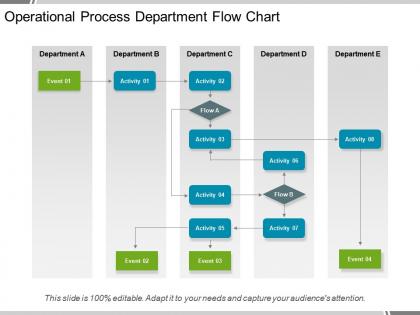
Operational process department flow chart powerpoint guide





Try Before you Buy Download Free Sample Product
 Impress Your
 Audience
 100%
100% Editable
 Save Hours
 of Time


Our Operational Process Department Flow Chart Powerpoint Guide give you an enormous boost. You will feel almost like a giant.
People who downloaded this PowerPoint presentation also viewed the following :
Operational process department flow chart powerpoint guide with all 5 slides:
Our Operational Process Department Flow Chart Powerpoint Guide enable you to evolve fast. You will get amidst the growth.

FAQs for Operational process department flow
So basically you need start/end points, those diamond decision shapes, and rectangles for processes. Clear arrows too - can't stress that enough. If different departments are involved, throw in swim lanes because honestly it'll save you from so many "wait, who does what?" meetings later. Also add any delays and approval steps where teams hand stuff off. Label everything clearly and stick with the same symbols throughout. Someone should be able to look at it and not bug you with questions. I'd start with the main happy path first, then once that looks good you can add all the weird exception cases.
So each industry tweaks their process charts based on what actually matters to them, you know? Healthcare gets obsessed with compliance stuff and patient safety - makes sense since people's lives are on the line. Manufacturing is all about quality checks and keeping track of inventory. Tech companies do those rapid feedback loops because they're constantly pushing updates. Retail focuses on supply chain tracking and customer experience points. Honestly, the biggest mistake is grabbing some generic template online. Better to figure out what your industry really cares about first, then build your processes around those specific things.
Honestly, just go with **Lucidchart** or **Visio** if you already have Microsoft stuff - they're both pretty solid for team work and come with decent templates. **Draw.io** is amazing and totally free, which is kinda crazy when you think about it. Your team using **Miro** for other things? That works too. Don't overthink this with some fancy specialized tool unless you're mapping out really complex processes. Whatever your team can actually access and share easily is gonna be your best bet. The flowchart that sits there collecting digital dust isn't helping anyone, you know?
Honestly, process flow charts are game-changers because they get everyone on the same page about who does what and when. No more of that "wait, wasn't Bob supposed to handle this?" confusion that drives everyone crazy. You'll catch bottlenecks super fast, and if someone calls in sick, their replacement can just follow the visual steps instead of panicking. The transparency thing is huge too - people actually start seeing how their work connects to everyone else's instead of just doing their own thing in isolation. I'd say pick your most common workflow first and map that out. Way less overwhelming than trying to chart everything at once.
Don't overcomplicate it - that's the big one. I've seen flowcharts that are basically impossible to decode because someone tried to map every single step. Keep it simple. Also, talk to the actual people doing the work before you finalize anything. What seems obvious to you might completely miss how things really happen day-to-day. Be specific too - writing "handle request" doesn't tell anyone what that actually means. Oh and definitely test it out with a couple scenarios first. Nothing worse than rolling out a flowchart that breaks the second someone encounters a weird edge case.
Okay so first figure out what you're actually trying to fix or accomplish - that's your north star for everything else. Map out where the whole thing starts and ends (I always sketch boundaries first, trust me on this). Focus on the main steps that directly affect your goal, plus any decision points or handoffs between different teams. Don't get bogged down in tiny sub-processes unless they're major bottlenecks. Quick test: if a step vanished tomorrow, would it actually change the outcome? No? Then ditch it. Keep things focused and something you can act on.
Honestly, process flow charts are perfect for this. Way better than those boring training manuals that just sit there collecting dust. Walk new hires through the charts first so they can see how work actually moves through your system. The visual thing really works - people remember pictures better than walls of text. Let them keep copies at their desks for quick reference. They'll understand where they fit in and who they're handing stuff off to. You can even use them for practice scenarios, though that might be overkill depending on your setup. Once they get the hang of it, they won't need to bug you with basic questions.
Honestly, flow charts are like a reality check for your processes. Map out every single step and you'll be amazed at the waste that pops up - unnecessary approvals, people doing the same work twice, tasks sitting in sequence when they could run together. The visual part is key because it makes bottlenecks super obvious. Plus you can see exactly where team handoffs get weird or where everyone's just... waiting around for someone else. I always tell people to document what's actually happening first (not what should be happening), then ruthlessly cut anything that doesn't add real value. Works every time.
Think of feedback loops as your safety net - they're those arrows that circle back in flowcharts so you can fix stuff when it goes sideways. Most processes aren't perfect on the first shot (honestly, mine rarely are). These loops let you catch mistakes and tweak things based on what actually happens, not what you hoped would happen. You'll want to build them in after major decision points or quality checks. Short ones work great. The longer feedback cycles can get messy if you're not careful, but they're still worth having.
First thing - figure out who actually does the work, not just the managers who think they know. Run workshops where people can walk through their day-to-day stuff and complain about what sucks. Honestly, the sticky note thing on whiteboards is kind of cheesy but it works way better than boring conference room meetings. People get weirdly into it. Document everything visually so they see you're actually listening. Oh, and definitely show them drafts before you lock anything in - saves so much headache later.
Stick with the classic shapes - rectangles for steps, diamonds for yes/no decisions, ovals for start/finish. Make your text big enough to actually read (I hate squinting at flowcharts). Flow should go top-to-bottom or left-to-right so people don't zigzag around confused. Don't cram everything together - white space makes it way less overwhelming. Different colors help too, especially for grouping similar stuff or calling out big decisions. Oh, and keep the words short and sweet. The whole point is someone should be able to follow it without asking you a million questions later.
Honestly? I'd say monthly if your processes are always changing, but quarterly at minimum. The real key is updating them right after you change any workflow - like immediately, not "I'll get to it next week." Nothing's worse than outdated flowcharts because they actually confuse people more than having none at all. Super frustrating when you're trying to train someone and the chart is totally wrong. Just set a calendar reminder so you don't forget. Also, if you notice the chart doesn't match what people actually do anymore, that's your cue to fix it ASAP.
Yeah, flow charts work with basically any PM method you're already doing. Map out your current process first - that's usually the easiest starting point. Then just see where it fits naturally into whatever framework you've got. Works awesome in Agile for documenting stuff during sprints, waterfall for those step-by-step phases, even Lean when you're trying to spot bottlenecks. Honestly they're super flexible tools. Scrum, Kanban, traditional PM - doesn't really matter. They help you actually see what's happening operationally, which is half the battle anyway.
Honestly, just go section by section with a pointer - don't dump the whole thing on them at once. I made that mistake so many times and just watched people's eyes glaze over lol. Make it big enough so everyone can actually see, maybe print copies if it's really complex. The decision points are usually where people have the most questions anyway. Oh and don't rush to the end! Pause after each major part for questions. You'll feel way more confident if you practice it beforehand too - helps you look at your audience instead of staring at the screen the whole time.
Oh yeah, this comes up all the time! Reading direction totally matters - if you're working with Arabic teams, they read right-to-left so your arrows should flow that way. Colors are tricky too. Red screams "stop" here but in China it's actually good luck. Some cultures want every approval step mapped out in detail, others prefer showing consensus-building. I've literally watched projects get stuck because the flowchart just felt "wrong" to the local team. Sounds weird but it happens. You'll want to run yours by people from each region first - saves so much headache later.
-
Designs have enough space to add content.
-
Informative presentations that are easily editable.