


Opportunities and challenges roadmap mountain summit powerpoint slide ideas
You must be logged in to download this presentation.




Try Before you Buy Download Free Sample Product
 Impress Your
 Audience
 100%
100% Editable
 Save Hours
 of Time


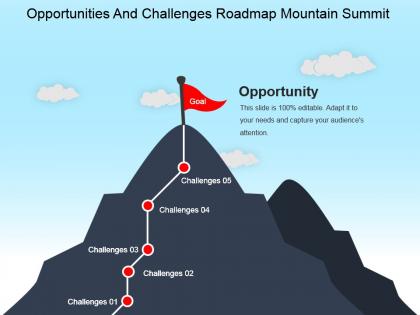
Are you looking to display important business challenges and solutions with some mountain roadmap PowerPoint design? We are presenting our fully professional, business oriented, modern opportunities and challenges roadmap mountain summit PowerPoint slide ideas presentation template to meet your requirements successfully. This flag at summit design is best for making presentations related to motivation, success, business and mountaineering. PPT template is mainly used by sales, marketing, business and technology professionals to discuss industrial growth challenges and solutions, business intelligence strategic plan and roadmap, digital transformation of business, agenda discussion etc. With the help of this wonderful, climbing the mountain PowerPoint template, you can easily update the relevant teams, clients, investors and stakeholders throughout the business process, to keep them updated of the product’s progress and to ensure that everyone is working toward the same strategic business goals. So, without giving a second thought, just download this powerful PPT template and deliver your ideas on overcoming challenges to achieve strategic business goals in most unique manner. Bowl them a googly with our Opportunities And Challenges Roadmap Mountain Summit Powerpoint Slide Ideas. It will confuse the competition.
People who downloaded this PowerPoint presentation also viewed the following :
Opportunities and challenges roadmap mountain summit powerpoint slide ideas with all 5 slides:
Use our Opportunities And Challenges Roadmap Mountain Summit Powerpoint Slide Ideas to deliver beneficial advice. They help counsel your employees.
FAQs for Opportunities and challenges roadmap mountain summit
Your roadmap needs a timeline with milestones, prioritized features, resource allocation, and success metrics. Honestly, I always screw up the timeline part first - way harder than it looks! Dependencies between workstreams are crucial, plus you'll want risk callouts for major blockers. Don't forget stakeholder ownership for each initiative. The exec team will eat up how everything ties back to business goals - they're obsessed with that stuff. Oh, and definitely customize based on your audience since engineering cares about totally different things than sales does.
Honestly, roadmaps are game-changers because they get your whole team on the same page about what you're building and when. Everyone can see how their piece fits into the bigger company goals. You'll catch conflicts way earlier too - like when two features need the same developer or whatever. The visual timeline makes those trade-off conversations so much smoother since people actually understand the priorities. Just don't let it sit there gathering dust. We learned that the hard way at my last job. You've gotta keep updating it and bring it up in your planning meetings, otherwise it's just another pretty chart nobody looks at.
So basically, strategic roadmaps are your big picture stuff - like 2-3 year vision and major goals for where the company's headed. Project roadmaps? Way more in the weeds. They're all about specific deliverables and timelines for individual projects. You'll use strategic ones to get executives on board and align everyone around the vision. But honestly, project roadmaps are where you'll spend most of your time since they keep the day-to-day stuff organized. Different audiences too - leadership cares about strategic, your team needs the project details. My advice? Always start with strategic first, then break it down into the nitty-gritty project roadmaps.
Quarterly updates are usually the sweet spot, but tech moves crazy fast so maybe monthly? Don't flip-flop every week though - your team will lose their minds. I'd match whatever your business cycle is. Between big updates, small tweaks are totally fine when stuff changes. Market shifts happen and you can't just pretend they don't exist. Block some time this month to look at your current roadmap and see what's actually doable still. The whole trick is staying flexible without being all over the place, you know?
Color-coding saves your life here. Different colors for themes, priorities, or timeline phases so people don't have to squint at tiny text. Timeline bars or swimlanes are clutch - everyone gets the sequencing immediately. Icons beat paragraphs every time, honestly. Keep your labels clean and formatting consistent or it'll look like a mess. Make the big stuff literally bigger and bolder for visual hierarchy. The whole point? Someone should grasp most of your roadmap in 30 seconds just by scanning. That's the sweet spot you're aiming for.
Give each milestone a name that actually means something - like "Customer Portal Launch Ready" instead of "Phase 2 Done." People need to know what they're building toward and why it matters. I swear, half the roadmaps I've seen look like someone just threw dates at a wall! Use colors or icons to show where you're at. Build in buffer time because stuff always runs late. Oh, and update everyone regularly when things shift - they'd rather hear bad news early than get surprised later. Your stakeholders will thank you for being straight with them.
Honestly, the worst thing you can do is get way too detailed right from the start. Teams waste SO much time mapping out every little feature when everything's gonna change anyway. Another huge mistake? Just throwing features on there without explaining why they matter - people need that context or they won't care. I've seen this mess up so many projects. Keep things high-level instead. Focus on what you're trying to achieve, not just what you're building. Build in some wiggle room because trust me, priorities will shift. Oh, and actually update the thing regularly - a stale roadmap is basically useless.
Try interactive tools like Miro instead of boring PowerPoint - people can actually engage with the content. Embed live dashboards to show real progress, not just static numbers. I've found collaborative voting works great for prioritization meetings too. Your audience will stay way more focused when they can zoom in, comment, and participate rather than just sit there. Death by slide deck is real, trust me. Oh, and share digital versions afterward so teams don't lose track of everything. Start small with just one interactive piece next time. You'll see the difference immediately.
Oh man, tech companies are obsessed with these things - always showing off their product timelines to investors and stuff. Consulting firms love them too. Manufacturing uses roadmaps for production schedules, which makes total sense. Even nonprofits jumped on the bandwagon for campaign planning. Construction, marketing agencies... honestly, any industry dealing with complex projects benefits from them. The real magic happens when you're trying to explain "what's next" to clients or your boss - suddenly everyone's on the same page instead of staring at you blankly. Seriously, try it next time you've got a messy timeline to present. Game changer.
Honestly, it's all about knowing your audience. Executives want the big picture stuff - revenue impact, strategic wins, that kind of thing. Engineers need the nitty-gritty technical details and dependencies. Customer support teams care about feature benefits they can actually explain to users. Sales is tricky though - they want competitive advantages but you can't let them overpromise (learned that one the hard way). The detail level changes completely depending on who's in the room. Before any roadmap presentation, I always ask myself: what decision are these people trying to make? That usually tells me exactly what to focus on.
Honestly, stakeholder feedback is like your roadmap's reality check. Gets you out of your own head, you know? Customers see pain points you miss. Internal teams know what's actually feasible. Executives... well, they have opinions about everything. The trick is being systematic about it - quarterly reviews work better than random feedback whenever someone feels like it. I've watched so many roadmaps fail because someone built them solo and missed obvious stuff. Create a simple process to collect and actually use their input. Otherwise you're just building something that sounds smart but doesn't solve real problems.
Honestly, templates are a game-changer for this stuff. Instead of reinventing the wheel every single time, your team gets a solid framework that's already been tested. Everyone knows what sections to fill out, what details matter, and how everything should look. No more arguing about formatting (trust me, those debates get old fast). The best part? Templates force you to hit the same key points each planning cycle - your priorities, what depends on what, how you'll measure success. Find one that fits your timeline, tweak it once for your team's quirks, and boom - you've probably just cut your roadmap prep time in half.
Dude, timeframes keep you honest about what you can actually pull off. Without them your roadmap just becomes some vague wishlist that nobody cares about. Stakeholders need real dates to plan around, and honestly? It's way easier to catch problems early when you've got actual deadlines. They create accountability too - which sounds boring but it's true. Always pad your estimates though because everything takes longer than you think it will. I learned that the hard way. Also review them regularly since priorities change constantly.
Build risk management right into your roadmap instead of keeping it separate. I always add risk level indicators to each milestone - saves me so much grief in stakeholder meetings when stuff goes sideways (and it always does). Document your assumptions upfront and flag any dependencies that could mess with your timeline. High-risk deliverables? Build in buffer time. The trick is making risks visible to everyone, not burying them in some doc people won't read anyway. Start small - list your top 3 risks for next quarter and add mitigation strategies directly in your roadmap tool.
Okay so the key is matching your audience - execs want big picture business stuff, engineers need the nitty-gritty technical details. Always start with WHY you're doing something before diving into timelines. Visual charts beat boring spreadsheets every time (seriously, nobody reads those). Your CEO doesn't care about API conflicts, but your dev team absolutely does. Switch up detail levels but keep the same terms so nobody gets confused. Oh and definitely leave Q&A time - people always have questions you didn't think of. Send a recap afterwards with action items so things don't fall through the cracks.
-
good
-
Innovative and attractive designs.
-
Colors used are bright and distinctive.