


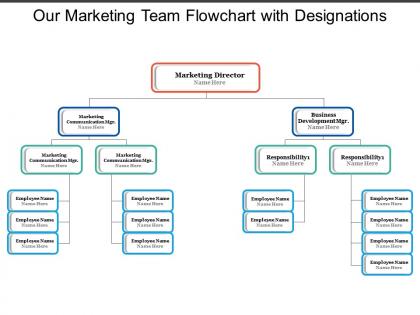
Our marketing team flowchart with designations




Try Before you Buy Download Free Sample Product
 Impress Your
 Audience
 100%
100% Editable
 Save Hours
 of Time


Thinking about organizing a marketing team for optimal efficiency and smooth functioning? Then you are at right place because we have predesigned our marketing team flowchart with designations. In this marketing team PPT PowerPoint slide design model one can very easily connect with the varied managers and directors seated at their respective hierarchical position to guide and execute work. Depending on the nature of product or service your company deals in; this marketing team flowchart PPT presentation slide might undergo few changes. You only need to download our presentation and modify it to match your needs. We hope that these generous contributions of Slide Team sheds some light on the subject for all marketing leaders who are now rethinking on how to organize their respective departments so as to take advantage of changes in all stages at the buying process. Crown your thoughts with our Our Marketing Team Flowchart With Designations. They will rule the minds of your team.
People who downloaded this PowerPoint presentation also viewed the following :
Our marketing team flowchart with designations with all 5 slides:
Be able to bag greater glory with our Our Marketing Team Flowchart With Designations. Add to the feathers in your cap.
FAQs for Our marketing team
Start with the basics - who reports to who, from your marketing manager down to the specialists. Map out how campaigns get approved and move between teams. Communication flows are where teams usually fall apart, so nail that part down. Show how you connect with sales and other departments too. Mark exactly who makes the final call on different decisions - that clarity saves so much drama later. Oh, and keep the whole thing visual and clean. Nobody wants to decode some crazy complicated chart when they're just trying to figure out their workflow.
Honestly, flowcharts are game-changers for marketing teams. You map out your whole campaign process - who does what, when handoffs happen, all that stuff. No more "wait, wasn't that your job?" panic moments right before deadlines (we've all been there). Your team can spot where things get stuck and figure out dependencies way faster. The visual aspect is huge - people actually GET it instead of trying to decode some messy email chain. I'd start with whatever campaign type you run most often. You'll probably discover communication gaps you didn't even know existed once everything's laid out properly.
So basically, content creators make the materials while designers do all the visual stuff. Project managers are tracking deadlines - honestly, they're lifesavers. Strategists figure out where you're going, analysts crunch the numbers on what's working. Your social media people handle those channels but they're doing like everything now, it's crazy. Email marketers run those automated sequences to nurture leads. The big thing? Map out exactly when each person jumps in and what they need to deliver. Those handoff points are where things usually get messy, so be super clear about who's doing what when.
So flowcharts are perfect for mapping out your marketing steps - you'll catch all those annoying gaps and bottlenecks you never noticed before. Think of it like drawing a roadmap for your campaigns. You can see where team handoffs get messy, what approvals slow things down, which tasks are blocking others. New team members love them too since they don't have to guess what comes next. I'd start with whatever process has been driving you crazy lately - probably something that keeps getting delayed or confusing people. Once you see it all laid out visually, the problems become super obvious.
Honestly, flowcharts are total lifesavers for campaigns. They make you think through every step upfront, so you catch all the weird handoff issues and bottlenecks before they bite you. When Sarah from design inevitably asks "wait, when do I get the brief?" you can just point to the chart instead of digging through endless Slack messages. New freelancers can actually figure out what's happening too, which is... refreshing. I know it sounds boring, but even a basic one will save you so much headache later. Trust me on this one.
Honestly, flowcharts are a game-changer for marketing teams. No more endless "who's doing what?" Slack threads. Everyone knows their role from day one, and you can actually see where things get stuck - approval stages are the worst culprits, trust me. The cool thing is spotting bottlenecks before they wreck your timeline. Your deadlines become way more realistic instead of just hopeful guesses. Plus tracking progress gets so much easier when everything's mapped out visually. I'd start by sketching out whatever campaign process is driving you crazy right now. You'll probably be shocked at how convoluted it looks on paper.
Honestly, I'd go with Lucidchart - their templates are actually decent and the real-time editing doesn't make you want to scream. Miro's pretty great too, feels more like doodling on a whiteboard which somehow makes meetings less painful. Your team's gonna be editing this thing constantly, so pick something everyone can access easily. If you're already stuck in Microsoft land, Visio works fine I guess. Google Drawings is super basic but gets the job done. Don't overthink it though - the best flowchart tool is whatever doesn't cause drama when Karen from PR tries to log in.
Quarterly works best for flowchart updates - or whenever you change something major. Most people create them once and never look again (totally been there). But honestly? That's such a waste. New tools pop up, team changes happen, campaigns shift... your flowcharts get stale fast. I always set a calendar reminder for every three months. Oh, and definitely pick one person to own this stuff. Otherwise everyone assumes someone else is handling it and nothing gets done. Trust me on that one - learned it the hard way when our whole team was working off completely outdated processes.
Flowcharts are seriously a game-changer for getting new people up to speed. Your new hires can actually see how campaigns flow instead of getting buried in boring docs. They'll know exactly who to talk to and where they fit in the whole process. Role-specific ones work best - like showing them their piece of the puzzle within everything else. The visual aspect just clicks better than explaining it all verbally, you know? Plus they can spot those tricky decision points and bottlenecks before they become headaches later.
Honestly, the worst thing you can do is overcomplicate it. I see people trying to map out every single tiny decision instead of focusing on the main flow. Super annoying when boxes just say vague stuff like "marketing happens here" - be specific! Test it with your actual team first because I swear, flowcharts that look amazing on paper often confuse everyone else. Stick to clear yes/no decisions rather than maybes. Oh, and don't try cramming everything into one massive chart - nobody wants to decode that mess. Break complex stuff into smaller chunks people can actually follow without their eyes glazing over.
Honestly, flowcharts are game-changers for this stuff. You literally see the gaps when everything's mapped out visually - way better than just thinking it through in your head. Like yesterday I was working on one and boom, there was this obvious hole where we generate leads but then... nothing. No follow-up at all. Those missing connections just jump out when it's all boxes and arrows laid out in front of you. Oh, and definitely color-code by team - makes it super clear where handoffs are getting messy or someone's dropping the ball.
Track process stuff first - how long tasks take, where things get stuck, delays between handoffs. Lead response times matter big time. Conversion rates at each campaign stage too. Honestly, bottleneck tracking has saved me so much headache because you'll see exactly where everything slows down. Check if workload's balanced - someone might be drowning while others are twiddling thumbs. You'll start noticing patterns in what fails or runs late. Oh, and don't try tracking everything at once. Pick maybe 2-3 metrics that hit your worst pain points right now.
Honestly, just think about what makes each strategy different and build your flowchart around those specific moments. Content marketing needs stuff like calendar reviews and SEO checks. Paid ads? You'll want budget approval steps and A/B testing phases built right in. Email campaigns are totally different beasts than social media - they need their own touchpoints. I'd start by writing down all the must-have checkpoints for whatever strategy you're working on. Then connect those dots where real decisions happen. The stakeholder approvals, review cycles, deliverables - that's where your flow should focus.
Honestly, feedback is everything when it comes to fixing your marketing flowchart. Talk to the people actually doing the work - they'll tell you where things break down. I can't tell you how many "perfect" flowcharts I've seen that were total disasters in real life. Check your data too, see where leads are dropping off or getting stuck. Set up regular team check-ins to catch bottlenecks early. Then just adjust - add steps you missed, cut the useless ones. Really though, start simple: ask your team what's working and what sucks.
Honestly, flowcharts are like having a translator for your whole team. Marketing maps out their campaign workflow, and suddenly everyone can see exactly where they fit in - no more confusion about handoffs or who's doing what. The visual thing just cuts through all the workplace jargon that usually trips people up. I've seen teams waste so much time on "wait, I thought you were handling that" back-and-forth. Sales, dev, design - doesn't matter what department you're in, everyone gets it when it's laid out visually. Next time you're planning something cross-team, try making one shared flowchart first. You'll be surprised how much smoother everything goes.
No Reviews