


Percentage increase in productivity ppt example




Try Before you Buy Download Free Sample Product
 Impress Your
 Audience
 100%
100% Editable
 Save Hours
 of Time


Measure the rate of productivity in your business using our percentage increase in productivity PPT example. Increased skill of your employees can add up to your company’s productivity. Reward workers who demonstrate an increase in productivity. Engage your employees in goal setting to make them cooperatively work to meet the desired targets. Enhance the working of your management. Determine the factors leading to percentage increase in your productivity. Gather the data and analyse the results using this percent change in productivity PPT diagram. Identify and lay emphasis on the areas of concern. Focus to improve the annual output of your products. Evaluate the results using productivity calculator to know where you stand in front of your competitors.Represent the complex data in a easy way using our productivity rate PPT graph. With high quality content and graphics, curate a PowerPoint presentation which is both visually appealing and comprehensive. Track the progress of your company effortlessly. Our calculate percentage increase PPT template is professionally designed and is readily accessible. Avail it to prepare an impressive PowerPoint presentation. Give consideration to all the arguments with our Percentage Increase In Productivity Ppt Example. It helps handle disputes carefully.
People who downloaded this PowerPoint presentation also viewed the following :
Content of this Powerpoint Presentation
Description:
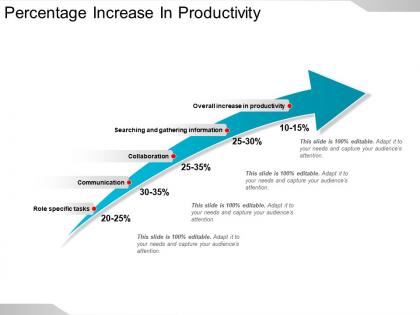
This image is a slide from a presentation depicting the "Percentage Increase In Productivity" due to various factors. It uses a blue arrow graphic to illustrate growth and highlights specific productivity areas with their corresponding percentage increase.
Each text element on the slide captures a different aspect of productivity improvement:
1. Searching and gathering information (10-15%):
This refers to the productivity increase one can expect when information search and retrieval processes are optimized.
2. Communication (20-25%):
Highlighting productivity gains achieved through better communication tools and strategies.
3. Role specific tasks (20-25%):
Showing improvements when employees are aided by technology or methods tailored to their specific job roles.
4. Collaboration (25-30%):
Indicates the significant productivity increase from improved teamwork, which is facilitated by cooperative tools and practices.
5. Overall increase in productivity:
This point captures the general enhancement in efficiency across all areas.
Use Cases:
This presentation slide demonstrates how different work-related activities contribute to productivity increases within various organizations.
1. Technology:
Use: Demonstrating efficiency gains from software.
Presenter: IT Managers.
Audience: Company Stakeholders.
2. Consulting:
Use: Showing client improvements post-implementation.
Presenter: Business Consultants.
Audience: Clients or Management Teams.
3. Education:
Use: Illustrating the impact of collaborative tools.
Presenter: Academic Researchers.
Audience: Educational Administrators.
4. Healthcare:
Use: Highlighting time saved through better communication.
Presenter: Healthcare Administrators.
Audience: Hospital Staff and Departments.
5. Finance:
Use: Indicating productivity boosts in financial processing.
Presenter: Financial Analysts.
Audience: Investors and Financial Advisors.
6. Manufacturing:
Use: Conveying efficiency improvements on the production line.
Presenter: Operations Managers.
Audience: Production Teams.
7. Retail:
Use: Sharing the results of task management systems.
Presenter: Retail Strategists.
Audience: Store Managers and Operational Teams.
Percentage increase in productivity ppt example with all 5 slides:
Join the display with our Percentage Increase In Productivity Ppt Example. Invite the attention of an international audience.

FAQs for Percentage increase in
Honestly, start with the obvious stuff - outdated software and messy workflows will kill productivity faster than anything. Your team probably knows exactly what's slowing them down, so just ask them. Better tools make a huge difference. Training helps too, especially if people are struggling with their actual jobs. Oh, and cut the useless meetings - I swear some companies think more meetings = more productive. Also check if your workspace setup is garbage. When people actually give a damn about their work, they'll naturally work harder. Fix the bottlenecks first, then worry about the fancy stuff.
Templates are a lifesaver for presenting productivity data - they keep everyone on the same page instead of you stumbling through random numbers. You'll look way more prepared with consistent charts that actually highlight what matters. Start with baseline performance, show the improvement, then explain what caused it. That flow just works better than jumping around. Oh and here's the thing - templates force you to get your thoughts straight beforehand. No more rambling about wins without decent visuals to back it up. Your audience will actually follow along instead of getting lost in a mess of percentages.
Dude, engaged employees are seriously worth their weight in gold - you'll see 20-25% productivity jumps when people actually give a damn about their work. They stop just clocking in and start taking ownership, collaborating better, solving problems on their own. Way fewer mysterious Friday "flu" cases too, if you catch my drift. The magic happens when your team feels connected to what the company's doing and sees their piece of the puzzle matters. I mean, nobody wants to feel like a replaceable cog, right? Start running those quick pulse surveys and actually do something with the feedback. That's honestly where you'll see the biggest gains happen.
First thing - get your baseline numbers down before changing anything. Track stuff like output per hour or revenue per employee. After implementing changes, measure again and see the percentage difference. Here's the annoying part though: figuring out what actually worked. Was it the new system or just people being more motivated? A/B testing helps if you can swing it - try the new approach with some teams while others stay the same. Don't just look at end results either. Check leading indicators like how engaged people seem or how fast processes wrap up. Give it at least 3-6 months to really see what's happening.
Dude, just start with Todoist or Asana for tasks and Google Calendar for time-blocking. I was totally one of those people who thought productivity apps were BS, but honestly? You'll see like a 15-25% boost if you actually stick with them. Slack or Teams help too - cuts way down on email madness. Don't go crazy downloading every new app though. Pick maybe 2-3 max and actually use them. I swear that's where most people mess up. A simple task manager plus calendar combo will probably double what you get done. Oh, and Calendly's pretty solid if you do lots of meetings.
Honestly, workspace changes can bump your productivity up 15-25% - pretty wild numbers. Natural light is huge, like 15% improvement just from that. I know it sounds basic, but decluttering your desk and throwing in a plant or two actually works (yeah, I was skeptical too). Temperature's another thing - being too hot or cold just kills your focus completely. Set up different zones for different work, and definitely tackle distractions first. Start with better lighting and organizing what's right in front of you. You'll feel the difference in days, not weeks.
Honestly, breaks aren't just slacking off - they actually make you way more productive. Like 15-25% better, which is wild. I used to power through everything but your brain literally needs those resets or you'll burn out fast. What works is doing 5-10 minutes every hour instead of one giant break. Get away from your screen though - I usually walk around or bug my coworkers for a sec. Oh, and schedule them like real meetings otherwise you'll definitely skip them when deadlines hit. Trust me on this one.
Honestly, you're probably already collecting most of what you need through your project management tools - you just haven't looked at it yet. Focus on tracking completion rates, how long stuff takes, and quality scores. Then throw it all into a dashboard so you can actually see what's happening. I'd segment everything by team member and project type - that's where the good insights usually hide. Seasonal patterns are weirdly common too. Pick maybe 2-3 metrics that actually tie to your goals (don't go overboard) and track them for at least a month. Short bursts of data are pretty useless.
Honestly, motivation is trash - you can't rely on it. What actually works? Build systems that stick. Start ridiculously small instead of going all-out and burning yourself out in two weeks (been there, done that). Time-blocking helps, regular breaks too. Track stuff weekly so you catch problems early. Oh and definitely leave room for when life gets messy because it will. Pick literally one thing to try this week and don't add anything else for a full month. I know that sounds slow but trust me on this one.
Honestly, good collaboration can boost productivity by like 20-35%, but it really varies. The magic happens when people actually share knowledge instead of doing the same work twice. Cross-functional stuff works best - that's where different skills mesh together. But here's the thing: too many meetings will kill your momentum. I've seen teams get addicted to brainstorming sessions that go nowhere. Stick with structured things like dashboards or quick stand-ups. Oh, and definitely measure where you're at now before changing anything, otherwise you won't know if it's actually helping.
Honestly? Poor communication kills productivity faster than anything else. Your team's probably drowning in unclear priorities and way too many pointless meetings. Then you've got outdated systems that don't even work together - super frustrating. Micromanagement doesn't help either. When people are burned out or constantly interrupted, they'll work longer hours but the quality just tanks. Oh, and inadequate training is huge too. I'd do an anonymous survey to figure out what's hitting your team hardest. You can't solve everything overnight, but if you nail the top two issues, you'll see a real difference pretty quickly.
Honestly, goal setting is a game changer because it stops you from bouncing around between random tasks all day. You'll actually know what matters instead of just staying busy for no reason. I always think of it like having directions - way better than just wandering around hoping you end up somewhere good. The trick is being super specific about what you want and when you want it by. None of that "I'll be more productive" nonsense. Break your big stuff into smaller weekly targets too. Makes it feel less overwhelming and you can actually see you're getting somewhere.
Honestly, just figure out what's actually slowing your team down first. Then build your slides around that stuff. Time management issues? Focus on tracking metrics and goal breakdowns. Pretty straightforward. Don't go crazy with animations though - I've watched people waste hours on that crap when simple works better. Include action items and who's doing what by when. The whole thing should feel more like a game plan than just slides you're showing off. Pick maybe 3 metrics that actually matter to your situation and center everything around those. Way more useful than generic templates.
Make improvement the norm, not some big deal. Celebrate those tiny 2-3% wins publicly - they add up way faster than you'd think. Monthly "what worked, what sucked" meetings are gold, but only if people can speak up without getting roasted later. I've watched this crash and burn when managers get all weird about criticism, so just stay curious instead. Give your team actual time to mess with their processes. Oh, and track your metrics consistently - you can't fix what you don't measure. Sounds obvious but most teams skip this part completely.
From what I've seen, most companies get around 15-25% productivity bumps in the first 6 months with time management training. The key stuff that actually moves the needle? Teaching people to prioritize better, cut out time-wasters, and do those focused work blocks. Short sentences work. But getting everyone to stick with it after the training honeymoon period - that's brutal. When it clicks though, you'll have fewer missed deadlines and way less of that "oh god everything's on fire" vibe around the office. My advice? Don't go crazy and implement everything at once. Pick one or two techniques max to start.
-
Attractive design and informative presentation.
-
Appreciate the research and its presentable format.