

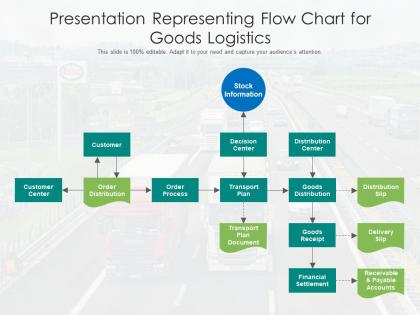
Presentation representing flow chart for goods logistics




Try Before you Buy Download Free Sample Product
 Impress Your
 Audience
 100%
100% Editable
 Save Hours
 of Time


Our Presentation Representing Flow Chart For Goods Logistics are topically designed to provide an attractive backdrop to any subject. Use them to look like a presentation pro.
People who downloaded this PowerPoint presentation also viewed the following :
Presentation representing flow chart for goods logistics with all 2 slides:
Use our Presentation Representing Flow Chart For Goods Logistics to effectively help you save your valuable time. They are readymade to fit into any presentation structure.
FAQs for Presentation representing flow chart
So for your logistics flowchart, start with inventory management, order processing, warehousing, transportation, and delivery tracking. Don't forget supplier management upfront and customer communication - that stuff matters more than people think. Map out decision points too, like what happens if you're low on stock or a delivery fails. Most companies I've seen totally botch the tracking piece, which is frustrating. Sketch your current process first, spot the bottlenecks, then design something better. Make sure handoffs between departments are super clear or you'll have chaos.
Honestly, flowcharts are game-changers for logistics stuff. Map out your whole process first - you'll instantly see where things get jammed up or where departments are fumbling handoffs. Short sentences work. Then the redundant steps become super obvious, plus your team finally knows who's supposed to do what (which is half the battle, let's be real). I'd focus on your current situation first, then pick maybe 3 of the worst pain points to fix. It's way better than just guessing what's broken. Once you see it all laid out, you can automate the boring parts too.
Visio's probably your best bet if you've got Microsoft stuff already. Lucidchart is really good for team collaboration though - everything's in the cloud. I honestly end up using Draw.io way too much because it's free and just works, even though I should probably use fancier tools. Miro's cool if your team likes that whiteboard vibe for mapping things out first. Start with whatever you already have access to, then see if you need to upgrade later. Most of the supply chain templates are pretty decent across all of them.
Start by checking where stuff backs up or sits around too long in your process. Compare your actual times against what you planned - big differences usually show you the problem spots. Multiple inputs going into one step? That's almost always trouble. Also watch for manual tasks or places where everything has to go through one person or machine - honestly, those single points of failure will kill you every time. Once you find these areas, measure your throughput and cycle times. That'll confirm which bottlenecks are actually dragging down your whole operation.
Dude, you absolutely need to talk to your stakeholders first. Don't make the same mistake I've seen a million times - people design these things alone and they're useless. Hit up warehouse folks, suppliers, transport people, even customers. They'll tell you about timing issues and bottlenecks you'd never think of. Each group sees different problems. Interview them before you start drawing anything, then show them your draft. Keep talking to them as you tweak it because honestly? Their buy-in is what makes these flowcharts actually work instead of just looking pretty on paper.
Dude, flowcharts are clutch for training new logistics people. Instead of dumping a massive manual on them, you break down the whole receiving-to-shipping process visually. Way easier to digest. They can actually see where decisions happen and how their job connects to everything else. Nobody's gonna retain info from some boring 50-page document anyway - that's just cruel. Plus when they're confused later, they can just glance at the flowchart instead of bugging you constantly. I'd start with your bread-and-butter processes first, then build from there. Makes the whole onboarding thing way less painful for everyone.
Don't go crazy with details right off the bat - you'll spend forever mapping every weird edge case. Get your main flow down first. Then add the messy stuff later. Oh, and skip those useless boxes like "process order" without actually explaining what happens. I've watched people build gorgeous flowcharts that are totally worthless because they're either too vague or missing crucial decision points. Map what really happens, not what's supposed to happen. Grab someone who does this job daily and walk through it together - they'll spot holes you completely missed. Trust me on that one.
Ugh, supplier delays are the worst - they totally screw up your whole logistics flow. One late delivery creates this domino effect that hits production, then warehouse stuff, then shipping. Before you know it, customers are pissed about late orders. What really sucks is when you use the same parts across different products because then one supplier tanks multiple lines. I'd definitely build some buffer time into your flowcharts. Map out which suppliers would hurt most if they're late, then maybe sketch backup options right in there. That way when things go sideways (and they will), your team actually knows what to do instead of just panicking.
Directional arrows, decision diamonds, and clear process boxes - nail those three and you're golden. Stick with rectangles for processes, diamonds for decisions, flowing left-to-right or top-to-bottom. Color coding helps tons - blue for transport, green for warehousing, red when things go sideways. Don't get fancy with graphics though, I've watched people overcomplicate the hell out of these things. Keep text short. Use swimlanes if different departments are involved - actually super helpful for that. Oh, and test your flowchart on someone who doesn't know the process. They'll catch confusing spots instantly.
Look, flowcharts are honestly your best friend for compliance stuff. Regulators eat that visual documentation right up - shows them exactly how your goods hit every checkpoint. Map out where inspections happen, where docs get verified, all that jazz. During audits? You'll look like you actually have your act together instead of fumbling around. When regs change (and they always do), you can spot what needs fixing super quick. I'd start with your current process first, then figure out what compliance boxes you need to check at each step. Way easier than doing it backwards.
Start with delivery times, inventory turnover, and order accuracy - those three will tell you the most. Cost per shipment matters too, but honestly, customer satisfaction scores are what I'd watch closest since they show if your logistics actually work in practice. Map each metric to specific flowchart steps so you can catch problems fast. Don't try tracking everything at once though - I made that mistake before and got overwhelmed by data. Warehouse utilization and return rates are solid additions once you've got the basics down. Three or four metrics first, then build from there.
Yeah, so logistics flowcharts are totally different depending on what you're dealing with. Retail is usually supplier → distribution center → store → customer, with tons of focus on inventory and those crazy seasonal rushes. Manufacturing flows more like raw materials → production → finished goods → customer, but they build in quality checks everywhere. Healthcare gets insane - we're talking life or death here, so cold chain storage and expiration dates are huge. E-commerce is all about speed now, direct shipping and handling returns smoothly. Honestly? Start with whatever's driving you nuts in your specific industry and design around those problem areas.
Quarterly reviews are the bare minimum, but real talk - you'll want to update them way more often than that. Every time there's a process change or new bottleneck, your flowcharts should reflect it. Supply chains are constantly shifting with new vendors, route changes, warehouse moves, seasonal stuff... you name it. Outdated charts honestly just confuse your team more. I learned this the hard way at my last job - we stuck with old flowcharts for months and it was a mess. Set those quarterly reminders for sure, but don't be rigid about it. Major operational changes? Update immediately.
For your logistics flowchart, grab some robot icons and diamond shapes with "automated" labels. Different colors work great too - like blue for automated stuff, gray for manual. Gear symbols are honestly my go-to because they're so obvious. Mark those decision points where systems automatically sort packages, plus highlight conveyor belts and warehouse robots. Oh, and definitely include a legend so people don't have to guess what your symbols mean. The whole point is making it crystal clear which steps run without humans touching anything. Short version: use visual cues that scream "no people needed here."
Honestly, flowcharts are like having a universal translator for your whole team. Warehouse guys and customer service can finally understand each other because everyone's looking at the same visual map. When something goes wrong, people can just point to exactly where the problem happened instead of playing twenty questions. New hires pick things up way faster too - they can actually see how everything connects. I swear, half the time teams argue just because they don't realize they're talking about different parts of the same process. Next time there's confusion, grab your flowchart and walk through it step by step.
-
Designs have enough space to add content.
-
Visually stunning presentation, love the content.