


Project roadmap proposed scheduled in progress completed swimlane




Try Before you Buy Download Free Sample Product
 Impress Your
 Audience
 100%
100% Editable
 Save Hours
 of Time


Denials disappear with our Project Roadmap Proposed Scheduled In Progress Completed Swimlane. They always beget approvals.
People who downloaded this PowerPoint presentation also viewed the following :
Content of this Powerpoint Presentation
Description:
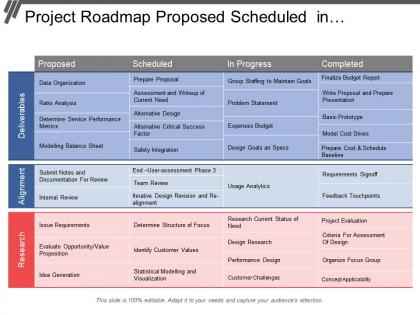
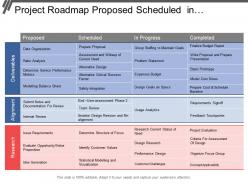
The image is a PowerPoint slide titled "Project Roadmap Proposed Scheduled in..." which serves as a structured timeline or plan for a project, segmented into four key columns: Proposed, Scheduled, In Progress, and Completed. These columns are further divided into three rows based on criteria: Deliverables, Alignment, and Research.
1. Deliverables:
Lists specific output or products to be delivered at each stage, such as "Data Organization" in the Proposed section and "Finalize Budget Report" in the Completed section.
2. Alignment:
Refers to processes that ensure the project remains aligned with its goals, like "Internal Review" in Proposed and "Feedback Touchpoints" in Completed.
3. Research:
Involves activities related to the discovery and analysis necessary for the project, for instance, "Issue Requirements" for Proposed and "Concept Applicability" for Completed.
Each cell in the grid contains project-related tasks or milestones, and the slide includes a footer stating "This slide is 100% editable. Adapt it to your needs and capture your audience's attention." This indicates that the slide's content is customizable.
Use Cases:
This roadmap slide can be adapted for use across a variety of industries to outline project stages and associated tasks:
1. Software Development:
Use: Planning and tracking software release stages.
Presenter: Product Manager
Audience: Development team, stakeholders
2. Healthcare Administration:
Use: Outlining the implementation of new healthcare systems.
Presenter: Healthcare Project Manager
Audience: Hospital staff, IT department
3. Marketing:
Use: Scheduling and reviewing marketing campaign launches.
Presenter: Marketing Director
Audience: Marketing team, executives
4. Construction:
Use: Staging construction project phases from conception to completion.
Presenter: Construction Manager
Audience: Builders, investors
5. Education:
Use: Developing new educational programs and initiatives.
Presenter: Curriculum Coordinator
Audience: Educators, school board members
6. Financial Services:
Use: Planning financial product development and market introduction.
Presenter: Financial Analyst
Audience: Investment team, compliance officers
7. Environmental Research:
Use: Managing research projects from proposal to project evaluation.
Presenter: Research Director
Audience: Research team, grant funders
Project roadmap proposed scheduled in progress completed swimlane with all 5 slides:
Feed the ebullience of your audience. Keep up the excitement with our Project Roadmap Proposed Scheduled In Progress Completed Swimlane.

FAQs for Project roadmap proposed scheduled in
So you need clear goals and major milestones with realistic timelines - buffer time is crucial here because stuff always runs late. Resource requirements and deliverables are obvious ones. The big thing though? Stakeholder roles. Seriously, I've seen so many projects crash because nobody knew who was responsible for what. Also connect it back to business goals somehow - makes everything easier to sell. Oh and risks/dependencies, can't forget those. Start simple with a basic timeline view, then layer in details. Much easier for people to digest that way instead of overwhelming them upfront.
Think of it as giving everyone the same GPS directions. Your team knows what's coming up, who's handling what, and how their piece fits into everything else. No more confused faces in meetings going "sorry, what are we doing?" Updates become so much simpler when there's one spot to check progress and catch problems early. Honestly, the hardest part is remembering to keep it current - otherwise you'll end up with another useless doc nobody looks at. But when it's done right? Game changer for keeping everyone aligned.
Honestly, Miro and Mural are my go-to picks if your team likes visual stuff - dragging timelines around is weirdly satisfying. Roadmunk or ProductPlan work better when you need something more structured. Don't overthink it though. Google Slides or even Figma can totally work for simpler projects. The real trick? Pick whatever your team will actually keep updated. I've seen too many beautiful roadmaps just sitting there collecting digital dust because nobody wanted to learn the fancy new tool. Start with what you already know - a decent roadmap in PowerPoint that gets used beats an abandoned masterpiece any day.
Honestly? I'd say monthly at minimum, but it really depends on your project's chaos level. Fast-moving stuff with tons of dependencies might need updates every couple weeks. The main thing is don't let it get stale - nothing destroys stakeholder trust faster than an obviously outdated roadmap (learned that one the hard way). Plus updating regularly helps you spot scope creep before it spirals. You'll catch changes early and keep everyone on the same page. Set a calendar reminder though, because this stuff is so easy to forget when you're swamped.
Look, roadmaps are basically your best friend for avoiding chaos. Everyone gets the same story about timing and priorities - no more "wait, didn't you say this was done already?" drama. Stakeholders eat this stuff up because it shows you're not just winging it. When delays happen (and they will), you can point to the roadmap and explain where things stand instead of looking like a deer in headlights. It also sets realistic expectations upfront about dependencies and potential roadblocks. Keep it updated though - nothing's worse than an outdated roadmap that makes you look disorganized.
Oh man, I mixed these up for the longest time! So basically a roadmap is your high-level view - like what you'd show your boss to explain the big vision and timeline. Project plans are way more detailed with all the nitty-gritty tasks and who's doing what. The roadmap answers "where are we headed?" while project plans tackle "how do we actually pull this off?" I always start with the roadmap first - gives you that bird's eye view before you dive into all the specifics. Way easier to wrap your head around it that way.
Honestly, the biggest mistake is going way too granular right from the start. You'll waste so much time updating every tiny detail when stuff changes - and it always does. Don't let stakeholders bully you into unrealistic timelines either. We've all made that mistake! Buffer time is crucial because something always goes sideways. Focus on the big milestones instead of getting lost in tasks. Oh, and dependencies will bite you if you're not careful - other teams, vendors, whatever. Keep assumptions super clear upfront. Treat it like a living document, not gospel.
Dude, color coding is your best friend here - different colors for each phase or team. Progress bars show completion status instantly. Icons help too, way better than paragraphs nobody's gonna read anyway. Timeline charts work really well, and you can throw in swimlanes to separate departments. Different shapes for milestones vs deliverables vs dependencies. Honestly, stakeholders just want to glance at it and immediately get what's happening. Don't go crazy though - start with one or two visual tricks and add more later. Simple beats fancy every time.
Make it visual first - execs want the big picture without squinting at tiny text. Start with your major milestones and deliverables, then get into dependencies later. Trust me, lead with business stuff because they'll mentally check out if you open with technical details (save that for questions). Be super clear about what's locked in versus what could change based on resources or feedback. Color-code different work streams so it's not just a wall of text. Always pad your timeline because something will definitely break. Oh, and wrap up by nailing down who decides what and when you'll check in again.
Build flexibility right into your roadmap from day one. Skip exact dates - use broader windows instead. Focus on what you're trying to achieve, not specific features. Gives you room to breathe when things inevitably shift (and they always do). Honestly, stakeholders care way more about understanding WHY you're pivoting than the actual changes themselves. Your core goals should stay rock solid. But tactics? Let those evolve. Set up regular check-ins so you can course-correct without looking like you don't know what you're doing.
Look, prioritization is what makes or breaks your roadmap. Can't just dump every feature request in there and call it a day - I've watched teams crash and burn doing exactly that. You gotta weigh business impact against user needs, plus factor in how complex the tech side gets and what resources you actually have. Otherwise your roadmap turns into fantasy football basically. Define success first, then rank everything against those goals. Be ruthless about it. Short sentences work here. The whole thing falls apart without clear criteria for what matters most.
Honestly, roadmaps are pretty clutch for catching problems early. You get this visual of everything - deadlines, who's doing what, dependencies between tasks. Makes it way easier to spot when someone's gonna be swamped or if you've got unrealistic timing (like major deliverables right after Christmas... been there). Dependencies are the real killer though - suddenly you realize three things hinge on one person finishing their part. I'd scan through it regularly and just mark the sketchy areas. Way better than scrambling when stuff inevitably goes sideways.
Track both delivery stuff and whether you're actually moving the business needle. Delivery-wise: are you hitting milestones, staying on timeline, avoiding scope creep? Pretty straightforward. But honestly, the business impact side matters way more - is user adoption going up, revenue increasing, customers happier? Whatever your roadmap was supposed to fix. Don't fall into the vanity metrics trap though, that stuff just makes you feel good without meaning anything. Monthly reviews work well for checking both sides. Oh and if you're not seeing real movement on your core goals after a quarter, something's probably wrong with your roadmap priorities.
So with Agile, your roadmap gets way more flexible than that old waterfall stuff. You're planning in quarters or sprints instead of mapping out every detail months ahead. The whole thing becomes this living document that changes based on user feedback and shifting priorities. Features move around depending on what's actually working - value trumps rigid deadlines every time. Honestly took me a while to get comfortable with all that uncertainty, but it's pretty freeing once you do. Just nail down your big-picture goals upfront and keep everything else loose enough to pivot.
Weekly check-ins are your best friend here. Get everyone together to talk through the roadmap - let them ask questions and complain about timelines (trust me, they will anyway). Visual timelines work great because people actually get excited seeing progress laid out. But here's the thing - don't just tell them what to build. Explain why it matters to the bigger picture. When stuff inevitably changes, be upfront about it. Nobody likes surprises, especially developers. The goal is making your team feel like they're part of the strategy, not just code monkeys following orders.
-
Content of slide is easy to understand and edit.
-
Very well designed and informative templates.